前端 Label 标签字符串内容怎么排列对齐好看?
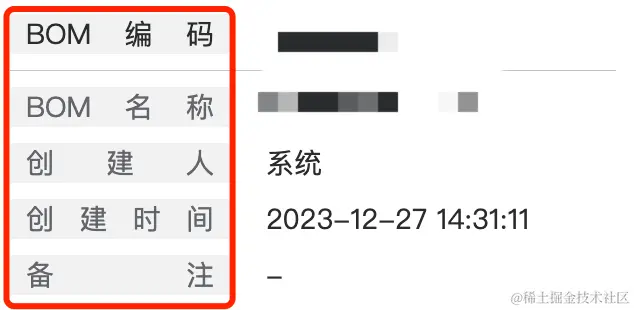
- 如下效果如何动态实现?
前言
- 我在项目中遇到过一些设计上的疑问,想着我们一些表单的 label 能够排列的好看一些
- 于是就想到了这种两端对齐的方式,这个需求如果我们代码里固定写的话,其实很容易,手动给这些文字进行拆分就行了,但是我们如果写一个自定义的 CustomLabel 组件的话,怎么动态实现呢?
- (本文只是我自己想到的一个方案,若写的不对,欢迎友好评论)
上代码!!
- 具体组件的完整代码我就不展示了,因为也就个div而已,只展示下核心代码,各位一看便知
-
<template>
<div :style="{ width: labelWidth }"><span v-for="c of rlabel" :key="c">{{ c }}</span></div>
</tempate>

<script>
/**
 * 【词句拆分分组】
 * 如原始字符串为:"hello LLMM我是谁 123 32 aaa的ddd&= $好好"
 * 拆分的预期结果为 ['hello', 'LLMM', '我', '是', '谁', '123', '32', 'aaa', '的', 'ddd&=', '$', '好', '好']
 * 【*】功能描述:
 * 1)把字符串从左开始依次拆分分组,
 * 2)其中的英文或数字或标点符号要通过空格进行分组
 * 3)中文就按每一个字进行分组
 * 4)空格不要包含在最后输出的数组中
 * @param {*} str
 */
function splitSentence(str) {
	// 使用正则匹配中文字符
	const chineseCharPattern = /[\u4E00-\u9FA5]/g;
	let result1 = [];
	let result = [];
	let currentWord = '';

	for (let i = 0; i < str.length; i++) {
		const char = str[i];
		// 如果是中文字符
		if (char.match(chineseCharPattern)) {
			// 如果currentWord不为空
			// 则push到结果数组中
			if (currentWord) {
				result1.push(currentWord);
				currentWord = '';
			}
			// 中文字符单独push
			result1.push(char);
		}
		// 如果是非中文字符
		else {
			// 将其归到currentWord中
			currentWord += char;
		}
	}

	// 将最后一个currentWord push进数组
	if (currentWord) {
		result1.push(currentWord);
	}

	// 二次拆解分组
	// 上面的步骤 result1 会得到这样的预期结果 ['hello LLMM', '我', '是', '谁', ' 123 32 aaa', '的', 'ddd&= $', '好', '好']
	// 所以再进行二次拆分,把其中带空格的元素再进行按空格拆分,就能够得到预期结果了:['hello', 'LLMM', '我', '是', '谁', '123', '32', 'aaa', '的', 'ddd&=', '$', '好', '好']
	for (const cg of result1) {
		result.push(...cg.split(' ').filter(c=>!!c))
	}
	return result
}

export default {
    props: {
        label: {
            type: String,
            required: true,
            default: ''
        },
        /**
        * 根据文字内容长度,设置合适的宽
        */
        labelWidth: {
            type: String,
            required: false,
            default: '180rpx'
        }
    },
    computed: {
        rlabel(val) {
            return splitSentence(val)
        }
    }
}
</script>