SpringSecurity6 | 登录失败后的JSON处理
学习参考 :
- 讲师:孙帅老师
- 课程:孙哥说SpringSecurity6
1.前言
大家好,我是Leo哥🫣🫣🫣,接到上一节,我们学习通过SpringSecurity登录失败之后的一些页面的跳转。这篇文章我们主要来介绍一下我们通过自定义登录界面之后的一些细节处理。好了,话不多说让我们开始吧😎😎😎。
2.概述
在我们现在流行的前后端分离开发中,其实后端已经不需要再进行页面的跳转,前后端数据的交换都是通过JSON来进行流传的。
就比如,我们后端登录之后,只需要给前端返回一段JSON数据,告诉前端登录成功即可,具体怎么做呢,我们接着向下看。
3.JSON处理
3.1 自定义Handle
首先我们需要自定义AuthenticationSuccessHandle并实现他的一些方法。
package org.javatop.custom.config;

import cn.hutool.json.JSONUtil;
import com.fasterxml.jackson.databind.ObjectMapper;
import jakarta.servlet.ServletException;
import jakarta.servlet.http.HttpServletRequest;
import jakarta.servlet.http.HttpServletResponse;
import org.springframework.security.core.AuthenticationException;
import org.springframework.security.web.authentication.AuthenticationFailureHandler;

import java.io.IOException;
import java.util.HashMap;

/**
 * @author : Leo
 * @version 1.0
 * @date 2023-12-26 21:20
 * @description : 自定义登录失败处理
 */
public class MyAuthenticationFailureHandler implements AuthenticationFailureHandler {
    @Override
    public void onAuthenticationFailure(HttpServletRequest request, HttpServletResponse response, AuthenticationException exception) throws IOException, ServletException {
        HashMap<String, Object> result = new HashMap<>();
        result.put("msg", "登录失败");
        result.put("code", 400);
        result.put("data", exception.getMessage());
        response.setContentType("application/json;charset=utf-8");
//        new ObjectMapper().writeValue(response.getWriter(), result);
        response.getWriter().write(JSONUtil.toJsonStr(result));
    }
}
这次我并没有直接向之前使用ObjectMapper进行响应JSON,而是通过hutool工具提供的JSONUtil进行JSON数据的转换。
3.2 进行配置
在我们的 MvcCconfig 中进行handler配置。
注意:使用JSON响应之后就必须注释掉页面的一些跳转配置。
//                .failureForwardUrl("/login.html")//登录失败后的forward跳转
//                .failureUrl("/login.html") //redirect跳转

                .failureHandler(new MyAuthenticationFailureHandler())// 自定义登录失败处理器
然后重启项目,进行测试。
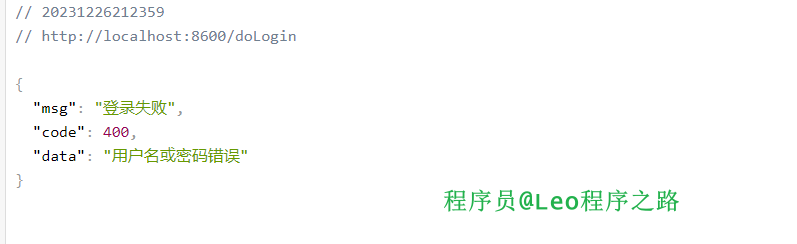
这个就是我们刚响应的JSON数据。
4.总结
以上便是本文的全部内容,本人才疏学浅,文章有什么错误的地方,欢迎大佬们批评指正!我是Leo,一个在互联网行业的小白,立志成为更好的自己。
如果你想了解更多关于Leo,可以关注公众号-程序员Leo,后面文章会首先同步至公众号。