方式一: 通过修改 package.json 中 build 构建命令实现
1. 在项目根目录下新建 scripts/copyFile.ts。

2. 项目根目录下 ecosystem.config.js 文件, 内容如下。
module.exports = {
apps: [{
name: 'nuxt-front-blog',
port: '9000',
exec_mode: 'cluster',
instances: 'max',
script: './server/index.mjs'
}]
}
3. 编写迁移 ecosystem.config.js 的脚本文件 copyFile.ts。
const fs = require("fs");
const path = require("path");
const argvs = process.argv.slice(2);
if (!argvs || !argvs.length) {
throw new Error("文件名不能为空,请填写后再试!");
}
const readFile = async(filePath: string):Promise<void | string> => {
try {
const file = await fs.readFileSync(path.join(process.cwd(), filePath));
return file.toString();
} catch (err) {
throw err;
}
}
const writeFile = async(filename: string, content: string): Promise<void> => {
try {
await fs.writeFileSync(path.join(process.cwd(), ".output", filename), content);
} catch (err) {
throw err;
}
}
const run = async(): Promise<void> => {
const handlerList:Promise[] = [];
for (let i = 0; i < argvs.length; i++) {
const handler = new Promise(async(resolve, reject) => {
try {
const content = await readFile(argvs[i]);
await writeFile(argvs[i], content);
resolve("success");
} catch (err) {
reject(err);
}
});
handlerList.push(handler);
}
try {
await Promise.all(handlerList);
} catch (err) {
throw err;
}
}
run();
4. 修改 package.json 中 build 打包运行命令, 如下图。
<!-- 注: ecosystem.config.js为需要迁移的文件路径,可以有多个,文件路径之间通过空格隔开 -->
"build": "nuxt build && ts-node ./scripts/copyFile.ts ecosystem.config.js",
5. 运行 pnpm build 命令进行生产产物构建。
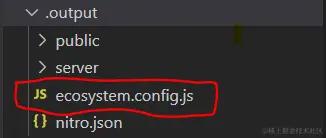
6. 运行成功后在打包输出目录.output 中存在 ecosystem.config.js 文件如下图,至此,迁移完成。😂
方式二:通过在 nuxt3 项目配置文件 nuxt.config.ts 中添加 Close 钩子实现
1. 项目根目录下 ecosystem.config.js 文件, 内容如下图。
module.exports = {
apps: [{
name: 'nuxt-front-blog',
port: '9000',
exec_mode: 'cluster',
instances: 'max',
script: './server/index.mjs'
}]
}
2. 在项目根目录下 nuxt.config.ts 文件中添加如下配置。
hooks: {
close: async () => {
const readFile = async (filePath: string): Promise<void | string> => {
try {
const file = await fs.readFileSync(
path.join(process.cwd(), filePath)
);
return file.toString();
} catch (err) {
throw err;
}
};
const writeFile = async (
filename: string,
content: string,
writePath: string
): Promise<void> => {
try {
await fs.writeFileSync(
path.join(process.cwd(), writePath, filename),
content
);
} catch (err) {
throw err;
}
};
const filePath = "ecosystem.config.js";
const fileOutputPath = ".output";
const content = (await readFile(filePath)) as string;
const filename = path.basename(filePath);
await writeFile(filename, content, fileOutputPath);
},
},
3. 运行 pnpm build 命令进行生产产物构建。
4. 运行成功后在打包输出目录.output 中存在 ecosystem.config.js 文件如下图,至此,迁移完成 😎。