init
组件
参考
import React, { ForwardedRef, useEffect, useImperativeHandle, useLayoutEffect, useRef } from 'react';
import * as echarts from 'echarts/core';
import { EChartsType } from 'echarts/core';
import { DatasetComponent, DatasetComponentOption, DataZoomComponent, DataZoomComponentOption, GridComponent, GridComponentOption, LegendComponent, LegendComponentOption, TitleComponent, TitleComponentOption, ToolboxComponent, ToolboxComponentOption, TooltipComponent, TooltipComponentOption, VisualMapComponent } from 'echarts/components';
import { BarChart, BarSeriesOption, LineChart, LineSeriesOption } from 'echarts/charts';
import { UniversalTransition } from 'echarts/features';
import { SVGRenderer } from 'echarts/renderers';
import { ECElementEvent } from 'echarts/types/src/util/types';
echarts.use([
VisualMapComponent,
DatasetComponent,
DataZoomComponent,
GridComponent,
LegendComponent,
TitleComponent,
ToolboxComponent,
TooltipComponent,
LineChart,
BarChart,
UniversalTransition,
SVGRenderer,
]);
export type MyChartOption = echarts.ComposeOption<| DatasetComponentOption
| DataZoomComponentOption
| GridComponentOption
| LegendComponentOption
| TitleComponentOption
| ToolboxComponentOption
| TooltipComponentOption
| LineSeriesOption
| BarSeriesOption>;
export interface MyChartProps {
option: MyChartOption | null | undefined | any;
width?: number | string;
height?: number | string;
merge?: boolean;
loading?: boolean;
empty?: React.ReactElement;
style?: any
onClick?(event: ECElementEvent): any;
}
export interface MyChartRef {
instance(): EChartsType | undefined;
}
const MyChartInner: React.ForwardRefRenderFunction<MyChartRef, MyChartProps> = (
{ option, width, height = false, onClick },
ref: ForwardedRef<MyChartRef>
) => {
const cRef = useRef<HTMLDivElement>(null);
const cInstance = useRef<EChartsType>();
useEffect(() => {
if (cRef.current) {
cInstance.current = echarts.getInstanceByDom(cRef.current);
if (!cInstance.current) {
cInstance.current = echarts.init(cRef.current, undefined, {
renderer: 'svg',
});
cInstance.current.on('click', (event) => {
const ec = event as ECElementEvent;
if (ec && onClick) onClick(ec);
});
}
if (option) cInstance.current?.setOption(option);
}
}, [cRef, option]);
useEffect(() => {
window.addEventListener('resize', resize);
return () => {
window.removeEventListener('resize', resize);
};
}, [option]);
useLayoutEffect(() => {
resize();
}, [width, height]);
const resize = () => {
cInstance.current?.resize({
animation: { duration: 300 }
});
}
const instance = () => {
return cInstance.current;
}
useImperativeHandle(ref, () => ({
instance
}));
return (
<div ref={cRef} style={{ width: '100%', height: '100%' }} />
);
};
const lineChart = React.forwardRef(MyChartInner);
export default lineChart;
柱状图
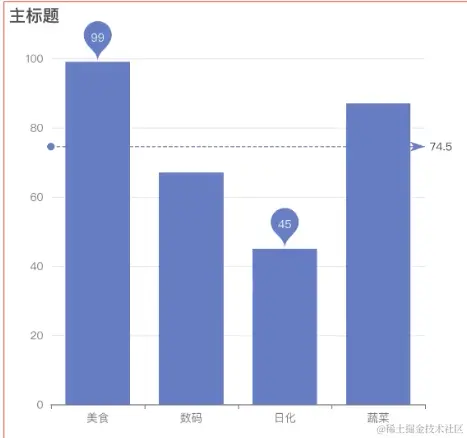
最大值/最小值/平均值
   series: {

        markPoint: {
            data: [
                {
                    type: 'max',
                    name: '最大值'
                },
                 {
                    type: 'min',
                    name: '最小值'
                }
            ]
        },
         markLine: {
            data: [
                {
                    type: 'average',
                    name: '平均值'
                },

            ]
        }
    }
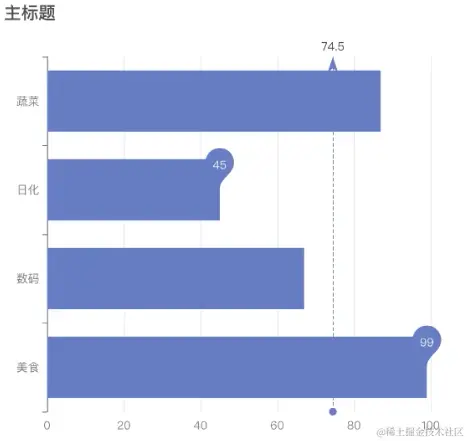
水平柱状图
getPdf = (id) => {
let promise = new Promise((resolve,reject) => {
const pdfDom = document.getElementById(id)
html2canvas(pdfDom, {useCORS: true,}).then(canvas=> {
let contentWidth = canvas.width
let contentHeight = canvas.height
let pageHeight = contentWidth / 595.28 * 841.89
let leftHeight = contentHeight
let position = 0
//a4纸的尺寸[595.28,841.89],html页面生成的canvas在pdf中图片的宽高
let imgWidth = 555.28
let imgHeight = 555.28 / contentWidth * contentHeight
let pageData = canvas.toDataURL('image/jpeg', 1.0)
resolve({pageData, imgWidth, imgHeight})
})
})
return promise
}
pdfCreate = async () => {
this.setState({isLoading: true})
let pdf = new jsPDF('', 'pt', 'a4')
const {pageData, imgWidth, imgHeight} = await this.getPdf('echartId')
pdf.addImage(pageData, 'JPEG', 20, 0, imgWidth, imgHeight)
pdf.addPage()
const table1 = await this.getPdf('table1')
pdf.addImage(table1.pageData, 'JPEG', 20, 20, table1.imgWidth * 2/3, table1.imgHeight * 2/3)
pdf.addPage()
const table2 = await this.getPdf('table2')
pdf.addImage(table2.pageData, 'JPEG', 20, 20, table2.imgWidth * 2/3, table2.imgHeight * 2/3)
pdf.addPage()
const table3 = await this.getPdf('table3')
pdf.addImage(table3.pageData, 'JPEG', 20, 20, table3.imgWidth * 2/3, table3.imgHeight * 2/3)
pdf.addPage()
const table4 = await this.getPdf('table4')
pdf.addImage(table4.pageData, 'JPEG', 20, 20, table4.imgWidth * 2/3, table4.imgHeight * 2/3)
pdf.addPage()
const table5 = await this.getPdf('table5')
pdf.addImage(table5.pageData, 'JPEG', 20, 20, table5.imgWidth * 2/3, table5.imgHeight * 2/3)
pdf.save('content.pdf')
this.setState({isLoading: false})
}