ajax
import axios from 'axios'
import $store from "@/store/index";
import qs from "qs";

// 判断当前的运行环境 process.env.NODE_ENV
// isDev 为真 开发环境 --- npm run serve
// isDev 为假 非开发环境(测试环境,生产环境)- npm run build
// const isDev = process.env.NODE_ENV === 'development'
const r = axios.create({
  baseURL: process.env.VUE_APP_API_URL
})
// 请求拦截器 - 所有的请求开始之前先到此处
r.interceptors.request.use((config) => {
  return config
}, (error) => {
  return Promise.reject(error)
})

// 响应拦截器 --- 所有请求的相应先到此处
r.interceptors.response.use((response) => {
  // 可以设置 加载的动画效果 的隐藏
  return response.data
}, (error) => {
  return Promise.reject(error)
})

const ajax = {
  login: (params) => {
    return r({
      url: "/login",
      method: "post",
      headers: {
        "Content-Type": "application/x-www-form-urlencoded",
      },
      data: qs.stringify(params)
    })
  },
  logout: () => {
    return r({
      url: "/logout",
      method: "post",
      headers: {
        "token": $store.state.token || ""
      }
    })
  },
  get: (url, params) => {
    return r({
      url,
      method: "get",
      headers: {
        "token": $store.state.token || ""
      },
      params
    })
  },
  post: (url, params) => {
    console.log(params);
    return r({
      url,
      method: "post",
      headers: {
        // "Content-Type": "application/x-www-form-urlencoded",
        'Content-Type':'application/json',
        "token": $store.state.token || ""
      },
      // data: typeof params === "object" ? qs.stringify(params) : params,
      data:params // data [post] params(query)
    })
  },
  upload: (url, params) => {
    let fd = new FormData()
    for(let key in params){
      fd.append(key, params[key])
    }
    return r({
      url,
      method: "post",
      headers: {
        "Content-Type": "multipart/form-data",
        "token": $store.state.token || ""
      },
      data: fd
    })
  },
  jsonp: (url) => {
    return new Promise((resolve, reject) => {
      // 这里的 "jsonCallBack" ,和调用的 jsonp 的 url 中的 callback 值相对应
      window.jsonCallBack = result => {
        resolve(result);
      };
      let JSONP = document.createElement("script");
      JSONP.type = "text/javascript";
      JSONP.src = url;
      document.getElementsByTagName("head")[0].appendChild(JSONP);

      setTimeout(() => {
        document.getElementsByTagName("head")[0].removeChild(JSONP);
      }, 500);
    });
  }
}

export default ajax

main.js
import ajax from './api/ajax'
Vue.prototype.ajax = ajax;
element ul
时间验证
 endTime: [
              { required: true, message: "请选择结束时间", trigger: "change" },
              {
                validator: (rule, value, callback) => {
                  const { startTime, endTime } = this.form;
                  if (
                    endTime &&
                    startTime &&
                    moment(endTime).isBefore(moment(startTime))
                  ) {
                    callback(new Error("结束时间不能早于开始时间"));
                  } else {
                    callback();
                  }
                },
                trigger: "change",
              },
            ],
文档图片预览插件
<ExcelPreview :isWatermark="false" :file-url="url" v-if="url" @setPreviewLoading="setPreviewLoading"/>
<template>
  <div class="Office-Preview" v-loading="loading">
    <VueOfficeDocx
      v-if="fileType == 'docx2'"
      :src="fileUrl"
      @rendered="rendered"
      @error="onError"
    ></VueOfficeDocx>

    <div
      v-loading="previewLoading"
      ref="docxContainer"
      class="docx-container"
      v-if="fileType == 'docx1'"
    ></div>

    <div class="excel-preview-container" v-if="fileType == 'excel'">
      <VueOfficeExcel
        :src="url"
        @rendered="rendered"
        v-if="fileType == 'excel'"
        ref="excelContainer"
        @error="onError"
      ></VueOfficeExcel>
    </div>

    <VueOfficePdf
      v-if="fileType == 'pdf'"
      :src="url"
      @rendered="rendered"
      @error="onError"
    ></VueOfficePdf>

    <div class="other-Preview">
      <el-image
        @load="loading = false"
        @error="loading = false"
        :src="url"
        v-if="fileType == 'img'"
      ></el-image>
      <video
        ref="videoPlayer"
        autoplay
        muted
        loop
        :src="fileUrl"
        v-if="fileType == 'mp4'"
      ></video>
      <div v-if="fileType === 'txt'" style="white-space: pre-wrap">
        <pre>{{ fileContent }}</pre>
      </div>
      <pre v-if="fileType == 'loadErr'">
文件无法解析或加载失败,可能存在编码问题或文件内容乱码。</pre
      >
    </div>
    <el-empty
      v-if="fileType == 'errType'"
      image=""
      description="暂无文件~"
      :image-size="300"
    ></el-empty>
  </div>
</template>

<script>
//引入VueOfficeDocx组件
import VueOfficeDocx from "@vue-office/docx";
//引入VueOfficeExcel组件
import VueOfficeExcel from "@vue-office/excel";
//引入VueOfficeExcel相关样式
import "@vue-office/excel/lib/index.css";
//引入VueOfficePdf组件
import VueOfficePdf from "@vue-office/pdf";

import { getToken } from "@/utils/auth";
import axios from "axios";

import BaseApi from "@/api/modules/BaseApi.js";

import { renderAsync } from "docx-preview";

export default {
  name: "Office-Preview",
  props: {
    fileUrl: {
      type: String,
      default: "",
    },
    isWatermark: {
      type: Boolean,
      default: true
    }
  },
  data() {
    return {
      fileType: "",
      fileContent: "",
      url: "",
      previewLoading: false,
      show: false,
      loading: false,
    };
  },
  components: {
    VueOfficeExcel,
    VueOfficeDocx,
    VueOfficePdf,
  },
  mounted() {
    // this.init();
  },
  beforeDestroy() {
    this.url = "";

    this.pauseVideo();
  },
  watch: {
    fileUrl: {
      handler(newVal) {
        if (newVal) {
          this.fileType = "";
          this.init();
        } else {
          this.pauseVideo();
        }
      },
      immediate: true,
    },
  },
  methods: {
    init() {
      if (!this.fileUrl) {
        this.fileType = "errType";
        this.$emit("setPreviewLoading");
        return;
      }
      var fileName = this.fileUrl.split("/").pop();
      var fileExtension = fileName.substring(fileName.lastIndexOf(".") + 1);

      if (fileExtension == "doc" || fileExtension == "docx") {

        if(this.isWatermark) {
          this.fileType = "docx1";
          this.previewClick();
        } else {
          this.fileType = "docx2";
          this.url = this.fileUrl
        }
      } else if (fileExtension == "xls" || fileExtension == "xlsx") {
        if(this.isWatermark) {
          this.getUrl("excel");
        } else {
          this.url = this.fileUrl
          this.fileType = "excel";
        }
      } else if (fileExtension == "pdf") {
        if(this.isWatermark) {
          this.getUrl("pdf");
        } else {
          this.url = this.fileUrl
          this.fileType = "pdf";
        }
      } else if (
        fileExtension == "jpeg" ||
        fileExtension == "webp" ||
        fileExtension == "JPG" ||
        fileExtension == "jpg" ||
        fileExtension == "png" ||
        fileExtension == "PNG"
      ) {
        if(this.isWatermark) {
          this.getUrl("img");
        } else {
          this.url = this.fileUrl
          this.fileType = "img";
        }
        this.$emit("setPreviewLoading");

      } else if (fileExtension == "mp4") {
        this.fileType = "mp4";
        this.$emit("setPreviewLoading");
      } else if (fileExtension == "txt") {
        this.fileType = "txt";
        fetch(this.fileUrl, {
          headers: {
            "Content-Type": "text/plain; charset=utf-8",
            cache: "no-cache", // 避免缓存
          },
        })
          .then((response) => response.arrayBuffer())
          .then((buffer) => {
            const decoder = new TextDecoder("utf-8"); // 如果文件是 GBK 编码,替换为 'gbk'
            const decodedText = decoder.decode(buffer);

            // 检测乱码的改进方案
            const isMostlyGarbage = (text) => {
              // 判断是否有太多不可见字符
              const nonVisibleChars =
                text.match(/[\u0000-\u001F\uFFFD]/g) || [];
              // 判断中文、英文、数字等常见字符是否少于 50%
              const visibleChars =
                text.match(/[\u4e00-\u9fa5A-Za-z0-9\s]/g) || [];
              return nonVisibleChars.length > visibleChars.length;
            };

            if (isMostlyGarbage(decodedText)) {
              this.fileContent =
                "文件无法解析或加载失败,可能存在编码问题或文件内容乱码。";
            } else {
              this.fileContent = decodedText;
            }
            this.$emit("setPreviewLoading");
          })
          .catch((error) => {
            this.fileContent = "文件无法解析或加载失败。";
            this.$emit("setPreviewLoading");
          });
      } else {
        this.fileType = "errType";
        this.$emit("setPreviewLoading");
      }
    },

    getUrl(type) {
      this.loading = true;
      let arr = this.fileUrl.split('/')
      let bucketName = arr[3]
      let url =
        process.env.VUE_APP_BASE_API +
        `/smc-file-service/api/v1/file/download/${bucketName}`;
      axios
        .get(url, {
          params: { address: this.fileUrl},
          headers: {
            Authorization: "bearer" + " " + getToken(),
          },
          responseType: "arraybuffer",
        })
        .then((response) => {
          let blob = new Blob([response.data], { type: "text/plain" });
          // // 创建一个临时的URL指向这个文件流
          this.url = URL.createObjectURL(blob);
          setTimeout(() => {
            this.fileType = type;
          });
        })
        .catch((error) => {
          this.loading = false;
          this.fileType = "errType";
          this.$emit("setPreviewLoading");
        });
    },

    previewClick() {
      this.previewLoading = true;
      let arr = this.fileUrl.split('/')
      let bucketName = arr[3]
      let url =
        process.env.VUE_APP_BASE_API +
        `/smc-file-service/api/v1/file/download/${bucketName}`;
      axios
        .get(url, {
          params: { address: this.fileUrl},
          headers: {
            Authorization: "bearer" + " " + getToken(),
          },
          responseType: "arraybuffer",
        })
        .then((response) => {
          this.previewLoading = false;
          let blob = new Blob([response.data], { type: "text/plain" });
          const reader = new FileReader();
          reader.onload = async (e) => {
            const arrayBuffer = e.target.result;
            const container = this.$refs.docxContainer;

            // 渲染 DOCX 文件内容
            await renderAsync(arrayBuffer, container, null, {
              className: "docx-preview",
              inWrapper: true,
            });

            // 添加水印
            this.addWatermarkToPages(container);
          };
          reader.readAsArrayBuffer(blob);
        })
        .catch((error) => {
          console.log(error, "errorerror");
        });
    },
    async addWatermarkToPages(container, watermarkText) {
      let res = await BaseApi.getPersonalInformation();
      let name = "";
      let phone = "";

      if (res.code == 200) {
        name = res.data.nickName;
        phone = res.data.mobile;

        if (phone) {
          phone = phone.slice(-4);
        }
      }
      // 获取所有页面元素
      const pages = container.querySelectorAll(".docx-preview");
      if (!pages.length) return;

      pages.forEach((page) => {
        // 创建水印容器
        const watermark = document.createElement("div");
        watermark.className = "watermark";

        // 设置水印样式为背景平铺
        Object.assign(watermark.style, {
          position: "absolute",
          top: 0,
          left: 0,
          width: "100%",
          height: "100%",
          background: `url('data:image/svg+xml;utf8,${encodeURIComponent(
            this.generateWatermarkSVG(`${name} ${phone}`)
          )}')`,
          backgroundRepeat: "repeat", // 平铺背景
          backgroundSize: "300px 200px", // 水印间距
          pointerEvents: "none", // 确保水印不可点击
          zIndex: 1000, // 确保水印在最上层
        });

        // 设置页面样式(确保页面相对定位)
        page.style.position = "relative";

        // 添加水印容器到页面
        page.appendChild(watermark);
      });
    },

    async addWatermarkToPages1(container, watermarkText) {
      let res = await BaseApi.getPersonalInformation();
      let name = "";
      let phone = "";

      if (res.code == 200) {
        name = res.data.nickName;
        phone = res.data.mobile;

        if (phone) {
          phone = phone.slice(-4);
        }
      }
      // 获取所有页面元素
      // const pages = document.querySelectorAll(".excel-preview-container");
      const pages = document.querySelectorAll(".x-spreadsheet-sheet");

      if (!pages.length) return;

      pages.forEach((page) => {
        // 创建水印容器
        const watermark = document.createElement("div");
        watermark.className = "watermark";

        // 设置水印样式为背景平铺
        Object.assign(watermark.style, {
          position: "absolute",
          top: 0,
          left: 0,
          width: "100%",
          height: "100%",
          background: `url('data:image/svg+xml;utf8,${encodeURIComponent(
            this.generateWatermarkSVG(`${name} ${phone}`)
          )}')`,
          backgroundRepeat: "repeat", // 平铺背景
          backgroundSize: "300px 200px", // 水印间距
          pointerEvents: "none", // 确保水印不可点击
          zIndex: 1000, // 确保水印在最上层
        });

        // 设置页面样式(确保页面相对定位)
        page.style.position = "relative";

        // 添加水印容器到页面
        page.appendChild(watermark);
      });
    },

    // 生成水印的 SVG 图像(文字为透明背景)
    generateWatermarkSVG(watermarkText) {
      return `
    <svg xmlns="http://www.w3.org/2000/svg" width="300" height="200">
      <text x="30%" y="20%" dominant-baseline="middle" text-anchor="middle"
        fill="rgba(0, 0, 0, 0.2)" font-size="20" font-family="Arial" transform="rotate(30)">
        ${watermarkText}
      </text>
    </svg>
  `;
    },
    rendered() {
      if (this.fileType == "excel" && this.isWatermark) {
        this.addWatermarkToPages1();
      }
      this.loading = false;
      this.$emit("setPreviewLoading");
    },
    onError() {
      // console.error("加载戳错");
      this.loading = false;
      this.fileType = "loadErr";
      this.$emit("setPreviewLoading");
    },
    pauseVideo() {
      if (this.$refs.videoPlayer) {
        this.$refs.videoPlayer.pause();
      }
    },
  },
};
</script>

<style lang="scss" scoped>
.Office-Preview {
  overflow-y: scroll;
  height: 100%;
}

.other-Preview {
  width: 100%;
  display: flex;
  justify-content: center;
  align-items: center;
}

.docx-preview-container {
  position: relative;
  overflow: auto;
  background: white;
  padding: 10px;
  border: 1px solid #ddd;
}

/* 每一页的水印样式 */
.watermark {
  user-select: none;
  pointer-events: none;
  font-size: 20px;
  color: rgba(0, 0, 0, 0.1);
  white-space: nowrap;
}

.excel-preview-container {
  position: relative;
  width: 100%;
  height: 100%;
}
</style>
下拉树形选择(单选)
 <el-form-item label="操作模块" prop="module">
        <el-select
          ref="treeSelect"
          v-model="params.module"
          placeholder="请选择"
          :popper-append-to-body="false"
        >
          <el-option
            :value="selectTree"
            class="setstyle"
            style="overflow: auto; height: 100%"
            disabled
          >
            <el-tree
              style="min-height: 50px; max-height: 150px"
              :data="depList"
              :props="{
                children: 'children',
                label: 'name',
              }"
              ref="tree"
              check-strictly
              :expand-on-click-node="false"
              :accordion="true"
              @node-click="(data) => addAdminHandleNodeClick(data)"
            ></el-tree>
          </el-option>
        </el-select>
      </el-form-item>

        depList : [] ,
      selectTree : '' ,

        addAdminHandleNodeClick(node) {
      this.$refs.treeSelect.visible = false;
      this.$emit("on-dep-select", node);
    },
el-table表格错位问题
  this.$nextTick(() => {
        this.$refs.tableBox.doLayout();
      });
下拉树形选择(多选)
 <div v-if="item.type == 'el-tree-select'">
                <el-select
                  v-model="value2"
                  placeholder="请选择"
                  multiple
                  collapse-tags
                  @change="delItem(item.name)"
                >
                  <el-option value="1" lable="1" v-show="false"></el-option>
                  <el-option
                    v-for="item in selectArr"
                    :key="item.id"
                    :value="item.id"
                    :lable="item.lable"
                    v-show="false"
                  ></el-option>
                  <el-tree
                    :props="item.props"
                    :data="item.list"
                    show-checkbox
                    :check-strictly="item.checks"
                    @check-change="handleCheckChange2(item.model, item.list,0)"
                    ref="tree2"
                    node-key="id"
                  >
                  </el-tree>
                </el-select>
              </div>


              delItem() {
      this.$refs.tree2[0].setCheckedKeys(this.value2);
      this.$refs.tree2[1].setCheckedKeys(this.value2_1);
    },


      handleCheckChange2(name, list,num) {
      this.$nextTick(() => {
        let data = this.$refs.tree2[num].getCheckedNodes(false, true)
        // let data1 = this.$refs.tree2[1].getCheckedNodes(false, true);
        this.value2 = data.map((item) => item.label);
        // this.value2_1 = data1.map((item) => item.label);
        this.selectArr = data;
        // console.log(data1,'data1');
        let ids = data.map((item) => item.id)
        this.condForm[name] = ids;
        this.$refs.tree2[0].setCheckedKeys(ids);
        this.$refs.tree2[1].setCheckedKeys(ids);
        // this.condForm['organizationName'] = this.value2;
      });
    },
动态设置表格头
组件调用
          <CustomizedColumn
            :slotList="['assetStatusSlot']"
            :btnWidth="'120'"
            :isSelect="true"
            :tableColumn="columnList"
            :columnList="columnList"
            :tableData="tableData"
            titleUp="表头设置"
            @tableColumnChange="tableColumnChange"
            @handleSelectionChange="handleSelectionChange"
          >
            <template slot="assetStatusSlot" slot-scope="scope">
              <template v-if="scope.row.row">
                <div class="tag-status">
                  <span
                    :style="{
                      backgroundColor: getStatusTagType(
                        scope.row.row.assetStatus
                      ),
                      height: '8px',
                      width: '8px',
                    }"
                  ></span>
                  <span>{{ statusText(scope.row.row.assetStatus) }}</span>
                </div>
              </template>

              <div v-else>-</div>
            </template>

            <template slot="operationSlot" slot-scope="scope">
              <el-button type="text" @click="preview(scope.row)"
                >查看</el-button
              >
              <el-button type="text" @click="update(scope.row)">编辑</el-button>
            </template>
          </CustomizedColumn>
组件的封装
<template>
  <div style="width: 100%; height: 100%">
    <ColumnUp
      v-if="visibles"
      :visibles.sync="visibles"
      :initTableColumn="initTableColumn"
      :titleUp="titleUp"
      @newinitTableColumn="newTableColumn"
    >
      <template v-slot:content>
        <p>点击文字拖拽</p>
      </template>
    </ColumnUp>
    <el-table
      :key="tableKey"
      class="table"
      v-if="myData.tableColumn.length >= 1"
      @selection-change="handleSelectionChange"
      v-loading="loading"
      ref="table"
      :data="myData.tableData"
      border
      style="width: 100%"
      height="100%"
      :header-cell-style="{
        fontSize: '14px',
        backgroundColor: '#f5f5f5',
        color: '#333',
      }"
    >
      <el-table-column
        v-if="this.isSelect"
        type="selection"
        width="55"
        fixed="left"
      >
      </el-table-column>
      <template>
        <RecursiveColumn
          v-for="column in myData.tableColumn"
          :column="column"
          :key="column.id"
        >
          <!-- <template > -->
          <slot v-for="it in slotList" :slot="it" slot-scope="scope">
            <template>
              <slot :name="it" :row="scope.row" />
            </template>
          </slot>

          <!-- </template> -->
        </RecursiveColumn>
      </template>

      <!-- <el-table-column
        label="操作"
        fixed="right"
        :show-overflow-tooltip="true"
        :width="'auto'"
      >
        <template #header>
          <div class="flex flex-align-c">
            <span>操作</span>
            <i
              @click="handlerSetColumn"
              style="
                font-size: 20px;
                margin-left: 10px;
                cursor: pointer;
                color: blue;
              "
              class="el-icon-setting"
            ></i>
          </div>
        </template>
        <template>
          <el-button type="primary" size="mini">删除</el-button>
        </template>
      </el-table-column> -->

      <el-table-column
        label="操作"
        v-if="showOperation"
        fixed="right"
        :show-overflow-tooltip="true"
        :width="btnWidth"
      >
        <template #header>
          <div class="flex flex-align-c">
            <span>操作</span>
            <i
              @click="handlerSetColumn"
              v-if="showSetHeader"
              style="font-size: 20px; margin-left: 10px; cursor: pointer"
              class="el-icon-setting"
            ></i>
          </div>
        </template>
        <template slot-scope="scope">
          <slot name="operationSlot" :row="scope.row" />
        </template>
      </el-table-column>
      <template slot="empty">
        <div class="table-empty">
          <img src="@/assets/images/empty-table.png" style="width: 220px" />
          <span style="margin-left: 24px">暂无数据~</span>
        </div>
      </template>
    </el-table>
  </div>
</template>
<script>
import ColumnUp from "./column-up";
import RecursiveColumn from "./RecursiveColumn";
export default {
  name: "index",
  props: {
    showOperation: {
      type: Boolean,
      default: true,
    },
    isSelect: {
      type: Boolean,
      default: false,
    },
    titleUp: {
      type: String,
      default: "",
    },
    showSetHeader: {
      type: Boolean,
      default: true,
    },
    tableColumn: {
      type: Array,
      default: [],
    },
    btnWidth: {
      type: String,
      default: "100",
    },
    columnList: {
      type: Array,
      default: () => [],
    },
    slotList: {
      type: Array,
      default: () => [],
    },
    loading: {
      type: Boolean,
      default: false,
    },
    tableData: {
      type: Array,
      // default: () => [
      //   {
      //     id: 2,
      //     name: "胡秋林",
      //     yuangonghao: 123,
      //     ruzhishijian: "2024-09-06",
      //     siling: 10,
      //     banciguanli: 1,
      //     banciguanli2: 22,
      //     laodongguanxi: 1,
      //     huamingce: 1,
      //   },
      // ],
      default: () => [],
    },
  },
  components: {
    ColumnUp,
    RecursiveColumn,
  },
  data() {
    return {
      // loading: false,
      visibles: false,
      tableKey: 1,
      myData: {
        tableData: [],
        tableColumn: [],
      },      initTableColumn: [],
      // tableColumn: [
      //   {
      //     id: 1,
      //     label: "姓名",
      //     prop: "name",
      //     parentTpe: 0,
      //   },
      //   {
      //     id: 3,
      //     label: "劳动关系",
      //     prop: "laodongguanxi",
      //     parentTpe: 0,
      //     children: [
      //       {
      //         id: 7,
      //         label: "入职日期",
      //         prop: "ruzhishijian",
      //         parentTpe: 1, // 二级节点的 parentTpe 指向对应的一级节点 id
      //       },
      //       {
      //         id: 8,
      //         prop: "siling",
      //         label: "司龄",
      //         parentTpe: 1, // 二级节点的 parentTpe 指向对应的一级节点 id
      //       },
      //     ],
      //   },
      // ],
    };
  },
  watch: {
    tableData(val) {
      // console.log("表格数据改变");
      this.$nextTick(() => {
        this.$set(this.myData, "tableData", val);
      });
    },
    tableColumn(val) {
      // console.log('表头数据改变', val)
      this.$nextTick(() => {
        this.$set(this.myData, "tableColumn", val);
      });
    },
  },
  mounted() {
    this.headerDragend();
  },
  created() {
    this.initTableColumn = JSON.parse(JSON.stringify(this.columnList));
    // this.addParentId(this.tableColumn);
  },
  methods: {
    // 表格多选
    handleSelectionChange(ids) {
      this.$emit("handleSelectionChange", ids);
    },
    headerDragend() {
      this.$nextTick(() => {
        if (this.$refs.table && this.$refs.table.doLayout) {
          this.$refs.table.doLayout();
        }
      });
    },
    // addParentId(columns, parentId = null) {
    //   columns.forEach((column) => {
    //     // 如果没有父节点 ID,则将当前节点的 parentId 设置为 null
    //     column.parentId = parentId;
    //     column.checked = true;
    //     // 如果当前节点有子节点,则递归处理子节点
    //     if (column.children && column.children.length > 0) {
    //       this.addParentId(column.children, column.id);
    //     }
    //   });
    // },
    processArray(arr) {
      function updateCheckedStatus(item) {
        if (item.children) {
          // 递归处理子级
          item.children.forEach((child) => updateCheckedStatus(child));
          // 如果子级中有一个是checked为true,那么当前项也应设置为true
          item.checked = item.children.some((child) => child.checked);
        }
        return item;
      }
      // 处理数组并过滤掉结果中的null
      return arr.map((item) => updateCheckedStatus(item));
    },
    // 改变之后
    newTableColumn(column) {
      this.$nextTick(() => {
        this.$refs.table.doLayout();
      })
      this.$emit("tableColumnChange", column);
      this.tableKey += 1;
    },
    handlerSetColumn() {
      this.tableKey += 1;
      // console.log(this.initTableColumn);
      this.initTableColumn = this.columnList;
      this.visibles = true;
    },

    content(row, column, cellValue) {
      return cellValue || cellValue === 0 || cellValue === "0"
        ? cellValue
        : "-"; // 如果 cellValue 为空,则返回 '--'
    },
  },
  computed: {},
};
</script>

<style lang="scss" scoped>
/* 防止表头内容换行的CSS */
::v-deep .el-table .el-table__header-wrapper tr {
  white-space: nowrap;
  line-height: 23px;
}

::v-deep .cell:hover {
  color: none !important;
}

::v-deep .el-table__empty-block {
  width: 100% !important;
}
</style>
column-up
<template>
  <el-dialog
    width="30%"
    :title="titleUp"
    :visible.sync="visible"
    :before-close="handleClose"
  >
    <div>
      <slot name="content"></slot>
      <el-tree
        :key="tableKey"

        show-checkbox
        :data="tableColumn"
        :props="defaultProps"
        ref="tree"
        node-key="id"
        draggable
        default-expand-all
        @check="check"
        @check-change="updateCheckedTrueFalse"
        @node-drop="handleNodeDrop"
        :allow-drop="allowDrop"
        :allow-drag="allowDrag"
      >
      </el-tree>
    </div>
    <span slot="footer" class="dialog-footer">
      <el-button @click="resetTree">重置</el-button>
      <span>
        <el-button @click="close">取 消</el-button>
      <el-button type="primary" @click="handleSubmit">确 定</el-button>
      </span>
    </span>
  </el-dialog>
</template>
    <script>
export default {
  props: {
    titleUp: {
      type: String,
      default: "",
    },
    initTableColumn: {
      type: Array,
      default: [],
    },
    visibles: {
      type: Boolean,
      default: false,
    },
  },
  data() {
    return {
      visible: false,
      defaultProps: {
        children: "children",
        label: "label",
        disabled: "disabled",
      },
      tableKey: 1,
      defaultCheckedNodes: [],
      tableColumn: [],
    };
  },
  watch: {
    visibles(n) {
      this.visible = n;
    },
  },
  mounted() {
    this.tableColumn = JSON.parse(JSON.stringify(this.initTableColumn));
    this.visible = this.visibles;
    this.setCheckedNodesTrue(); // 设置默认勾选
  },
  methods: {
    setCheckedNodesTrue() {
      this.$nextTick(() => {
        this.defaultCheckedNodes = this.findNode(this.initTableColumn, []);
        this.$refs.tree.setCheckedNodes(
          this.findNode(this.initTableColumn, [])
        );
      });
    },
    findNode(node, ary) {
      node.forEach((n) => {
        if (n.checked) ary.push({ id: n.id, label: n.label });
        if (n.children && n.children.length > 0) {
          this.findNode(n.children, ary);
        }
      });
      return ary;
    },
    allowDrop(draggingNode, dropNode, type) {
      // console.log(draggingNode, dropNode, type)
      if (!draggingNode.data.modifiableFlag || !dropNode.data.modifiableFlag) {
        return false;
      }
      if (draggingNode.data.level === dropNode.data.level) {
        if (draggingNode.data.parentId === dropNode.data.parentId) {
          return type === "prev" || type === "next";
        } else {
          return false;
        }
      } else {
        return false;
      }
    },
    updateCheckedStatus(data, id, checked) {
      for (const item of data) {
        if (item.id === id) {
          item.checked = checked;
          break;
        }
        if (item.children && item.children.length) {
          this.updateCheckedStatus(item.children, id, checked);
        }
      }
    },
    updateCheckedTrueFalse(a, b) {
      a.checked = b;
    },
    handleNodeDrop(before,after,inner,event) {
      // let sort1 = before.data.sortNum
      // let sort2 = after.data.sortNum
      // before.data.sortNum = sort2
      // after.data.sortNum = sort1
      this.$nextTick(() => {
        this.$refs.tree.setCheckedNodes(this.defaultCheckedNodes);
      });
    },
    check(data, checkNodes) {
      this.defaultCheckedNodes = checkNodes.checkedNodes;
      // console.log(this.defaultCheckedNodes);
    },
    close() {
      this.tableKey += 1;
      this.tableColumn = JSON.parse(JSON.stringify(this.initTableColumn));
      this.$emit("update:visibles", false);
    },
    allowDrag() {
      return true;
    },
    handleClose(done) {
      done();
      this.close();
    },
    async handleSubmit() {
      // console.log(this.initTableColumn,'this.initTableColumn',this.tableColumn);
      await this.initSort(this.tableColumn)

      // console.log(this.tableColumn, '556666')
      this.$emit("newinitTableColumn", this.tableColumn);
      this.close();
    },

    initSort(arr) {
      arr.map((it, index) => {
        it.sortNum = index + 1
        if(it.children.length >= 1) {
          it.children = this.initSort(it.children)
        }
        return it
      })

      return arr

    },

    resetTree (){
      // 获取所有节点的key
      const allKeys = this.tableColumn.map(node=>node.id)
      // 使用setCheckedKeys全选
      this.$refs.tree.setCheckedKeys(allKeys)
      this.$nextTick(() => {
        this.handleSubmit()
      })

    } ,
  },
};
</script>

<style lang="scss" scoped>
::v-deep .el-dialog__body {
  height: 55vh;
  overflow: auto;
}

.dialog-footer {
  width: 100%;
  display: flex;
  justify-content: space-between;
  align-items: center;
}
</style>
checkbox
(除了可以用树形结构tree,那就是自定义复选框了,常常用来做权限管理)
checkbox 复选框(二级)
<template>
  <el-dialog
    width="80%"
    title="选择设备"
    :visible.sync="visible"
    :before-close="handleClose"
  >
    <div class="equipment-content">
      <div class="flex equipment-content-tree">
        <div class="flex-one equipment-left equipment-share">
          <div class="search-body">
            <el-row :gutter="18">
              <el-col :span="8">
                <el-input
                  placeholder="搜索关键字"
                  size="mini"
                  v-model="searchValue"
                  clearable
                >
                </el-input>
              </el-col>
              <el-col :span="11" class="flex">
                <el-button size="mini" type="primary">搜索</el-button>
                <el-button size="mini">重置</el-button>
              </el-col>
            </el-row>
          </div>
          <div class="tree-body">
            <div v-for="item in list" :key="item.id">
              <div class="flex flex-align-c">
                <el-checkbox
                  :indeterminate="item['indeterminate']"
                  v-model="item['checkbox']"
                  @change="handleCheckChange(item, $event)"
                />
                <div class="flex flex-dir-c flex-jus-c checkbox-right">
                  <b>{{ item.name }}</b>
                  <span>{{ item.mater }}</span>
                </div>
              </div>
            </div>
          </div>
          <el-pagination
            class="text-center"
            background
            layout="prev, pager, next"
            :total="50"
          >
          </el-pagination>
        </div>
        <div class="line"></div>
        <div class="flex-one equipment-right equipment-share">
          <div class="search-body">
            <el-row :gutter="18">
              <el-col :span="8">
                <el-input
                  placeholder="搜索关键字"
                  size="mini"
                  v-model="searchValueChldren"
                  clearable
                >
                </el-input>
              </el-col>
              <el-col :span="11" class="flex">
                <el-button size="mini" type="primary">搜索</el-button>
                <el-button size="mini">重置</el-button>
              </el-col>
            </el-row>
          </div>
          <div class="tree-body">
            <div v-for="item in checkboxChild" :key="item.id">
              <div class="flex flex-align-c">
                <el-checkbox
                  v-model="item['checkbox']"
                  @change="handleCheckedChldrenChange(item, $event)"
                />
                <div class="flex flex-dir-c flex-jus-c checkbox-right">
                  <b>{{ item.name }}</b>
                  <span>{{ item.mater }}</span>
                </div>
              </div>
            </div>
          </div>
          <el-pagination
            class="text-center"
            background
            layout="prev, pager, next"
            :total="50"
          >
          </el-pagination>
        </div>
      </div>
      <div slot="footer" class="dialog-footer">
        <el-button type="primary" @click="handleSubmit">保 存</el-button>
        <el-button @click="cancel">取 消</el-button>
      </div>
    </div>
  </el-dialog>
</template>
  <script>
export default {
  components: {},
  props: {
    visibles: {
      type: Boolean,
      default: false,
    },
  },
  data() {
    return {
      searchValueChldren: "", // 子搜索
      searchValue: "", // 夫搜索
      visible: false, // 开关
      cureentCheckboxItem: {}, // 当前选中得对象
      isIndeterminate: true, // 控制半选全选
      checkboxChild: [], // 右侧显示得子集
      list: [
        {
          id: 0,
          name: "都江堰市",
          mater: "智能分析服务器",
          checkbox: false,
          indeterminate: false,
          children: [
            {
              name: "建安和流与0-0",
              mater: "江安河812大的公司规定",
              checkbox: false,
              id: "015",
            },
            {
              name: "建安和流与0-1",
              mater: "江安河812大的公司规定",
              checkbox: false,
              id: "016",
            },
          ],
        },
        {
          id: 1,
          name: "都江堰市1",
          mater: "智能分析服务器1",
          indeterminate: false,
          checkbox: false,
          children: [
            {
              name: "建安和流与1-1",
              mater: "江安河812大的公司规定",
              checkbox: false,
              id: "115",
            },
            {
              name: "建安和流与1-2",
              mater: "江安河812大的公司规定",
              checkbox: false,
              id: "116",
            },
          ],
        },
      ],
    };
  },
  watch: {
    visibles(n) {
      this.visible = n;
    },
    cureentCheckboxItem(v) {
      this.checkboxChild = this.list.filter((item) => item.id === v.id)[0][
        "children"
      ];
    },
  },

  mounted() {
    console.warn('equipment')
    this.visible = this.visibles;
  },
  methods: {
    // 子点击复选框执行事件
    handleCheckedChldrenChange(val, e) {
      let checkedCount = this.cureentCheckboxItem["children"].filter(
        (item) => item["checkbox"]
      )["length"];
      let cureentList = this.list.filter(
        (item) => item.id == this.cureentCheckboxItem.id
      );
      cureentList[0]["checkbox"] =
        checkedCount === cureentList[0]["children"]["length"];
      cureentList[0]["indeterminate"] =
        checkedCount > 0 && checkedCount < cureentList[0]["children"]["length"];
    },
    // 父点击复选框执行事件
    handleCheckChange(val, e) {
      val.indeterminate = false;
      val.children = val.children.map((item) => {
        item["checkbox"] = e;
        return item;
      });
      // if (!val.checkbox) return;
      this.cureentCheckboxItem = val;
    },
    // 保存
    handleSubmit() {
      this.cancel();
    },
    // 取消
    cancel() {
      this.visible = false;
      this.$emit("update:visibles", false);
    },
    handleClose(done) {
      done();
      this.cancel();
    },
  },
};
</script>
  <style scoped lang='scss'>
::v-deep .el-dialog__body {
  padding: 5px 25px;
}
.equipment-content {
  .equipment-content-tree {
    height: 540px;
    .line {
      width: 0px;
      height: 100%;
      border: 2px solid #ddd;
      margin: 0 40px;
    }
    .tree-body {
      height: 440px;
      overflow-y: auto !important;
      margin-top: 30px;
      .checkbox-right {
        margin-left: 20px;
        line-height: 23px;
      }
    }
  }
}
.dialog-footer {
  margin: 20px 0 10px 0;
  text-align: center;
}
</style>
checkbox 复选框(三级或超过三级)
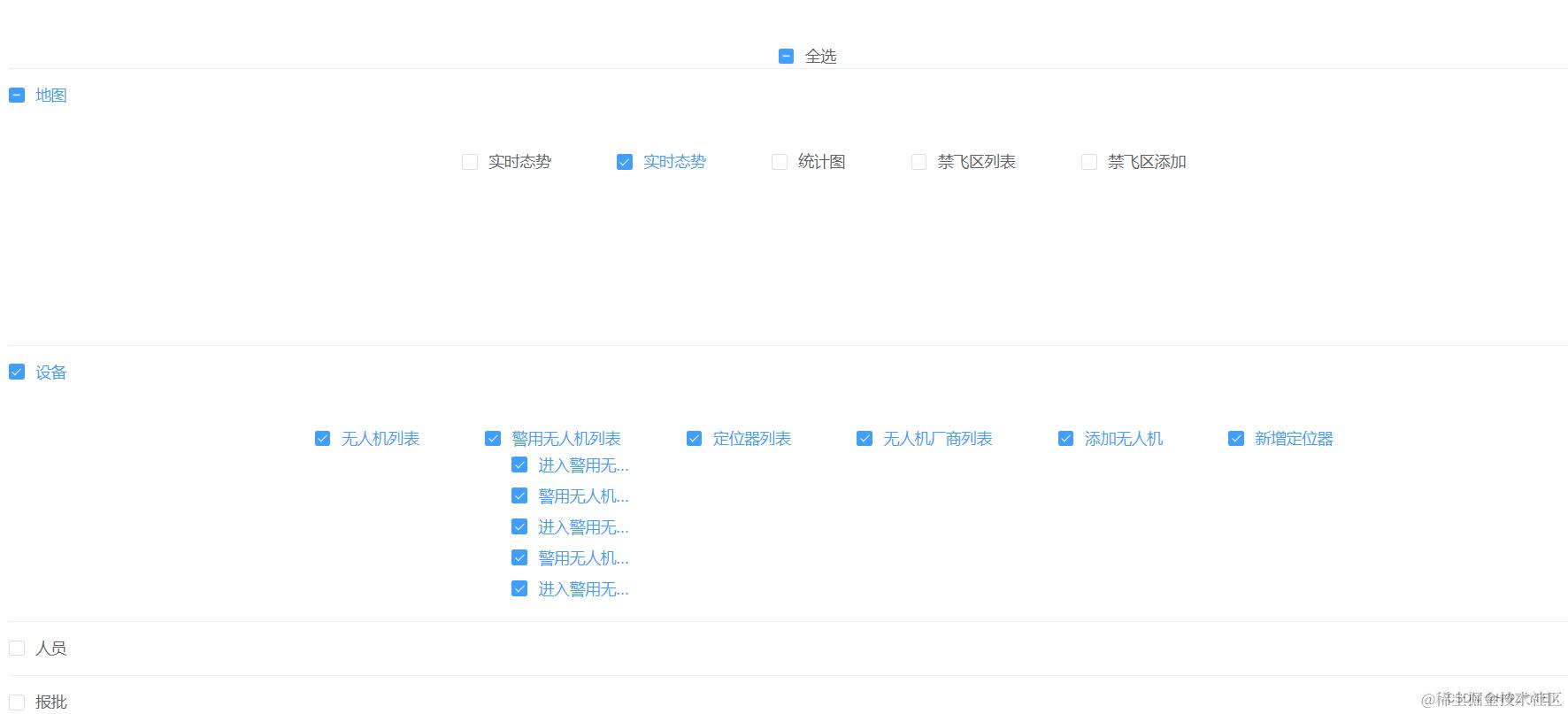
<template>
<el-scrollbar style="height: 90%">
<div class="menuList">
<el-row style="margin-top: 20px">
<div class="menuList-table">
<!-- 总全选-->
<el-checkbox
:indeterminate="indeterminate"
v-model="isCheckAll"
@change="checkAll"
>全选
</el-checkbox>
<!--这里使用element-ui 的折叠板-->
<el-collapse>
<el-collapse-item
v-for="(one, oneIndex) in menuData"
:key="oneIndex"
>
<template slot="title">
<!-- 一级 权限列表-->
<el-checkbox
:indeterminate="one.indeterminate"
v-model="one.checked"
@change="checkedOneAll(oneIndex, one.id, $event)"
:key="oneIndex"
>{{ one.name }}
</el-checkbox>
</template>
<!-- 二级 权限列表-->
<el-checkbox
v-for="(two, twoIndex) in one.children"
v-model="two.checked"
@change="
checkedTwoAll(oneIndex, twoIndex, two.id, one.id, $event)
"
:indeterminate="two.indeterminate"
:key="twoIndex"
>{{ two.name }}
<div style="position: absolute" v-if="two.children.length > 0">
<el-checkbox
style="display: block; line-height: 2"
v-for="(three, threeIndex) in two.children"
:key="threeIndex"
v-model="three.checked"
:title="three.name"
@change="
checkedThreeAll(
oneIndex,
twoIndex,
threeIndex,
three.id,
two.id,
$event
)
"
>{{ three.name | filterName }}
</el-checkbox>
</div>
</el-checkbox>
</el-collapse-item>
</el-collapse>
</div>
</el-row>
</div>
</el-scrollbar>
</template>
<script>
export default {
name: "menuList",
components: {},
props: {},
data() {
return {
menuData: [
{
id: 73,
name: "地图",
children: [
{
id: 35,
name: "实时态势",
children: [],
checked: false,
},
{
id: 69,
name: "实时态势",
children: [],
checked: false,
},
{
id: 68,
name: "统计图",
children: [],
checked: false,
},
{
id: 21,
name: "禁飞区列表",
children: [],
checked: false,
},
{
id: 22,
name: "禁飞区添加",
children: [],
checked: false,
},
],
checked: false,
},
{
id: 74,
name: "设备",
children: [
{
id: 2,
name: "无人机列表",
children: [],
checked: false,
},
{
id: 79,
name: "警用无人机列表",
children: [
{
id: 108,
name: "进入警用无人机修改页面",
children: [],
checked: false,
},
{
id: 111,
name: "警用无人机修改操作",
children: [],
checked: false,
},
{
id: 110,
name: "进入警用无人机详情页面",
children: [],
checked: false,
},
{
id: 151,
name: "警用无人机删除",
children: [],
checked: false,
},
{
id: 109,
name: "进入警用无人机添加页面",
children: [],
checked: false,
},
],
checked: false,
},
{
id: 66,
name: "定位器列表",
children: [],
checked: false,
},
{
id: 30,
name: "无人机厂商列表",
children: [],
checked: false,
},
{
id: 3,
name: "添加无人机",
children: [],
checked: false,
},
{
id: 67,
name: "新增定位器",
children: [],
checked: false,
},
],
checked: false,
},
{
id: 75,
name: "人员",
children: [
{
id: 59,
name: "持有者列表",
children: [],
checked: false,
},
{
id: 172,
name: "新增持有者",
children: [],
checked: false,
},
{
id: 178,
name: "待审核名单",
children: [],
checked: false,
},
{
id: 192,
name: "历史用户日志",
children: [],
checked: false,
},
{
id: 175,
name: "任务小组列表",
children: [],
checked: false,
},
],
checked: false,
},
{
id: 76,
name: "报批",
children: [
{
id: 7,
name: "飞行计划列表",
children: [],
checked: false,
},
{
id: 8,
name: "飞行计划/报备",
children: [],
checked: false,
},
],
checked: false,
},
{
id: 80,
name: "权限",
children: [
{
id: 141,
name: "警员权限管理",
children: [
{
id: 142,
name: "新增子权限组",
children: [],
checked: false,
},
],
checked: false,
},
{
id: 190,
name: "警员访问权限",
children: [],
checked: false,
},
{
id: 193,
name: "模块访问权限",
children: [],
checked: false,
},
{
id: 81,
name: "权限组列表",
children: [
{
id: 85,
name: "新增权限组",
children: [],
checked: false,
},
{
id: 88,
name: "查看用户列表",
children: [],
checked: false,
},
{
id: 87,
name: "查看菜单列表",
children: [],
checked: false,
},
{
id: 86,
name: "删除权限组",
children: [],
checked: false,
},
],
checked: false,
},
],
checked: false,
},
],
isCheckAll: false, //一级全选状态
indeterminate: false,
};
},
computed: {},
methods: {
//总change事件
checkAll(e) {
this.ischeckAll = e;
console.log('eeeeeeeeeeeee',e);
if (e === true) {
this.indeterminate = false;
for (var i = 0, len = this.menuData.length; i < len; i++) {
//二级全选反选不确定
this.menuData[i].checked = e;
this.menuData[i].indeterminate = false;
for (
var j = 0, len1 = this.menuData[i].children.length;
j < len1;
j++
) {
this.menuData[i].children[j].checked = e;
for (
var k = 0, len2 = this.menuData[i].children[j].children.length;
k < len2;
k++
) {
this.menuData[i].children[j].children[k].checked = e;
}
}
}
} else {
this.indeterminate = false;
for (let i = 0, len = this.menuData.length; i < len; i++) {
//三级全选反选不确定
this.menuData[i].checked = e;
this.menuData[i].indeterminate = false;
for (
let j = 0, len1 = this.menuData[i].children.length;
j < len1;
j++
) {
this.menuData[i].children[j].checked = e;
for (
let k = 0, len2 = this.menuData[i].children[j].children.length;
k < len2;
k++
) {
this.menuData[i].children[j].children[k].checked = e;
}
}
}
}
},
//一级change事件
checkedOneAll(oneIndex, oneId, e) {
this.menuData[oneIndex].checked = e; //一级勾选后,子级全部勾选或者取消
if (e === true) {
//去掉一级不确定状态
this.menuData[oneIndex].indeterminate = false;
}
let childrenArray = this.menuData[oneIndex].children;
if (childrenArray.length > 0) {
childrenArray.forEach((oneItem) => {
oneItem.checked = e;
if (oneItem.children.length > 0) {
oneItem.children.forEach((twoItem) => {
twoItem.checked = e;
});
}
});
}
this.getIsCheckAll();
},
//二级change事件
checkedTwoAll(oneIndex, twoIndex, twoId, oneId, e) {
var childrenArray = this.menuData[oneIndex].children;
var tickCount = 0,
unTickCount = 0,
len = childrenArray.length;
for (var i = 0; i < len; i++) {
if (twoId === childrenArray[i].id) childrenArray[i].checked = e;
if (childrenArray[i].checked === true) tickCount++;
if (childrenArray[i].checked === false) unTickCount++;
}
//判断二级下面是否还有三级,点击选择二级(选择与不选)时候下面三级是全选还是全不选
if (childrenArray[twoIndex].children.length > 0) {
childrenArray[twoIndex].children.forEach((threeItem) => {
threeItem.checked = e;
});
//判断二级是否选中
childrenArray[twoIndex].checked = e;
if (e === true) {
childrenArray[twoIndex].indeterminate = false;
}
}
if (tickCount === len) {
//二级全勾选
this.menuData[oneIndex].checked = e;
this.menuData[oneIndex].indeterminate = false;
} else if (unTickCount === len) {
//二级全不勾选
this.menuData[oneIndex].checked = e;
this.menuData[oneIndex].indeterminate = false;
} else {
this.menuData[oneIndex].checked = e;
this.menuData[oneIndex].indeterminate = true; //添加一级不确定状态
}
this.getIsCheckAll();
},
//三级change事件
checkedThreeAll(oneIndex, twoIndex, threeIndex, threeId, twoId, e) {
let childrenArray = this.menuData[oneIndex].children[twoIndex].children;
let tickCount = 0,
unTickCount = 0,
len = childrenArray.length;
for (let i = 0; i < len; i++) {
if (threeId === childrenArray[i].id) childrenArray[i].checked = e;
if (childrenArray[i].checked === true) tickCount++;
if (childrenArray[i].checked === false) unTickCount++;
}
if (tickCount === len) {
//三级全勾选
this.menuData[oneIndex].children[twoIndex].checked = true;
this.menuData[oneIndex].children[twoIndex].indeterminate = false;
this.menuData[oneIndex].checked = true;
this.menuData[oneIndex].indeterminate = false; //添加二级不确定状态
} else if (unTickCount === len) {
//三级全不勾选
this.menuData[oneIndex].children[twoIndex].checked = false;
this.menuData[oneIndex].children[twoIndex].indeterminate = false;
this.menuData[oneIndex].checked = false;
this.menuData[oneIndex].indeterminate = true; //添加二级不确定状态
this.isCheckAll = false;
this.indeterminate = true;
} else if (tickCount !== len) {
//三级勾选几个
this.menuData[oneIndex].children[twoIndex].checked = e;
this.menuData[oneIndex].children[twoIndex].indeterminate = true;
this.menuData[oneIndex].checked = false;
this.menuData[oneIndex].indeterminate = true; //添加二级不确定状态
this.isCheckAll = false;
this.indeterminate = true;
}
this.getIsCheckAll();
},
/**
*是否全选
*/
getIsCheckAll() {
var tickCount = 0,
unTickCount = 0,
ArrLength = this.menuData.length;
for (var j = 0; j < ArrLength; j++) {
//全选checkbox状态
if (this.menuData[j].checked === true) tickCount++;
if (this.menuData[j].checked === false) unTickCount++;
}
if (tickCount === ArrLength) {
//二级全勾选
this.isCheckAll = true;
this.indeterminate = false;
} else if (unTickCount === ArrLength) {
//二级全不勾选
this.isCheckAll = false;
this.indeterminate = false;
} else {
this.isCheckAll = false;
this.indeterminate = true; //添加一级不确定状态
}
},
/**
* 获取列表数据
*
*/
getList() {
this.menuData.forEach((oneItem, oneIndex) => {
console.log('+++++',oneIndex);
if (oneItem.children.length > 0) {
let oneCountNum = oneItem.children.length;
let isOneCheckedNum = 0;
oneItem.children.forEach((twoItem) => {
if (twoItem.checked) {
isOneCheckedNum += 1;
}
if (twoItem.children.length > 0) {
let twoCountNum = twoItem.children.length;
let isTwoCheckedNum = 0;
twoItem.children.forEach((three) => {
if (three.checked) {
isTwoCheckedNum += 1;
}
});
twoItem.checked = isTwoCheckedNum === twoCountNum;
twoItem.indeterminate =
isTwoCheckedNum > 0 && isTwoCheckedNum < twoCountNum;
}
});
oneItem.checked = isOneCheckedNum === oneCountNum;
oneItem.indeterminate =
isOneCheckedNum > 0 && isOneCheckedNum < oneCountNum;
}
});
},
},
created() {
this.getList();
},
watch: {},
filters: {
filterName(value) {
return value.substring(0, 5) + "...";
},
},
};
</script>
<style lang="less" scoped>
/deep/ .el-collapse-item__content {
padding-bottom: 0;
min-height: 200px;
font-size: 33px;
margin-left: 2%;
}
/deep/.el-checkbox {
margin-right: 60px !important;
}
</style>
table
通过hover出发table内容可编辑
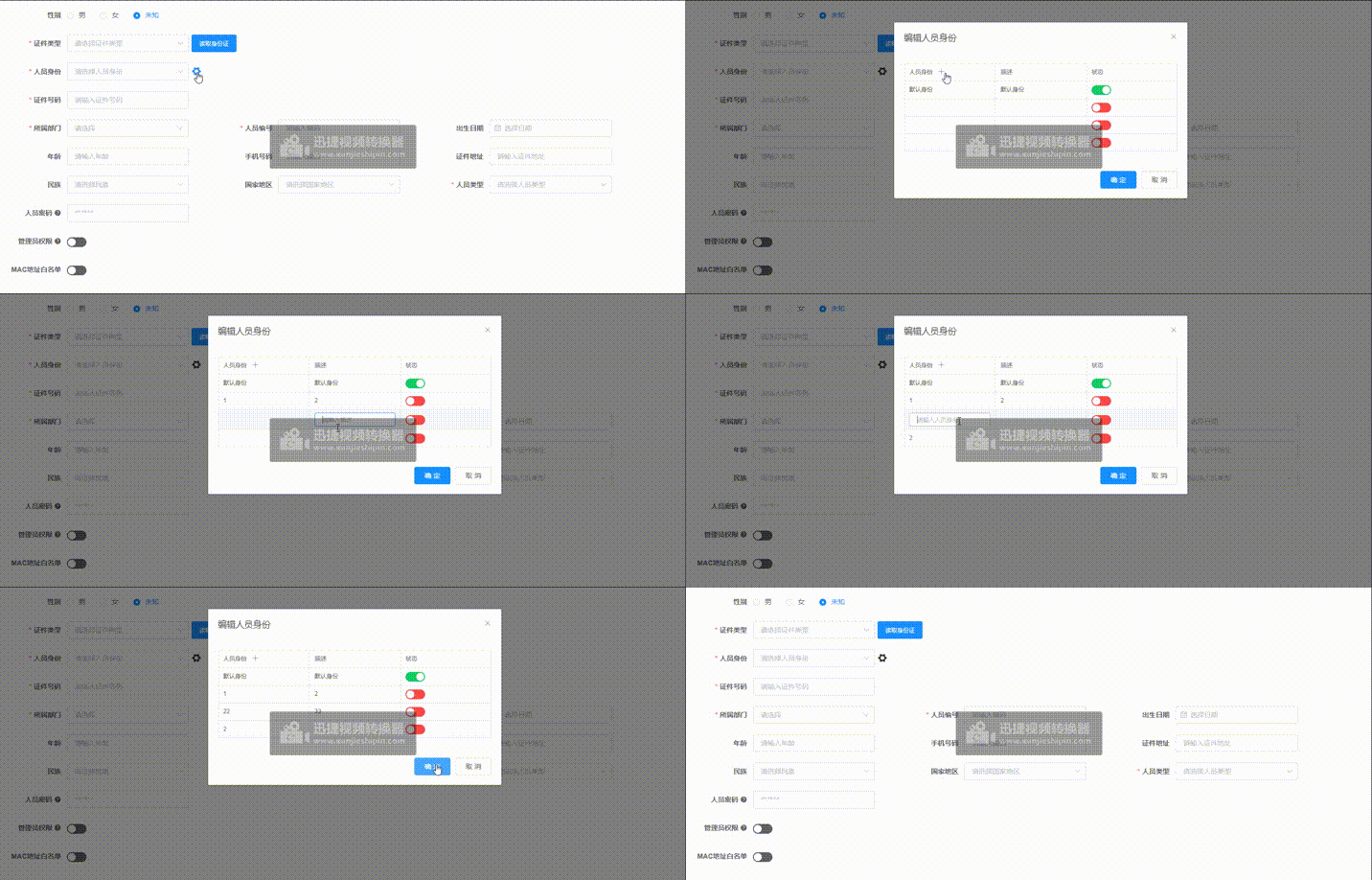
<template>
  <div class="fingerprintables">
    <el-dialog
      title="编辑人员身份"
      :visible.sync="visible"
      width="600px"
      :before-close="handleClose"
    >
      <el-table
        :data="tableData"
        :row-class-name="tableRowClassName"
        border
        max-height="780"
        style="width: 100%"
        size="mini"
        @cell-mouse-enter="enterTab"
        @cell-mouse-leave="leaveTab"
      >
        <el-table-column
          label="人员身份"
          prop="userTyep"
          :render-header="renderHeader"
        >
          <template slot-scope="scope">
            <span
              v-if="
                scope.row.index === tabClickIndex &&
                tabClickLabel === '人员身份' &&
                scope.row.index != 0
              "
            >
              <el-input
                v-model="scope.row.userTyep"
                type="text"
                maxlength="20"
                placeholder="请输入人员身份"
                size="mini"
                @blur="inputBlur(scope.row)"
              />
            </span>
            <span v-else>{{ scope.row.userTyep }}</span>
          </template>
        </el-table-column>
        <el-table-column label="描述" prop="describe">
          <template slot-scope="scope">
            <span
              v-if="
                scope.row.index === tabClickIndex &&
                tabClickLabel === '描述' &&
                scope.row.index != 0
              "
            >
              <el-input
                v-model="scope.row.describe"
                type="text"
                maxlength="20"
                placeholder="请输入描述"
                size="mini"
                @blur="inputBlur(scope.row)"
              />
            </span>
            <span v-else>{{ scope.row.describe }}</span>
          </template>
        </el-table-column>
        <el-table-column label="状态" prop="status">
          <template slot-scope="scope">
            <el-switch
              v-model="scope.row.status"
              active-color="#13ce66"
              inactive-color="#ff4949"
            >
            </el-switch>
          </template>
        </el-table-column>
      </el-table>
      <span slot="footer" class="dialog-footer">
        <el-button @click="cancel" type="primary">确 定</el-button>
        <el-button @click="cancel">取 消</el-button>
      </span>
    </el-dialog>
  </div>
</template>

<script>
export default {
  name: "test",
  data() {
    return {
      visible: true,
      tableData: [{ userTyep: "默认身份", describe: "默认身份", status: true }],
      tabClickIndex: 0,
      tabClickLabel: "",
    };
  },
  components: {},
  mounted() {},
  methods: {
    cancel() {
      // 关闭按钮
      this.visible = false;
      this.$emit("cancel", false);
    },
    handleClose(done) {
      done();
      this.cancel();
    },
    tableRowClassName({ row, rowIndex }) {
      // 把每一行的索引放进row
      row.index = rowIndex;
    },
    // enterTab row 当前行 column 当前列
    enterTab(row, column, cell, event) {
      switch (column.label) {
        case "人员身份":
          this.tabClickIndex = row.index;
          this.tabClickLabel = column.label;
          break;
        case "描述":
          this.tabClickIndex = row.index;
          this.tabClickLabel = column.label;
          break;
        default:
          return;
      }
      console.log("enterTab", this.tabClickIndex, row.adName, row.userTyep);
    },
    leaveTab() {
      this.tabClickIndex = null;
      this.tabClickLabel = "";
    },
    // 失去焦点初始化
    inputBlur(row) {
      // console.log('row', row)
      this.tabClickIndex = null;
      this.tabClickLabel = "";
    },
    renderHeader(h) {
      return (
        <div>
          <span>人员身份</span>
          <i
            class="el-icon-plus set-icon"
            style="font-size:15px;margin-left:10px;cursor: pointer"
            onClick={this.handelAddRow}
          ></i>
        </div>
      );
    },
    handelAddRow() {
      this.tableData.push({ userTyep: "", describe: "", status: false });
    },
  },
};
</script>
<style scoped lang='scss'>
</style>
页码动态计算高度
<template>

<div :class="{'hidden':hidden}" class="pagination-container">

<el-pagination

:background="background"

:current-page.sync="currentPage"

:page-size.sync="pageSize"

:layout="layout"

:page-sizes="pageSizes"

:total="total"

v-bind="$attrs"

@size-change="handleSizeChange"

@current-change="handleCurrentChange"

/>

</div>

</template>


<script>

import { scrollTo } from '@/utils/scroll-to'


export default {

name: 'Pagination',

props: {

total: {

required: true,

type: Number

},

page: {

type: Number,

default: 1

},

limit: {

type: Number,

default: 20

},

pageSizes: {

type: Array,

default() {

return [10, 20, 30, 50]

}

},

layout: {

type: String,

default: 'total, sizes, prev, pager, next, jumper'

},

background: {

type: Boolean,

default: true

},

autoScroll: {

type: Boolean,

default: true

},

hidden: {

type: Boolean,

default: false

}

},

computed: {

currentPage: {

get() {

return this.page

},

set(val) {

this.$emit('update:page', val)

}

},

pageSize: {

get() {

return this.limit

},

set(val) {

this.$emit('update:limit', val)

}

}

},

methods: {

handleSizeChange(val) {

this.$emit('pagination', { page: this.currentPage, limit: val })

if (this.autoScroll) {

scrollTo(0, 800)

}

},

handleCurrentChange(val) {

this.$emit('pagination', { page: val, limit: this.pageSize })

if (this.autoScroll) {

scrollTo(0, 800)

}

}

}

}

</script>


<style scoped>

.pagination-container {

background: #fff;

padding: 0;

}

.pagination-container.hidden {

display: none;

}

</style>
<Pagination

v-show="devicePagination.total > 0"

slot="down"

:total="devicePagination.total"

:page.sync="devicePagination.page"

:limit.sync="devicePagination.limit"

@pagination="getDeviceList"

/>
el-table合计总计
<template>
  <div class="component-main">
    <div class="component-table">
      <el-table
        :data="tableData"
        border
        max-height="300"
        :header-cell-style="{
          fontSize: '14px',
          backgroundColor: '#f5f5f5',
          color: '#333',
        }"
      >
        <el-table-column prop="index" label="序号" width="60">
          <template v-slot="scope">
            {{ scope.$index + 1 }}
          </template>
        </el-table-column>

        <el-table-column prop="itemName" label="物品名称">
          <template v-slot="scope">
            <el-input
              v-model="scope.row.itemName"
              placeholder="请输入内容"
            ></el-input>
          </template>
        </el-table-column>
        <el-table-column prop="specificationModel" label="规格型号">
          <template v-slot="scope">
            <el-input
              v-model="scope.row.specificationModel"
              placeholder="请输入内容"
            ></el-input>
          </template>
        </el-table-column>
        <el-table-column prop="purchaseUnit" label="单位">
          <template v-slot="scope">
            <el-input
              v-model="scope.row.purchaseUnit"
              placeholder="请输入内容"
            ></el-input>
          </template>
        </el-table-column>
        <el-table-column prop="itemNumber" label="申购数量">
          <template v-slot="scope">
            <el-input
              v-model="scope.row.itemNumber"
              placeholder="请输入内容"
              @input="validateSize(scope.row)"
            ></el-input>
          </template>
        </el-table-column>
        <el-table-column prop="unitPrice" label="预购单价(元)">
          <template v-slot="scope">
            <el-input
              v-model="scope.row.unitPrice"
              placeholder="请输入内容"
              @input="validateNum(scope.row)"
            ></el-input>
          </template>
        </el-table-column>
        <el-table-column prop="totalPrice" label="总价(元)">
          <template #default="scope">
            <span>{{
              scope.row.totalPrice === "-" ? "-" : formatPrice(scope.row.totalPrice)
            }}</span>
          </template>
        </el-table-column>
        <el-table-column prop="remark" label="备注">
          <template v-slot="scope">
            <el-input
              v-model="scope.row.remark"
              placeholder="请输入内容"
            ></el-input>
          </template>
        </el-table-column>
        <el-table-column fixed="right" label="操作" :width="'100px'">
          <template v-slot="scope">
            <div>
              <el-button
                type="text"
                size="small"
                style="color: red"
                @click="handleDelete(scope.$index)"
                >删除</el-button
              >
            </div>
          </template>
        </el-table-column>
        <template slot="empty">
          <span>暂无数据~</span>
        </template>
      </el-table>
    </div>

    <div class="table-btns" v-if="tableData.length">
      共{{ tableData.length }}件,合计{{ formatPrice(totalPrice) }}元
    </div>

    <!-- 添加一行按钮 -->
    <div class="table-btn" @click="addRow">
      <i class="el-icon-plus"></i>
      添加一行
    </div>
  </div>
</template>

<script>
export default {
  props: {
    tableData: {
      type: Array,
      default: () => [],
    },
  },
  data() {
    return {
      addHeight: 6,
    };
  },
  computed: {
    // 计算总价
    totalPrice() {
      return this.tableData.reduce((sum, row) => {
        return sum + (row.totalPrice !== "-" ? row.totalPrice : 0);
      }, 0);
    },
  },
  methods: {
    // 添加新行
    addRow() {
      this.addHeight = this.addHeight + 6;
      this.$emit("addRow");
    },
    handleClick(address) {
      this.fileUrl = address;
      this.lookFilesDialogVisible = true;
    },
    handleDelete(idx) {
      this.$confirm("确认删除?", "提示", { type: "warning" }).then(() => {
        this.$emit("deleteRow", idx);
      });
    },
    // 验证金额(限制为最多两位小数)
    validateNum(row) {
      let value = row.unitPrice;
      // 仅允许数字和最多两位小数
      value = value.replace(/[^\d.]/g, ""); // 移除非数字和小数点字符
      value = value.replace(/\.{2,}/g, "."); // 确保只允许一个小数点
      value = value.replace(/^0+(\d)/, "$1"); // 去掉前导多余零
      value = value.replace(/^(\d+)\.(\d{2}).*$/, "$1.$2"); // 限制两位小数
      row.unitPrice = value; // 更新金额值
      this.updatePrice(row);
    },

    // 验证数量(限制为整数)
    validateSize(row) {
      let value = row.itemNumber;
      // 仅允许整数
      value = value.replace(/[^\d]/g, ""); // 移除非数字字符
      row.itemNumber = value; // 更新数量值
      this.updatePrice(row);
    },
    formatPrice(value) {
      return value ? value.toFixed(2) : "0.00";
    },
    updatePrice(row) {
      const unitPrice = parseFloat(row.unitPrice) || 0;
      const itemNumber = parseFloat(row.itemNumber) || 0;
      row.totalPrice =
        unitPrice > 0 && itemNumber > 0 ? parseFloat((unitPrice * itemNumber).toFixed(2)) : "-";
    },
  },
};
</script>

<style lang="scss" scoped>
.component-main {
  padding: 20px;
}

.table-btn,
.table-btns {
  opacity: 0.9;
  font-size: 14px;
  color: #616367;
  height: 40px;
  line-height: 40px;
  text-align: center;
  border: 1px solid #e4e4e4;
  border-top: none;
}

.table-btn:hover {
  cursor: pointer;
  color: #039340;
}

::v-deep .lookFilesDialog .el-dialog {
  width: 100%;
  height: 100vh;
  margin-top: 0px !important;
  display: flex;
  flex-direction: column;
}

::v-deep .lookFilesDialog .el-dialog__body {
  height: 100%;
}

::v-deep .el-dialog__wrapper {
  overflow: hidden;
}
</style>
封装简单的table
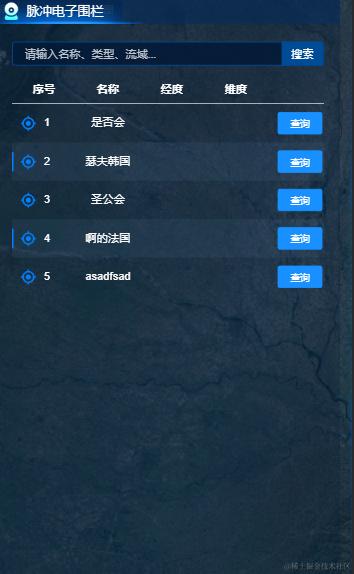
组件.vue
<template>
  <div class="table">
    <el-table :data="tableData" style="width: 100%" :height="height">
      <el-table-column
        v-if="column[0].selection"
        type="selection"
        width="42"
        align="center"
      />
      <template v-for="item in column">
        <el-table-column
          v-loading="loading"
          v-if="item.slot"
          :key="item.key"
          :label="item.name"
          :prop="item.key"
          :min-width="item.minWidth"
          :align="item.align || 'center'"
          :width="item.width"
          :fixed="item.fixed"
        >
          <template slot-scope="scope">
            <slot
              :name="item.key"
              :row="scope.row"
              :index="scope.$index"
            ></slot>
          </template>
        </el-table-column>
        <el-table-column
          v-else
          :key="item.key"
          v-loading="loading"
          :label="item.name"
          :prop="item.key"
          :min-width="item.minWidth"
          :align="item.align || 'center'"
          :width="item.width"
          :fixed="item.fixed"
        />
      </template>
    </el-table>
  </div>
</template>

  <script>
export default {
  props: {
    column: {
      type: Array,
      default: [],
    },
    tableData: {
      type: Array,
      default: [],
    },
    loading: {
      type: Boolean,
      default: false,
    },
    height: {
      type: Number,
      default: 250,
    },
  },
  data() {
    return {
      currentIndex: null,
    };
  },
  components: {},
  mounted() {},
  methods: {
    handlerClick(item, index) {
      if (this.slotType.includes("locating")) {
        this.currentIndex = index;
        this.$bus.$emit(this.slotType, item);
      }
    },
    handlerItemClick(item) {
      this.$emit("handlerItemClick", item);
    },
  },
};
</script>
  <style scoped lang='scss'>
.table-font {
  font-size: 16px !important;
  line-height: 28px;
  color: rgba(255, 255, 255, 0.9);
  font-size: 16px;
  font-family: Source Han Sans CN;
  font-weight: 400;
}
.table {
  margin-top: 10px;
  .w50 {
    width: 50px !important;
  }
  .table-tr {
    margin: 5px 0;
    color: rgba(152, 173, 197, 0.8) !important;
  }

  .table-chlid-tr {
    cursor: pointer;
    font-size: 13px;
    opacity: 0.9;

    .table-chlid-locating {
      transition: all 0.8s;
      width: 20px;
      height: 20px;
      cursor: pointer;
    }
    .active {
      transition: all 0.8s;
      background-color: rgba($color: #ddd, $alpha: 0.1);
      border: 1px dashed #ddd;
    }

    &:nth-child(even) {
      background-image: url("../../../../assets/images/list-backg.png");
      background-repeat: no-repeat;
      background-size: 100% 100%;
    }
  }
}
/*最外层透明*/
::v-deep .el-table,
::v-deep .el-table__expanded-cell {
  background-color: transparent;
  border: none !important;
}
/* 表格内背景颜色 */
::v-deep .el-table th,
::v-deep .el-table tr,
::v-deep .el-table td {
  background-color: transparent !important;
  // border: none !important;
  border: none;
  color: #fff !important;
}

::v-deep .el-table__row {
  &:nth-child(even) {
    background-image: url("../../../../assets/images/list-backg.png");
    background-repeat: no-repeat;
    background-size: 100% 100%;
  }
}

::v-deep .el-table__body-wrapper .is-scrolling-none {
  border: none !important;
}
::v-deep .el-table__body-wrapper::-webkit-scrollbar {
  /*width: 0;宽度为0隐藏*/
  width: 0px;
}
::v-deep .el-table__body-wrapper::-webkit-scrollbar-thumb {
  border-radius: 2px;
  height: 50px;
  background: #eee;
}
::v-deep .el-table__body-wrapper::-webkit-scrollbar-track {
  box-shadow: inset 0 0 5px rgba(0, 0, 0, 0.2);
  border-radius: 2px;
  background: rgba(0, 0, 0, 0.4);
}
::v-deep .el-table .cell{
  line-height: 15px !important;
}
</style>
使用
<MapTable :height="680" :column="column" :tableData="tableData" :loading="loading">
        <template #location="scope">
          <div class="flex flex-align-c">
            <img
              src="../../../../../../../assets/images/locating.png"
              class="table-chlid-locating"
              :class="currentIndex == scope.index ? 'active' : ''"
              alt=""
              @click="handlerClick(scope)"
            />
            <div style="margin-left: 10px">{{ scope.index + 1 }}</div>
          </div>
        </template>
        <template #action="scope">
          <el-button type="primary" size="mini" >查询</el-button>
        </template>
        <template #address="scope">
            <el-link @click="handlerItemClick(scope.row)" type="primary">{{
              scope.row.address
            }}</el-link>
          </template>
      </MapTable>

       column: [
        { key: "location", name: "序号", slot: true },
        { key: "baseStationGroupName", name: "名称" },
        { key: "teamNum", name: "经度" },
        { key: "personNum", name: "维度" },
        { key: "action", name: "",slot: true },
      ],
      tableData: [],
前端实现左右分页查询和勾选状态(不依靠后端)
组件(夫)equipment
<template>
  <el-dialog
    width="50%"
    title="选择设备"
    :visible.sync="visible"
    :before-close="handleClose"
  >
    <div class="equipment-content">
      <div
        v-if="initConfigLinst.length > 0"
        class="flex equipment-content-tree"
      >
        <Custom
          ref="Custom0"
          :key="initConfigLinst.length"
          v-if="initConfigLinst.length > 0"
          :list="initConfigLinst"
          :search="leftSearch"
          :selected="false"
        />
        <div class="line"></div>
        <Custom
          ref="Custom1"
          :key="initLinst.length"
          v-if="initLinst.length > 0"
          :list="initLinst"
          :search="rightSearch"
          :selected="true"
        />
      </div>
      <div v-else style="height: 300px" v-loading="true"></div>
      <div slot="footer" class="dialog-footer">
        <el-button type="primary" @click="handleSubmit">保 存</el-button>
        <el-button @click="cancel">取 消</el-button>
      </div>
    </div>
  </el-dialog>
</template>
  <script>
import Custom from "./custom.vue";
export default {
  components: {
    Custom,
  },
  props: {
    visibles: {
      type: Boolean,
      default: false,
    },
    inspectType: {
      type: Number,
      default: 1,
    },
  },
  data() {
    return {
      visible: false, // 开关
      initConfigLinst: [], //待选
      initLinst: [], //已选择
      leftSearch: {
        // 左侧搜索
        inspectType: 1, //	巡检方式,1-按时间段,2-按次数
        pageNum: 1,
        pageSize: 9,
        searchKey: "",
        taskModule: "", // 任务模块,巡检方式为时间段时需要传入,按次数时不传
      },
      rightSearch: {
        // 右侧侧搜索
        inspectType: 1, //	巡检方式,1-按时间段,2-按次数
        pageNum: 1,
        pageSize: 9,
        searchKey: "",
        taskModule: "", // 任务模块,巡检方式为时间段时需要传入,按次数时不传
      },
    };
  },
  watch: {
    visibles(n) {
      this.visible = n;
    },
  },
  created() {
    // 默认值附带组件参数
    this.getDetail();
    // TOOD渲染获取设备配置分页列表
    this.renderDevice();
  },
  mounted() {
    this.eventBus();
    console.warn("equipment");
  },
  methods: {
    // 验证格式
    isArrayWithObjectsOfFormat(arr) {
      return (
        Array.isArray(arr) &&
        arr.every(
          (item) =>
            typeof item === "object" && item !== null && "primaryId" in item
        )
      );
    },
    // 默认值附带组件参数比如当前的第几项
    getDetail() {
      this.visible = this.visibles;
      // console.log(this.$attrs.equipmentInfo, "equipmentInfo");
      this.leftSearch.inspectType = this.inspectType;
      this.inspectType == 1
        ? (this.leftSearch.taskModule =
            "任务" + (Number(this.$attrs.equipmentInfo.index) + 1))
        : delete this.leftSearch.taskModule;
      this.rightSearch.inspectType = this.inspectType;
      this.inspectType == 1
        ? (this.rightSearch.taskModule =
            "任务" + (Number(this.$attrs.equipmentInfo.index) + 1))
        : delete this.leftSearch.taskModule;
      this.getRightChebox();
    },
    async renderDevice() {
      let [url, params] = [];
      url = "/eps-biz-service/api/v1/inspect/list/device/config";
      params = {
        inspectType: this.inspectType, //	巡检方式,1-按时间段,2-按次数
        pageNum: 1,
        pageSize: 9999,
        searchKey: "",
      };
      this.inspectType == 1
        ? (params.taskModule =
            "任务" + (Number(this.$attrs.equipmentInfo.index) + 1))
        : delete params.taskModule;
      const res = await this.$ajax.get(url, params);
      this.responseSuuces(res, () => {
        console.warn(res);
        let { list } = res.data;
        list = list.map((item) => {
          item.selected = false;
          return item;
        });
        // 获取渲染右侧数据
        this.getRightChebox();
        // 判断左侧的勾选默认放到右侧勾选中
        this.transitionSelected(list);
      });
    },
    // 判断左侧的勾选默认放到右侧勾选中
    transitionSelected(list) {
      if (this.initLinst.length) {
        for (let i = 0; i < list.length; i++) {
          const matchingIndex = this.initLinst.findIndex(
            (item) => item.primaryId === list[i].primaryId
          );
          if (matchingIndex !== -1) {
            list[i].selected = true;
          }
        }
      }
      this.initConfigLinst = list;
    },
    // 获取渲染右侧数据
    getRightChebox() {
      if (
        this.isArrayWithObjectsOfFormat(
          this.$attrs.equipmentInfo.deviceUpdateList
        )
      ) {
        this.initLinst = this.$attrs.equipmentInfo.deviceUpdateList;
      } else {
        this.initLinst = [];
      }
    },
    responseSuuces(res, fn) {
      res.code === 200 ? fn() : this.$message.error(res.message);
    },

    // 保存
    handleSubmit() {
      let obj = this.$attrs.equipmentInfo;
      obj.deviceUpdateList = this.initLinst;
      this.$emit("handleSubmit", obj);
      this.cancel();
    },
    // 两则的勾选穿梭
    eventBus() {
      this.$bus.$on("gaibains", (v, b) => {
        let index = this.initLinst.findIndex(
          (item) => item.primaryId === v.primaryId
        );
        // 如果是左边点击
        if (b) {
          this.initLinst.splice(index, 1);
          this.initConfigLinst.forEach((item) => {
            if (item.primaryId == v.primaryId) {
              item.selected = v.selected;
            }
          });
          // 如果是右边点击
        } else {
          if (v.selected) {
            if (index == -1) this.initLinst.unshift(v);
          } else {
            this.initLinst.splice(index, 1);
          }
        }
      });
    },
    // 取消
    cancel() {
      this.visible = false;
      this.$emit("update:visibles", false);
    },
    handleClose(done) {
      done();
      this.cancel();
    },
  },
  destroyed() {
    this.$bus.$off("gaibains"); // bus
  },
};
</script>
  <style scoped lang='scss'>
::v-deep .el-dialog__body {
  padding: 5px 25px;
}
.equipment-content {
  .equipment-content-tree {
    height: 540px;
    .line {
      width: 0px;
      height: 100%;
      border: 2px solid #ddd;
      margin: 0 40px;
    }
  }
}
.dialog-footer {
  margin: 20px 0 10px 0;
  text-align: center;
}
</style>
上传
<el-upload accept=".png, .jpg,.mp4" action="" class="avatar-uploader" :show-file-list="false"
    :on-change="changeupload" :http-request="handelrUploads">
    <img v-if="initImageUrl" :src="initImageUrl" class="avatar">
    <i v-else class="el-icon-plus avatar-uploader-icon"></i>
</el-upload>
  handelrUploads(param) {
      var file = param.file
      let formData = new FormData()
      formData.append("file", file);
      this.$ajax.uploads('/eps-biz-service/api/v1/inspectAnalysis/imageUpload', formData).then((res) => {
        res.code === 200 ? this.imageUrl = res.data : this.$message.error(res.message)
      })
        .catch(err => {
          console.log(err)
        })
    },
    changeupload(file) {
      const isMP4 = file.raw.type === 'video/mp4'
      const isJPG = file.raw.type === 'image/jpeg'
      const isPNG = file.raw.type === 'image/png'
      const isJPEG = file.raw.type === 'image/jpeg'
      if (!isPNG && !isJPG && !isMP4 && !isJPEG) {
        this.$message.warning('只能上传图片和视频!')
        return false
      } else {
        this.initImageUrl = URL.createObjectURL(file.raw);//赋值图片的url,用于图片回显功能
      }
    },
组件(子)custom
<template>
  <div class="equipment-left equipment-share">
    <div class="search-body">
      <el-row :gutter="18">
        <el-col :span="8">
          <el-input
            placeholder="搜索关键字"
            size="mini"
            v-model="search.searchKey"
            clearable
          >
          </el-input>
        </el-col>
        <el-col :span="11" class="flex">
          <el-button size="mini" type="primary" @click="dataFilter"
            >搜索</el-button
          >
          <el-button size="mini" @click="CZ()">重置</el-button>
        </el-col>
      </el-row>
    </div>
    <div class="tree-body">
      <div v-for="item in resUltList" :key="item.id">
        <div class="flex flex-align-c">
          <el-checkbox
            v-model="item['selected']"
            @change="handleCheckChange(item, $event)"
          />
          <div class="flex flex-dir-c flex-jus-c checkbox-right">
            <b>{{ item.organization }}</b>
            <span>{{ item.deviceName }}</span>
          </div>
        </div>
      </div>
    </div>
    <!-- :hide-on-single-page="true" -->
    <el-pagination
      class="text-center"
      background
      layout="prev, pager, next"
      :total="total"
      @current-change="(e) => handleCurrentChange(e, 'config')"
      :current-page.sync="search.pageNum"
      :page-size="search.pageSize"
    >
    </el-pagination>
  </div>
</template>

<script>
export default {
  name: "custom",
  props: {
    search: {
      type: Object,
      default: {},
    },

    list: {
      type: Array,
      default: [],
    },
  },
  components: {},
  data() {
    return {
      resUltList: [],
      total: 0,
    };
  },
  created() {},
  mounted() {
    this.dataFilter();
  },
  methods: {
    dataFilter() {
      // name过滤
      let list = this.list.filter((item, index) => {
        if (this.search.searchKey === "") {
          return item;
        }
        return item.deviceName.includes(this.search.searchKey);
      });
      // 实现分页
      this.resUltList = list.filter(
        (item, index) =>
          index < this.search.pageNum * this.search.pageSize &&
          index >= this.search.pageSize * (this.search.pageNum - 1)
      );
      // 总数量赋值
      this.total = list.length;
    },
    handleCheckChange(val, e) {
      val.selected = e;
      this.$bus.$emit("gaibains", val, this.$attrs.selected);
      //   this.dataFilter();
    },
    handleCurrentChange(e, type) {
      this.search.pageNum = e;
      this.dataFilter();
    },
    CZ() {
      this.search.pageNum = 1;
      this.search.pageSize = 10;
      this.search.searchKey = "";
      this.dataFilter();
    },
  },
};
</script>

<style lang='scss' scoped>
.tree-body {
  height: 440px;
  overflow-y: auto !important;
  margin-top: 30px;
  .checkbox-right {
    margin-left: 20px;
    line-height: 23px;
  }
}
</style>

<el-form-item prop="password">
          <span slot="label" style="display: inline-block">
            人员密码
            <el-tooltip effect="dark" content="默认密码为123456" placement="bottom">
              <i class="el-icon-question" />
            </el-tooltip>
          </span>
          <el-input v-model="forms.password" clearable type="password" style="width: 250px" placeholder="******"
            maxlength="50" />
        </el-form-item>
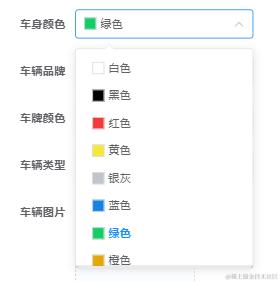
 <el-form-item label="车身颜色" prop="color">
            <el-select v-model="form.color" placeholder="请选择车牌颜色" style="width: 220px">
              <template v-slot:prefix>
                <div class="square test" :style="{
                  backgroundColor: getBackgrund(form.color, 'color', color),
                }"></div>
              </template>
              <el-option v-for="item in color" :key="item.dictValue" :label="item.dictLabel" :value="item.dictValue">
                <div class="flex flex-align-c">
                  <div class="square" :style="{
                    backgroundColor: item.cssClass
                  }"></div>
                  <span>{{ item.dictLabel }}</span>
                </div>
              </el-option>
            </el-select>
          </el-form-item>
antd
table
通过操作按钮展开


 <a-table
          :height="500"
          :columns="columns"
          :data-source="dataSource"
          :pagination="false"
          :rowKey="
            (record, index) => {
              return record.id;
            }
          "
          :expandedRowKeys="expandedRowKeys"
          :expandIconAsCell="false"
          :expandIconColumnIndex="-1"
        >
          <span slot="action" slot-scope="text, record, index" >
            <a @click="handleExpand(record,index)" v-show="record.detail.length" >{{
              expandedRowKeys[0] == record.id ? "收起" : "展开"
            }}</a>
            <a-divider type="vertical"  v-show="record.detail.length"/>
            <a @click="handleAction('edit', record, index)">编辑</a>
            <a-divider type="vertical" />
            <a-popconfirm
              v-if="dataSource.length"
              title="是否确定删除?"
              @confirm="() => handleDelete(record, index)"
            >
              <a style="color: red">删除</a>
            </a-popconfirm>
          </span>
          <div
            class="expendTableCell"
            slot="expandedRowRender"
            slot-scope="record"
            style="margin: 0"
          >
            <div style="margin: 5px 10px">
              <ul class="flex expandedRowRender-children" v-for="(item,index) in record.detail" :key="index">
                <li>状态:{{ item.status == 1 ? '展开的内容' : '发射中' }}</li>
              </ul>
            </div>
          </div>
        </a-table>
        data(){
    return{
  columns: [
        {
          title: "任务目标",
          dataIndex: "joinName",
          align: "left",
        },
        {
          title: "分配",
          dataIndex: "allocation",
          align: "center",
        },
        {
          title: "状态",
          dataIndex: "status",
          align: "center",
        },
        {
          title: "创建时间",
          dataIndex: "createdAt",
          align: "center",
        },
        {
          title: "操作",
          dataIndex: "action",
          width: 250,
          align: "center",
          scopedSlots: {
            customRender: "action",
          },
        },
      ],
      dataSource: [],
            expandedRowKeys: [],

  }
}
methods: {
  handleExpand(record,index) {
      let key = record.id;
      if (this.expandedRowKeys.length > 0) {
        //判断当前点击行是否已展开,若展开则把当前key从expandedRowKeys中移除,代表关闭当前展开列
        let index = this.expandedRowKeys.indexOf(key);
        if (index > -1) {
          this.expandedRowKeys.splice(index, 1);
        } else {
          //关闭其他展开行,展开当前点击行
          this.expandedRowKeys = [];
          this.expandedRowKeys.push(key);
        }
      } else {
        //如果当前没有展开列,把当前行绑定的唯一key值放到expandedRowKeys数组中
        this.expandedRowKeys.push(key);
      }
}
不通过操作栏点击,点击行触发
 <a-table
          :rowKey="(record) => record.id"
          :customRow="handleRowClick"
          :scroll="{ y: height - 250 }"
          :columns="columns"
          :data-source="list"
          :height="height - 250"
          v-if="list.length"
          :loading="loading"
          :pagination="false"
        >
        </a-table>

          // 给table点击行事件
    handleRowClick(record, index) {
      return {
        on: {
          click: async (v) => {
            this.width = 365;
            const { roomNumber } = record;
            // 2353后端目前只对这个数字做了处理,并且只传数字
            const res = await this.ajax.post("data/room/self", 2353);
            if (res.code == 0) {
              this.recordDetail = res.extendData;
            } else {
              this.$message.error("房间详情请求出错!请联系技术人员");
            }
          },
        },
      };
    },
进度条
<template>
    <div class="slider" ref="slider" @click.stop="handelClickSlider">
        <div class="process" :style="{ width, background: bgColor }"></div>
        <div class="thunk" ref="trunk" :style="{ left }">
            <div class="block" ref="dot"></div>
        </div>
    </div>
</template>
<script>
/*
 * min 进度条最小值
 * max 进度条最大值
 * v-model 对当前值进行双向绑定实时显示拖拽进度
 * */
export default {
    props: {
        // 最小值
        min: {
            type: Number,
            default: 0,
        },
        // 最大值
        max: {
            type: Number,
            default: 100,
        },
        // 当前值
        value: {
            type: Number,
            default: 0,
        },
        // 进度条颜色
        bgColor: {
            type: String,
            default: "#4ab157",
        },
        // 是否可拖拽
        isDrag: {
            type: Boolean,
            default: true,
        },
    },
    data() {
        return {
            slider: null, //滚动条DOM元素
            thunk: null, //拖拽DOM元素
            per: this.value, //当前值
        };
    },
    mounted() {
        this.slider = this.$refs.slider;
        this.thunk = this.$refs.trunk;
        var _this = this;
        if (!this.isDrag) return;
        this.thunk.onmousedown = function (e) {
            var width = parseInt(_this.width);
            var disX = e.clientX;
            document.onmousemove = function (e) {
                // value, left, width
                // 当value变化的时候,会通过计算属性修改left,width
                // 拖拽的时候获取的新width
                var newWidth = e.clientX - disX + width;
                // 计算百分比
                var scale = newWidth / _this.slider.offsetWidth;
                _this.per = Math.ceil((_this.max - _this.min) * scale + _this.min); //取整
                // 限制值大小
                _this.per = Math.max(_this.per, _this.min);
                _this.per = Math.min(_this.per, _this.max);

                _this.$emit("input", _this.per);
            };
            document.onmouseup = function () {
                //当拖拽停止发送事件
                _this.$emit("stop", _this.per);
                //清除拖拽事件
                document.onmousemove = document.onmouseup = null;
            };
        };
    },
    methods: {
        handelClickSlider(event) {
            //禁止点击
            if (!this.isDrag) return;
            const dot = this.$refs.dot;
            if (event.target == dot) return;
            //获取元素的宽度l
            let width = this.slider.offsetWidth;
            //获取元素的左边距
            let ev = event || window.event;
            //获取当前点击位置的百分比
            let scale = ((ev.offsetX / width) * 100).toFixed(2);
            this.per = scale;
        },
    },
    computed: {
        // 设置一个百分比,提供计算slider进度宽度和trunk的left值
        // 对应公式为  当前值-最小值/最大值-最小值 = slider进度width / slider总width
        // trunk left =  slider进度width + trunk宽度/2
        scale() {
            return (this.per - this.min) / (this.max - this.min);
        },
        width() {
            return this.slider ? this.slider.offsetWidth * this.scale + "px" : "0px";
        },
        left() {
            return this.slider ? this.slider.offsetWidth * this.scale - this.thunk.offsetWidth / 2 + "px" : "0px";
        },
    },
    watch: {
        value: {
            handler: function () {
                this.per = this.value;
            },
        },
    },
};
</script>

<style scoped>
.box {
    margin: 100px auto 0;
    width: 50%;
}

.clear:after {
    content: "";
    display: block;
    clear: both;
}

.slider {
    position: relative;
    margin: 20px 0;
    width: 30%;
    height: 10px;
    top: 50%;
    background: #747475;
    border-radius: 5px;
    cursor: pointer;
    z-index: 99999;
}

.slider .process {
    position: absolute;
    left: 0;
    top: 0;
    width: 112px;
    height: 10px;
    border-radius: 5px;
    background: #4ab157;
    z-index: 111;
}

.slider .thunk {
    position: absolute;
    left: 100px;
    top: -4px;
    width: 10px;
    height: 6px;
    z-index: 122;
}

.slider .block {
    width: 16px;
    height: 16px;
    border-radius: 50%;
    background: rgba(255, 255, 255, 1);
    transition: 0.2s all;
}

.slider .block:hover {
    transform: scale(1.1);
    opacity: 0.6;
}
</style>


<!--  <slisd :min="0" :max="100" :value="50" :isDrag="true" bgColor="#4ab157"></slisd> -->
树行下拉框
<el-select
            ref="treeSelect"
            v-model="params.departmentName"
            placeholder="请选择"
            :popper-append-to-body="false"
        >
          <el-option
              :value="selectTree"
              class="setstyle"
              style="overflow: auto; height: 100%"
              disabled
          >
            <el-tree
                style="min-height: 50px; max-height: 150px"
                :data="depList"
                 :props=" {
                children : 'children' ,
                label : 'label' ,
              }"
                ref="tree"
                check-strictly
                :expand-on-click-node="false"
                :accordion="true"
                @node-click="(data) => addAdminHandleNodeClick(data)"
            ></el-tree>
          </el-option>
        </el-select>

 addAdminHandleNodeClick (node){
      this.$refs.treeSelect.visible = false
      this.$emit('on-dep-select',node)
    } ,