iOS升级xcode15后报错:
错误1:
SDK does not contain 'libarclite' at the path /Applications/Xcode.app/Contents/Developer/Toolchains/XcodeDefault.xctoolchain/usr/lib/arc/libarclite_iphoneos.a'; try increasing the minimum deployment target
根据上面报错路径,进入可以看到没有对应的arc文件夹及其内容。
- 新建文件夹arc;
- 下载对应的libarclite文件;注意区分真机(libarclite_iphoneos.a)和模拟器(libarclite_iphonesimulator.a)文件;
- 下载好的文件放入到
/Applications/Xcode.app/Contents/Developer/Toolchains/XcodeDefault.xctoolchain/usr/lib/arc里面 - 重新编译。
错误2:
Symlinked...
rsync --delete -av --filter P .*.?????? --links --filter "- CVS/" --filter "- .svn/" --filter "- .git/" --filter "- .hg/" --filter "- Headers" --filter "- PrivateHeaders" --filter "- Modules" "../../../IntermediateBuildFilesPath/UninstalledProducts/iphoneos/xxx.framework" "/Users/xxx/Library/Developer/Xcode/DerivedData/app-dukdzczlzijlklamofogqicmtktj/Build/Intermediates.noindex/ArchiveIntermediates/app/InstallationBuildProductsLocation/Applications/app.app/Frameworks"
building file list ... rsync: link_stat "xxx/../../../IntermediateBuildFilesPath/UninstalledProducts/iphoneos/xxx.framework" failed: No such file or directory(2)
rsync error: some files could not be transferred (code 23) at /AppleInternal/Library/BuildRoots/97f6331a-ba75-11ed-a4bc-863efbbaf80d/Library/Caches/com.apple.xbs/Sources/rsync/rsync/main.c(996) [sender=2.6.9]
Command PhaseScriptExecution failed with a nonzero exit code
方法一: 出现这个问题有可能是cocoapods版本的问题,通过查找说是在1.12.1版本后修复,可以试着升级到1.12.1及以上版本(没试);
方法二:修改Podfile文件,主要是加上以下一段(目前采用的这种修改方法,有效):
post_install do |installer|
  installer.pods_project.targets.each do |target|
    #加上这段开始
    shell_script_path = "Pods/Target Support Files/#{target.name}/#{target.name}-frameworks.sh"
      if File::exists?(shell_script_path)
        shell_script_input_lines = File.readlines(shell_script_path)
        shell_script_output_lines = shell_script_input_lines.map { |line| line.sub("source=\"$(readlink \"${source}\")\"", "source=\"$(readlink -f \"${source}\")\"") }
        File.open(shell_script_path, 'w') do |f|
          shell_script_output_lines.each do |line|
            f.write line
        end
      end
    end
    #加上这段结束
    flutter_additional_ios_build_settings(target)
    target.build_configurations.each do |config|
      config.build_settings['EXPANDED_CODE_SIGN_IDENTITY'] = ""
      config.build_settings['CODE_SIGNING_REQUIRED'] = "NO"
      config.build_settings['CODE_SIGNING_ALLOWED'] = "NO"
      config.build_settings['GCC_PREPROCESSOR_DEFINITIONS'] ||= [
        '$(inherited)',
        'PERMISSION_MICROPHONE=1',
        'PERMISSION_CAMERA=1',
        'PERMISSION_PHOTOS=1',
        'PERMISSION_LOCATION=1',
        'PERMISSION_NOTIFICATIONS=1',
      ]
    end
  end
end
方法三:修改#### embed_frameworks_script.rb 文件
文件位于CocoaPods包下的lib/cocoapods/generator/embed_frameworks_script.rb路径,将文件中的source="$(readlink "${source}")"替换为source="$(readlink -f "${source}")",重新执行pod install命令解决问题。
错误2参考链接:blog.csdn.net/biyuhuaping…
错误3:
NWPathMonitor() 初始化 EXC_BAD_ACCESS (code=1, address=0x0)
flutter项目 iOS端运行后直接闪退,查看日志时 EXC_BAD_ACCESS (code=1, address=0x0),
使用xcode debug发现是 let pathMonitor = NWPathMonitor() 初始化报错,查看了一下NWPathMonitor实现:
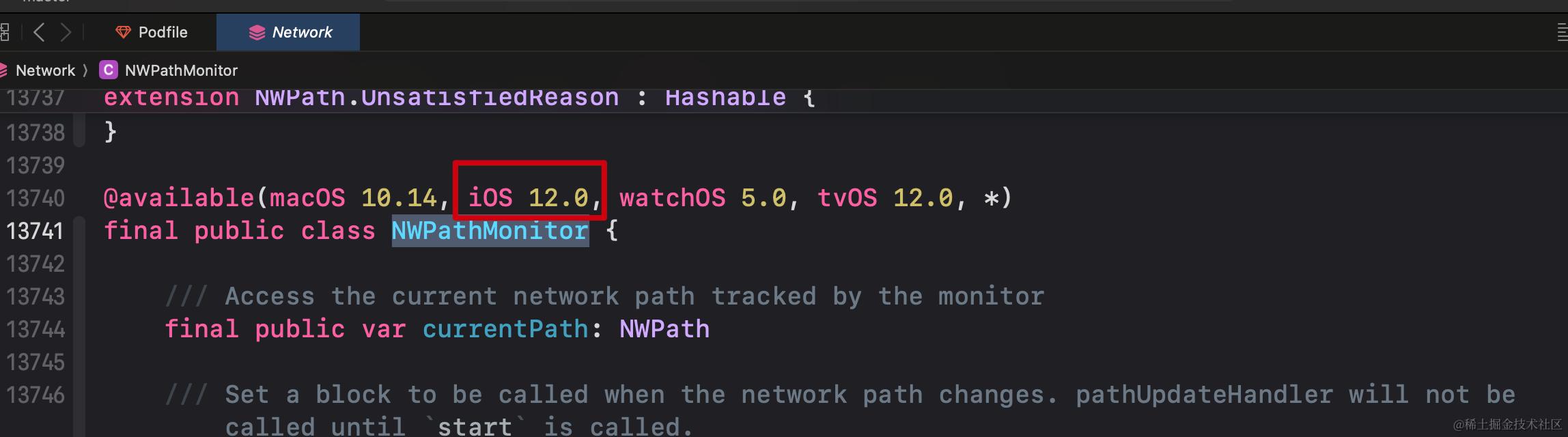
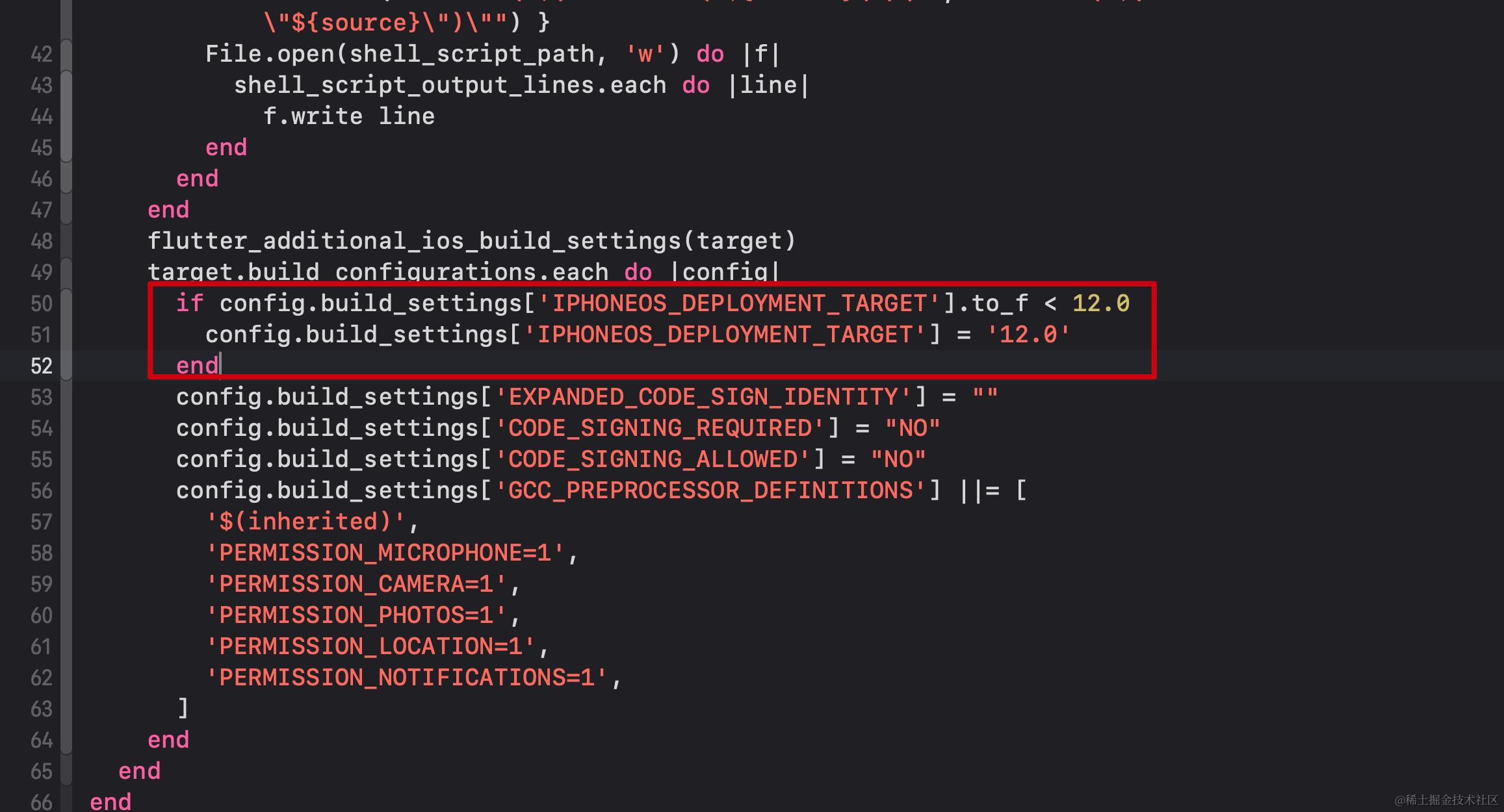
出现这个错误的原因主要是 flutter 项目中引用了 connectivity_plus 插件,而这个插件会用到iOS原生的Network库里面的NWPathMonitor,而这个库最低支持iOS12,所以如果connectivity_plus插件版本较低,那么可以尝试升级插件版本,其次也可以将iOS项目最低支持到iOS12;最后如果还不能解决问题的话,可以试着修改Podfile文件,加入一下代码:
if config.build_settings['IPHONEOS_DEPLOYMENT_TARGET'].to_f < 12.0
   config.build_settings['IPHONEOS_DEPLOYMENT_TARGET'] = '12.0'
end
错误4
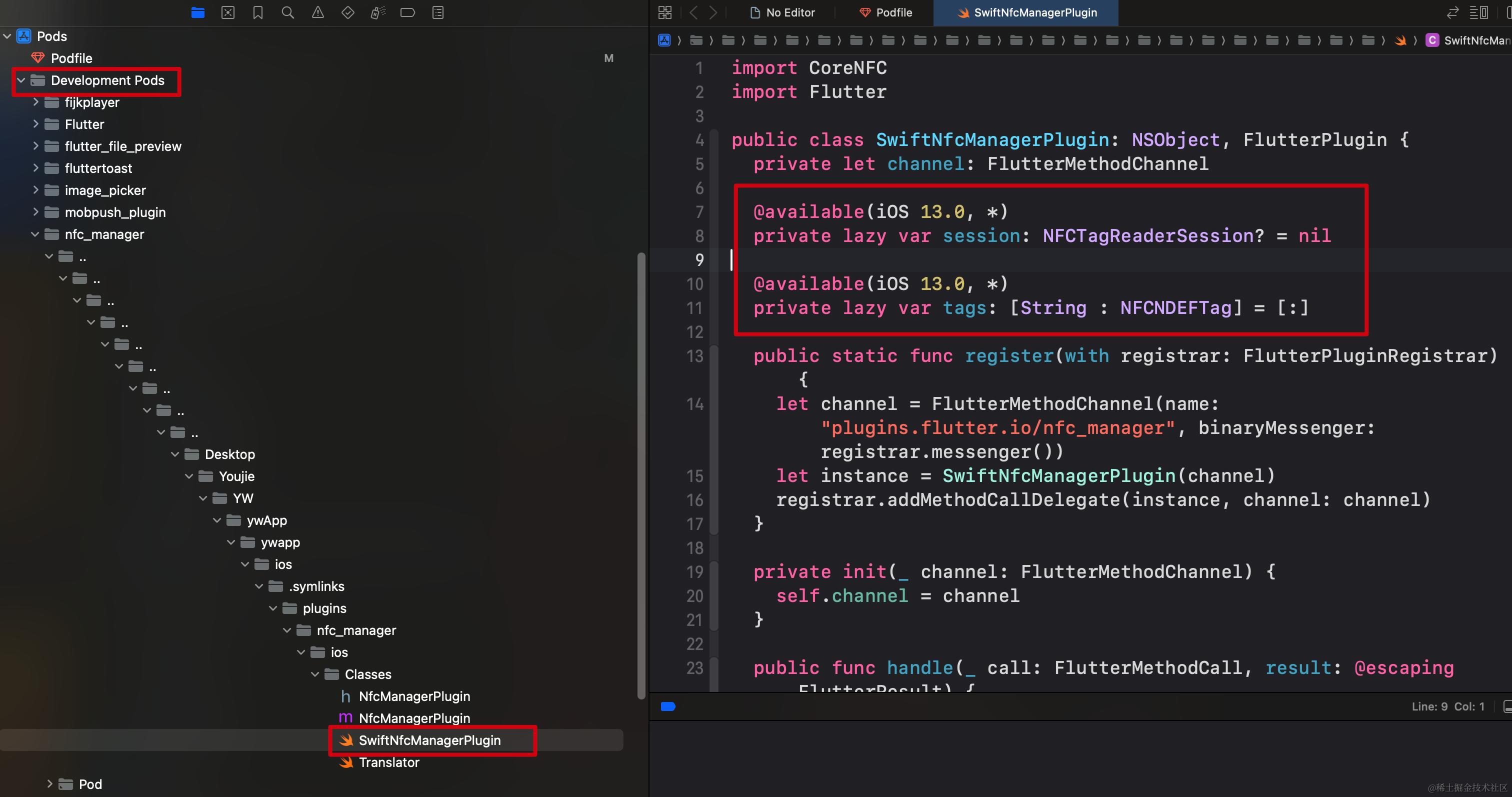
@available 修饰类成员变量报错Stored properties cannot be marked potentially unavailable
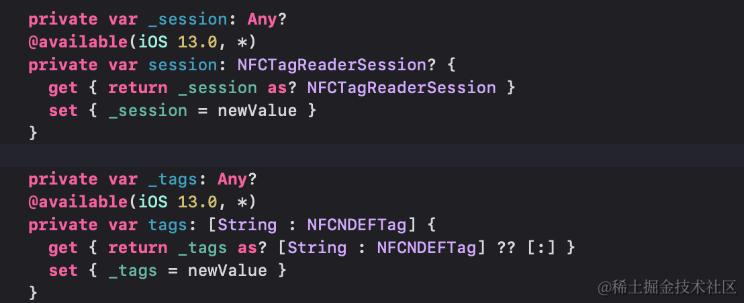
这个错误是使用了nfc_manager这个插件,然后ios编译最低版本低于12就会出错; 解决方案1: 最低直接支持到ios13; 解决方案2:
找到报错的文件
 修改为下面写法
错误5
error: Sandbox: rsync(57179) deny(1) file-read-data /Users/weaponchen/Library/Developer/Xcode/DerivedData/Runner-hjqlzyrldlfirpaixxzobarzjaqi/Build/Intermediates.noindex/ArchiveIntermediates/Runner/BuildProductsPath/Release-iphoneos xxx error: Flutter failed to write to a file at "/Users/weaponchen/Library/Developer/Xcode/DerivedData/Runner-hjqlzyrldlfirpaixxzobarzjaqi/Build/Intermediates.noindex/ArchiveIntermediates/Runner/BuildProductsPath/Release-iphoneos/.last_build_id".
解决办法