响应式原理
import { initMixin } from "./init";
import { lifecycleMixin } from "./lifecycle";
import { renderMixin } from "./render";
import {stateMixin} from './state'
function Vue(options){
this._init(options);
}
initMixin(Vue);
renderMixin(Vue);
lifecycleMixin(Vue);
stateMixin(Vue);
export default Vue;
import { compileToFunction } from "./compiler/index"
import { mountComponent } from "./lifecycle"
import { initState } from "./state"
export function initMixin(Vue) { // 表示在vue的基础上做一次混合操作
Vue.prototype._init = function(options) {
// el,data
const vm = this
vm.$options = options
// 对数据进行初始化 watch computed props data ...
initState(vm)
if(vm.$options.el){
// 将数据挂载到这个模板上
vm.$mount(vm.$options.el)
}
}
Vue.prototype.$mount = function (el) {
const vm = this
const options = vm.$options
el = document.querySelector(el)
vm.$el = el
// 把模板转化成 对应的渲染函数 =》 虚拟dom概念 vnode =》 diff算法 更新虚拟dom =》 产生真实节点,更新
if(!options.render){ // 没有render用template,目前没render
let template = options.template
if(!template && el){ // 用户也没有传递template 就取el的内容作为模板
template = el.outerHTML
let render = compileToFunction(template)
options.render = render
}
}
// options.render 就是渲染函数
// 调用render方法 渲染成真实dom 替换掉页面的内容
mountComponent(vm,el)
}
}
import { observe } from "./observer/index";
import { isFunction } from "./utils";
export function initState(vm) {
const opts = vm.$options;
if (opts.data) {
initData(vm);
}
}
function proxy(vm,source,key){
Object.defineProperty(vm,key,{
get(){
return vm[source][key];
},
set(newValue){
vm[source][key] = newValue
}
})
}
function initData(vm) {
let data = vm.$options.data;
data = vm._data = isFunction(data) ? data.call(vm) : data;
for(let key in data){
proxy(vm,'_data',key);
}
observe(data);
}
import { isObject } from "../utils";
import { arrayMethods } from "./array";
import Dep from './dep'
class Observer {
constructor(data) {
this.dep = new Dep();
Object.defineProperty(data,'__ob__',{
value:this,
enumerable:false // 不可枚举的
})
if(Array.isArray(data)){
data.__proto__ = arrayMethods;
this.observeArray(data);
}else{
this.walk(data);
}
}
observeArray(data){
data.forEach(item=>observe(item))
}
walk(data) {
Object.keys(data).forEach(key => {
defineReactive(data, key, data[key]);
})
}
}
function dependArray(value){
for(let i = 0; i < value.length;i++){
let current = value[i];
current.__ob__ && current.__ob__.dep.depend();
if(Array.isArray(current)){
dependArray(current);
}
}
}
function defineReactive(data,key,value){
let childOb = observe(value);
let dep = new Dep();
Object.defineProperty(data,key,{
get(){
if(Dep.target){
dep.depend()
if(childOb){
childOb.dep.depend();
if(Array.isArray(value)){
dependArray(value);
}
}
}
return value
},
set(newV){
if(newV !== value){
observe(newV);
value = newV;
dep.notify();
}
}
})
}
export function observe(data) {
if (!isObject(data)) {
return;
}
if(data.__ob__){
return data.__ob__;
}
return new Observer(data)
}
import Watcher from "./observer/watcher";
import { nextTick } from "./utils";
import { patch } from "./vdom/patch";
export function lifecycleMixin(Vue) {
Vue.prototype._update = function(vnode) {
const vm = this;
vm.$el = patch(vm.$el, vnode);
}
Vue.prototype.$nextTick = nextTick
}
export function mountComponent(vm, el) {
let updateComponent = () => {
vm._update(vm._render());
}
new Watcher(vm,updateComponent,()=>{
console.log('更新视图了')
},true);
}
watch与computed原理
import Dep from "./observer/dep";
import { observe } from "./observer/index";
import Watcher from "./observer/watcher";
import { isFunction } from "./utils";
export function stateMixin(Vue) {
Vue.prototype.$watch = function(key, handler, options = {}) {
options.user = true;
new Watcher(this, key, handler, options);
}
}
export function initState(vm) {
const opts = vm.$options;
if (opts.data) {
initData(vm);
}
if (opts.computed) {
initComputed(vm, opts.computed);
}
if (opts.watch) {
initWatch(vm, opts.watch);
}
}
function proxy(vm, source, key) {
Object.defineProperty(vm, key, {
get() {
return vm[source][key];
},
set(newValue) {
vm[source][key] = newValue
}
})
}
function initData(vm) {
let data = vm.$options.data;
data = vm._data = isFunction(data) ? data.call(vm) : data;
for (let key in data) {
proxy(vm, '_data', key);
}
observe(data);
}
function initWatch(vm, watch) {
for (let key in watch) {
let handler = watch[key];
if (Array.isArray(handler)) {
for (let i = 0; i < handler.length; i++) {
createWatcher(vm, key, handler[i])
}
} else {
createWatcher(vm, key, handler)
}
}
}
function createWatcher(vm, key, handler) {
return vm.$watch(key, handler)
}
function initComputed(vm, computed) {
const watchers = vm._computedWatchers = {}
for (let key in computed) {
const userDef = computed[key];
let getter = typeof userDef == 'function' ? userDef : userDef.get;
watchers[key] = new Watcher(vm, getter, () => {}, { lazy: true });
defineComputed(vm, key, userDef);
}
}
function createComputedGetter(key) {
return function computedGetter() {
let watcher = this._computedWatchers[key]
if(watcher.dirty){
watcher.evaluate();
}
if(Dep.target){
watcher.depend();
}
return watcher.value
}
}
function defineComputed(vm, key, userDef) {
let sharedProperty = {};
if (typeof userDef == 'function') {
sharedProperty.get = userDef;
} else {
sharedProperty.get = createComputedGetter(key);
sharedProperty.set = userDef.set ;
}
Object.defineProperty(vm, key, sharedProperty);
}
vue上全局方法原理 vue.componment、vue.extends、vue.mixin
import { mergeOptions } from "../utils"
export function initGlobalApi(Vue) {
Vue.options = {}
// Vue.component
// Vue.filter
// Vue.directive
Vue.mixin = function(options) {
this.options = mergeOptions(this.options, options)
return this
}
Vue.options._base = Vue
Vue.options.components = {}
Vue.component = function (id,definition){
// 保证组件的隔离, 每个组件都会产生一个新的类,去继承父类
definition = this.options._base.extend(definition)
this.options.components[id] = definition
}
// 给个对象返回类
Vue.extend = function (opts) { // extend方法就是产生一个继承于Vue的类
// 并且身上应该有父类的所有功能
const Super = this
const Sub = function VueComponent(options){
this._init(options)
}
// 原型继承
Sub.prototype = Object.create(Super.prototype)
Sub.prototype.constructor = Sub
Sub.options = mergeOptions(Super.options,opts)
return Sub
}
}
import { compileToFunction } from "./compiler/index"
import { callHook, mountComponent } from "./lifecycle"
import { initState } from "./state"
import { mergeOptions } from "./utils"
export function initMixin(Vue) { // 表示在vue的基础上做一次混合操作
Vue.prototype._init = function(options) {
// el,data
const vm = this
vm.$options = mergeOptions(vm.constructor.options, options)
callHook(vm, 'beforeCreate')
// 对数据进行初始化 watch computed props data ...
initState(vm)
callHook(vm, 'created')
if (vm.$options.el) {
// 将数据挂载到这个模板上
vm.$mount(vm.$options.el)
}
}
Vue.prototype.$mount = function(el) {
const vm = this
const options = vm.$options
el = document.querySelector(el)
vm.$el = el
// 把模板转化成 对应的渲染函数 =》 虚拟dom概念 vnode =》 diff算法 更新虚拟dom =》 产生真实节点,更新
if (!options.render) { // 没有render用template,目前没render
let template = options.template
if (!template && el) { // 用户也没有传递template 就取el的内容作为模板
template = el.outerHTML
}
let render = compileToFunction(template)
options.render = render
}
// options.render 就是渲染函数
// 调用render方法 渲染成真实dom 替换掉页面的内容
mountComponent(vm, el)
}
}
vuex实现原理
export let Vue;
function install(_Vue) {
Vue = _Vue;
Vue.mixin({
beforeCreate(){
let options= this.$options;
if(options.store){
this.$store = options.store
}else{
if(this.$parent && this.$parent.$store){
this.$store = this.$parent.$store
}
}
}
})
}
export default install
import Vue from 'vue'
import Vuex from '@/vuex'
Vue.use(Vuex)
function persists() {
return function(store) {
let localState = JSON.parse(localStorage.getItem('VUEX:STATE'))
if (localState) {
store.replaceState(localState);
}
store.subscribe((mutation, rootState) => {
localStorage.setItem('VUEX:STATE', JSON.stringify(rootState));
});
}
}
let store = new Vuex.Store({
plugins: [
persists()
],
state: {
name: 'zhufeng',
age: 12
},
mutations: {
changeAge(state, payload) {
state.age += payload
}
},
actions: {
changeAge({ commit }, payload) {
setTimeout(() => {
commit('changeAge', payload);
}, 1000);
}
},
getters: {
myAge(state) {
return state.age + 10
}
},
strict: true,
modules: {
a: {
namespaced: true,
state: {
name: 't1',
age: 10
},
getters: {
myAge(state) {
return state.age + 20;
}
},
mutations: {
changeAge(state, payload) {
state.age += payload
}
},
modules: {
c: {
namespaced: true,
state: {
age: 100
},
mutations: {
changeAge(state, payload) {
state.age += payload
}
},
modules: {
d: {
namespaced: true,
state: {
age: 100
},
}
}
}
}
},
}
})
export default store;
import { forEach } from '../util'
import Module from './module';
class ModuleCollection {
constructor(options) {
this.root = null;
this.register([],options);
}
getNamespace(path){
let root = this.root
let ns = path.reduce((ns,key)=>{
let module = root.getChild(key);
root = module;
return module.namespaced ? ns + key + '/' :ns
},'');
return ns;
}
register(path,rawModule){
let newModule = new Module(rawModule)
rawModule.newModule = newModule;
if(path.length == 0){
this.root = newModule
}else{
let parent = path.slice(0,-1).reduce((memo,current)=>{
return memo.getChild(current)
}, this.root);
parent.addChild(path[path.length-1],newModule);
}
if(rawModule.modules){
forEach(rawModule.modules,(module,key)=>{
this.register(path.concat(key),module);
})
}
}
}
export default ModuleCollection
import { Vue } from './install'
import ModuleCollection from './module/module-collection';
import { forEach } from './util';
function getNewState(store, path) {
return path.reduce((memo, current) => {
return memo[current];
}, store.state)
}
function installModule(store, rootState, path, module) {
let ns = store._modules.getNamespace(path);
if (path.length > 0) {
let parent = path.slice(0, -1).reduce((memo, current) => {
return memo[current];
}, rootState);
store._withCommittting(() => {
Vue.set(parent, path[path.length - 1], module.state);
})
}
module.forEachGetter((fn, key) => {
store.wrapperGetters[ns + key] = function() {
return fn.call(store, getNewState(store, path));
}
});
module.forEachMutation((fn, key) => {
store.mutations[ns + key] = store.mutations[ns + key] || [];
store.mutations[ns + key].push((payload) => {
store._withCommittting(() => {
fn.call(store, getNewState(store, path), payload);
})
store._subscribes.forEach(fn => fn({ type: ns + key, payload }, store.state));
})
});
module.forEachAction((fn, key) => {
store.actions[ns + key] = store.actions[ns + key] || [];
store.actions[ns + key].push((payload) => {
return fn.call(store, store, payload)
})
});
module.forEachChildren((child, key) => {
installModule(store, rootState, path.concat(key), child);
});
}
function resetVM(store, state) {
let oldVm = store._vm;
store.getters = {};
const computed = {};
forEach(store.wrapperGetters, (getter, key) => {
computed[key] = getter;
Object.defineProperty(store.getters, key, {
get: () => store._vm[key]
})
});
store._vm = new Vue({
data: {
$$state: state
},
computed
});
if (store.strict) {
store._vm.$watch(() => store._vm._data.$$state, () => {
console.assert(store._committing, 'no mutate in mutation handler outside')
}, { deep: true, sync: true });
}
if (oldVm) {
Vue.nextTick(() => oldVm.$destroy())
}
}
class Store {
constructor(options) {
this._modules = new ModuleCollection(options);
this.wrapperGetters = {}
this.mutations = {};
this.actions = {};
this._subscribes = [];
this._committing = false;
this.strict = options.strict;
let state = options.state;
installModule(this, state, [], this._modules.root);
resetVM(this, state);
if (options.plugins) {
options.plugins.forEach(plugin => plugin(this))
}
}
_withCommittting(fn) {
this._committing = true;
fn();
this._committing = false;
}
subscribe(fn) {
this._subscribes.push(fn);
}
replaceState(newState) {
this._withCommittting(() => {
this._vm._data.$$state = newState;
})
}
get state() {
return this._vm._data.$$state
}
commit = (mutationName, payload) => {
this.mutations[mutationName] && this.mutations[mutationName].forEach(fn => fn(payload))
}
dispatch = (actionName, payload) => {
this.actions[actionName] && this.actions[actionName].forEach(fn => fn(payload))
}
registerModule(path, module) {
if (typeof path == 'string') path = [path];
this._modules.register(path, module);
installModule(this, this.state, path, module.newModule);
resetVM(this, this.state);
}
}
export default Store;
mapState、mapgetters、mapMutations、mapActions
import install from './install'
import Store from './store'
function mapState(stateList) {
let obj = {}
for (let i = 0
let stateName = stateList[i]
obj[stateName] = function () {
return this.$store.state[stateName]
}
}
return obj
}
function mapGetters(gettersList) {
let obj = {}
for (let i = 0
let getterName = gettersList[i]
obj[getterName] = function () {
return this.$store.getters[getterName]
}
}
return obj
}
function mapMutations(mutationList) {
let obj = {}
for (let i = 0
obj[mutationList[i]] = function (payload) {
this.$store.commit(mutationList[i], payload)
}
}
return obj
}
function mapActions(actionList) {
let obj = {}
for (let i = 0
obj[actionList[i]] = function (payload) {
this.$store.dispatch(actionList[i], payload)
}
}
return obj
}
export default {
install,
Store,
mapState,
mapGetters,
mapMutations,
mapActions
}
路由实现原理
import Vue from 'vue'
import VueRouter from '@/vue-router'
import Home from '../views/Home.vue';
import About from '../views/About.vue';
Vue.use(VueRouter);
const routes = [
{
path: '/',
name: 'Home',
component: Home
},
{
path: '/about',
name: 'About',
component: About,
children:[
{path:'a',component:{
render:(h)=> <h1>about a</h1>
}},
{path:'b',component:{
render:(h)=> <h1>about b</h1>
}}
]
}
]
const router = new VueRouter({
mode:'history',
routes
})
router.beforeEach((to,from,next)=>{
console.log(to,from,1);
setTimeout(() => {
next();
}, 1000);
})
router.beforeEach((to,from,next)=>{
console.log(to,from,2);
next();
})
export default router
export let Vue;
import RouterLink from './components/link';
import RouterView from './components/view'
export default function install(_Vue){
Vue = _Vue;
Vue.mixin({
beforeCreate(){
if(this.$options.router){
this._router = this.$options.router;
this._routerRoot = this;
this._router.init(this);
}else{
this._routerRoot = this.$parent && this.$parent._routerRoot
}
}
})
Object.defineProperty(Vue.prototype,'$router',{
get(){
return this._routerRoot._router
}
})
Object.defineProperty(Vue.prototype,'$route',{
get(){
return this._routerRoot._route
}
});
Vue.component('router-link',RouterLink)
Vue.component('router-view',RouterView)
Vue.component('router-link',RouterLink)
Vue.component('router-view',RouterView)
}
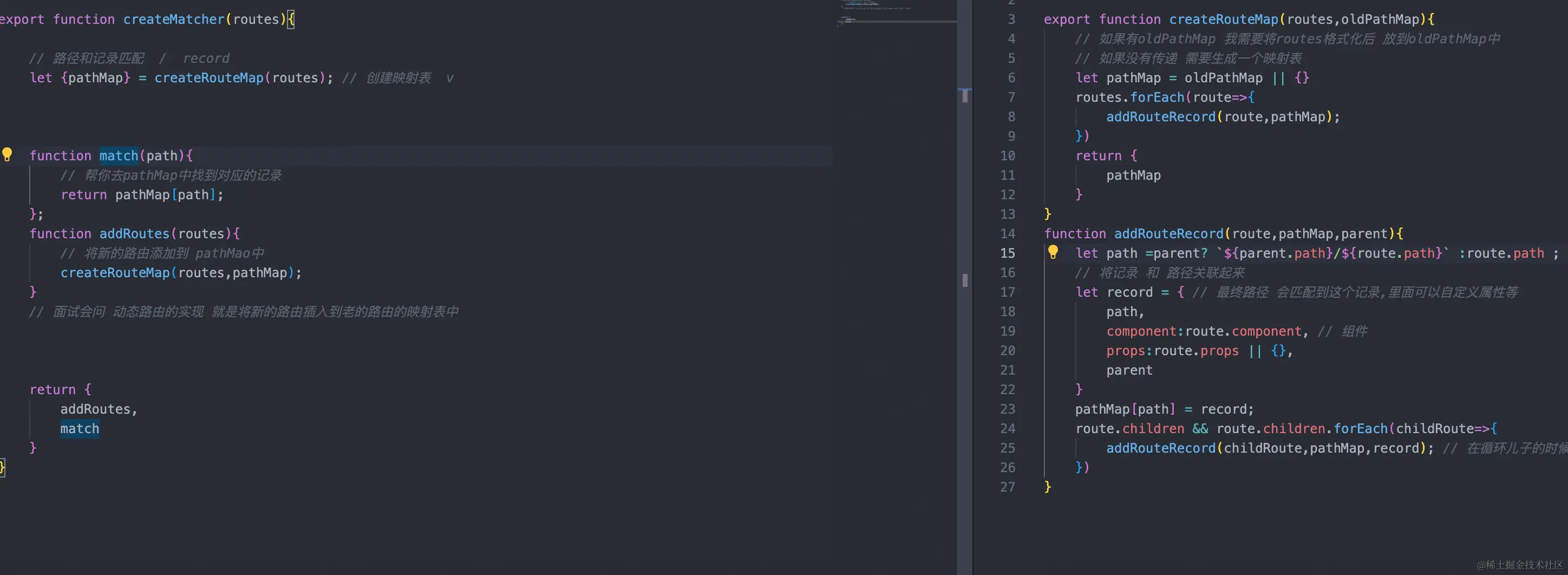
import install, { Vue } from './install';
import {createMatcher} from './create-matcher'
import Hash from './history/hash';
import HTML5History from './history/h5';
class VueRouter {
constructor(options = {}) {
const routes = options.routes;
this.mode = options.mode || 'hash';
this.matcher = createMatcher(options.routes || []);
switch(this.mode) {
case 'hash':
this.history = new Hash(this)
break
case 'history':
this.history = new HTML5History(this);
break
}
this.beforeHooks = []
}
match(location){
return this.matcher.match(location);
}
push(location){
this.history.transitionTo(location,()=>{
this.history.pushState(location);
})
}
init(app) {
const history = this.history;
const setUpListener = () =>{
history.setUpListener();
}
history.transitionTo(
history.getCurrentLocation(),
setUpListener
);
history.listen((route)=>{
app._route = route;
})
}
beforeEach(fn){
this.beforeHooks.push(fn);
}
}
VueRouter.install = install;
export default VueRouter
function createRoute(record, location) {
const matched = [];
if (record) {
while (record) {
matched.unshift(record);
record = record.parent;
}
}
return {
...location,
matched
}
}
function runQueue(queue,iterator,cb){
function step(index){
if(index >= queue.length) return cb();
let hook = queue[index];
iterator(hook,()=>step(index+1));
}
step(0);
}
export default class History {
constructor(router) {
this.router = router;
this.current = createRoute(null, {
path: '/'
});
}
listen(cb){
this.cb = cb;
}
transitionTo(path, cb) {
let record = this.router.match(path);
let route = createRoute(record, { path });
if (path === this.current.path && route.matched.length === this.current.matched.length) {
return
}
let queue = this.router.beforeHooks;
const iterator = (hook,next) =>{
hook(route,this.current,next);
}
runQueue(queue,iterator,()=>{
this.updateRoute(route);
cb && cb();
})
}
updateRoute(route){
this.current = route;
this.cb && this.cb(route);
}
}
export default {
functional:true,
render(h,{parent,data}){ // current = {matched:[]} .$route // data里面我可以增加点标识
// 内部current变成了响应式的
// 真正用的是$route this.$route = current
let route = parent.$route
// 依次的将matched 的结果赋予给每个router-view
// 父 * 父 * -> 父 * -> 子 *
let depth = 0
while (parent) { // 1.得是组件 <router-view></router-view> <app></app>
if(parent.$vnode && parent.$vnode.data.routerView ){
depth++
}
parent = parent.$parent
}
// 两个router-view [ /about /about/a] /about/a
let record = route.matched[depth]
if(!record){
return h() // 空
}
// 渲染匹配到的组件,这里一直渲染的是第一个
data.routerView = true
return h(record.component, data)
}
}



