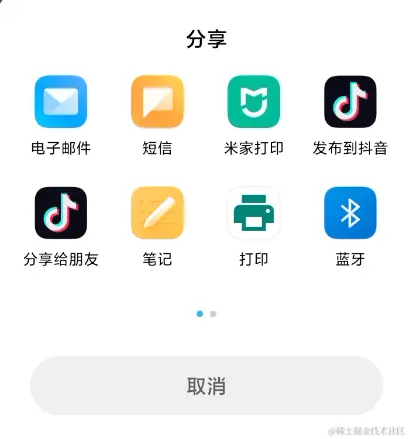
1. 拉起系统分享功能
1.1 在清单文件AndroidManifest.xml中声明
<manifest>
    <application>
        ...
        <provider
            android:name="androidx.core.content.FileProvider"
            android:authorities="包名.fileprovider"
            android:exported="false"
            android:grantUriPermissions="true">
            <meta-data
                android:name="android.support.FILE_PROVIDER_PATHS"
                android:resource="@xml/file_paths" />
        </provider>
        ...
    </application>
</manifest>
1.2 在res/xml/目录下创建一个file_paths.xml文件,用于指定你想要共享的文件路径
<paths xmlns:android="http://schemas.android.com/apk/res/android">
    <external-path name="external_files" path="." />
</paths>
1.3 编码
根据分享的内容不同判断shareType的值
String shareType = "text/plain"
String shareType = "video/mp4"
String shareType = "image/jpeg"
Intent sendIntent = new Intent()
sendIntent.setAction(Intent.ACTION_SEND)
sendIntent.setType(shareType)
if() {
//分享的是文本
sendIntent.putExtra(Intent.EXTRA_TEXT, "分享的文本")
} else {
//分享的是照片视频等文件时
File file = new File(filePath)
//注意此处的包名.fileprovider 要和清单文件中的保持一致
Uri videoUri = FileProvider.getUriForFile(this, "包名.fileprovider", file)
sendIntent.putExtra(Intent.EXTRA_STREAM, videoUri)
// 添加权限标志
sendIntent.addFlags(Intent.FLAG_GRANT_READ_URI_PERMISSION)
}
Intent chooser = Intent.createChooser(sendIntent, "选择分享方式")
if (sendIntent.resolveActivity(getPackageManager()) != null) {
startActivity(chooser)
}
常见文件的mimeType
{".3gp", "video/3gpp"},
{".apk", "application/vnd.android.package-archive"},
{".asf", "video/x-ms-asf"},
{".avi", "video/x-msvideo"},
{".bin", "application/octet-stream"},
{".bmp", "image/bmp"},
{".c", "text/plain"},
{".class", "application/octet-stream"},
{".conf", "text/plain"},
{".cpp", "text/plain"},
{".doc", "application/msword"},
{".exe", "application/octet-stream"},
{".gif", "image/gif"},
{".gtar", "application/x-gtar"},
{".gz", "application/x-gzip"},
{".h", "text/plain"},
{".htm", "text/html"},
{".html", "text/html"},
{".jar", "application/java-archive"},
{".java", "text/plain"},
{".jpeg", "image/jpeg"},
{".jpg", "image/jpeg"},
{".js", "application/x-javascript"},
{".log", "text/plain"},
{".m3u", "audio/x-mpegurl"},
{".m4a", "audio/mp4a-latm"},
{".m4b", "audio/mp4a-latm"},
{".m4p", "audio/mp4a-latm"},
{".m4u", "video/vnd.mpegurl"},
{".m4v", "video/x-m4v"},
{".mov", "video/quicktime"},
{".mp2", "audio/x-mpeg"},
{".mp3", "audio/x-mpeg"},
{".mp4", "video/mp4"},
{".mpc", "application/vnd.mpohun.certificate"},
{".mpe", "video/mpeg"},
{".mpeg", "video/mpeg"},
{".mpg", "video/mpeg"},
{".mpg4", "video/mp4"},
{".mpga", "audio/mpeg"},
{".msg", "application/vnd.ms-outlook"},
{".ogg", "audio/ogg"},
{".pdf", "application/pdf"},
{".png", "image/png"},
{".pps", "application/vnd.ms-powerpoint"},
{".ppt", "application/vnd.ms-powerpoint"},
{".prop", "text/plain"},
{".rar", "application/x-rar-compressed"},
{".rc", "text/plain"},
{".rmvb", "audio/x-pn-realaudio"},
{".rtf", "application/rtf"},
{".sh", "text/plain"},
{".tar", "application/x-tar"},
{".tgz", "application/x-compressed"},
{".txt", "text/plain"},
{".wav", "audio/x-wav"},
{".wma", "audio/x-ms-wma"},
{".wmv", "audio/x-ms-wmv"},
{".wps", "application/vnd.ms-works"},
{".xml", "text/xml"},
{".xml", "text/plain"},
{".z", "application/x-compress"},
{".zip", "application/zip"},
{"", "*/*"}
2. 拉起系统邮箱
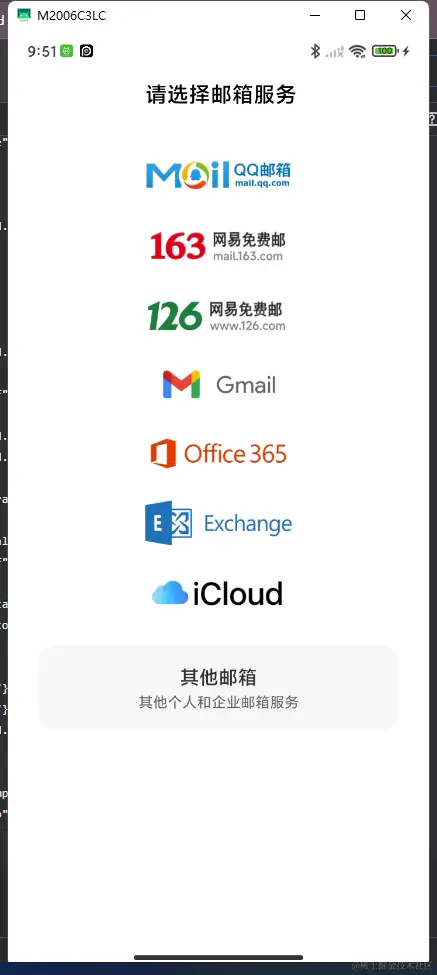
Intent intent = new Intent(Intent.ACTION_SENDTO);
intent.setData(Uri.parse("mailto:"));
this.startActivity(intent);