是什么?适用于哪些场景?
GSAP 是一个强大的 JavaScript 工具集,可以将开发人员变成动画超级英雄。构建适用于所有主流浏览器的高性能动画。动画化 CSS、SVG、Canvas、React、Vue、WebGL、颜色、字符串、运动路径、通用对象……任何 JavaScript 可以触及的东西! GSAP 的 ScrollTrigger 插件可让您使用最少的代码创建令人惊叹的基于滚动的动画。
Api,以及用法
前置内容(Html、Css)
<div class="box green"></div>
<div class="box pink"></div>
<div class="box orange"></div>
.box {
  position: fixed;
  left: 0;
  width: 100px;
  height: 100px;
  border-radius: 10px;
  display: block;
}
.orange {
  margin-top: -300px;
  background-color: orange;
}
.green {
  background-color: green;
}
.pink {
  margin-top: 300px;
  background-color: pink;
}
补间动画
gsap.to(Target, Variables)
· 补间动画有4种类型(Method)
gsap.to(".box", { y: 200, duration: 1 });
gsap.from(".box", { y: -200, duration: 1 });
gsap.fromTo(".box", { y: -200, duration: 1 }, { y: 200, duration: 1 });
gsap.set(".box", { y: 200 });
· Target
在 GSAP 使用的底层document.querySelectorAll(),因此对于 HTML 或 SVG 目标,我们可以使用选择器文本,例如".class"和"#id"。或者您可以传入一个变量甚至一个数组。
gsap.to(".box", { x: 200, duration: 3 });

let box = document.querySelector(".box");
gsap.to(box, { x: 200, duration: 3 });

let square = document.querySelector(".green");
let circle = document.querySelector(".pink");
gsap.to([square, circle], { x: 200, duration: 3 })
· Variables
vars 对象包含有关动画的所有信息。这些可以是您想要设置动画的任意属性,也可以是影响动画行为的特殊属性。
gsap.to(target, {
  x: 200,
  rotation: 360,
  duration: 2
})
可以为哪些属性设置动画
GSAP几乎可以为任何东西制作动画,没有预先确定的列表。这包括CSS 属性、自定义对象属性,甚至 CSS 变量和复杂字符串!最常见的动画属性是变换和不透明度。
· CSS属性
// 对应 CSS 的转换
transform: rotate(360deg) translateX(10px) translateY(50%);
{ rotation: 360, x: 10, yPercent: 50 }
以下是对应的转换列表。
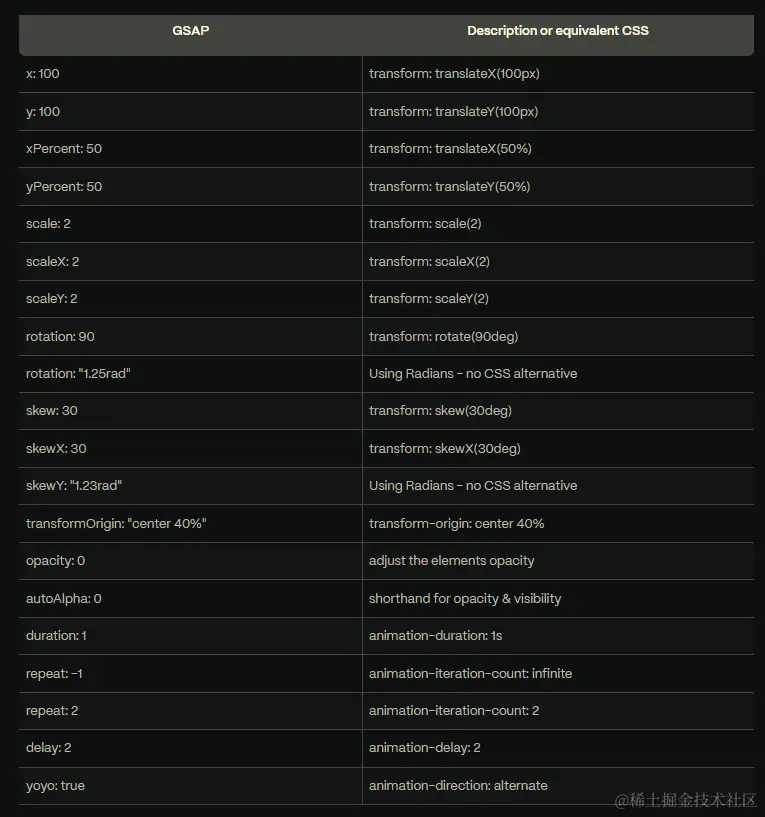
x: 200, // 绝对单位(像素)
x: "+=200" // 相对单位,在当前的位置上再移动200(像素)
x: '40vw'
x: () => window.innerWidth / 2

rotation: 360 // 角度
rotation: "6.28rad" // 弧度
Transforms,colors,padding,border radius,GSAP 可以为这一切设置动画!需记住属性用驼峰命名法。
gsap.to(".box", {
  duration: 2,
  backgroundColor: '#8d3dae',
});
· SVG
gsap.to(".svgBox", {
  duration: 2,
  x: 100,
  xPercent: -100,
  attr: {
    fill: '#8d3dae',
    rx: 25,
  },
});
· 任何 Number、Color 或 Var(变量)
let obj = { myNum: 10, myColor: "red" };
gsap.to(obj, {
  myNum: 200,
  myColor: "blue",
  onUpdate: () => {
    console.log(obj.myNum, obj.myColor);
  },
});
· Canvas
const canvas = document.getElementById("canvas");
const ctx = canvas.getContext("2d");
ctx.fillStyle = "#28a92b";

let position = { x: 0, y: 0 };

function draw() {
  ctx.clearRect(0, 0, 300, 300);
  ctx.fillRect(position.x, position.y, 100, 100);
}

gsap.to(position, {
  x: 200,
  y: 200,
  duration: 4,
  onUpdate: draw
});
· Variables
gsap.to(".box", {
  rotation: 360,
  x: 200,
  duration: 2,
  repeat: 2,
  yoyo: true,
});
gsap.to(".green", { rotation: 360, duration: 5, ease: "none" });
gsap.to(".pink", { rotation: 360, duration: 5, ease: "bounce.out" });
时间线
· gsap.timeline
gsap.to(".green", {
  rotation: 360,
  duration: 1,
});
gsap.to(".pink", {
  rotation: 360,
  duration: 1,
  delay: 1,
});
使用这种方式,如果改变了第一个元素的动画执行的时长,就必须将第二个也进行相应的改变,造成效率低下,所以我们可以考虑通过时间线来完成这样的效果。
时间线是创建易于调整、有弹性的动画序列的关键。将补间添加到时间轴时,默认情况下它们会按照添加的顺序一个接一个地播放。
let tl = gsap.timeline();

tl.to(".green", { x: 600, duration: 2 });
tl.to(".pink", { x: 600, duration: 1 });
时间轴与补间具有大部分相同的特殊属性repeat,delay
let tl = gsap.timeline({ repeat: -1, repeatDelay: 1, yoyo: true });

tl.to(".green", { rotation: 360 });
tl.to(".pink", { rotation: 360 });
tl.to(".orange", { rotation: 360 });
const tl = gsap.timeline({ defaults: { duration: 1 } });

tl.to(".green", { x: 200, duration: 1 })
  .to(".pink", { x: 200, scale: 0.1 })
  .to(".orange", { x: 200, scale: 1.5 });
· Callbacks
onComplete:动画完成时调用。onStart:动画开始时调用onUpdate:每次动画更新时调用(在动画处于活动状态时的每一帧上)。onRepeat:每次动画重复时调用。onReverseComplete:当动画反转时再次到达开头时调用。
gsap.to(".class", {
  duration: 1,
  x: 100,
  onComplete: () => console.log("Ok!")
}

gsap.timeline({onComplete: tlComplete});

function tlComplete() {
  console.log("the tl is complete");
}