添加点 线 面 模型 飞行轨迹 绘制点线,卫星定位扫描

<!DOCTYPE html>
<html lang="en">
<head>
<meta charset="UTF-8">
<meta http-equiv="X-UA-Compatible" content="IE=edge">
<meta name="viewport" content="width=device-width, initial-scale=1.0">
<title>Cesium</title>
<link rel="stylesheet" href="../Cesium/Widgets/widgets.css" rel="stylesheet">
<script src="../Cesium/Cesium.js"></script>
<script src="../Cesium/Sandcastle-header.js"></script>
<style>
html,
body {
margin: 0;
padding: 0;
}
header {
background-color: #ccc;
height: 40px;
text-align: center;
line-height: 40px;
}
#cesiumContainer {
/* width: 1000px; */
flex: 1;
height: calc(100vh - 40px);
}
.flex {
display: flex;
}
.map-left {
width: 200px;
padding: 10px;
}
.map-right {
width: 200px;
padding: 10px;
}
</style>
<div id="map">
<header>头部</header>
<div class="flex">
<!-- <div class="map-left">
<ul>
<li>模型</li>
<li>模型</li>
<li>模型</li>
<li>模型</li>
<li>模型</li>
<li>模型</li>
</ul>
</div> -->
<div id="cesiumContainer" class="fullSize"></div>
<div class="map-right">
<button class="lineStrat " onclick="lineStrat()">绘制线</button>
<button class="lineStrat " onclick="flight()">观察飞行轨迹</button>
<hr>
</div>
</div>
</div>
</html>
<script>
var lineFlg = false; // 是否点击了开始绘制线
var resArr = []
Cesium.Ion.defaultAccessToken = 'eyJhbGciOiJIUzI1NiIsInR5cCI6IkpXVCJ9.eyJqdGkiOiIzOWZkZmRkNy0wNWRhLTRiNDYtOGIwYS04N2Q5OGIwY2JiMmIiLCJpZCI6MTc3MzU5LCJpYXQiOjE2OTk2MDIyNjR9.PzGSOdmvVlbzyRYWQFv_rWk6uRZ1CMq1I7Y8wBQsJME'
const viewer = new Cesium.Viewer("cesiumContainer", {
//显示取消指蓝针和刻度尺默认
animation: true,//显隐时钟
shouldAnimate: true,//自动播放
timeline: true,//显隐时间轴
baseLayerPicker: true,//显隐切换底图按钮
geocoder: true,//显隐搜索按钮
navigationHelpButton: true,//显隐帮助按钮
vrButton: true,//显隐vr按钮
infoBox: true,//显隐默认弹框
sceneModePicker: true,//显隐切换二三维按钮
homeButton: true,//显隐home按钮
fullscreenButton: true,//显隐全屏按钮
});
viewer.scene.globe.enableLighting = true;
viewer.scene.globe.depthTestAgainstTerrain = true;
createEntitiesModel({
model_name: '战记T-001',
model_uri: "../models/Cesium_Air.glb",
longitude: "-61.59777",
latitude: "39.03883",
height: "6000000",
heading: "20",
pitch: 0,
roll: 0,
scale: 20000.0,
})
// 创建模型
function createEntitiesModel(params) {
let longitude = params.longitude
let latitude = params.latitude
let height = params.height
let heading = params.heading // 头向北方旋转
let pitch = params.pitch
let roll = params.roll
let model_name = params.model_name // 模型的名字
let model_uri = params.model_uri // 模型地址
let scale = params.scale
let position = Cesium.Cartesian3.fromDegrees(longitude, latitude, height); // 地理位置
let hpr = new Cesium.HeadingPitchRoll(
Cesium.Math.toRadians(heading),
Cesium.Math.toRadians(pitch),
Cesium.Math.toRadians(roll));
let orientation = Cesium.Transforms.headingPitchRollQuaternion(position, hpr); // 朝向
viewer.entities.add({
id: "TW580-001",
model_name,
position,
orientation,
model: {
uri: model_uri,
scale, // 模型缩放倍数
heightReference: Cesium.HeightReference.CLAMP_TO_GROUND, // 贴地,无论上面第三行的高度数据是多少,都会自动贴到地面
// 模型的近似最小像素大小,而不考虑缩放。这可以用来确保即使观看者缩小也可以看到模型。如果为0.0,则不强制使用最小大小
minimumPixelSize: 1280,
// 模型的颜色(与模型的渲染颜色混合的属性)
color: Cesium.Color.WHITE.withAlpha(1),
// 模型的最大比例大小
maximumScale: 20000,
// 设置模型轮廓(边框)颜色
silhouetteColor: Cesium.Color.BLACK,
// 设置模型轮廓(边框)大小
silhouetteSize: 2,
// 是否执行模型动画
runAnimations: true,
// 应用于图像的统一比例。比例大于会1.0放大标签,而比例小于会1.0缩小标签。
scale: 1.0,
// 显示在距相机的距离处的属性,多少区间内是可以显示的
// distanceDisplayCondition: new Cesium.DistanceDisplayCondition(0, 1500),
// 是否显示
show: true
}
});
}
// 红色立方体
viewer.scene.primitives.add(
new Cesium.Primitive({
geometryInstances: new Cesium.GeometryInstance({
geometry: Cesium.BoxGeometry.fromDimensions({
vertexFormat: Cesium.PerInstanceColorAppearance.VERTEX_FORMAT,
dimensions: new Cesium.Cartesian3(400000.0, 300000.0, 500000.0),
}),
modelMatrix: Cesium.Matrix4.multiplyByTranslation(
Cesium.Transforms.eastNorthUpToFixedFrame(
Cesium.Cartesian3.fromDegrees(-105.0, 45.0)
),
new Cesium.Cartesian3(0.0, 0.0, 250000),
new Cesium.Matrix4()
),
attributes: {
color: Cesium.ColorGeometryInstanceAttribute.fromColor(
Cesium.Color.RED.withAlpha(0.5)
),
},
}),
appearance: new Cesium.PerInstanceColorAppearance({
closed: true,
}),
})
);
// 新增线
var polylineEntity = viewer.entities.add({
name: "线",
polyline: {
positions: [Cesium.Cartesian3.fromDegrees(
2616780.6875298703,
-1961994.5743075255,
5454863.633100168), Cesium.Cartesian3.fromDegrees(1385220.4137846949, -4054524.7897733897, 3778638.920994822)], // 点位置数组
width: 5, // 线宽度
material: new Cesium.PolylineGlowMaterialProperty({
color: new Cesium.Color.fromCssColorString('blue'),
}), // 颜色
clampToGround: true, // 是否贴和地型
}
});
// 圆
viewer.entities.add({
// fromDegrees(经度,纬度,高度,椭球,结果)从以度为单位的经度和纬度值返回Cartesian3位置
position: Cesium.Cartesian3.fromDegrees(250, 180, 3000000),
point: {
// 点的大小(像素)
pixelSize: 115,
// 点位颜色,fromCssColorString 可以直接使用CSS颜色
color: Cesium.Color.fromCssColorString('#fff'),
// 边框颜色
outlineColor: Cesium.Color.fromCssColorString('blue'),
// 边框宽度(像素)
outlineWidth: 2,
// 显示在距相机的距离处的属性,多少区间内是可以显示的
// distanceDisplayCondition: new Cesium.DistanceDisplayCondition(0, 1500),
// 是否显示
show: true
}
});
// 图片
viewer.entities.add({
position: Cesium.Cartesian3.fromDegrees(42, 40, 2000000),
billboard: {
image: "../img/icon.bmp",
color: Cesium.Color.WHITE.withAlpha(0.8),
// 高度(以像素为单位)
height: 100,
// 宽度(以像素为单位)
width: 100,
// 逆时针旋转
rotation: 0,
// 大小是否以米为单位
sizeInMeters: false,
// 相对于坐标的垂直位置
verticalOrigin: Cesium.VerticalOrigin.CENTER,
// 相对于坐标的水平位置
horizontalOrigin: Cesium.HorizontalOrigin.LEFT,
// 该属性指定标签在屏幕空间中距此标签原点的像素偏移量
pixelOffset: new Cesium.Cartesian2(10, 0),
// 应用于图像的统一比例。比例大于会1.0放大标签,而比例小于会1.0缩小标签。
scale: 1.0,
// 显示在距相机的距离处的属性,多少区间内是可以显示的
// distanceDisplayCondition: new Cesium.DistanceDisplayCondition(0, 1500),
// 是否显示
show: true
}
})
// 文字
viewer.entities.add({
position: Cesium.Cartesian3.fromDegrees(-60, 39, 100005),
label: {
// 文本。支持显式换行符“ \ n”
text: '扫描线',
// 字体样式,以CSS语法指定字体
font: '22pt Source Han Sans CN',
// 字体颜色
fillColor: Cesium.Color.AQUA,
// 背景颜色
// backgroundColor: Cesium.Color.AQUA,
// 是否显示背景颜色
// showBackground: true,
// 字体边框
// outline: true,
// 字体边框颜色
outlineColor: Cesium.Color.WHITE,
// 字体边框尺寸
outlineWidth: 10,
// 应用于图像的统一比例。比例大于会1.0放大标签,而比例小于会1.0缩小标签。
// scale: 1.0,
// 设置样式:FILL:填写标签的文本,但不要勾勒轮廓;OUTLINE:概述标签的文本,但不要填写;FILL_AND_OUTLINE:填写并概述标签文本。
style: Cesium.LabelStyle.FILL_AND_OUTLINE,
// 相对于坐标的水平位置
verticalOrigin: Cesium.VerticalOrigin.CENTER,
// 相对于坐标的水平位置
horizontalOrigin: Cesium.HorizontalOrigin.LEFT,
// 该属性指定标签在屏幕空间中距此标签原点的像素偏移量
pixelOffset: new Cesium.Cartesian2(10, 0),
// 显示在距相机的距离处的属性,多少区间内是可以显示的
// distanceDisplayCondition: new Cesium.DistanceDisplayCondition(0, 1500),
// 是否显示
show: true
}
});
// 多边
viewer.entities.add({
position: Cesium.Cartesian3.fromDegrees(113, 39, 100005),
label: {
// 文本。支持显式换行符“ \ n”
text: '多边形',
// 字体样式,以CSS语法指定字体
font: '22pt Source Han Sans CN',
// 字体颜色
fillColor: Cesium.Color.WHITE,
verticalOrigin: Cesium.VerticalOrigin.CENTER,
// 相对于坐标的水平位置
horizontalOrigin: Cesium.HorizontalOrigin.LEFT,
},
polygon: {
// 获取指定属性(positions,holes(图形内需要挖空的区域))
hierarchy: {
positions: Cesium.Cartesian3.fromDegreesArray([
120.9677706, 30.7985748,
110.20, 34.55,
120.20, 50.55
]),
holes: [{
positions: Cesium.Cartesian3.fromDegreesArray([
119, 32,
115, 34,
119, 40
])
}]
},
// 边框
outline: true,
// 边框颜色
outlineColor: Cesium.Color.WHITE,
// 边框尺寸
outlineWidth: 2,
// 填充的颜色,withAlpha透明度
material: Cesium.Color.GREEN.withAlpha(0.5),
// 是否被提供的材质填充
fill: true,
// 恒定高度
height: 5000,
// 显示在距相机的距离处的属性,多少区间内是可以显示的
// distanceDisplayCondition: new Cesium.DistanceDisplayCondition(1000, 10000000),
// 是否显示
show: true,
// 顺序,仅当`clampToGround`为true并且支持地形上的折线时才有效。
// zIndex: 10
}
});
var html = '<h1 style="color:"red">Hello, Cesium!</h1>';
viewer.entities.add({
position: Cesium.Cartesian3.fromDegrees(23, 18.03883, 100005),
name: 'Custom HTML',
description: html
});
// 添加自定义HTML弹窗
viewer.selectedEntity = viewer.entities.getById('TW580-001');
viewer.selectedEntity.description = `
<div style="background-color: rgba(255, 255, 255, 0.8); padding: 10px; border-radius: 5px;">
<h1>TW580-战机</h1>
<p>战斗机,即歼击机,是主要用于保护制空权,并摧毁敌人使用制空权能力的军用机种</p>
<p>-----------我是HTML-----------------</p>
<input type="date">
<p>---------------------------</p>
</div>
`;
var overlay = document.createElement("div");
overlay.innerHTML = "<h1>飞行模拟</h1>";
overlay.style.position = "absolute";
overlay.style.top = "10px";
overlay.style.left = "10px";
overlay.style.backgroundColor = "rgba(255, 255, 255, 0.8)";
overlay.style.padding = "10px";
overlay.style.borderRadius = "5px";
var scene = viewer.scene;
var container = scene.canvas.parentNode;
container.appendChild(overlay);
fetch("../data.json")
.then(function (response) {
if (response.ok) {
return response.json();
}
throw new Error("Network response was not ok.");
})
.then(function (jsonData) {
resArr = jsonData
resArr.map((item, index) => {
item.time = index * 40;
});
createPoint(resArr)
createLine(resArr)
modelMove(resArr)
})
.catch(function (error) {
console.log("Error:", error);
});
function createPoint(arr) {
let pointPrimitives = null;
pointPrimitives = viewer.scene.primitives.add(new Cesium.PointPrimitiveCollection());
arr.map(item => {
pointPrimitives.add({
id: `point_${item.lon}_${item.lat}`,
pixelSize: 10,
color: Cesium.Color.fromCssColorString(item.weatherImg !== '' ? "#ff0000" : "#FC7E02"),
position: Cesium.Cartesian3.fromDegrees(item.lon, item.lat, 0),
});
})
}
function createLine(arr) {
let newArr1 = [], newArr2 = [];
arr.map(item => {
newArr1.push(item.lon);
newArr1.push(item.lat);
})
newArr2 = newArr1;
viewer.entities.add({
name: 'line',
polyline: {
positions: Cesium.Cartesian3.fromDegreesArray(newArr2),
width: 5,
material: Cesium.Color.fromCssColorString('#883d01'),
clampToGround: true,
}
})
}
//模型移动功能
function modelMove(arr) {
//初始化位置
// viewer.scene.camera.setView({
// destination: Cesium.Cartesian3.fromDegrees(arr[0].lon + 0.7, arr[0].lat - 2.4, 100000),
// orientation: {
// heading: Cesium.Math.toRadians(0),
// pitch: Cesium.Math.toRadians(-30),//看地图的角度
// roll: Cesium.Math.toRadians(0),
// },
// });
//获取最后一个经纬度点的时间
let lastTime = arr[arr.length - 1].time;
//起始时间
let start = Cesium.JulianDate.fromDate(new Date());
//结束时间
let stop = Cesium.JulianDate.addSeconds(start, lastTime, new Cesium.JulianDate());
//设置始时钟始时间
viewer.clock.startTime = start.clone();
//设置时钟当前时间
viewer.clock.currentTime = start.clone();
//设置始终停止时间
viewer.clock.stopTime = stop.clone();
//时间速率,数字越大时间过的越快
viewer.clock.multiplier = 10;
//时间轴
viewer.timeline.zoomTo(start, stop);
//循环执行,即为2,到达终止时间,重新从起点时间开始
viewer.clock.clockRange = Cesium.ClockRange.LOOP_STOP;
//添加模型
let property = computeFlight(start, arr);
let modelEnty = viewer.entities.add({
//和时间轴关联
availability: new Cesium.TimeIntervalCollection([new Cesium.TimeInterval({
start: start,
stop: stop
})]),
position: property,
//根据所提供的速度计算模型的朝向
orientation: new Cesium.VelocityOrientationProperty(property),
//模型数据
model: {
uri: "../models/Cesium_Air.glb",
minimumPixelSize: 100,
scale: 20,
runAnimations: true,
show: true,
// heightReference: Cesium.HeightReference.CLAMP_TO_GROUND, // 贴地,无论上面第三行的高度数据是多少,都会自动贴到地面
},
//文字标签
label: {
text: "飞行航路点",
font: '500 30px Helvetica',
scale: 0.5,
style: Cesium.LabelStyle.FILL,
// fillColor: Cesium.Color.fromCssColorString("#000000"),
fillColor: Cesium.Color.fromCssColorString("red"),
pixelOffset: new Cesium.Cartesian2(0, -50),//偏移量
// showBackground: true,
backgroundColor: new Cesium.Color(230, 129, 36, 0.7),
backgroundPadding: new Cesium.Cartesian2(16, 9)
},
});
}
function computeFlight(start, source) {
//取样位置,相当于一个集合
let property = new Cesium.SampledPositionProperty();
for (let i = 0; i < source.length; i++) {
let time = Cesium.JulianDate.addSeconds(start, source[i].time, new Cesium.JulianDate);
let position = Cesium.Cartesian3.fromDegrees(source[i].lon, source[i].lat, source[i].height);
property.addSample(time, position);
}
return property;
}
// 添加卫星
//
// 坐标获取
let handler = new Cesium.ScreenSpaceEventHandler(viewer.scene.canvas);
var positions = [] // 用于存储点的位置数据数组
handler.setInputAction(function (movement) {
if (!lineFlg) return
let ray = viewer.camera.getPickRay(movement.position);
let cartesian = viewer.scene.globe.pick(ray, viewer.scene);
let cartographic = Cesium.Cartographic.fromCartesian(cartesian);
let lng = Cesium.Math.toDegrees(cartographic.longitude); // 经度
let lat = Cesium.Math.toDegrees(cartographic.latitude); // 纬度
let alt = cartographic.height; // 高度
positions.push(Cesium.Cartesian3.fromDegrees(lng, lat, alt))
if (positions.length < 1) return;
viewer.entities.add({
name: "线",
polyline: {
positions: positions, // 点位置数组
width: 10, // 线宽度
material: new Cesium.PolylineGlowMaterialProperty({
color: new Cesium.Color.fromCssColorString('blue'),
}), // 颜色
depthFailMaterial: new Cesium.PolylineGlowMaterialProperty({
color: new Cesium.Color.fromCssColorString('#fff'),
}), // 被地形覆盖的虚线颜色
clampToGround: true, // 是否贴和地型
}
});
}, Cesium.ScreenSpaceEventType.LEFT_CLICK);
new Cesium.ScreenSpaceEventHandler(viewer.scene.canvas).setInputAction(event => {
let cartesian2 = event.position;
let object = viewer.scene.pick(cartesian2) // 获取点击的物体
let terrain_cartesian3 = viewer.scene.globe.pick(viewer.camera.getPickRay(cartesian2), viewer.scene); // 地形坐标
console.log("获取点击的物体:", object);
console.log('地形坐标:', terrain_cartesian3,);
}, Cesium.ScreenSpaceEventType.LEFT_CLICK)
// 获取经纬度
// var handlers = new Cesium.ScreenSpaceEventHandler(viewer.scene.canvas);
// handlers.setInputAction(function (movement) {
// var cartesian = viewer.camera.pickEllipsoid(movement.endPosition, viewer.scene.globe.ellipsoid);
// if (cartesian) {
// var cartographic = Cesium.Cartographic.fromCartesian(cartesian);
// var longitude = Cesium.Math.toDegrees(cartographic.longitude);
// var latitude = Cesium.Math.toDegrees(cartographic.latitude);
// console.log("Longitude: " + longitude + ", Latitude: " + latitude);
// }
// }, Cesium.ScreenSpaceEventType.MOUSE_MOVE);
// —————————————————————————————————————— 处理逻辑js 事件 ————————————————————————————————————————————
function lineStrat() {
lineFlg = !lineFlg
let lineStratDom = document.getElementsByClassName('lineStrat')[0]
lineStratDom.style.backgroundColor = lineFlg ? "blue" : "#fff"
lineStratDom.style.color = lineFlg ? "#fff" : "black"
}
function flight(params) {
viewer.scene.camera.setView({
destination: Cesium.Cartesian3.fromDegrees(resArr[0].lon + 0.7, resArr[0].lat - 2.4, 100000),
orientation: {
heading: Cesium.Math.toRadians(0),
pitch: Cesium.Math.toRadians(-30),//看地图的角度
roll: Cesium.Math.toRadians(0),
},
});
}
</script>
卫星扫描
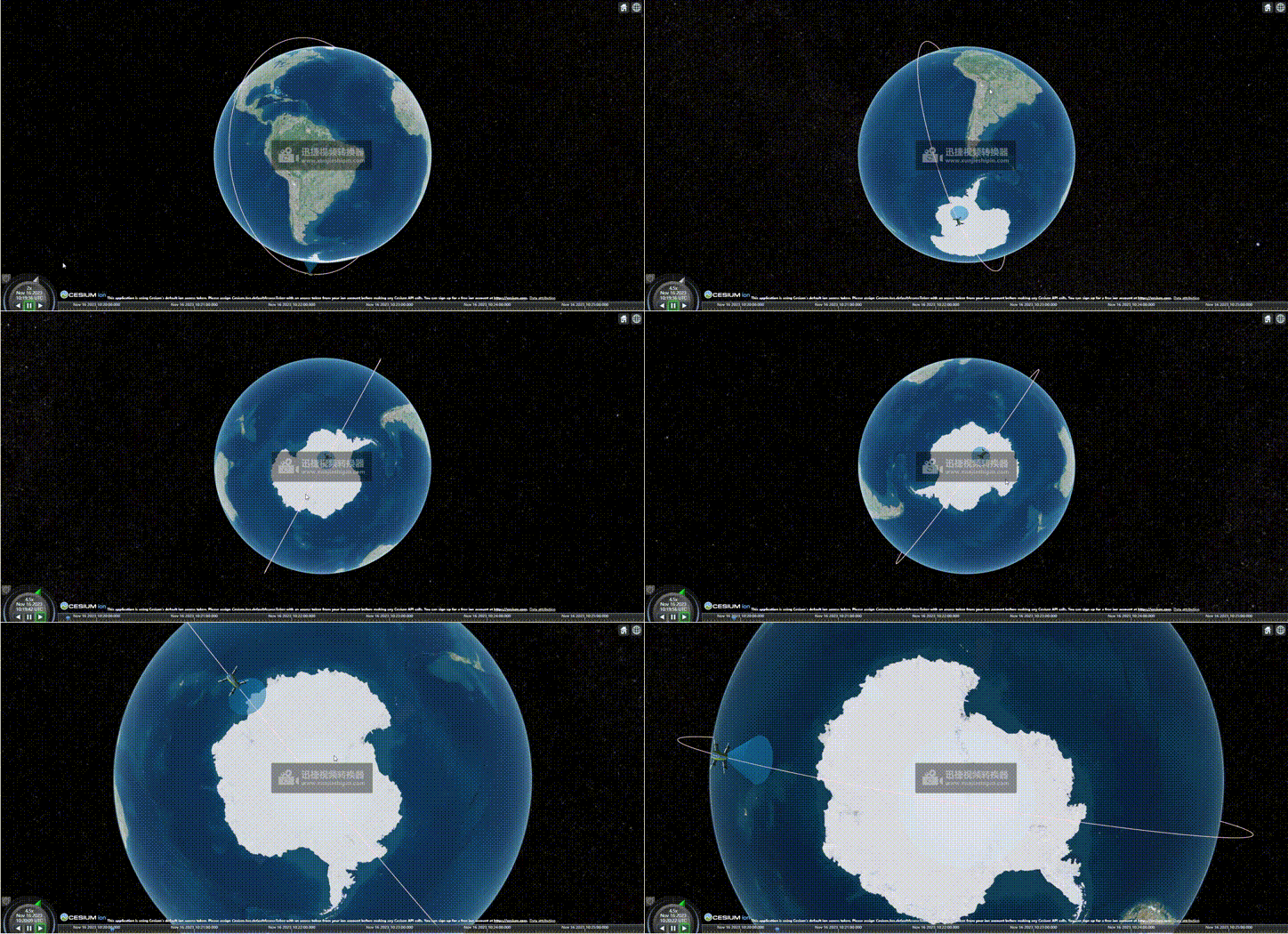
<!DOCTYPE html>
<html lang="en">

<head>
  <meta charset="UTF-8">
  <meta http-equiv="X-UA-Compatible" content="IE=edge">
  <meta name="viewport" content="width=device-width, initial-scale=1.0">
  <title>卫星扫描</title>
  <link rel="stylesheet" href="../Cesium/Widgets/widgets.css" rel="stylesheet">
  <script src="../Cesium/Cesium.js"></script>
  <script src="../Cesium/Sandcastle-header.js"></script>
  <style>
    #cesiumContainer {
      /* width: 1000px; */
      flex: 1;
      height: calc(100vh - 40px);
    }
  </style>

</head>

<body>
  <div id="cesiumContainer" class="fullSize"></div>
</body>

</html>
<script>
  var arrStates = []
  var viewer = new Cesium.Viewer('cesiumContainer', {
    baseLayerPicker: false,  // 影像切换
    animation: true,  //是否显示动画控件
    infoBox: false, //是否显示点击要素之后显示的信息
    geocoder: false, //是否显示地名查找控件
    timeline: true, //是否显示时间线控件
    fullscreenButton: false,
    shouldAnimate: false,
    navigationHelpButton: false, //是否显示帮助信息控件
    //   terrainProvider: new Cesium.createWorldTerrain({
    //     requestWaterMask: true,
    //     requestVertexNormals: true
    //   }),
    //   imageryProvider: new Cesium.UrlTemplateImageryProvider({
    //     url: "http://mt1.google.cn/vt/lyrs=s&hl=zh-CN&x={x}&y={y}&z={z}&s=Gali"
    //   })
  })
  // fetch("../data.json")
  //     .then(function (response) {
  //         if (response.ok) {
  //             return response.json();
  //         }
  //         throw new Error("Network response was not ok.");
  //     })
  //     .then(function (jsonData) {
  //         arrStates = jsonData
  //         arrStates.map((item, index) => {
  //             item.time = index * 40;
  //         });
  //         satellite()

  //     })
  //     .catch(function (error) {
  //         console.log("Error:", error);
  //     });

  satellite()
  // 卫星
  function satellite() {
    start = new Cesium.JulianDate.fromDate(new Date());  // 获取当前时间 这不是国内的时间
    start = Cesium.JulianDate.addHours(start, 8, new Cesium.JulianDate());  // 添加八小时,得到我们东八区的北京时间
    stop = Cesium.JulianDate.addSeconds(start, 360, new Cesium.JulianDate());  // 设置一个结束时间,意思是360秒之后时间结束

    console.log(start);
    viewer.clock.startTime = start.clone();   // 给cesium时间轴设置开始的时间,也就是上边的东八区时间
    viewer.clock.stopTime = stop.clone();     // 设置cesium时间轴设置结束的时间
    viewer.clock.currentTime = start.clone(); // 设置cesium时间轴设置当前的时间
    viewer.clock.clockRange = Cesium.ClockRange.LOOP_STOP;  // 时间结束了,再继续重复来一遍
    //时间变化来控制速度 // 时间速率,数字越大时间过的越快
    viewer.clock.multiplier = 2;
    //给时间线设置边界
    viewer.timeline.zoomTo(start, stop);

    rrStates = [];
    getRandState(arrStates, 2);
    startFunc();
  }
  function mySatePosition() {
    this.lon = 0;
    this.lat = 0;
    this.hei = 700000;          //卫星高度
    this.phei = 700000 / 2;     //轨道高度
    this.time = 0;
  }

  function computeCirclularFlight(source, panduan) {
    var property = new Cesium.SampledPositionProperty();
    if (panduan == 1) {         //卫星位置
      for (var i = 0; i < source.length; i++) {
        var time = Cesium.JulianDate.addSeconds(start, source[i].time, new Cesium.JulianDate);
        var position = Cesium.Cartesian3.fromDegrees(source[i].lon, source[i].lat, source[i].hei);
        // 添加位置,和时间对应
        property.addSample(time, position);
      }
    } else if (panduan == 2) {//轨道位置
      for (var i = 0; i < source.length; i++) {
        var time = Cesium.JulianDate.addSeconds(start, source[i].time, new Cesium.JulianDate);
        var position = Cesium.Cartesian3.fromDegrees(source[i].lon, source[i].lat, source[i].phei);
        // 添加位置,和时间对应
        property.addSample(time, position);
      }
    }
    return property;
  }

  function getRandState(brr, count) {
    for (var m = 0; m < count; m++) {
      var arr = [];
      var t1 = Math.floor(Math.random() * 360);
      var t2 = Math.floor(Math.random() * 360);

      for (var i = t1; i <= 360 + t1; i += 30) {
        var aaa = new mySatePosition();
        aaa.lon = t2;
        aaa.lat = i;
        aaa.time = i - t1;
        arr.push(aaa);
      }
      brr.push(arr);
    }
  }

  function getStatePath(aaa) {
    var entity_ty1p = computeCirclularFlight(aaa, 2);
    var entity_ty1 = viewer.entities.add({
      availability: new Cesium.TimeIntervalCollection([new Cesium.TimeInterval({
        start: start,
        stop: stop
      })]),
      position: entity_ty1p,   //轨道高度
      orientation: new Cesium.VelocityOrientationProperty(entity_ty1p),
      cylinder: {
        HeightReference: Cesium.HeightReference.CLAMP_TO_GROUND,
        length: 700000,
        topRadius: 0,
        bottomRadius: 900000 / 2,
        // material: Cesium.Color.RED.withAlpha(.4),
        // outline: !0,
        numberOfVerticalLines: 0,
        // outlineColor: Cesium.Color.RED.withAlpha(.8),
        material: Cesium.Color.fromBytes(35, 170, 242, 80)
      },
    });

    entity_ty1.position.setInterpolationOptions({
      interpolationDegree: 5,
      interpolationAlgorithm: Cesium.LagrangePolynomialApproximation
    });

    var entity1p = computeCirclularFlight(aaa, 1);
    //创建实体
    var entity1 = viewer.entities.add({
      // 将实体availability设置为与模拟时间相同的时间间隔。
      availability: new Cesium.TimeIntervalCollection([new Cesium.TimeInterval({
        start: start,
        stop: stop
      })]),
      position: entity1p,//计算实体位置属性
      //基于位置移动自动计算方向.
      orientation: new Cesium.VelocityOrientationProperty(entity1p),
      //加载飞机模型
      model: {
        uri: '../models/CesiumDrone.glb',
        scale: 100000
      },
      //路径
      path: {
        resolution: 1,
        material: new Cesium.PolylineGlowMaterialProperty({
          glowPower: 0.1,
          color: Cesium.Color.PINK
        }),
        width: 5
      }
    });

    //差值器
    entity1.position.setInterpolationOptions({
      interpolationDegree: 5,
      interpolationAlgorithm: Cesium.LagrangePolynomialApproximation
    });
  }

  function startFunc() {
    console.log(arrStates);
    for (var i = 0; i < arrStates.length; i++) {
      getStatePath(arrStates[i]);
    }
  }


</script>