npm上传
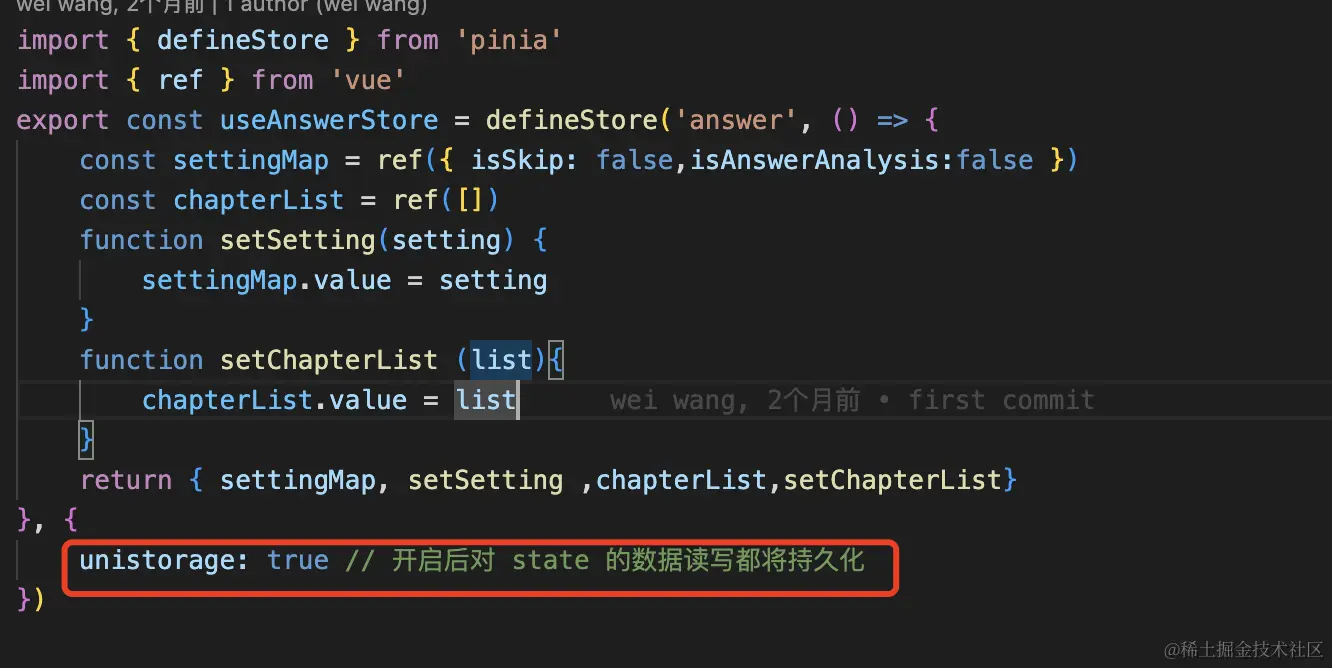
pinia 持久化
- 安装 pinia-plugin-unistorage
获取微信头像
- 微信小程序
                    <button
                        class="avatar-wrapper"
                        open-type="chooseAvatar"
                        @chooseavatar="onChooseAvatar">
                        <u-avatar :src="info.avatar" size="30"></u-avatar>
                    </button>
- APP
const wxAppLogin = () => {
uni.getProvider({
service: 'oauth',
success: function (res) {
uni.login({
provider: 'weixin',
success: function (loginRes) {
console.log(loginRes, '----')
uni.getUserInfo({
provider: 'weixin',
success: async (infoRes) => {
console.log(infoRes, 'getUserInfo')
info.avatar = infoRes.userInfo.avatarUrl
}
})
}
})
}
})
}
支付
1. 支付宝APP支付
async goPayNativeAppAlipay() {
const { pay_money, pay_type, order_source } = this
const res = await postTopUpOrderApi({ pay_money, pay_type, order_source })
if (res.success) {
console.log(res)
uni.requestPayment({
provider: 'alipay',
orderInfo: res.data.alipay,
success: (res) => {
this.payStatus()
},
fail: (err) => {
this.payStatus()
console.log(err, '微信公众号内jsapi支付error')
}
})
} else {
uni.showToast({
title: '获取失败',
icon: 'none'
})
this.loading = false
}
},
2.支付宝web支付
async goPayH5AppAlipay() {
const { pay_money, pay_type, order_source } = this
const res = await postTopUpOrderApi({ pay_money, pay_type, order_source })
if (res.success) {
console.log(res)
const div = document.createElement('div')
div.innerHTML = res.data.alipay
console.log(res, 'res.data.alipy')
document.body.appendChild(div)
console.log(document.forms, ' document.forms')
document.forms[0].submit()
document.body.removeChild(div)
} else {
uni.showToast({
title: '获取失败',
icon: 'none'
})
this.loading = false
}
},
3. 微信公众号支付
- 安装 jweixin-module
- 获取code
getWeChatCode() {
let local = encodeURIComponent(window.location.href)
let appid = ''
window.location.href =
'https://open.weixin.qq.com/connect/oauth2/authorize?appid=' +
appid +
'&redirect_uri=' +
local +
'&response_type=code&scope=snsapi_userinfo&state=1#wechat_redirect'
},
- 获取openid,并通过openid完成支付
async goUserWxOpenGzhid(code) {
            const res = await getOrderOpenidGzhApi({ code, source: this.order_source })
            console.log(res.data.openid, 'openid')
            if (res.success) {
                return res.data.openid
            } else {
                uni.showToast({
                    title: '获取openId失败',
                    icon: 'none'
                })
            }
        }
async goPayJSAPIWeiXin(openid) {
uni.showToast({
title: '微信H5支付申请中',
icon: 'none'
})
var that = this
const { pay_money, pay_type, order_source } = this
const res = await postTopUpOrderApi({ pay_money, pay_type, order_source, openid })
uni.hideLoading()
if (res.success) {
var weixin = res.data.wxpay.weixin
var jweixin = require('jweixin-module')
jweixin.config({
debug: false,
appId: weixin.appId,
timestamp: weixin.timeStamp,
nonceStr: weixin.nonceStr,
signature: weixin.sign,
jsApiList: ['chooseWXPay']
})
jweixin.ready(function () {
jweixin.checkJsApi({
jsApiList: ['chooseWXPay'],
success: function (res) {
console.log('checkjsapi Success')
console.log(res)
},
fail: function (res) {
console.log(res)
}
})
jweixin.chooseWXPay({
appId: weixin.appId,
timestamp: weixin.timeStamp,
nonceStr: weixin.nonceStr,
package: weixin.package,
signType: 'MD5',
paySign: weixin.sign,
success: function (res) {
that.payStatus()
},
cancel: function (r) {
uni.showToast({
title: '支付取消!',
icon: 'none'
})
return
},
fail: function (error) {
that.payStatus()
console.log(error, '微信公众号内jsapi支付error')
}
})
})
jweixin.error(function (res) {
console.log('error')
console.log(res)
uni.showToast({
icon: 'none',
title: '支付失败了',
duration: 4000
})
})
} else {
uni.showToast({
title: '获取失败',
icon: 'none'
})
}
},
4.微信小程序支付
- 获取code,并将code给到后端获取openid
uni.login({
                success: async ({ code }) => {
                    console.log(code, '---')
                    try {
                        const openid = await this.goUserWxOpenMpid(code)
                    } catch {
                        uni.hideLoading()
                    }
                },
                fail: function () {
                    uni.hideLoading()
                    uni.showToast({
                        title: '获取用户信息失败',
                        icon: 'none'
                    })
                    this.onClick = 0
                }
            })
- 通过 requestPayment 完成支付
async goPayWXappStepTwo(openid) {
try {
const { pay_money, pay_type, order_source } = this
const res = await postTopUpOrderApi({ pay_money, pay_type, order_source, openid })
uni.hideLoading()
if (res.success) {
uni.requestPayment({
timeStamp: res.data.wxpay.weixin.timeStamp,
nonceStr: res.data.wxpay.weixin.nonceStr,
package: res.data.wxpay.weixin.package,
signType: 'MD5',
paySign: res.data.wxpay.weixin.sign,
provider: 'wxpay',
success: (res) => {
this.payStatus()
},
fail: (res) => {
console.log(res, '微信小程序支付error')
this.payError()
this.loading = false
}
})
} else {
uni.showToast({
title: res.data.msg,
icon: 'none'
})
this.loading = false
}
} catch (error) {
this.loading = false
}
},
5. 微信APP支付
async goPayNativeAppWeiXin() {
uni.hideLoading()
const { pay_money, pay_type, order_source } = this
const res = await postTopUpOrderApi({ pay_money, pay_type, order_source })
if (res.success) {
uni.requestPayment({
provider: 'wxpay',
orderInfo: res.data.wxpay.weixin,
success: (res) => {
this.payStatus()
},
fail: (err) => {
let msg = err.errMsg.toString()
let errorRes = msg.split(',')
if (errorRes[0] == 'requestPayment:fail:客户端未安装') {
uni.showToast({
title: '检测到未安装微信',
icon: 'none'
})
} else {
this.payStatus()
}
console.log(error, '微信App支付error')
}
})
} else {
uni.showToast({
title: '获取失败',
icon: 'none'
})
}
},
websocket封装
class socketIO {
constructor(time) {
this.socketTask = null
this.is_open_socket = false
this.url = process.uniEnv.BASE_SOCKET_URL
this.data = {}
this.userTokenMap = {}
this.connectNum = 1
this.is_hand_socket = false
this.timeout = time ? time : 50000
this.heartbeatInterval = null
this.reconnectTimeOut = null
}
connectSocketInit(data) {
this.userTokenMap = data
this.socketTask = uni.connectSocket({
url: this.url,
success: () => {
console.log('正准备建立websocket中...')
return this.socketTask
}
})
this.socketTask.onOpen((res) => {
this.connectNum = 1
console.log('WebSocket连接正常!')
this.send(data)
clearInterval(this.reconnectTimeOut)
clearInterval(this.heartbeatInterval)
this.is_open_socket = true
this.start()
this.socketTask.onMessage((e) => {
let res = JSON.parse(e.data)
console.log('res---------->', res)
uni.$emit(`getPositonsOrder`, res)
})
})
uni.onSocketError((res) => {
console.log('WebSocket连接打开失败,请检查!')
})
this.socketTask.onClose(() => {
console.log('已经被关闭了-------')
clearInterval(this.heartbeatInterval)
clearInterval(this.reconnectTimeOut)
uni.$off(`getPositonsOrder`)
uni.$off(`connectError`)
if (!this.is_hand_socket) {
this.socketTask = null
this.is_open_socket = false
if (this.connectNum < 6) {
console.log(`连接失败,正尝试第${this.connectNum}次连接`);
this.reconnect(true)
this.connectNum += 1
} else {
console.log(`尝试连接失败,请在网络健康情况下重试`);
uni.$emit(`connectError`)
this.connectNum = 1
}
}
})
}
Close() {
if (!this.is_open_socket) {
return
}
this.is_hand_socket = true
this.socketTask.close({
success() {
uni.showToast({
title: 'SocketTask 关闭成功',
icon: 'none'
})
}
})
}
send(contentData, isNoData = false) {
const data = isNoData ? contentData : { ...contentData, ...this.data }
console.log(data, 'send----')
if (this.socketTask) {
this.socketTask.send({
data: JSON.stringify(data),
async success() {
console.log('消息发送成功')
}
})
}
}
start() {
this.heartbeatInterval = setInterval(() => {
this.send(
{
type: 'ping'
},
true
)
}, this.timeout)
}
reconnect(isError) {
clearInterval(this.heartbeatInterval)
console.log(this.is_open_socket, isError, '----')
if (!this.is_open_socket && isError) {
this.reconnectTimeOut = setTimeout(() => {
this.connectSocketInit(this.userTokenMap)
}, 5000)
}
}
setdata(data) {
this.data = data
}
}
module.exports = socketIO


