RegExp 对象
RegExp 对象表示正则表达式,它是对字符串执行模式匹配的强大工具。
语法
/pattern/attributes
创建 RegExp 对象的语法
new RegExp(_pattern_, _attributes_);
参数
- 参数
_pattern_ 是一个字符串,指定了正则表达式的模式或其他正则表达式。
- 参数
_attributes_ 是一个可选的字符串,包含属性"g"、"i" 和 "m",分别用于指定全局匹配、区分大小写的匹配和多行匹配。ECMAScript 标准化之前,不支持 m 属性。如果 _pattern_ 是正则表达式,而不是字符串,则必须省略该参数。
修饰符
| 修饰符 | 描述 |
|---|
i | 执行对大小写不敏感的匹配。 |
g | 执行全局匹配(查找所有匹配而非在找到第一个匹配后停止)。 |
m | 执行多行匹配。 |
方括号
| 表达式 | 描述 |
|---|
[abc] | 查找方括号之间的任何字符。 |
[^abc] | 查找任何不在方括号之间的字符。 |
[0-9] | 查找任何从 0 至 9 的数字。 |
[a-z] | 查找任何从小写 a 到小写 z 的字符。 |
[A-Z] | 查找任何从大写 A 到大写 Z 的字符。 |
[A-z] | 查找任何从大写 A 到小写 z 的字符。 |
[abcd] | 查找给定集合内的任何字符。 |
[^abcd] | 查找给定集合外的任何字符。 |
(red|blue|green) | 查找任何指定的选项。 |
元字符
- 元字符(Metacharacter)是拥有特殊含义的字符
| 元字符 | 描述 |
|---|
. | 查找单个字符,除了换行和行结束符。 |
\w | 查找单词字符。 |
\W | 查找非单词字符。 |
\d | 查找数字。 |
\D | 查找非数字字符。 |
\s | 查找空白字符。 |
\S | 查找非空白字符。 |
\b | 匹配单词边界。 |
\B | 匹配非单词边界。 |
\0 | 查找 NUL 字符。 |
\n | 查找换行符。 |
\f | 查找换页符。 |
\r | 查找回车符。 |
\t | 查找制表符。 |
\v | 查找垂直制表符。 |
\xxx | 查找以八进制数 xxx 规定的字符。 |
\xdd | 查找以十六进制数 dd 规定的字符。 |
\uxxxx | 查找以十六进制数 xxxx 规定的 Unicode 字符。 |
量词
| 量词 | 描述 |
|---|
n+ | 匹配任何包含至少一个 n 的字符串。 |
n* | 匹配任何包含零个或多个 n 的字符串。 |
n? | 匹配任何包含零个或一个 n 的字符串。 |
n{X} | 匹配包含 X 个 n 的序列的字符串。 |
n{X,Y} | 匹配包含 X 至 Y 个 n 的序列的字符串。 |
n{X,} | 匹配包含至少 X 个 n 的序列的字符串。 |
n$ | 匹配任何结尾为 n 的字符串。 |
^n | 匹配任何开头为 n 的字符串。 |
hxb(?=n) | 匹配 hxb 其后紧接指定字符串 n 的字符串。 |
hxb(?!n) | 匹配 hxb 其后没有紧接指定字符串 n 的字符串。 |
(?<=n)hxb | 匹配 hxb 其前有指定字符串 n 的字符串。 |
(?<!n)hxb | 匹配 hxb 其前没有指定字符串 n 的字符串。 |
RegExp 对象属性
RegExp 对象方法
| 方法 | 描述 |
|---|
| compile | 编译正则表达式。 |
| exec | 检索字符串中指定的值。返回找到的值,并确定其位置。 |
| test | 检索字符串中指定的值。返回 true 或 false。 |
支持正则表达式的 String 对象的方法
其他
前面我们有提到此量词,那么详细说一下他们的使用吧,前面的两个一般是向后匹配,而后面两个是向前匹配。
' 前空格 中间有三个空格保留一个 后空格 '.replace(/(^\s*)|(\s*$)|\s(?=\s)/g, '');
'helloworld helloothers'.replace(/hello(?!world)/, '');
'helloworld testworld'.replace(/(?<=test)world/, '');
'helloworld testworld'.replace(/(?<!hello)world/, '');
'123@456@789'.replace(/\d+/g, function (a, b, c) {
console.log({ a, b, c });
switch (a) {
case '123':
return 'test1';
case '456':
return 'test2';
case '789':
return 'test3';
}
return 'test';
});
'123@456@789'.replace(/(\d+)/g, function (a, b, c, d) {
console.log({ a, b, c, d });
switch (a) {
case '123':
return 'test1';
case '456':
return 'test2';
case '789':
return 'test3';
}
return 'test';
});
'123456@qq.com'.replace(/^([\dA-Za-z]\w*)@(qq\.com)$/, function (a, b, c, d, e) {
console.log({ a, b, c, d, e });
return `qq:${b};domain:${c}`;
});
'123456@qq.com'.replace(/^(?<qq>[\dA-Za-z]\w*)@(?<domain>qq\.com)$/, function (a, b, c, d, e, f) {
console.log({ a, b, c, d, e, f });
return `qq:${b};domain:${c}`;
});
多说一点
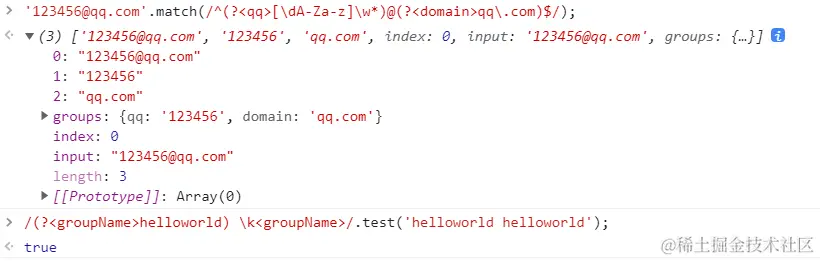
当我们小括号时,每个小括号里面的内容标识一个组,我们可以对组进行命名,甚至引用。
'123456@qq.com'.match(/^([\dA-Za-z]\w*)@(qq\.com)$/);
console.log(RegExp.$1);
console.log(RegExp.$2);
'XiongBiao He'.replace(/(\w+) (\w+)/, '$2$1');
/(helloworld) \1/.test('helloworld helloworld');
/(helloworld) \1/.test('helloworld helloothers');
/^(?:red|green|blue) (#[\w\d]{3,6})$/.test('red #F00');
console.log(RegExp.$1);
'123456@qq.com'.match(/^(?<qq>[\dA-Za-z]\w*)@(?<domain>qq\.com)$/);
/(?<groupName>helloworld) \k<groupName>/.test('helloworld helloworld');
escape('转码').toLocaleLowerCase().replace(/%u/gi, '\\u');
unescape('\u8f6c\u7801'.replace(/\\u/gi, '%u'));