<!DOCTYPE html>
<html lang="en">

<head>
    <meta charset="UTF-8">
    <meta http-equiv="X-UA-Compatible" content="IE=edge">
    <meta name="viewport" content="width=device-width, initial-scale=1.0">
    <title>Document</title>
    <style>
        svg {
            transform: rotate(-0.05deg);
        }

        circle {
            transition: stroke-dasharray .2s;
        }

        .time-count-x {
            line-height: 1.5;
            position: relative;
        }
    </style>
</head>

<body>
    <div id="timeCountX" class="time-count-x">
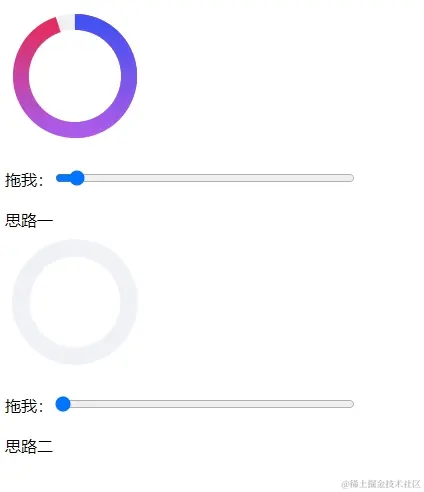
        <svg width="140" height="140" viewBox="0 0 440 440" class="center">
            <defs>
                <linearGradient x1="1" y1="0" x2="0" y2="0" id="gradient1">
                    <stop offset="0%" stop-color="#e52c5c"></stop>
                    <stop offset="100%" stop-color="#ab5aea"></stop>
                </linearGradient>
                <linearGradient x1="1" y1="0" x2="0" y2="0" id="gradient2">
                    <stop offset="0%" stop-color="#4352f3"></stop>
                    <stop offset="100%" stop-color="#ab5aea"></stop>
                </linearGradient>
            </defs>
            <g transform="matrix(0,-1,1,0,0,440)">
                <circle cx="220" cy="220" r="170" stroke-width="50" stroke="#f0f1f5" fill="none"
                    stroke-dasharray="1069 1069">
                </circle>
                <circle cx="220" cy="220" r="170" stroke-width="50" stroke="url('#gradient1')" fill="none"
                    stroke-dasharray="1069 1069"></circle>
                <circle cx="220" cy="220" r="170" stroke-width="50" stroke="url('#gradient2')" fill="none"
                    stroke-dasharray="534.5 1069"></circle>
            </g>
        </svg>
        <span id="timeSecond" class="time-second"></span>

        <p>拖我:<input id="range1" type="range" min="0" max="100" value="0" style="width:300px;"></p>
        思路一
    </div>

    <div id="timeCountX" class="time-count-x">
        <svg width="140" height="140" viewBox="0 0 440 440" class="center">
            <defs>
                <linearGradient x1="1" y1="0" x2="0" y2="0" id="gradient1">
                    <stop offset="0%" stop-color="#e52c5c"></stop>
                    <stop offset="100%" stop-color="#ab5aea"></stop>
                </linearGradient>
                <linearGradient x1="1" y1="0" x2="0" y2="0" id="gradient2">
                    <stop offset="0%" stop-color="#4352f3"></stop>
                    <stop offset="100%" stop-color="#ab5aea"></stop>
                </linearGradient>
            </defs>
            <g transform="matrix(0,-1,1,0,0,440)">
                <circle cx="220" cy="220" r="170" stroke-width="50" stroke="url('#gradient1')" fill="none"
                    stroke-dasharray="1069 1069"></circle>
                <circle cx="220" cy="220" r="170" stroke-width="50" stroke="url('#gradient2')" fill="none"
                    stroke-dasharray="534.5 1069"></circle>
                <circle cx="220" cy="-220" r="170" stroke-width="55" stroke="#f0f1f5" fill="none"
                    style="transform: scaleY(-1);" stroke-dasharray="1069 1069">
                </circle>
            </g>
        </svg>

        <p>拖我:<input id="range2" type="range" min="0" max="100" value="0" style="width:300px;"></p>
        思路二
    </div>
</body>
<script>

    function one () {
        var range = document.querySelector("#range1");
        var circle = [].slice.call(document.querySelectorAll("circle"));
        range.addEventListener("change", function () {
            let percent = (100 - this.value) / 100, perimeter = Math.PI * 2 * 170;
            if (this.value <= 50) {
                circle[2].setAttribute('stroke-dasharray', "534.5 1069");
                circle[1].setAttribute('stroke-dasharray', perimeter * percent + " 1069");
            } else {
                circle[1].setAttribute('stroke-dasharray', "0 1069");
                circle[2].setAttribute('stroke-dasharray', perimeter * percent + " 1069");
            }
        });
    }

    function tow () {
        var range = document.querySelector("#range2");
        var circle = [].slice.call(document.querySelectorAll("circle"));
        range.addEventListener("change", function () {
            let percent = 1 - (this.value / 100), perimeter = Math.PI * 2 * 170;
            circle[5].setAttribute('stroke-dasharray', `${perimeter * percent}` + " 1069");
        });
    }
    one()
    tow()

</script>

</html>