

时间越久,还是要加回顾基础知识点,才能在开发及面对问题时更快速的定位,温故知新~
盒模型
盒模型分两种: 怪异盒模型(IE)、标准盒模型(W3C)
盒模型:content、padding、margin、border

 **怪异盒模型(IE)**
     width/height包含了 padding、border
     width = content + padding + border
     height = content + padding + border
     盒子width = width + margin
     盒子height = height + margin

** 标准盒模型**
     width = content
     height = content
     盒子width = width + padding + border + margin
     盒子height = height + padding + border + margin

**box-sizing可以改变盒模型**
    是css3属性
    box-sizing:border-box;怪异模式(IE),盒子width包含 content + margin
    box-sizing:content-box;标准模式(W3C),盒子width包含 content + padding + border + margin
 **小结**
    开发中较多使用标准盒模型,在实际开发中怪异盒模型可解决盒子被撑大的问题。
BFC (Block Formatting Context)
块级格式化上下文,是一个独立的渲染区域,有自己的渲染规则,使内外元素不会相互影响,可以更好的控制文档流、处理浮动等问题。
创建块级格式化上下文的方法:
文档的根元素(html)
浮动元素(float:left/right)
绝对定位元素(position:fixed/absoluted)
overflow值不为visible/clip,overflow: auto/hidden/scroll
块级元素(display:inline-block/flex/grid/table/inline-flex/inline-grid)
[更多](https://developer.mozilla.org/zh-CN/docs/Web/Guide/CSS/Block_formatting_context)
** 规则:**
-
同一个BFC的两个相邻Box垂直布局 -
同一个BFC的两个相邻Box的margin会重叠,是取两个box的margin的最大值
BFC的特性:
- 外边距重叠
- 两个box,margin是取最大的margin-top: 100px
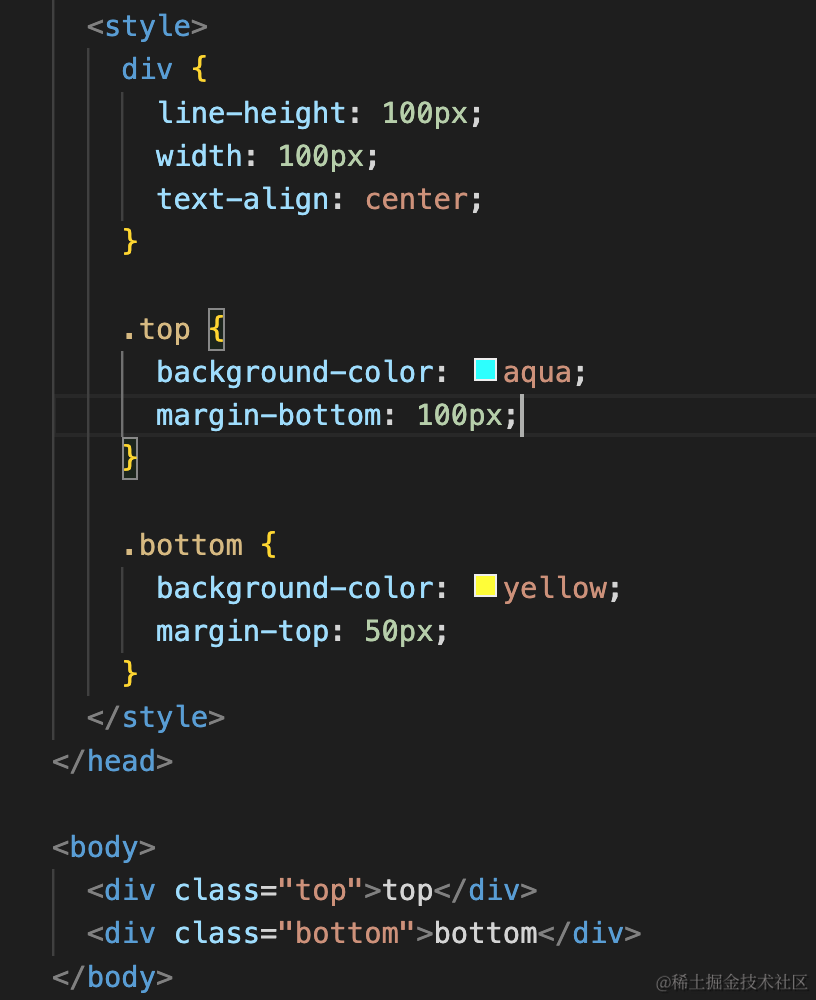
- 给bottom元素包裹outer元素,设置overflow:hidden,形成独立的BFC,内部元素的外边接不会与外部的marigin发生重叠
- 清除内部浮动
上图是:子元素float:left;父元素高度塌陷。
上图:父元素设置overflow:hidden,触发BFC,浮动元素就会参与到高度计算。
- BFC不会与float的元素区域重叠
上图: aside元素float,main依然与块左边距接触
main元素形成独立BFC块,就不会和浮动元素重叠。形成两列布局。

