1. 获得浏览器窗口的尺寸
    console.log(window.innerHeight,innerHeight) (window可省略)测量宽度
    console.log(window.innerWidth,innerWidth) 测量高度
2. 浏览器的window.location属性
console.log(window.location.href)
<body>
<button id="btn1">刷新</button>
<script>
btn1.onclick = function(){
location.reload()
}
</script>
</body>
3. 浏览器的window.onload属性
3. 浏览器的window.document属性
console.log(document.documentElement.scrollTop)
window.onscroll = function(){
console.log(document.documentElement.scrollTop)
}
console.log(document.documentElement.scrollLeft)
window.onscroll = function(){
console.log(document.documentElement.scrollLeft)
}
<button id="dut">回到首页</button>
<script>
dut.onclick = function(){
window.scrollTo({
top:0,
left:0
})
}
</script>
4. 浏览器的window.open()/close()属性
    <button id="dut1">open</button>
    <button id="dut2">close</button>
    <script>
        dut1.onclick = function(){
            window.open("https://www.baidu.com/")  (打开一个网页)
        }
        dut2.onclick = function(){
            window.close()  (删除当前网页)
        }
    </script>
5.浏览器的history属性
<button id="dut1">返回</button>
<button id="dut2">前近</button>
<script>
dut1.onclick = function(){
history.back()
}
dut2.onclick = function(){
history.forward()
}
</script>
<button id="dut1">go</button>
dut1.onclick = function(){
history.go(数字)
}
6.浏览器的本地存储和云端存储
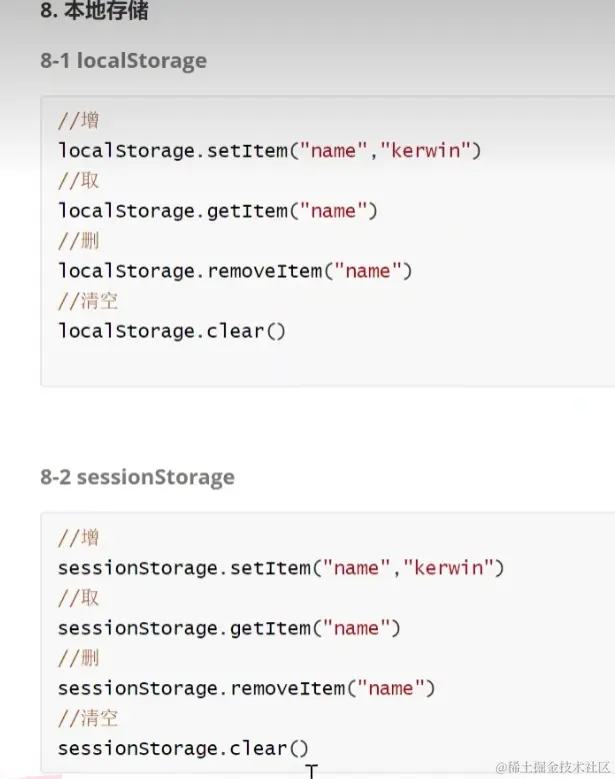
<script>
localStorage.setItem("名字","数值")
localStorage.getItem("名字")
localStorage.removeItem("名字")
localStorage.clear()
localStorage.setItem("obj",JSON.stringify({name:"zcw",age:100}))
console.log( JSON.parse(localStorage.getItem("obj")))
</script>



