

效果与功能
- 目前只支持横向的轮播图
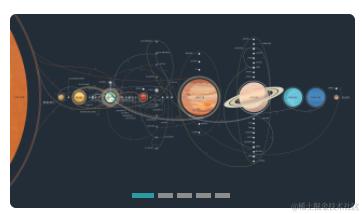
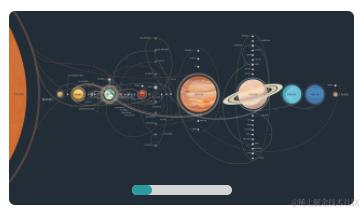
- 指示器有两种展示方式
- 可选择 是否显示指示器、是否自动轮播、是否循环轮播、控制轮播的切换时间
- 可自定轮播图高度、圆角、使用卡片式轮播图时自定前后间距
- 可通过轮播图数据中的url链接自动推断是图片还是视频资源
第一种:指示器是分开的
第二种:指示器是在一个滑块中的
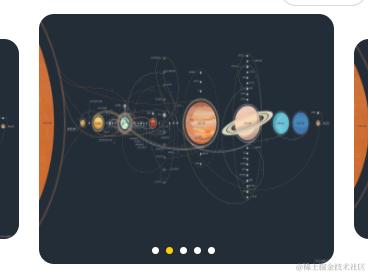
卡片式轮播图
组件参数
| 参数名 | 解释 | 示例 |
|---|---|---|
| bannerList | 轮播图数据(必传) | Array:对象数组 |
| proxyField | 代理字段 | Object |
| height | 轮播图高度 | String:'500rpx' |
| circular | 是否开启循环轮播 | Boolean |
| autoplay | 是否自动轮播 | Boolean |
| interval | 自动轮播的时间间隔 单位 ms | Number |
| type | 轮播图类型 | String:1 普通轮播图 2 卡片式轮播图 |
| previousMargin | 前边距,可用于露出前一项的一小部分(仅type为2时生效) | String:'30rpx' |
| nextMargin | 后边距 ,可用于露出后一项的一小部分(仅type为2时生效) | String:'30rpx' |
| spacing | 轮播图之间的间距(仅type为2时生效) | String:'30rpx' |
| sideHeight | 两侧轮播图的高度(仅type为2时生效) | String:'130rpx'、'80%' |
| radius | 圆角 | String:'30rpx' |
| isIndicator | 是否显示指示器 | Boolean |
| indicatorType | 指示器类型 | String:1 指示器分开展示 2 指示器在一个滑块中 |
| indicatorBoxStyle | 指示器盒子样式 | Object:{} |
| isPreviewImage | 点击图片是否进行预览 | Boolean |
参数说明
proxyField:指定图片或视频资源的字段、指定视频封面的图片网络资源的字段、指定资源的类型(轮播图只支持图片或视频,不传则自动判断,但是自动判断有可能有误)
组件代码
<template>
	<div class="banner-box" :style="isIndicator ? 'position: relative' : ''">
		<swiper
			:circular="props.circular"
			:autoplay="props.autoplay"
			:interval="props.interval"
			:current="swiperIndex"
			:previous-margin="previousMargin"
			:next-margin="nextMargin"
			@change="swiperChange"
			@animationfinish="swiperFinish"
			:style="{ height: props.height, 'border-radius': props.radius }"
		>
			<swiper-item
				v-for="(item, index) in bannerList"
				:key="index"
				@click="clickSwiper(item)"
			>
				<template v-if="props.type == 1">
					<image
						:src="item[props.proxyField.url]"
						mode="scaleToFill"
						v-if="item.urlType == 'image'"
					/>
					<video
						class="banner-video"
						:src="item[props.proxyField.url]"
						:poster="item[props.proxyField.poster]"
						object-fit="fill"
						v-if="item.urlType == 'video'"
					></video>
				</template>
				<template v-if="props.type == 2">
					<view
						class="main-card"
						:class="swiperIndex == index ? 'current-card' : ''"
						:style="{
							'border-radius': props.radius,
							margin: swiperIndex == index ? `0 ${props.spacing}` : '',
							height: swiperIndex != index ? props.sideHeight : '',
						}"
					>
						<image
							:src="item[props.proxyField.url]"
							mode="scaleToFill"
							v-if="item.urlType == 'image'"
						/>
						<video
							class="banner-video"
							:src="item[props.proxyField.url]"
							:poster="item[props.proxyField.poster]"
							object-fit="fill"
							v-if="item.urlType == 'video'"
						></video>
					</view>
				</template>
			</swiper-item>
		</swiper>
		<view
			class="banner-indicator indicator1"
			:style="indicatorBoxStyle"
			v-if="isIndicator && props.indicatorType == 1"
		>
			<view
				class="indicator-item"
				:class="{ 'indicator-item-active': indicatorIndex === swiperIndex }"
				v-for="(img, indicatorIndex) in bannerList.length"
				:key="indicatorIndex"
				@click="swiperIndex = indicatorIndex"
			></view>
		</view>
		<view
			class="banner-indicator indicator2"
			:style="[
				`width: calc(${40}rpx * ${bannerList.length})`,
				indicatorBoxStyle,
			]"
			v-if="isIndicator && props.indicatorType == 2"
		>
			<div class="banner-indicator-box">
				<view
					class="indicator-item"
					:style="`transform: translateX(calc(${40}rpx * ${swiperIndex}))`"
				></view>
			</div>
		</view>
	</div>
</template>

<script setup>
	import { ref, onMounted, computed, watch, getCurrentInstance } from 'vue';
	import { onLoad } from '@dcloudio/uni-app';
	const { proxy } = getCurrentInstance();
	const example = proxy;
	const props = defineProps({
		bannerList: {
			type: Array,
			required: true,
		},
		// 代理字段
		proxyField: {
			type: Object,
			default: {
				url: 'url', // 图片或视频资源的字段
				poster: 'poster', // 视频封面的图片网络资源的字段
				urlType: '', // 资源类型(image/video)
			},
		},
		height: {
			type: String,
			default: '500rpx',
		},
		circular: {
			type: Boolean,
			default: true,
		},
		autoplay: {
			type: Boolean,
			default: true,
		},
		interval: {
			type: Number,
			default: 3000,
		},
		type: {
			type: String,
			default: '1',
		},
		previousMargin: {
			type: String,
			default: '',
		},
		nextMargin: {
			type: String,
			default: '',
		},
		spacing: {
			type: String,
			default: '20rpx',
		},
		sideHeight: {
			type: String,
			default: '80%',
		},
		radius: {
			type: String,
			default: '0rpx',
		},
		isIndicator: {
			type: Boolean,
			default: true,
		},
		indicatorType: {
			type: String,
			default: '1',
		},
		indicatorBoxStyle: {
			type: Object,
			default: {},
		},
		isPreviewImage: {
			type: Boolean,
			default: false,
		},
	});

	let bannerList = ref([]);
	let previousMargin = ref('');
	let nextMargin = ref('');
	let isIndicator = ref(''); // 是否显示指示器
	watch(
		() => props.bannerList,
		() => {
			isIndicator.value = props.isIndicator;
			let osName = uni.getDeviceInfo().osName;
			if (props.type == 2) {
				previousMargin.value = props.previousMargin || '60rpx';
				nextMargin.value = props.nextMargin || '60rpx';
			}
			if (props.bannerList) {
				bannerList.value = props.bannerList;
				if (bannerList.value.length) {
					bannerList.value = bannerList.value.map((item) => {
						let urlType =
							props.proxyField.urlType ||
							judgeFileType(item[props.proxyField.url]);
						if (urlType == 'video' && osName == 'ios') {
							isIndicator.value = false;
						}
						return {
							...item,
							urlType,
						};
					});
				}
			}
		},
		{
			immediate: true,
		},
	);

	// 根据url判断文件类型
	function judgeFileType(url) {
		let imageType = [
			'jpg',
			'jpeg',
			'png',
			'gif',
			'bmp',
			'tiff',
			'tif',
			'webp',
			'heic',
			'ico',
			'svg',
			'eps',
			'ai',
			'raw',
			'psd',
			'xcf',
			'tga',
			'dds',
		];
		let videoType = [
			'mp4',
			'mkv',
			'avi',
			'mov',
			'wmv',
			'flv',
			'webm',
			'mpg',
			'mpeg',
			'3gp',
			'm4v',
			'vob',
			'rmvb',
			'f4v',
			'ts',
			'ogv',
			'mxf',
			'asf',
			'swf',
		];
		if (imageType.includes(url.split('.').pop())) {
			return 'image';
		} else if (videoType.includes(url.split('.').pop())) {
			return 'video';
		}
	}

	const emit = defineEmits(['clickSwiper']);
	let swiperIndex = ref(0); // 轮播图当前所在滑块的 index
	// 轮播图切换
	function swiperChange(e) {
		if (props.type == 2) {
			swiperIndex.value = e.detail.current;
		}
	}
	// 轮播图切换
	function swiperFinish(e) {
		if (props.type == 1) {
			swiperIndex.value = e.detail.current;
		}
	}
	// 点击轮播图
	function clickSwiper(item) {
		if (item.urlType == 'image' && props.isPreviewImage) {
			// 预览所有图片
			let urls = bannerList.value
				.filter((item) => item.urlType == 'image')
				.map((item) => item[props.proxyField.url]);
			uni.previewImage({
				urls,
				current: urls.indexOf(item[props.proxyField.url]),
			});
		}
		emit('clickSwiper', item);
	}
</script>

<style lang="scss" scoped>
	.banner-box {
		swiper {
			overflow: hidden;
			swiper-item {
				display: grid;
				align-items: center;
				overflow: hidden;
				transform: rotate(0deg);
				-webkit-transform: rotate(0deg);
				image {
					width: 100%;
					height: 100%;
				}
				video {
					width: 100%;
					height: 100%;
				}
			}
		}
		.banner-video {
			overflow: hidden;
			transform: rotate(0deg);
			-webkit-transform: rotate(0deg);
		}
		.main-card {
			overflow: hidden;
			transition: all 0.6s;
		}
		.current-card {
			height: 100%;
		}
		.banner-indicator {
			position: absolute;
			bottom: 24rpx;
			left: 50%;
			transform: translateX(-50%);
		}
		.indicator1 {
			display: flex;
			justify-content: center;
			align-items: center;
			gap: 12rpx;
			.indicator-item {
				width: 32rpx;
				height: 6rpx;
				border-radius: 3rpx;
				background: rgba(255, 255, 255, 0.4);
				transition: all 0.3s;
			}
			.indicator-item-active {
				width: 48rpx;
				background: #fff;
			}
		}
		.indicator2 {
			.banner-indicator-box {
				background: #d4d4d4;
				border-radius: 15rpx;
				height: 20rpx;
				position: relative;
				.indicator-item {
					position: absolute;
					width: 40rpx;
					height: 20rpx;
					background: #2d99a1;
					border-radius: 15rpx;
					transition: all 0.3s;
				}
			}
		}
	}
</style>
注意:如果轮播图中有视频数据,在iOS设备中轮播图的指示器会强制去除
页面使用
<myBanner
		type="2"
		radius="30rpx"
		previousMargin="30rpx"
		nextMargin="30rpx"
		spacing="30rpx"
		:isIndicator="false"
		:autoplay="false"
		:bannerList="bannerList"
		height="300rpx"
		:proxyField="{
			url: 'url',
			poster: 'poster',
		}"
		@clickSwiper="clickSwiper"
	></myBanner>
    const bannerList = ref([
		{ url: 'https://pic.20988.xyz/2024-08-29/1724899264-903459-preview.jpg' },
		{ url: 'https://pic.20988.xyz/2024-08-29/1724899264-903459-preview.jpg' },
		{ url: 'https://pic.20988.xyz/2024-08-29/1724899264-903459-preview.jpg' },
		{ url: 'https://pic.20988.xyz/2024-08-29/1724899264-903459-preview.jpg' },
		{
			url: 'http://vjs.zencdn.net/v/oceans.mp4',
			poster: 'https://pic.20988.xyz/2024-08-29/1724899264-903459-preview.jpg',
		},
		{
			url: 'http://vjs.zencdn.net/v/oceans.mp4',
			poster: 'https://pic.20988.xyz/2024-08-29/1724899264-903459-preview.jpg',
		},
		{
			url: 'http://vjs.zencdn.net/v/oceans.mp4',
			poster: 'https://pic.20988.xyz/2024-08-29/1724899264-903459-preview.jpg',
		},
		{
			url: 'http://vjs.zencdn.net/v/oceans.mp4',
			poster: 'https://pic.20988.xyz/2024-08-29/1724899264-903459-preview.jpg',
		},
	]);
	// 点击轮播图
	function clickSwiper(item) {
		console.log(item);
	}

