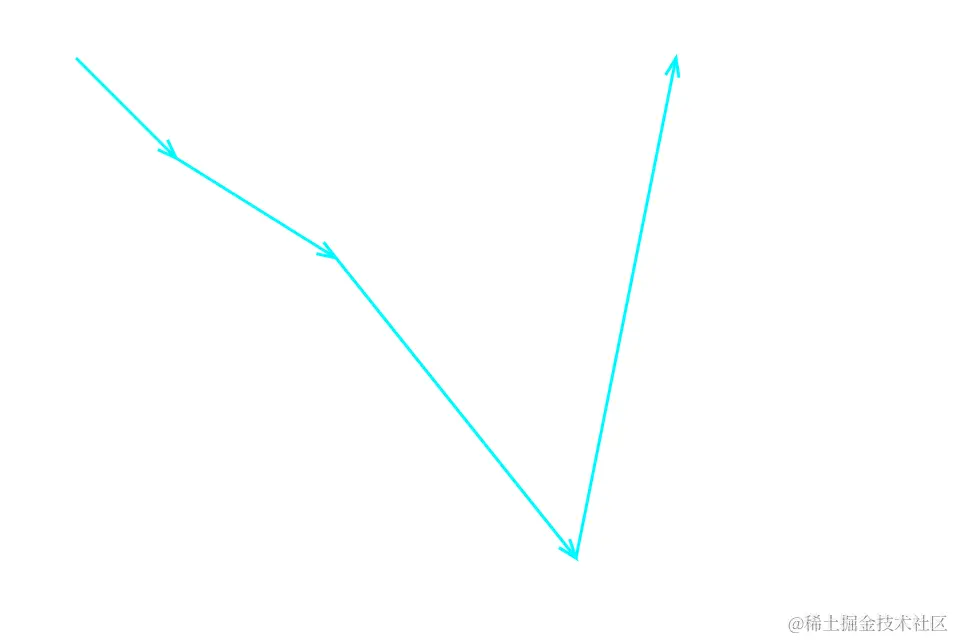
效果预览图
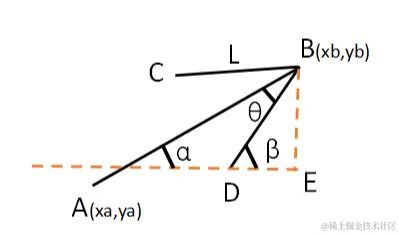
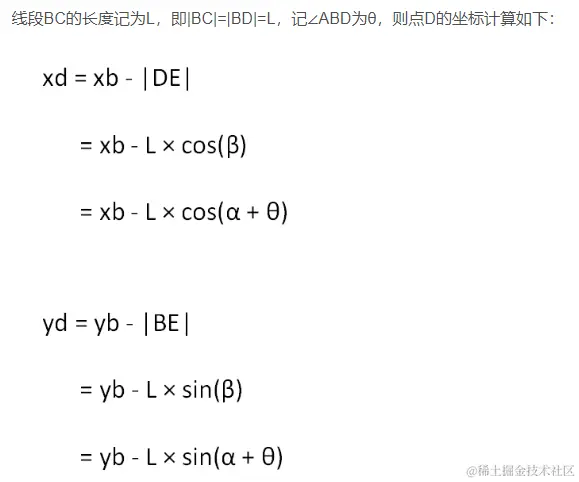
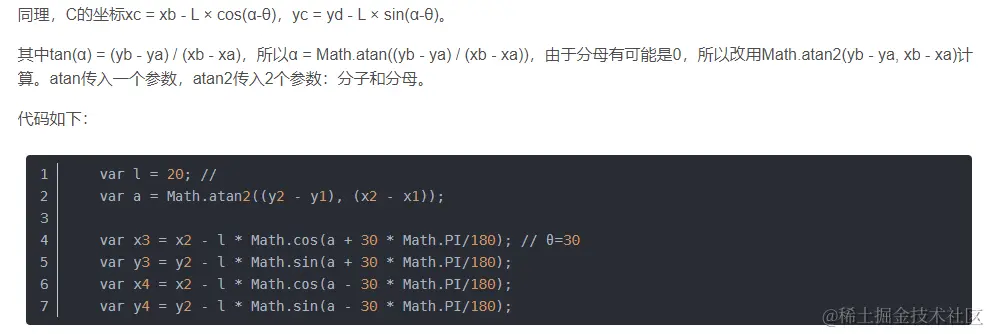
思路
<!DOCTYPE html>
<html lang="en">

<head>
    <meta charset="UTF-8">
    <meta name="viewport" content="width=device-width, initial-scale=1.0">
    <title>Document</title>
    <style>
        * {
            margin: 0;
            padding: 0;
            box-sizing: border-box;
        }
    </style>
</head>

<body>
    <img src="" alt="">
    <script>
        // 获取箭头坐标
        const getArrowPoint = (fromX, fromY, toX, toY, theta = 30, len = 20) => {
            const a = Math.atan2(toY - fromY, toX - fromX)

            const p1x = toX - len * Math.cos(a + (theta * Math.PI) / 180)
            const p1y = toY - len * Math.sin(a + (theta * Math.PI) / 180)

            const p2x = toX - len * Math.cos(a - (theta * Math.PI) / 180)
            const p2y = toY - len * Math.sin(a - (theta * Math.PI) / 180)

            return { p1x, p1y, p2x, p2y }
        }
        // theta:箭头与线段的夹角,len:箭头长度
        const draw = (ctx, fromX, fromY, toX, toY, theta = 20, len = 20) => {
            // line
            ctx.moveTo(fromX, fromY)
            ctx.lineTo(toX, toY)
            // arrow
            const { p1x, p1y, p2x, p2y } = getArrowPoint(fromX, fromY, toX, toY, theta, len)
            ctx.moveTo(p1x, p1y)
            ctx.lineTo(toX, toY)
            ctx.lineTo(p2x, p2y)
        }

        const canvas = document.createElement('canvas')
        const ctx = canvas.getContext('2d')

        canvas.width = innerWidth
        canvas.height = innerHeight
        canvas.getContext('2d')

        const arr = [
            { "fx": 100, "fy": 100, "tx": 200, "ty": 200 },
            { "fx": 200, "fy": 200, "tx": 360, "ty": 300 },
            { "fx": 360, "fy": 300, "tx": 600, "ty": 600 },
            { "fx": 600, "fy": 600, "tx": 700, "ty": 100 },
        ]
        arr.forEach((v) => draw(ctx, v.fx, v.fy, v.tx, v.ty, 20, 20))

        ctx.strokeStyle = '#00F8FF'
        ctx.lineWidth = 3
        ctx.stroke()

        const url = canvas.toDataURL('image/png')

        const el = document.querySelector('img')
        setTimeout(() => {
            el.setAttribute('src', url)
        }, 3000);
    </script>
</body>

</html>
参考文章
- # 在canvas中绘制箭头