springsecurity使用(一)认识springsecurity
一、导入相关依赖
<dependency>
<groupId>org.springframework.boot</groupId>
<artifactId>spring-boot-starter-security</artifactId>
</dependency>
<dependency>
<groupId>org.springframework.boot</groupId>
<artifactId>spring-boot-starter-freemarker</artifactId>
</dependency>
二、配置yaml文件
server:
port: 80
email:
username: weiwei
password: 123321
spring:
datasource:
driverClassName: com.mysql.jdbc.Driver
url: jdbc:mysql://localhost:3306/ttask?useUnicode=true&characterEncoding=utf-8&serverTimezone=GMT%2B8&useSSL=false
password: root
username: root
task:
execution:
pool:
core-size: 5
max-size: 10
queue-capacity: 100
freemarker:
settings:
classic_compatible: true
datetime_format: yyy-MM-dd HH:mm
number_format: 0.##
suffix: .ftl
template-loader-path:
- classpath:/templates
三、创建SecurityConfig
package com.example.mayikttest.config;
import org.springframework.context.annotation.Bean;
import org.springframework.security.config.annotation.authentication.builders.AuthenticationManagerBuilder;
import org.springframework.security.config.annotation.web.builders.HttpSecurity;
import org.springframework.security.config.annotation.web.configuration.EnableWebSecurity;
import org.springframework.security.config.annotation.web.configuration.WebSecurityConfigurerAdapter;
import org.springframework.security.crypto.password.NoOpPasswordEncoder;
import org.springframework.stereotype.Component;
@Component
@EnableWebSecurity
public class SecurityConfig extends WebSecurityConfigurerAdapter {
@Override
protected void configure(AuthenticationManagerBuilder auth) throws Exception {
auth.inMemoryAuthentication().withUser("mayikt_admin").password("mayikt_admin")
.authorities("addMember", "delMember");
auth.inMemoryAuthentication().withUser("mayikt_add").password("mayikt_add")
.authorities("addMember");
}
@Override
protected void configure(HttpSecurity http) throws Exception {
http.authorizeRequests()
.antMatchers("/addMember").hasAuthority("addMember")
.antMatchers("/delMember").hasAuthority("delMember")
.antMatchers("/login").permitAll()
.anyRequest().authenticated()
.and()
.formLogin()
.loginPage("/login")
.and()
.csrf().disable();
}
@Bean
public static NoOpPasswordEncoder passwordEncoder() {
return (NoOpPasswordEncoder) NoOpPasswordEncoder.getInstance();
}
}
四、项目目录结构
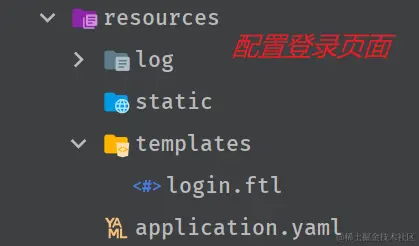
五、静态模板页面
<!DOCTYPE html PUBLIC "-//W3C//DTD HTML 4.01 Transitional//EN" "http://www.w3.org/TR/html4/loose.dtd">
<html>
<head>
  <meta http-equiv="Content-Type" content="text/html; charset=ISO-8859-1">
  <title>Insert title here</title>
</head>
<body>

<form action="/login" method="post">
  <span>用户名称</span><input type="text" name="username"/> <br>
  <span>用户密码</span><input type="password" name="password"/> <br>
  <input type="submit" value="登陆">

</form>

<#if RequestParameters['error']??>
  用户名称或者密码错误
</#if>


</body>
</html>