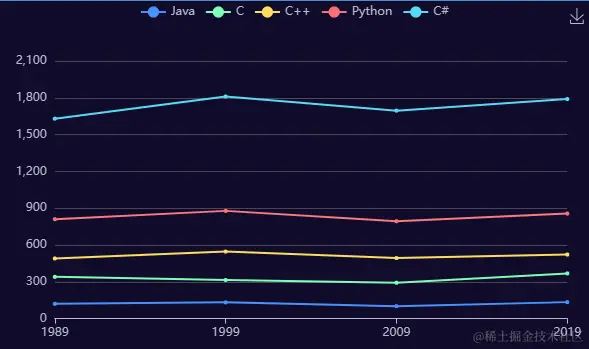
1、创建vue3项目
npm create vue vue-demo
2、下载echarts
pnpm i echarts
3、引入echarts
import { ref, onMounted, watch } from "vue"
import * as echarts from 'echarts'
4、创建echarts实例
<div ref="chart" style="width: 100%;height: 300px;"></div>
let mChart = null
const target = ref(null)
onMounted(() => {
mChart = echarts.init(target.value, 'dark')
renderChart()
})
5、构建options对象
const options = {
legend: {
data: ['Java', 'C', 'C++', 'Python', 'C#']
},
grid: {
left: '3%',
right: '4%',
bottom: '3%',
containLabel: true
},
toolbox: {
feature: {
saveAsImage: {}
}
},
xAxis: {
type: 'category',
boundaryGap: false,
data: ['1989', '1999', '2009', '2019']
},
yAxis: {
type: 'value'
},
series: [
{
name: 'Java',
type: 'line',
stack: 'Total',
data: [120, 132, 101, 134, 90, 230, 210]
},
{
name: 'C',
type: 'line',
stack: 'Total',
data: [220, 182, 191, 234, 290, 330, 310]
},
{
name: 'C++',
type: 'line',
stack: 'Total',
data: [150, 232, 201, 154, 190, 330, 410]
},
{
name: 'Python',
type: 'line',
stack: 'Total',
data: [320, 332, 301, 334, 390, 330, 320]
},
{
name: 'C#',
type: 'line',
stack: 'Total',
data: [820, 932, 901, 934, 1290, 1330, 1320]
}
]
}
6、通过实例setOption(option)方法配置
mChart.setOption(options)
7、监听浏览器变化,重新渲染图表
window.addEventListener('resize', () => {
myChart.resize()
})
8、完整代码
<template>
<div class="wrapper">
<div class="header">vue3使用echarts</div>
<div ref="target" style="width: 100%;height: 100%;"></div>
</div>
</template>
<script setup>
import { ref, onMounted, watch } from "vue"
import * as echarts from 'echarts'
let mChart = null;
const target = ref(null)

onMounted(() => {
    mChart = echarts.init(target.value, 'dark')
    renderChart()
})
const renderChart = () => {
const options = {
        legend: {
            data: ['Java', 'C', 'C++', 'Python', 'C#']
        },
        grid: {
            left: '3%',
            right: '4%',
            bottom: '3%',
            containLabel: true
        },
        toolbox: {
            feature: {
                saveAsImage: {}
            }
        },
        xAxis: {
            type: 'category',
            boundaryGap: false,
            data: ['1989', '1999', '2009', '2019']
        },
        yAxis: {
            type: 'value'
        },
        series: [
            {
                name: 'Java',
                type: 'line',
                stack: 'Total',
                data: [120, 132, 101, 134, 90, 230, 210]
            },
            {
                name: 'C',
                type: 'line',
                stack: 'Total',
                data: [220, 182, 191, 234, 290, 330, 310]
            },
            {
                name: 'C++',
                type: 'line',
                stack: 'Total',
                data: [150, 232, 201, 154, 190, 330, 410]
            },
            {
                name: 'Python',
                type: 'line',
                stack: 'Total',
                data: [320, 332, 301, 334, 390, 330, 320]
            },
            {
                name: 'C#',
                type: 'line',
                stack: 'Total',
                data: [820, 932, 901, 934, 1290, 1330, 1320]
            }
        ]
    }
mChart.setOption(options)
window.addEventListener('resize', () => {
        myChart.resize()
})
}
</script>
<style lang="less" scoped>
.wrapper {
width: 100%;
height: 100%;
display: flex;
flex-direction: column;
.header {
height: 50px;
background: #4398d1;
color: #fff;
font-size: 20px;
display: flex;
align-items: center;
}
.target {
flex: 1;
}
}
</style>