需求:
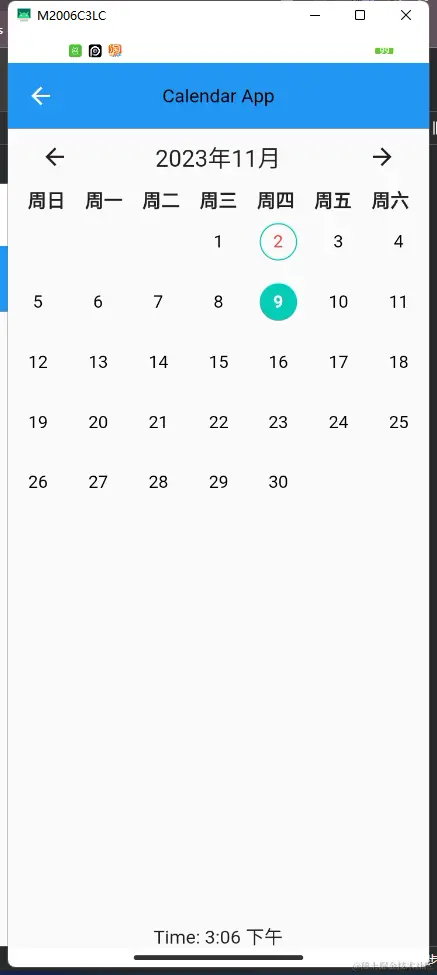
- 允许左右切换日历月份并且监听
- 如果是当天则被圈起来显示红色
- 点击可选择,选择的事件展示绿色背景
- 切换月份时已选择的日期被重置
- 显示当前时间,并且判断显示是上午还是下午
import 'package:camera/app_allocation/app_style.dart';
import 'package:flutter/material.dart';
import 'package:intl/intl.dart';
import '../generated/l10n.dart';
class CalendarScreenUtils extends StatefulWidget {
const CalendarScreenUtils({super.key});
@override
State<CalendarScreenUtils> createState() => _CalendarScreenUtilsState();
}
class _CalendarScreenUtilsState extends State<CalendarScreenUtils> {
DateTime selectedDate = DateTime.now();
DateTime? manuallySelectedDate;
final weekdays = [S().sun, S().mon, S().tue, S().wed, S().thu, S().fri, S().sat];
late int daysInMonth;
late DateTime firstDay;
late int startingWeekday;
bool isToday = true;
bool isSelected = false;
@override
Widget build(BuildContext context) {
daysInMonth = DateTime(selectedDate.year, selectedDate.month + 1, 0).day;
firstDay = DateTime(selectedDate.year, selectedDate.month, 1);
startingWeekday = (firstDay.weekday - 7) % 7;
return Scaffold(
appBar: AppBar(
title: const Text('Calendar App'),
),
body: Column(
children: <Widget>[
Padding(
padding: const EdgeInsets.symmetric(horizontal: 16.0),
child: Row(
mainAxisAlignment: MainAxisAlignment.spaceBetween,
children: <Widget>[
IconButton(
icon: const Icon(Icons.arrow_back),
onPressed: () {
setState(() {
manuallySelectedDate = null;
selectedDate = DateTime(selectedDate.year, selectedDate.month - 1, selectedDate.day);
});
},
),
Text(
DateFormat.yMMMM().format(selectedDate),
style: const TextStyle(fontSize: 20),
),
IconButton(
icon: const Icon(Icons.arrow_forward),
onPressed: () {
setState(() {
manuallySelectedDate = null;
selectedDate = DateTime(selectedDate.year, selectedDate.month + 1, selectedDate.day);
});
},
),
],
),
),
Row(
mainAxisAlignment: MainAxisAlignment.spaceEvenly,
children: weekdays.map((day) {
return Text(day, style: const TextStyle(fontSize: 16, fontWeight: FontWeight.bold));
}).toList(),
),
Expanded(child: calendarGrid()),
calendarGrid(),
Text(
'Time: ${DateFormat('h:mm a').format(DateTime.now())}',
style: const TextStyle(fontSize: 16),
),
],
),
);
}
calendarGrid() {
return CustomScrollView(
shrinkWrap: true,
slivers: <Widget>[
SliverGrid(
gridDelegate: const SliverGridDelegateWithFixedCrossAxisCount(crossAxisCount: 7),
delegate: SliverChildBuilderDelegate(
(BuildContext context, int index) {
if (index < startingWeekday) return Container();
int day = index - startingWeekday + 1;
DateTime currentDate = DateTime(selectedDate.year, selectedDate.month, day);
isToday = currentDate.day == DateTime.now().day &&
currentDate.month == DateTime.now().month &&
currentDate.year == DateTime.now().year;
isSelected = currentDate.year == selectedDate.year &&
currentDate.month == selectedDate.month &&
currentDate.day == selectedDate.day &&
manuallySelectedDate != null;
return GestureDetector(
onTap: () {
setState(() {
selectedDate = currentDate;
manuallySelectedDate = currentDate;
print("选择的日期:$manuallySelectedDate");
});
},
child: UnconstrainedBox(
child: Container(
width: 32,
height: 32,
alignment: Alignment.center,
decoration: BoxDecoration(
shape: BoxShape.circle,
border: Border.all(color: isToday ? AppStyle().getColor.mainColor : Colors.transparent),
color: isSelected ? AppStyle().getColor.mainColor : Colors.transparent,
),
child: Text(
day.toString(),
style: TextStyle(
color: isSelected ? Colors.white : (isToday ? Colors.red : Colors.black),
fontWeight: isSelected ? FontWeight.bold : FontWeight.normal,
),
),
),
),
);
},
childCount: daysInMonth + startingWeekday,
),
),
],
);
}
}