scrapy爬取自建网站的数据
目标:使用scrapy爬取自定义新闻网站的国内、国际、航空三个板块的新闻数据存储在csv中
初始化操作
scrapy startproject wangyiPro # 新建项目
cd wangyiPro
scrapy genspider news # 创建爬虫
编写爬虫(news.py)
import scrapy
from selenium.webdriver import Chrome, ChromeOptions
from wangyiPro.items import WangyiproItem
import re


class NewsSpider(scrapy.Spider):
    name = 'news'
    # allowed_domains = ['www.xxx.com']
    # 这里我使用自建的网站
    start_urls = ['custome-website/']

    '''
        爬虫初始化阶段创建selenium无头浏览器实例用于获取动态加载的数据
    '''
    def __init__(self, **kwargs):
        super().__init__(**kwargs)
        options = ChromeOptions()
        options.add_experimental_option("excludeSwitches",['enable-automation'])
        # options.add_argument('--headless')  这两个是无头浏览器的选项
        # options.add_argument('--disable-gpu')
        self.bro = Chrome(executable_path='D:\\Project\\python\\scrapy-test\\5.动态加载数据处理\\chromedriver.exe',
                          chrome_options=options)

    # 解析五大板块对应详情页的url
    section_urls = []

    # parse用于解析网易新闻的首页导航栏的对应板块url
    def parse(self, response):
        li_list = response.xpath('//*[@id="index2016_wrap"]/div[3]/div[2]/div[2]/div[2]/div/ul/li')
        # with open('page.html', 'w', encoding='utf-8') as fp:
        #     fp.write(response.text)
        index_list = [3, 6]
        # index_list = [2]
        # 板块url
        for index in index_list:
            name = li_list[index].xpath('./a/text()').extract_first()
            url = li_list[index].xpath('./a/@href').extract_first()
            item = {
                "url": url,
                "name": name
            }
            self.section_urls.append(item)
        # 依次对每个板块对应的页面进行请求
        for item in self.section_urls:
            # print(url)
            yield scrapy.Request(url=item['url'], callback=self.parse_section,
                                 meta={"url": item['url'], "category": item['name']})

    # 解析新闻标题和详情页url
    def parse_section(self, response):
        with open('./page.html', 'w', encoding='utf-8') as fp:
            fp.write(response.text) # 用于储存页面便于调试
        div_list = response.xpath('//div[@class="ndi_main"]/div')
        category = response.meta['category']
        print(div_list[0])
        for div in div_list:
            title = div.xpath('./div//h3/a/text()').extract_first()
            detail_url = div.xpath('./div//h3/a//@href').extract_first()
            print(title, detail_url)
            item = WangyiproItem()
            item['title'] = title
            item['category'] = category
            yield scrapy.Request(url=detail_url, callback=self.parse_detail, meta={"item": item})

    # 解析新闻数据
    def parse_detail(self, response):
        '''
            这一部分是对新闻的内容、发布时间、来源做解析
            内容获取后进行数据清晰,去掉空行、制表符等多余内容
        '''
        content = response.xpath('//*[@id="content"]/div[2]').extract()
        content = ''.join(content)
        content = re.sub('\n', '', content)
        content = re.sub('\s', '', content)
        content = re.sub(' ', '', content)
        item = response.meta['item']
        item['content'] = content
        '''
            发布时间的原始格式是"\n         2022-01-22 12:02:20 来源:",使用函数对时间部分进行提取
        '''
        timeline = response.xpath('//div[@class="post_info"]/text()').extract_first()
        timeline = timeline.split('来源')[0]
        timeline = re.findall(pattern=r'20?.* ?.*:[0-9]{2}', string=timeline)[0]
        item['timeline'] = timeline
        item['origin'] = response.xpath('//*[@id="container"]/div[1]/div[2]/a/text()').extract_first()
        # print(item)
        yield item

    def closed(spider, reason):
        spider.bro.quit()
        pass
items.py
import scrapy


class WangyiproItem(scrapy.Item):
    # 标题、内容、来源、发布时间、分类
    title = scrapy.Field()
    content = scrapy.Field()
    origin = scrapy.Field()
    timeline = scrapy.Field()
    category = scrapy.Field()
中间件middleware.py
中间件部分主要用于处理新闻板块的新闻列表部分是动态加载出来的,所以在这里使用
selenium将获取到的动态加载数据替换原先下载器获取的数据,然后发送给引擎处理
# Define here the models for your spider middleware

import time

from scrapy import signals
from scrapy.http import HtmlResponse

# useful for handling different item types with a single interface
from itemadapter import is_item, ItemAdapter


class WangyiproDownloaderMiddleware(object):
    # Not all methods need to be defined. If a method is not defined,
    # scrapy acts as if the downloader middleware does not modify the
    # passed objects.

    def process_request(self, request, spider):
        # Called for each request that goes through the downloader
        # middleware.
        # print('request middleware')

        # Must either:
        # - return None: continue processing this request
        # - or return a Response object
        # - or return a Request object
        # - or raise IgnoreRequest: process_exception() methods of
        #   installed downloader middleware will be called
        return None

    #  拦截板块详情页响应对象,修改为符合需求的对象
    def process_response(self, request, response, spider):
        #  获取在爬虫中定义的浏览器对象
        print('开始拦截...')
        bro = spider.bro
        urls = []
        for url in spider.section_urls:
            urls.append(url['url'])
        # Called with the response returned from the downloader.
        #  筛选对应的响应对象
        if request.url in urls:
            # response 板块详情页响应对象
            # 实例化新的响应对象,包含动态加载的数据
            '''
                如何获取动态加载的响应数据?
                selenium
            '''
            bro.get(url=request.url)
            bro.implicitly_wait(30)  # 隐形等待最长30s
            # time.sleep(4)
            page_text = bro.page_source # 获取动态加载的新闻数据
            new_res = HtmlResponse(url=request.url, body=page_text, encoding='utf-8', request=request)
            return new_res
        else:
            print('Middleware no filter:', request.url)
            return response

    def process_exception(self, request, exception, spider):
        # Called when a download handler or a process_request()
        # (from other downloader middleware) raises an exception.

        # Must either:
        # - return None: continue processing this exception
        # - return a Response object: stops process_exception() chain
        # - return a Request object: stops process_exception() chain
        return None
管道pipelines.py
用于持久化存储
# Define your item pipelines here
#
# Don't forget to add your pipeline to the ITEM_PIPELINES setting
# See: https://docs.scrapy.org/en/latest/topics/item-pipeline.html


# useful for handling different item types with a single interface
import csv
import os

from itemadapter import ItemAdapter


class WangyiproPipeline:
    def __init__(self):
        # 如果文件不存在就新建文件
        # 这里参考了https://www.cnblogs.com/shawone/p/10228912.html
        if not os.path.exists('./news.csv'):
            # 打开文件,指定方式为写,利用第3个参数把csv写数据时产生的空行消除
            self.f = open("news.csv", "a", newline="", encoding='utf-8')
            # 设置文件第一行的字段名,注意要跟spider传过来的字典key名称相同
            self.fieldnames = ["title", "content", "origin", "timeline", "category"]
            # 指定文件的写入方式为csv字典写入,参数1为指定具体文件,参数2为指定字段名
            self.writer = csv.DictWriter(self.f, fieldnames=self.fieldnames)
            # 写入第一行字段名,因为只要写入一次,所以文件放在__init__里面
            self.writer.writeheader()
        else:
            self.f = open("news.csv", "a", newline="", encoding='utf-8')
            self.fieldnames = ["title", "content", "origin", "timeline", "category"]
            self.writer = csv.DictWriter(self.f, fieldnames=self.fieldnames)
    '''
        重写父类方法
        该仅仅在爬虫开始时调用一次
    '''
    def open_spider(self, spider):
        pass

    def process_item(self, item, spider):
        self.writer.writerow(item)
        return item  # 传递给下一个执行的管道类

    def close_spider(self, spider):
        print('结束爬虫...')
        self.f.close()
项目配置settings.py
这是坑比较多的一部分
UA伪装与代理IP
# 由于网易没有太复杂的校验,所有我的全部请求使用的一样的请求头
# Crawl responsibly by identifying yourself (and your website) on the user-agent
USER_AGENT = 'Mozilla/5.0 (Windows NT 10.0; Win64; x64) AppleWebKit/537.36 (KHTML, like Gecko) Chrome/97.0.4692.99 Safari/537.36'
另外代理IP可以在中间件中的
downloader类中的process_exception函数中做判断并设置代理IP
# 拦截发生异常的请求
    def process_exception(self, request, exception, spider):
        # Called when a download handler or a process_request()
        # (from other downloader middleware) raises an exception.

        #  代理
        if request.split(':')[0]=='http':
            request.meta['proxy'] = 'http://'+ random.choice(self.proxy_http)
        else:
            request.meta['proxy'] = 'http://'+ random.choice(self.proxy_https)
        # Must either:
        # - return None: continue processing this exception
        # - return a Response object: stops process_exception() chain
        # - return a Request object: stops process_exception() chain
        return request
最后就是一些常见配置
# Obey robots.txt rules
ROBOTSTXT_OBEY = False
LOG_LEVEL = 'ERROR'
# Enable or disable downloader middlewares
# 这里有个很坑的地方是关于中间件,下载中间件和爬虫中间件的配置是在两个不同的地方,我们只需要开启下载中间件就可以了。第一次使用的时候没有看清开启的是SPIDER_MIDDLEWARES,还特意把WangyiproSpiderrMiddleware换成WangyiproDownloaderMiddleware因此走了很多弯路,导致中间件调试了很久都不起作用,我还以为我电脑坏了。

SPIDER_MIDDLEWARES = {
#   'wangyiPro.middlewares.WangyiproSpiderrMiddleware': 543,
   'wangyiPro.middlewares.WangyiproDownloaderMiddleware': 543,
}

DOWNLOADER_MIDDLEWARES = {
   'wangyiPro.middlewares.WangyiproDownloaderMiddleware': 543,
}
# Configure item pipelines
ITEM_PIPELINES = {
   'wangyiPro.pipelines.WangyiproPipeline': 300,
}
关于调试main.py
起初运行爬虫都是在控制台中用scrapy命令,但是这样就无法让IDE中的断点生效从而无法调试,后来参考了https://www.cnblogs.com/weixuqin/p/9074448.html, 在项目的根目录创建main.py,写入以下内容后右键debug开启了调试功能
#!/usr/bin/env python
#-*- coding:utf-8 -*-

from scrapy.cmdline import execute
import os
import sys

#添加当前项目的绝对地址
sys.path.append(os.path.dirname(os.path.abspath(__file__)))
#执行 scrapy 内置的函数方法execute,  使用 crawl 爬取并调试,最后一个参数news 是我的爬虫文件名
execute(['scrapy', 'crawl', 'news'])
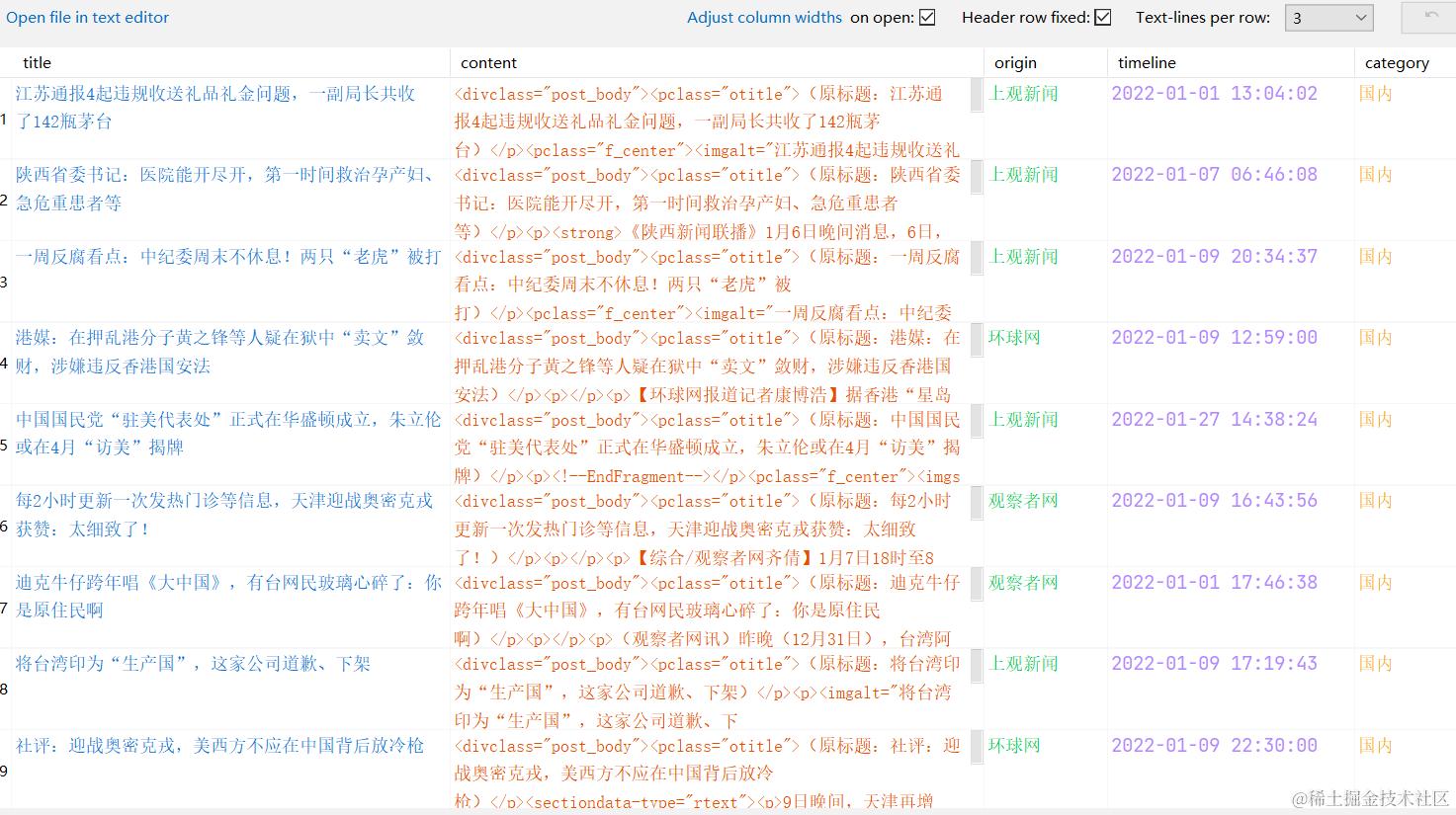
最终结果