在开发基于SpringBoot框架的项目时,会用到下面的条件注解,有时会有需要控制配置类是否生效或注入到Spring上下文中的场景,可以使用@ConditionalOnProperty注解来控制@Configuration的注解是否生效。
实现原理
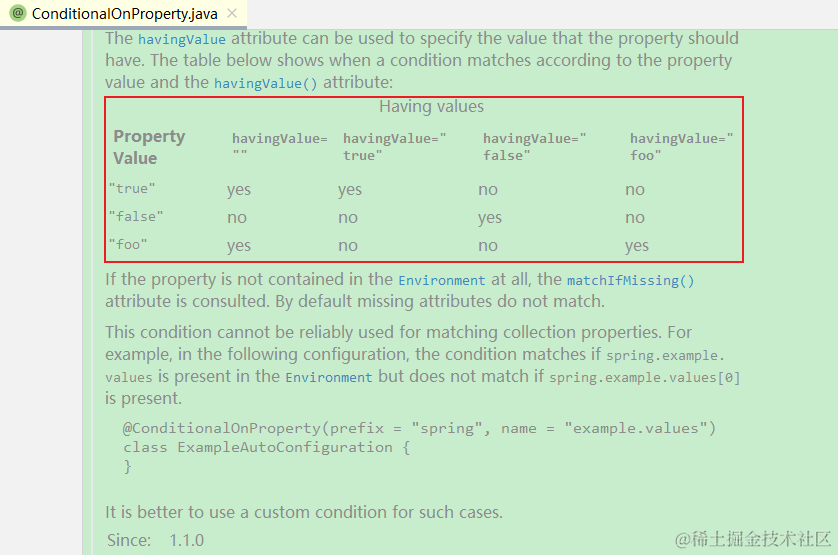
@ConditionalOnProperty通过havingValue与配置文件中的值进行对比,如果对比值返回TRUE则配置类生效,反之失效。
源码分析
@Retention(RetentionPolicy.RUNTIME)
@Target({ ElementType.TYPE, ElementType.METHOD })
@Documented
@Conditional(OnPropertyCondition.class)
public @interface ConditionalOnProperty {

    // 配置项值
    String[] value() default {};

    // 配置项前缀
    String prefix() default "";

    // 配置项名
    String[] name() default {};

    // havingValue的值与配置项的值进行比较,一致返回TRUE,不一致返回FALSE
    String havingValue() default "";

    // 如果配置文件中, 没有该配置项, 判断是否加载BEAN, 默认为false。
    boolean matchIfMissing() default false;

}
注解使用实例
注解实例1
matchIfMissing值为TRUE,即使配置文件中没有file.service.type配置,依然会加载UploadFile
@Configuration
@ConditionalOnProperty(name = "file.service.type", matchIfMissing = true)
public class UploadFile {
}
注解实例2
file.service.type=true
- 既指定
prefix也指定name,配置项的值为TRUE,因此依然加载UploadFile
@Configuration @ConditionalOnProperty(prefix = "file",name = "service.type")
public class UploadFile {
}
注解实例3
file.service.type=true
- 只指定
name或value,配置项的值为true,因此加载UploadFile
@Configuration @ConditionalOnProperty(name = "file.service.type")
public class UploadFile {
}
注解实例4
file.service.type=true
- 只指定
name或value,配置项的值为true,但havingValue为false;因为havingValue的值为false所以不会加载UploadFile
@Configuration @ConditionalOnProperty(name = "file.service.type",havingValue = "false")
public class UploadFile {
}
注解实例5
file.service.type=local
- 指定
name也指定havingValue,name配置项的值与havingValue的值相同,因此加载UploadFile
@Configuration @ConditionalOnProperty(name = "file.service.type",havingValue = "local")
public class UploadFile {
}
注解总结
- 当配置项为true,
havingValue的值为true;对比配置项与havingValue的值相同该类会加载 - 当配置项为false,
havingValue的值为false;对比配置项与havingValue的值相同该类会加载 - 当配置项为true,
havingValue的值为false;对比配置项与havingValue的值相同该类不会加载 - 当配置项为false,
havingValue的值为true;对比配置项与havingValue的值相同该类不会加载 - 当
havingValue不设置值时,是否加载有配置项决定- 配置项为true,该类会加载
- 配置项为false,该类不会加载
工作中实际应用
工作需求
根据配置文件中file.service.type配置项,来决定文件上传到本地还是minio。
#文件服务类型分为 minio 和 local
file.service.type=local
# file.service.type=minio
代码示例
- 创建上传文件Service
import org.springframework.web.multipart.MultipartFile;
import javax.servlet.http.HttpServletResponse;
import java.io.InputStream;
public interface FileService {
/**
* 上传文件
* @param uploadfile
* @param pathName
* @throws Exception
*/
void fileUpload(MultipartFile uploadfile, String pathName) throws Exception;
/**
* 下载文件
* @param wholePath
* @param response
* @param fileName
* @throws Exception
*/
void downloadFile(String wholePath, HttpServletResponse response, String fileName) throws Exception;
/**
* 删除文件
* @param wholePath
* @throws Exception
*/
void deleteFile(String wholePath) throws Exception;
/**
* 生成InputStream
* @param wholePath
* @return
* @throws Exception
*/
InputStream getFileStream(String wholePath) throws Exception;
}
- 创建本地文件上传Service,本地文件上传Service继承
FileService,编写接口实现类
import com.zmy.lib.file.FileService;
import org.springframework.web.multipart.MultipartFile;
import javax.servlet.http.HttpServletResponse;
import java.io.InputStream;

public interface LocalFileService extends FileService {

    String LOCAL = "local";
}
创建LocalFileService接口实现类LocalFileServiceImpl
import cn.hutool.core.io.IoUtil;
import cn.hutool.core.util.StrUtil;
import lombok.extern.slf4j.Slf4j;
import org.springframework.beans.factory.annotation.Value;
import org.springframework.boot.autoconfigure.condition.ConditionalOnProperty;
import org.springframework.stereotype.Service;
import org.springframework.web.multipart.MultipartFile;
import javax.servlet.http.HttpServletResponse;
import java.io.*;
import java.net.URLEncoder;
import java.util.Arrays;
import java.util.LinkedList;

@Service
@Slf4j
@ConditionalOnProperty(name = "file.service.type", havingValue = LocalFileService.LOCAL)
public class LocalFileServiceImpl implements LocalFileService {
    @Value("${local.file.path.prefix}")
    private String localPath;

    @Override
    public void fileUpload(MultipartFile uploadfile, String pathName) {
        String[] split = pathName.split(StrUtil.SLASH);
        LinkedList<String> list = new LinkedList<>(Arrays.asList(split));
        String newName = list.get(list.size() - 1);
        list.removeLast();
        pathName = StrUtil.join(StrUtil.SLASH, list);
        File file = new File(localPath + pathName);
        if (!file.exists()) {
            boolean mkdirs = file.mkdirs();
            if (!mkdirs) {
                log.error("创建文件夹异常!");
                throw new RuntimeException(("创建文件夹异常!"));
            }
        }

        try (InputStream inputStream = uploadfile.getInputStream();
        FileOutputStream fileOutputStream = new FileOutputStream(localPath + pathName + StrUtil.SLASH + newName)) {
            IoUtil.copy(inputStream, fileOutputStream);
        } catch (Exception e) {
            log.error("文件上传异常!", e);
            throw new RuntimeException(("文件上传失败!"));
        }
    }

    @Override
    public void downloadFile(String wholePath, HttpServletResponse response, String fileName) throws Exception {
        String filePathName = localPath + wholePath;

        BufferedInputStream bis = null;
        BufferedOutputStream bos = null;
        try {
            response.reset();
            File file = new File(filePathName);
            if (!file.exists()) {
                log.error("要下载的文件不存在:{}", filePathName);
                return;
            }
            bis = new BufferedInputStream(new FileInputStream(filePathName));
            bos = new BufferedOutputStream(response.getOutputStream());
            if (fileName != null) {
                response.setHeader("Content-Disposition", "attachment;filename=" + URLEncoder.encode(fileName, "UTF-8"));
            } else {
                response.setHeader("Content-Disposition", "attachment;filename=" + URLEncoder.encode(wholePath.substring(wholePath.lastIndexOf(StrUtil.SLASH) + 1), "UTF-8"));
            }
            response.setContentType("application/form-data");
            IoUtil.copy(bis, bos);
        } catch (IOException e) {
            log.error("文件下载异常!", e);
            throw new RuntimeException("文件下载失败!");
        } finally {
            if (bis != null) {
                bis.close();
            }
            if (bos != null) {
                bos.close();
            }
        }
    }

    @Override
    public void deleteFile(String wholePath) {
        File file = new File(localPath + wholePath);
        if (file.exists()) {
            boolean delete = file.delete();
            if (!delete) {
                throw new RuntimeException("文件删除失败! 请关闭文件后再进行删除!");
            }
            log.info("已删除文件:{}", localPath + wholePath);
        } else {
            log.warn("文件不存在:{}", localPath + wholePath);
        }
    }

    @Override
    public InputStream getFileStream(String wholePath) {
        try {
            File file = new File(localPath + wholePath);
            return new FileInputStream(file);
        } catch (FileNotFoundException e) {
            throw new RuntimeException("文件不存在,请重新上传!");
        }
    }

}
3.创建minio上传Service,minio文件上传Service继承FileService编写接口实现类
- 首先配置Minio
public class MinioConfig {

    @Value("${minio.url}")
    private String url;
    @Value("${minio.accessKey}")
    private String accessKey;
    @Value("${minio.secretKey}")
    private String secretKey;

    @Bean
    public MinioClient getMinioClient() {
        return MinioClient.builder().endpoint(url).credentials(accessKey, secretKey).build();
    }

}
- 编写Minio文件上传工具类
import com.zmy.lib.minio.model.FileInfo;
import io.minio.*;
import io.minio.messages.Bucket;
import io.minio.messages.Item;
import org.springframework.beans.factory.annotation.Autowired;
import org.springframework.stereotype.Component;
import java.io.InputStream;
import java.util.ArrayList;
import java.util.List;

@Component
public class MinioUtil {
@Autowired
private MinioClient minioClient;

    /**
    * 创建一个桶
    */
    public void createBucket(String bucket) throws Exception {
        boolean found = minioClient.bucketExists(BucketExistsArgs.builder().bucket(bucket).build());
        if (!found) {
            minioClient.makeBucket(MakeBucketArgs.builder().bucket(bucket).build());
        }
    }

    /**
    * 上传一个文件
    */
    public void uploadFile(InputStream stream, String bucket, String objectName) throws Exception {
        minioClient.putObject(PutObjectArgs.builder().bucket(bucket).object(objectName).stream(stream, -1, 10485760).build());
    }

    /**
    * 列出所有的桶
    */
    public List<String> listBuckets() throws Exception {
        List<Bucket> list = minioClient.listBuckets();
        List<String> names = new ArrayList<>();
        list.forEach(b -> {
            names.add(b.name());
        });
        return names;
    }

    /**
    * 判断Bucket是否存在
    *
    * @return true:存在,false:不存在
    */
    public boolean bucketExists(String bucketName) throws Exception {
        return minioClient.bucketExists(BucketExistsArgs.builder().bucket(bucketName).build());
    }

    /**
    * 下载一个文件
    */
    public InputStream download(String bucket, String objectName) throws Exception {
        return minioClient.getObject(GetObjectArgs.builder().bucket(bucket).object(objectName).build());
    }

    /**
    * 删除一个桶
    */
    public void deleteBucket(String bucket) throws Exception {
        minioClient.removeBucket(RemoveBucketArgs.builder().bucket(bucket).build());
    }

    /**
    * 删除一个对象
    */
    public void deleteObject(String bucket, String objectName) throws Exception {
        minioClient.removeObject(RemoveObjectArgs.builder().bucket(bucket).object(objectName).build());
    }

    /**
    * 下载一个文件
    */
    public GetObjectResponse getObject(String bucket, String objectName) throws Exception {
        GetObjectResponse stream = minioClient.getObject(
        GetObjectArgs.builder().bucket(bucket).object(objectName).build());
        return stream;
    }
}
创建MinioService和MinioService接口实现类MinioServiceImpl
- 创建MinioService文件上传接口并继承
FileService
import com.zmy.lib.file.FileService;

public interface MinioService extends FileService {

    String MINIO = "minio";
}
- 创建MinioService文件实现类
import com.zmy.lib.minio.util.MinioUtil;
import io.minio.BucketExistsArgs;
import io.minio.GetPresignedObjectUrlArgs;
import io.minio.MinioClient;
import io.minio.http.Method;
import lombok.extern.slf4j.Slf4j;
import org.apache.commons.io.IOUtils;
import org.springframework.beans.factory.annotation.Autowired;
import org.springframework.beans.factory.annotation.Value;
import org.springframework.boot.autoconfigure.condition.ConditionalOnProperty;
import org.springframework.stereotype.Service;
import org.springframework.web.multipart.MultipartFile;

import javax.servlet.ServletOutputStream;
import javax.servlet.http.HttpServletResponse;
import java.io.InputStream;
import java.net.URLEncoder;

@Service
@Slf4j
@ConditionalOnProperty(name="file.service.type",havingValue = MinioService.MINIO)
public class MinioServiceImpl implements MinioService {

    @Autowired
    MinioUtil minioUtil;

    @Autowired
    MinioClient minioClient;

    @Value("${minio.bucketName}")
    String bucketName;

    /**
    * 上传一个文件
    *
    * @param uploadfile 上传的文件
    * @param pathName 文件所在目录及文件名
    * @throws Exception
    */
    @Override
    public void fileUpload(MultipartFile uploadfile, String pathName) throws Exception {
        if (pathName != null) {
            minioUtil.uploadFile(uploadfile.getInputStream(), bucketName, pathName);
        } else {
            minioUtil.uploadFile(uploadfile.getInputStream(), bucketName, uploadfile.getOriginalFilename());
        }
    }

    /**
    * 下载一个文件
    * <p>
    * fileName可以为空为空时使用保存的文件名
    *
    * @param wholePath 文件存储的目录及文件名
    * @param fileName 下载下来的文件名
    * @throws Exception
    */
    @Override
    public void downloadFile(String wholePath, HttpServletResponse response, String fileName) throws Exception {
        InputStream stream = minioUtil.download(bucketName, wholePath);
        ServletOutputStream output = response.getOutputStream();
        if (fileName != null) {
            response.setHeader("Content-Disposition", "attachment;filename=" + URLEncoder.encode(fileName, "UTF-8"));
        } else {
            response.setHeader("Content-Disposition", "attachment;filename=" + URLEncoder.encode(wholePath.substring(wholePath.lastIndexOf("/") + 1), "UTF-8"));
        }
        response.setContentType("application/octet-stream");
        response.setCharacterEncoding("UTF-8");
        IOUtils.copy(stream, output);
    }

    /**
    * 删除一个文件
    *
    * @param wholePath 文件的目录加名字
    * @throws Exception
    */
    @Override
    public void deleteFile(String wholePath) throws Exception {
        minioUtil.deleteObject(bucketName, wholePath);
    }

    @Override
    public InputStream getFileStream(String wholePath) throws Exception {
        return minioUtil.download(bucketName, wholePath);
    }

    /**
    * 生成一个GET请求的分享链接。
    * 失效时间默认是7天。
    *
    * @param bucketName 存储桶名称
    * @param wholePath 文件的目录加名字
    * @param expires    失效时间(以秒为单位),默认是7天,不得大于七天
    * @return
    *
    */
    @Override
    public String presignedGetObject(String wholePath, Integer expires) throws Exception {
        BucketExistsArgs bucketArgs = BucketExistsArgs.builder().bucket(bucketName).build();
        boolean bucketExists = minioClient.bucketExists(bucketArgs);
        String url = "";
        if (bucketExists) {
            try {
                if (expires == null) {
                    expires = 604800;
                }

                GetPresignedObjectUrlArgs getPresignedObjectUrlArgs = GetPresignedObjectUrlArgs.builder()
                .method(Method.GET)
                .bucket(bucketName)
                .object(wholePath)
                .build();
                url = minioClient.getPresignedObjectUrl(getPresignedObjectUrlArgs);
                log.info("*******url2:{}", url);
            } catch (Exception e) {
                log.info("presigned get object fail:{}", e);
            }
        }
        return url;
    }

}
备注说明
在本地上传LocalFileService实现类和MinioFileService实现类中使用@ConditionalOnProperty注解,Spring容器会根据name配置的值与havingValue的值进行对比,如果值相同则havingValue为TRUE,便会将该实现类注入Spring容器;进而实现根据配置文件来选择上传到本地或者Minio
补充
类似ConditionalOnProperty有条件的类加载注解,SpringBoot提供了14个,在org.springframework.boot.autoconfigure.condition包下