微信小程序自定义"日历组件",使用场景选课程时间段。

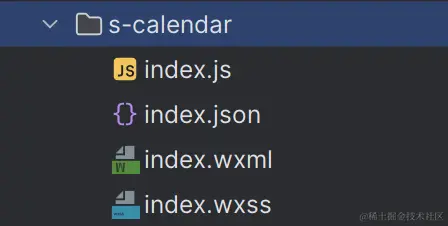
1、自定义日历组件,命名 s-calendar,组件结构如下:
index.js
function mapArray(target) {
let obj = {};
let result = [];
target.map((item) => {
let key = item.id;
if (obj[key]) {
obj[key].push(item);
} else {
obj[key] = [item];
}
});
for (const key in obj) {
const element = obj[key];
element.forEach((item, index) => {
if (index == 0) {
item.clazz = "left";
} else if (index == element.length - 1) {
item.clazz = "right";
} else {
item.clazz = "center";
}
result.push(item);
});
}
return result;
}
let lastDay = "";
Component({
properties: {
isFullTimes: {
type: Array,
value: [],
},
showMonth: {
type: Number,
value: 1,
},
showDays: {
type: Number,
value: 90,
},
title: {
type: String,
value: "",
},
disable: {
type: Boolean,
value: false
}
},
data: {
showMonthTemp: "",
isFullStr: "开课",
year: "",
month: "",
day: "",
days: [],
tomorrowDate: "",
tomorrowTimestamp: "",
selectDate: "",
list: [],
showMonthArr: []
},
lifetimes: {
attached() {
this.getAfterMonth()
this.initData();
},
},
observers: {
},
methods: {
initData() {
let lastDayYMD = this.getDateStr(null, this.data.showDays);
lastDay = (
new Date(lastDayYMD.replace(/-/g, "/") + " 00:00:00").getTime() / 1000
).toFixed(0);
let tomorrowDate = this.getDateStr(null, 0);
let tomorrowTimestamp = (
new Date(tomorrowDate.replace(/-/g, "/") + " 00:00:00").getTime() / 1000
).toFixed(0);
this.setData({
tomorrowDate,
tomorrowTimestamp,
});
let now = new Date();
this.setData({
year: now.getFullYear(),
month: now.getMonth() + 1,
day: now.getDate(),
});
this.initDate();
},
setUnSelectDate() {
this.setData({
selectDate: "",
});
},
onClosePopup() {
this.triggerEvent("onClosePopup", {});
},
setShowMonth(showMonth) {
if (showMonth != this.data.showMonth) {
this.setData({
showMonth,
showMonthTemp: showMonth,
list: [],
});
this.initData();
}
},
setIsFullTimes(isFullTimes) {
isFullTimes = mapArray(isFullTimes);
isFullTimes.forEach((item, index) => {
});
this.setData({
isFullTimes,
});
if (this.data.showMonthTemp != this.data.showMonth) {
this.setData({
selectDate: "",
});
}
for (let i = 0; i < this.data.list.length; i++) {
let obj = this.data.list[i];
for (let j = 0; j < obj.days.length; j++) {
obj.days[j].isFull = "";
}
}
for (let i = 0; i < this.data.isFullTimes.length; i++) {
for (let j = 0; j < this.data.list.length; j++) {
let obj = this.data.list[j];
let isOK = false;
for (let k = 0; k < obj.days.length; k++) {
if (isFullTimes[i].time == obj.days[k].dateTime) {
if (!obj.days[k].bigNinety) {
obj.days[k].isFull = this.data.isFullStr;
obj.days[k].id = isFullTimes[i].id;
obj.days[k].clazz = isFullTimes[i].clazz;
}
isOK = true;
break;
}
}
if (isOK) break;
}
}
this.setData({
list: this.data.list,
});
console.table(this.data.list);
},
add0(m) {
return m < 10 ? "0" + m : m;
},
getDateStr(today, addDayCount) {
let date;
if (today) {
date = new Date(today);
} else {
date = new Date();
}
date.setDate(date.getDate() + addDayCount);
let y = date.getFullYear();
let m = this.add0(date.getMonth() + 1);
let d = this.add0(date.getDate());
return y + "-" + m + "-" + d;
},
getAfterMonth() {
let showMonthArr = []
for (let i = 0; i < this.data.showMonth; i++) {
let {year, month} = this.afterMonth(i)
showMonthArr.push({year, month})
}
this.setData({
showMonthArr
})
console.log(showMonthArr)
},
afterMonth(n) {
let date = new Date()
date.setMonth(date.getMonth() + n)
date.toLocaleDateString()
let y = date.getFullYear()
let m = date.getMonth() + 1
return {year: y, month: m}
},
pushDays() {
let item = {
title: this.data.year + "年" + this.data.month + "月",
days: [],
};
let daysTemp = [];
for (let i = 1; i <= this.getDays(this.data.year, this.data.month); i++) {
let day = i < 10 ? "0" + i : i;
let dateTime =
this.data.year + "-" + this.add0(this.data.month) + "-" + day;
let daysTimestamp = (
new Date(dateTime.replace(/-/g, "/") + " 00:00:00").getTime() / 1000
).toFixed(0);
let obj = {
day: i,
isFull: "",
isExpireDate: false,
bigNinety: false,
dateTime: dateTime,
daysTimestamp: daysTimestamp,
selectDate: false,
};
if (
daysTimestamp < this.data.tomorrowTimestamp ||
(this.data.showMonth != 1 && daysTimestamp > lastDay)
) {
obj.isExpireDate = true;
obj.bigNinety = true;
} else {
obj.isExpireDate = false;
}
daysTemp.push(obj);
item.days = daysTemp;
}
for (
let i = 1; i <=
42 -
this.getDays(this.year, this.month) -
this.getWeek(this.year, this.month); i++
) {
let obj = {
day: i,
isFull: "",
isExpireDate: false,
dateTime: "",
};
daysTemp.push(obj);
item.days = daysTemp;
}
for (let i = 0; i < this.getWeek(this.year, this.month) - 1; i++) {
let obj = {
day: "",
isFull: "",
isExpireDate: false,
dateTime: "",
};
daysTemp.unshift(obj);
item.days = daysTemp;
}
this.data.list.push(item);
this.setData({
list: this.data.list,
});
},
getDays(Y, M) {
let day = new Date(Y, M, 0).getDate();
return day;
},
getWeek(Y, M) {
let oo = this.data.year + "/" + this.data.month + "/" + 1;
let nn = new Date(oo);
let week = nn.getDay();
return week;
},
initDate() {
this.setData({
list: []
})
for (let i = 0; i < this.data.showMonthArr.length; i++) {
let obj = this.data.showMonthArr[i]
this.setData({
month: obj.month,
year: obj.year
})
this.pushDays();
}
this.setIsFullTimes(this.data.isFullTimes)
},
onSelectDay(e) {
debugger
let item = e.currentTarget.dataset.item;
let hasDay = this.data.isFullTimes.find((d) => d.time == item.dateTime);
if (item.isExpireDate || hasDay == undefined) {
return;
}
this.data.list[0].days.forEach((d) => (d.selectDate = false));
this.data.list[0].days.forEach((d) => {
if (item.id == d.id) {
d.selectDate = true;
}
});
this.setData({
list: this.data.list,
});
this.triggerEvent("onSelectDay", item);
},
onConfirm(){
this.triggerEvent("onConfirm");
},
handleShowLastMonth() {
this.setData({
list: [],
});
if (this.data.month > 1) {
this.setData({
month: this.data.month - 1,
});
} else if (this.data.year > 1970) {
this.setData({
month: 12,
year: this.data.year - 1,
});
} else {
wx.showToast("不能查找更远的日期");
}
this.pushDays();
this.setIsFullTimes(this.data.isFullTimes);
},
handleShowNextMonth() {
this.setData({
list: [],
});
if (this.data.month < 12) {
this.setData({
month: this.data.month + 1,
});
} else {
this.setData({
month: 1,
year: this.data.year + 1,
});
}
this.pushDays();
this.setIsFullTimes(this.data.isFullTimes);
},
},
});
indes.json
{
  "component": true,
  "usingComponents": {
  }
}
indes.wxml
<view class="calender">
<view class="date_wrap isIPX">
<view class="header">
<view class="tip-top">
<view class="t1">{{title}}</view>
<image class="poppu-close"
src="/img/home/del_msg_icon.png"
bindtap="onClosePopup"></image>
</view>
<view class="line-class"></view>
<view class="week">
<view class="li">一</view>
<view class="li">二</view>
<view class="li">三</view>
<view class="li">四</view>
<view class="li">五</view>
<view class="li">六</view>
<view class="li">日</view>
</view>
</view>
<view class="sc-v ">
<block wx:for="{{list}}"
wx:key="title">
<view class="top-date-box">
<view wx:if="{{index===0&&showMonth==1}}"
class="icon_left-p"
catchtap="handleShowLastMonth">
<image class="icon_left"
src="/img/common/calendar_left.png"></image>
</view>
<view class="top_date">
{{item.title}}
</view>
<view wx:if="{{index===0&&showMonth==1}}"
class="icon_left-p"
catchtap="handleShowNextMonth">
<image class="icon_left"
src="/img/common/calendar_right.png"></image>
</view>
</view>
<view class="day">
<view class="li {{daysItem.isExpireDate?'gray':''}} {{daysItem.day&&daysItem.isFull == isFullStr&&daysItem.clazz=='left'?'c_select_bg_left':''}} {{daysItem.day&&daysItem.isFull == isFullStr&&daysItem.clazz=='center'?'c_select_bg_center':''}} {{daysItem.day&&daysItem.isFull == isFullStr&&daysItem.clazz=='right'?'c_select_bg_right':''}} {{daysItem.day&&daysItem.selectDate&&daysItem.clazz=='left'?'c_border_left':''}} {{daysItem.day&&daysItem.selectDate&&daysItem.clazz=='center'?'c_border_center':''}} {{daysItem.day&&daysItem.selectDate&&daysItem.clazz=='right'?'c_border_right':''}}"
wx:for="{{item.days}}"
wx:key="id"
wx:for-item="daysItem"
catchtap="onSelectDay"
data-item="{{daysItem}}">
<view class="day_item">
<view>
<view>
{{daysItem.day}}
</view>
<view class="fs-20">{{daysItem.isFull}}</view>
</view>
</view>
</view>
</view>
</block>
</view>
</view>
</view>
indes.wxss
.calender {
background: white;
border-radius: 16rpx 16rpx 0 0;
}
.calender .top {
display: flex;
align-items: center;
}
.calender .icon_left-p {
padding-top: 15rpx;
padding-left: 20rpx;
padding-right: 20rpx;
}
.calender .icon_left {
vertical-align: top;
width: 20rpx;
height: 30rpx;
}
.top-date-box {
padding: 0 10rpx;
display: flex;
align-items: center;
justify-content: center;
}
.top_date {
padding-top: 20rpx;
padding-bottom: 40rpx;
text-align: center;
flex: 1;
font-size: 28rpx;
font-family: PingFangSC-Medium, PingFang SC;
font-weight: 500;
color: #333333;
}
.header {
width: 100%;
position: fixed;
top: 0;
left: 0;
z-index: 1;
background: #ffffff;
border-radius: 16rpx 16rpx 0 0;
}
.tip-top {
display: flex;
align-items: center;
}
.t1 {
font-size: 32rpx;
font-weight: 500;
font-family: PingFangSC-Medium, PingFang SC;
color: #333333;
padding-left: 34rpx;
flex: 1;
}
.poppu-close {
width: 40rpx;
height: 40rpx;
padding: 32rpx;
}
.week {
padding: 0 10rpx;
background: #f9f9f9;
z-index: 1;
display: flex;
height: 80rpx;
line-height: 80rpx;
}
.week .li {
text-align: center;
flex: 1;
width: 14.28%;
font-size: 28rpx;
font-family: PingFangSC-Regular, PingFang SC;
font-weight: 400;
color: #999999;
}
.day {
padding: 0 10rpx;
display: flex;
flex-direction: row;
font-size: 28rpx;
flex-wrap: wrap;
color: #333333;
}
.day .li {
width: 14.28%;
box-sizing: border-box;
display: flex;
align-items: center;
justify-content: center;
flex-direction: column;
color: #333333;
margin-top: 4rpx;
}
.day_item {
width: 76rpx;
height: 80rpx;
margin-top: 12rpx;
display: flex;
text-align: center;
justify-content: center;
font-size: 28rpx;
font-family: PingFangSC-Regular, PingFang SC;
font-weight: 400;
}
.c_select_bg_center {
color: #ff561a !important;
background: #fff7f5;
border-top: 2rpx solid #fff7f5;
border-bottom: 2rpx solid #fff7f5;
}
.c_select_bg_left {
color: #ff561a !important;
background: #fff7f5;
border-radius: 16rpx 0 0 16rpx !important;
border-left: 2rpx solid #fff7f5 !important;
border-top: 2rpx solid #fff7f5 !important;
border-bottom: 2rpx solid #fff7f5 !important;
}
.c_select_bg_right {
color: #ff561a !important;
background: #fff7f5;
border-right: 2rpx solid #fff7f5 !important;
border-top: 2rpx solid #fff7f5 !important;
border-bottom: 2rpx solid #fff7f5 !important;
border-radius: 0 16rpx 16rpx 0 !important;
}
.c_border_left {
border-radius: 16rpx 0 0 16rpx !important;
border-left: 2rpx solid #ff561a !important;
border-top: 2rpx solid #ff561a !important;
border-bottom: 2rpx solid #ff561a !important;
}
.c_border_center {
border-top: 2rpx solid #ff561a !important;
border-bottom: 2rpx solid #ff561a !important;
}
.c_border_right {
border-right: 2rpx solid #ff561a !important;
border-top: 2rpx solid #ff561a !important;
border-bottom: 2rpx solid #ff561a !important;
border-radius: 0 16rpx 16rpx 0 !important;
}
.yqd-icon {
width: 25rpx;
height: 25rpx;
}
.gray {
color: #bebebe !important;
}
.c-bold {
font-weight: bold;
}
.fs-26 {
font-size: 26rpx !important;
}
.fs-20 {
font-size: 20rpx;
}
.c-f {
color: #ffffff;
}
.sc-v {
border-radius: 16rpx 16rpx 0 0;
padding-top: 182rpx;
}
.isIPX {
padding-bottom: constant(safe-area-inset-bottom);
padding-bottom: env(safe-area-inset-bottom);
}
.line-class {
height: 1rpx;
background-color: #ebebed;
}
.reserve-container {
display: flex;
align-items: center;
padding: 24rpx 0;
}
.img-tip {
height: 24rpx;
width: 24rpx;
margin-top: 8rpx;
}
.reserve-tip-text {
font-size: 24rpx;
font-family: PingFangSC-Regular, PingFang SC;
font-weight: 400;
color: #faa96d;
}
.reserve-tip-text-bg {
background: #f9e1e1;
padding: 16rpx 32rpx;
margin-bottom: 20rpx;
font-size: 26rpx;
font-family: PingFangSC-Regular, PingFang SC;
font-weight: 400;
color: #f86363;
display: flex;
flex-direction: column;
}
.tip-class {
display: flex;
flex-direction: column;
margin-left: 10rpx;
flex: 1;
line-height: 40rpx;
}
2、使用方式:在需要使用的页面引入 s-calendar 组件

courses-dedail.js
let sCalendar = null;
Page({
data: {
choose_times: [
{
"id": 1,
"time": "2023-11-04"
},
{
"id": 1,
"time": "2023-11-05"
},
{
"id": 2,
"time": "2023-11-11"
},
{
"id": 2,
"time": "2023-11-12"
},
{
"id": 2,
"time": "2023-11-13"
}
]
},
});
onLoad(options) {
sCalendar = this.selectComponent("#sCalendar");
this.onCalendar();
},
onCalendar() {
sCalendar.setIsFullTimes(this.data.choose_times);
},
onSelectDay(e) {
console.log(e.detail.id);
}
courses-dedail.json
{
  "navigationBarTitleText": "课程详情",
  "navigationBarBackgroundColor": "#FFFFFF",
  "navigationBarTextStyle": "black",
  "backgroundColor": "#FFFFFF",
  "usingComponents": {
    "s-calendar": "/components/s-calendar/index"
  }
}
courses-dedail.wxml
<s-calendar
  id="sCalendar"
  title="开课时间预告"
  bindonSelectDay="onSelectDay"
  showMonth="1">
</s-calendar>


