插件
必装插件
搜索关键字 ext:go
Tooltitude for Go (GoLang)
> 实现/引用 计数
Chinese (Simplified) (简体中文) Language Pack for Visual
CodeSnap
> 代码截图
Colorful Comments
> 彩色备注,默认# 灰色,! 红色
Commit Message Editor
> 规范msg提交
# DDL To Go Struct
Docker
#Gin Framework Snippets
Git History
GitHub Copilot*
GitLens — Git supercharged
GO
Go Outliner
> IDE左侧代码大纲
Go struct tag
> struct tag多风格支持\支持类型最多
#Go Profiling
> benchmark
JSON to Go
> json字符串一键转struct
koroFileHeader
> 文件头
Kubernetes
Markdown All in One
> MD文件
# Rainbow CSV
Syntax Highlighter
> 语法高亮
Tabnine: AI Chat & Autocomplete for JavaScript, Python, Typescript, Java, PHP, Go, and more
> 效果尚可
XML
XML Tools
YAML
#Studio Code
#Rainbow Brackets
SemanticDiff
> 差异展示更佳
#SonarLint
#Golang Snippets
#vscode-icons
Group Imports for Go
> 1.0.1
Bookmarks
Dev Containers
Error Lens
GitHub Theme
Golang Snippets
sneak mark
> 检查英文中的中文
GO插件配置
cmd+shift+p 插件安装
gotools
Tools environment: GOPATH=/root/go
Installing 7 tools at /root/go/bin
  gopls
  gotests
  gomodifytags
  impl
  goplay
  dlv
  staticcheck

Installing golang.org/x/tools/gopls@latest (/root/go/bin/gopls) SUCCEEDED
Installing github.com/cweill/gotests/gotests@v1.6.0 (/root/go/bin/gotests) SUCCEEDED
Installing github.com/fatih/gomodifytags@v1.16.0 (/root/go/bin/gomodifytags) SUCCEEDED
Installing github.com/josharian/impl@v1.1.0 (/root/go/bin/impl) SUCCEEDED
Installing github.com/haya14busa/goplay/cmd/goplay@v1.0.0 (/root/go/bin/goplay) SUCCEEDED
Installing github.com/go-delve/delve/cmd/dlv@latest (/root/go/bin/dlv) SUCCEEDED
Installing honnef.co/go/tools/cmd/staticcheck@latest (/root/go/bin/staticcheck) SUCCEEDED

All tools successfully installed. You are ready to Go. :)
linter
go install github.com/golangci/golangci-lint/cmd/golangci-lint@latest

golangci-lint

.vscode/settings.json增加
"go.lintTool": "golangci-lint",
"go.lintFlags": [ "--fast" ]

golangci-lint help linters
查看支持的检查器

默认启用的检查器
Enabled by default linters:
errcheck: errcheck is a program for checking for unchecked errors in Go code. These unchecked errors can be critical bugs in some cases [fast: false, auto-fix: false]
gosimple: Linter for Go source code that specializes in simplifying code [fast: false, auto-fix: false]
govet: Vet examines Go source code and reports suspicious constructs. It is roughly the same as 'go vet' and uses its passes. [fast: false, auto-fix: false]
ineffassign: Detects when assignments to existing variables are not used [fast: true, auto-fix: false]
staticcheck: It's a set of rules from staticcheck. It's not the same thing as the staticcheck binary. The author of staticcheck doesn't support or approve the use of staticcheck as a library inside golangci-lint. [fast: false, auto-fix: false]
unused: Checks Go code for unused constants, variables, functions and types [fast: false, auto-fix: false]
插件配置
Tooltitude for Go (GoLang)
展示类的实现、引用 等信息
koroFileHeader
代码注释
cmd+shift+i 文件头注释
cmd+shift+t 函数/方法注释
关闭自动添加文件头注释
        "autoAdd": false,
        "autoAlready": false,
fileheader
配置函数注释快捷键
先删除这里的绑定

ctrl+cmd+t 在函数定位所在行或选中函数后,可对函数添加注释
文件头注释模版:
这里有bug;custom_string_obkoro1;custom_string_obkoro1_copyright 无法删除
"fileheader.customMade": {
        "Author": "git config user.name",
        "Date": "Do not edit",
        "LastEditors": "git config user.name",
        "LastEditTime": "Do not edit",
        "FilePath": "Do not edit",
        "Description": "",
        "custom_string_obkoro1": "",
        "custom_string_obkoro1_copyright": "Copyright (c) ${now_year} by git config user.name, All Rights Reserved. "
    }
函数注释模版:
    "fileheader.cursorMode": {
        "description": "", // 介绍文件的作用、文件的入参、出参。
        "param": "", // param 开启函数参数自动提取 需要将光标放在函数行或者函数上方的空白行
        "return": "",
    },
go-struct-tag v0.3.0
go struct tag 自动关联联想输入
struct 自动联想输入
Go struct tag
 "go-struct-tag.cases": [
        "pascal",
        "snake",
        "camel"
    ]
Commit Message Editor
配置git提交描述快捷键编辑窗
JSON to Go
cmd+shift+p 格式化json、以及转换json到struct
SemanticDiff
更智能的diff工具
SonarLint
代码扫描
Golang Snippets
虽然AI插件很多,但这玩意依然很有用
Gin Framework Snippets
Git History
Go插件搜索
CodeSnap
选中代码,cmd+shift+p选中 CodeSnap 即可生成截图
其他VSCode插件
ENV
Go Critic
Go Profiling
Gremlins tracker for Visual Studio Code
indent-rainbow
Indenticator
Todo Tree
驼峰翻译助手
Error Lens
Better Comments
Go Critic
静态代码检查器
Todo Tree
写/看TODO
Error Lens
错误提示
Better Comments
按照插件语法编写,会有颜色提醒各类注释信息
AI插件
GitHub Copilot
GitHub Copilot Chat
Tabnine: AI Autocomplete & Chat for Javascript, Python, Typescript, PHP, Go, Java & more
Codeium: AI Coding Autocomplete and Chat for Python, Javascript, Typescript, Java, Go, and more
Blackbox AI Code Generation, Code Chat, Code Search
使用
默认快捷键
ctrl+cmd+i 文件头 注释
ctrl+cmd+t 在函数定位所在行或选中函数后,可对函数添加注释

cmd+/ 单行注释
shit+opt+A 在光标所在行,跨行注释

cmd+|\ 左右分屏


cmd+shift+k 删除光标所在行

ctl+shift+` 打开终端
cmd+b 隐藏侧边栏
cmd+` 显示终端
cmd+s 快捷键设置
opt+ 上|下 移动光标所在行代码 上|下
shift+opt+ 上|下;复制光标所在行、并往上或往下复制、复制后光标聚焦新行所在行
cmd+shift+f 搜索
opt+shift+ [] 代码折叠
opt+点击多行 选中多行

control + - ,回到跳转前原始位置
cmd+↑ 文件头
cmd+↓ 文件尾
ctrl+g ,输入指定行号;跳转指定行号
ctrl+w, 在多个窗口间切换
自定义快捷键
ctrl+cmd+1 跨行/块注释
ctrl+cmd+2 重命名符号
ctrl+cmd+3 git: open commit message editor
ctrl+cmd+4 删除光标所在行
ctrl+cmd+e 资源管理器
ctrl+cmd+` 跳转到括号

ctl+cmd+y 设置同步:立即同步

shift+cmd+2 代码折叠
VSCode配置
自动保存
中文显示
安装中文语言包
cmd+shift+p Configure Display Language,选择中文
搜索排除文件/文件夹
mkdir .vscode
touch .vscode/settings.json

{
    "search.exclude": {
      "**/vendor": true,
      "**/.history": true,
      "**/log": true,
      "**/.git": true,
      "**/.vscode": true,
      "**/docs": true,
      "**/script": true
    }
}
golang 配置
go build 配置
{
    // Use IntelliSense to learn about possible attributes.
    // Hover to view descriptions of existing attributes.
    // For more information, visit: https://go.microsoft.com/fwlink/?linkid=830387
    "version": "0.2.0",
    "configurations": [
        {
            "name": "Launch",
            "type": "go",
            "request": "launch",
            "mode": "auto",
            "program": "${workspaceFolder}",
            "env": {},
            "args": [
                "api",
                "--item=gin"
            ],
    }
    ]
}
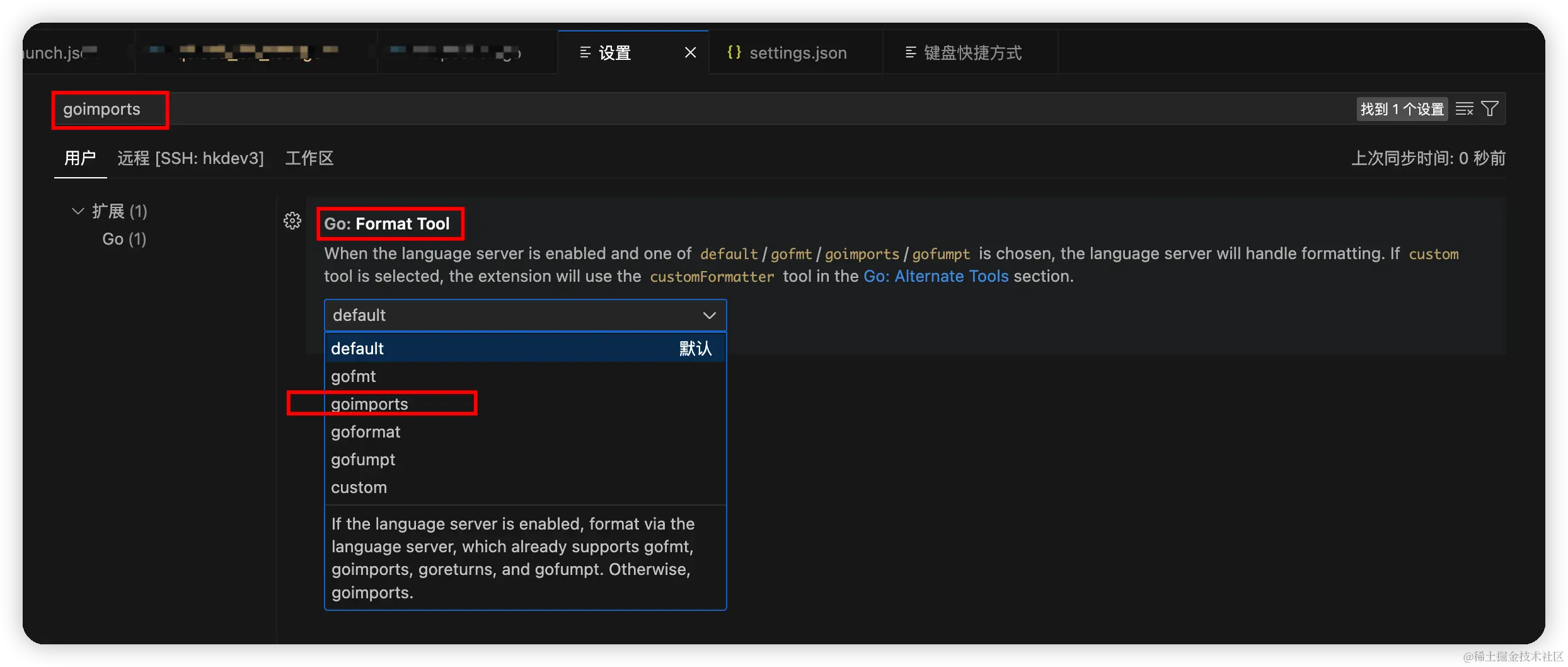
Go import
root@iZj6cfhy74to2yudyezwz7Z:/data/app/inspection# go get golang.org/x/tools/cmd/goimports
go: downloading golang.org/x/crypto v0.16.0
go: downloading golang.org/x/net v0.19.0
go: downloading golang.org/x/sys v0.15.0
go: upgraded golang.org/x/crypto v0.11.0 => v0.16.0
go: upgraded golang.org/x/mod v0.11.0 => v0.14.0
go: upgraded golang.org/x/net v0.12.0 => v0.19.0
go: upgraded golang.org/x/sync v0.3.0 => v0.5.0
go: upgraded golang.org/x/sys v0.10.0 => v0.15.0
go: upgraded golang.org/x/text v0.11.0 => v0.14.0
go: upgraded golang.org/x/tools v0.10.0 => v0.16.0
修改default为 goimports