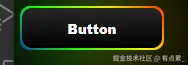
<!DOCTYPE html>
<html lang="en">

<head>
    <meta charset="UTF-8">
    <meta http-equiv="X-UA-Compatible" content="IE=edge">
    <meta name="viewport" content="width=device-width, initial-scale=1.0">
    <title>Document</title>
</head>

<body>
    <button class="button">
        Button
    </button>
</body>
<style>
    body{
        background-color:black;
    }
    .button {
        width: 140px;
        height: 40px;
        display: flex;
        align-items: center;
        justify-content: center;
        gap: 10px;
        padding: 0px 15px;
        background-color: red;
        border-radius: 10px;
        border: none;
        color: white;
        position: relative;
        cursor: pointer;
        font-weight: 900;
        transition-duration: .2s;
        background: linear-gradient(0deg, #000, #272727);
    }

    .button:before,
    .button:after {
        content: '';
        position: absolute;
        left: -2px;
        top: -2px;
        border-radius: 10px;
        background: linear-gradient(45deg, #fb0094, #0000ff, #00ff00, #ffff00, #ff0000, #fb0094,
                #0000ff, #00ff00, #ffff00, #ff0000);
        background-size: 400%;
        width: calc(100% + 4px);
        height: calc(100% + 4px);
        z-index: -1;
        animation: steam 20s linear infinite;
    }

    @keyframes steam {
        0% {
            background-position: 0 0;
        }

        50% {
            background-position: 400% 0;
        }

        100% {
            background-position: 0 0;
        }
    }

    .button:after {
        filter: blur(50px);
    }
</style>

</html>