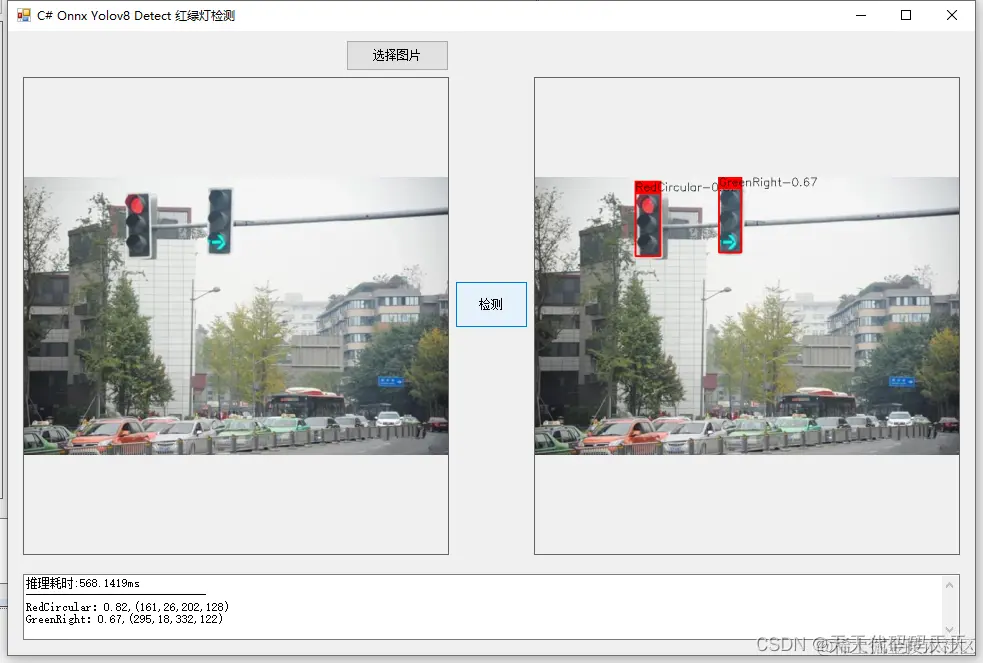
效果
lable
GreenCircular
GreenLeft
GreenRight
GreenStraight
RedCircular
RedLeft
RedRight
RedStraight
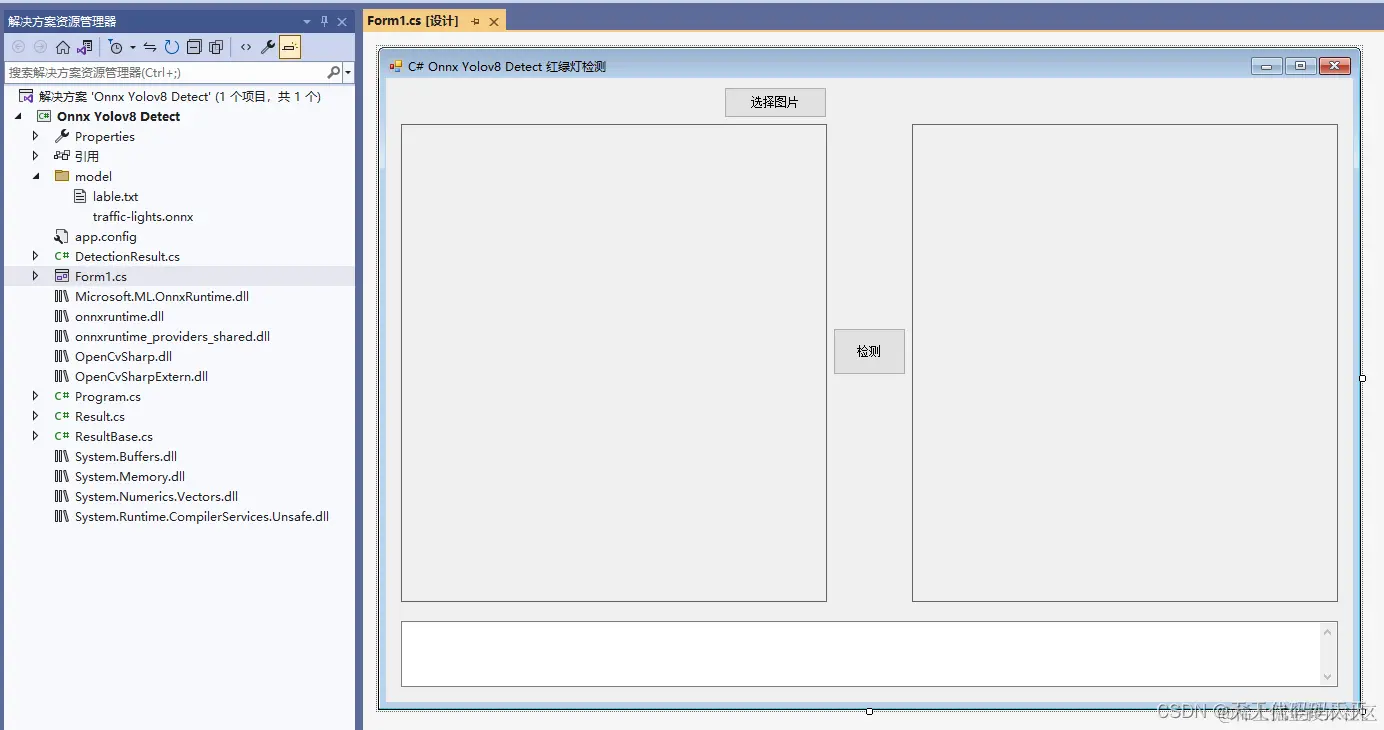
项目
代码
using Microsoft.ML.OnnxRuntime
using Microsoft.ML.OnnxRuntime.Tensors
using OpenCvSharp
using System
using System.Collections.Generic
using System.Drawing
using System.Linq
using System.Text
using System.Windows.Forms
namespace Onnx_Yolov8_Detect
{
public partial class Form1 : Form
{
public Form1()
{
InitializeComponent()
}
string fileFilter = "*.*|*.bmp;*.jpg;*.jpeg;*.tiff;*.tiff;*.png"
string image_path = ""
string startupPath
string classer_path
string model_path
DateTime dt1 = DateTime.Now
DateTime dt2 = DateTime.Now
Mat image
Mat result_image
SessionOptions options
InferenceSession onnx_session
Tensor<float> input_tensor
List<NamedOnnxValue> input_ontainer
IDisposableReadOnlyCollection<DisposableNamedOnnxValue> result_infer
DisposableNamedOnnxValue[] results_onnxvalue
Tensor<float> result_tensors
float[] result_array
float[] factors = new float[2]
Result result
DetectionResult result_pro
StringBuilder sb = new StringBuilder()
private void button1_Click(object sender, EventArgs e)
{
OpenFileDialog ofd = new OpenFileDialog()
ofd.Filter = fileFilter
if (ofd.ShowDialog() != DialogResult.OK) return
pictureBox1.Image = null
pictureBox2.Image = null
textBox1.Text = ""
image_path = ofd.FileName
pictureBox1.Image = new Bitmap(image_path)
image = new Mat(image_path)
}
private void Form1_Load(object sender, EventArgs e)
{
startupPath = Application.StartupPath + "\\model\\"
model_path = startupPath + "traffic-lights.onnx"
classer_path = startupPath + "lable.txt"
// 创建输出会话
options = new SessionOptions()
options.LogSeverityLevel = OrtLoggingLevel.ORT_LOGGING_LEVEL_INFO
options.AppendExecutionProvider_CPU(0)
// 创建推理模型类,读取本地模型文件
onnx_session = new InferenceSession(model_path, options)
// 输入Tensor
input_tensor = new DenseTensor<float>(new[] { 1, 3, 640, 640 })
// 创建输入容器
input_ontainer = new List<NamedOnnxValue>()
}
private void button2_Click(object sender, EventArgs e)
{
if (image_path == "")
{
return
}
textBox1.Text = "检测中,请稍等……"
pictureBox2.Image = null
Application.DoEvents()
//图片缩放
image = new Mat(image_path)
int max_image_length = image.Cols > image.Rows ? image.Cols : image.Rows
Mat max_image = Mat.Zeros(new OpenCvSharp.Size(max_image_length, max_image_length), MatType.CV_8UC3)
Rect roi = new Rect(0, 0, image.Cols, image.Rows)
image.CopyTo(new Mat(max_image, roi))
factors[0] = factors[1] = (float)(max_image_length / 640.0)
//将图片转为RGB通道
Mat image_rgb = new Mat()
Cv2.CvtColor(max_image, image_rgb, ColorConversionCodes.BGR2RGB)
Mat resize_image = new Mat()
Cv2.Resize(image_rgb, resize_image, new OpenCvSharp.Size(640, 640))
//输入Tensor
for (int y = 0
{
for (int x = 0
{
input_tensor[0, 0, y, x] = resize_image.At<Vec3b>(y, x)[0] / 255f
input_tensor[0, 1, y, x] = resize_image.At<Vec3b>(y, x)[1] / 255f
input_tensor[0, 2, y, x] = resize_image.At<Vec3b>(y, x)[2] / 255f
}
}
//将 input_tensor 放入一个输入参数的容器,并指定名称
input_ontainer.Add(NamedOnnxValue.CreateFromTensor("images", input_tensor))
dt1 = DateTime.Now
//运行 Inference 并获取结果
result_infer = onnx_session.Run(input_ontainer)
dt2 = DateTime.Now
//将输出结果转为DisposableNamedOnnxValue数组
results_onnxvalue = result_infer.ToArray()
//读取第一个节点输出并转为Tensor数据
result_tensors = results_onnxvalue[0].AsTensor<float>()
result_array = result_tensors.ToArray()
resize_image.Dispose()
image_rgb.Dispose()
result_pro = new DetectionResult(classer_path, factors)
result = result_pro.process_result(result_array)
result_image = result_pro.draw_result(result, image.Clone())
if (!result_image.Empty())
{
pictureBox2.Image = new Bitmap(result_image.ToMemoryStream())
sb.Clear()
sb.AppendLine("推理耗时:" + (dt2 - dt1).TotalMilliseconds + "ms")
sb.AppendLine("------------------------------")
for (int i = 0
{
sb.AppendLine(string.Format("{0}:{1},({2},{3},{4},{5})"
, result.classes[i]
, result.scores[i].ToString("0.00")
, result.rects[i].TopLeft.X
, result.rects[i].TopLeft.Y
, result.rects[i].BottomRight.X
, result.rects[i].BottomRight.Y
))
}
textBox1.Text = sb.ToString()
}
else
{
textBox1.Text = "无信息"
}
}
}
}
下载
源码下载



