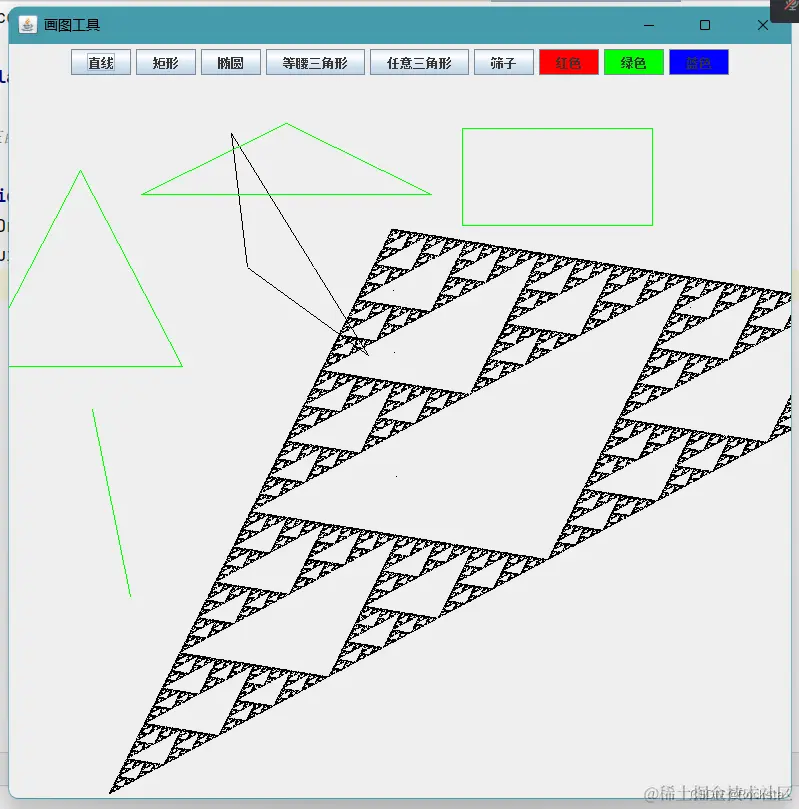
- 鼠标监听器MouseListener一共能监听到鼠标的5种方法。
- 在原点按下并且释放才显示点击操作,如果按下之后移动只显示释放。
- 所以说绘制图形只用到按下和释放两个操作
- 在代码层面解释:释放时画线,点击时画点
- 窗体里面坐标只能显示正数,负数在窗体外显示
- e.getActionCommand()来获取按钮上的内容
- 绘制矩形:g.drawRect(x, y, width, height);从左往右画,从右往左画保证起始点最小,窗体里面只能显示正数。
- 画任意三角形bug的原因:点击的时候把按下和释放的坐标覆盖了,因为点击操作是需要按下和释放在同一个点才执行。处理方法:把按下和释放得到的坐标值想办法保存下来。
- 怎么保存?通过标记位来保存
- g.drawArc(x, y, width, height, startAngle, arcAngle) 绘制覆盖指定矩形的圆形或者椭圆形圆弧的轮廓。
package com.gch.drawUI;
import javax.swing.*;
import java.awt.*;
import java.awt.event.ActionEvent;
import java.awt.event.ActionListener;
import java.awt.event.MouseEvent;
import java.awt.event.MouseListener;
import java.util.Random;
public class DrawUI {
public static int x1,y1,x2,y2,x3,y3;
public static String graphicsButtonName = null;
public static boolean flag = true;
public void showUI(){
JFrame win = new JFrame("画图工具");
JPanel panel = new JPanel();
win.add(panel);
win.setSize(800,800);
win.setLocationRelativeTo(null);
win.setDefaultCloseOperation(3);
String[] graphicsButton = {"直线","矩形","椭圆","等腰三角形","任意三角形","筛子"};
for(int i = 0;i < graphicsButton.length;i++){
JButton btn = new JButton(graphicsButton[i]);
btn.addActionListener(new ActionListener() {
@Override
public void actionPerformed(ActionEvent e) {
graphicsButtonName = e.getActionCommand();
}
});
panel.add(btn);
}
ColorMouse mouse = new ColorMouse();
String[] colorButton = {"红色","绿色","蓝色"};
Color[] color = {Color.RED,Color.GREEN,Color.blue};
for(int i = 0;i < colorButton.length;i++){
JButton btn = new JButton(colorButton[i]);
btn.addActionListener(mouse);
btn.setBackground(color[i]);
panel.add(btn);
}
win.setVisible(true);
Graphics g = win.getGraphics();
mouse.setG(g);
win.addMouseListener(new MouseListener() {
@Override
public void mouseClicked(MouseEvent e) {
System.out.println("点击!");
x3 = e.getX();
y3 = e.getY();
if(graphicsButtonName.equals("任意三角形")){
g.drawLine(x1, y1, x3, y3);
g.drawLine(x2, y2, x3, y3);
flag = true;
}
}
@Override
public void mousePressed(MouseEvent e) {
System.out.println("按下!");
if(flag){
x1 = e.getX();
y1 = e.getY();
}
}
@Override
public void mouseReleased(MouseEvent e) {
System.out.println("释放!");
if(flag){
x2 = e.getX();
y2 = e.getY();
}
if(graphicsButtonName.equals("直线")){
g.drawLine(x1,y1,x2,y2);
}else if(graphicsButtonName.equals("矩形")){
g.drawRect(Math.min(x1,x2),Math.min(y1,y2),Math.abs(x2 - x1),Math.abs(y2 - y1));
}else if(graphicsButtonName.equals("椭圆")){
g.drawArc(Math.min(x1,x2),Math.min(y1,y2),Math.abs(x2 -x1),Math.abs(y2 - y1),0,360);
}else if(graphicsButtonName.equals("等腰三角形")){
g.drawLine(x1, y1, x2, y2);
g.drawLine(x2,y2,2 * x1 - x2, y2);
g.drawLine(2 * x1 - x2,y2, x1, y1);
}else if(graphicsButtonName.equals("任意三角形") && flag == true){
g.drawLine(x1, y1, x2, y2);
flag = false;
}else if(graphicsButtonName.equals("筛子")){
sifter();
}
}
public void sifter(){
Random r = new Random();
int ax = r.nextInt(1000) + 1;
int ay = r.nextInt(1000) + 1;
int bx = r.nextInt(1000) + 1;
int by = r.nextInt(1000) + 1;
int cx = r.nextInt(1000) + 1;
int cy = r.nextInt(1000) + 1;
int px = r.nextInt(1000) + 1;
int py = r.nextInt(1000) + 1;
for(int i = 0;i < 100000;i++){
int number = r.nextInt(3) + 1;
if(number == 1){
px = (ax + px) / 2;
py = (ay + py) / 2;
}else if(number == 2){
px = (bx + px) / 2;
py = (by + py) / 2;
}else if(number == 3){
px = (cx + px) / 2;
py = (cy + py) / 2;
}
g.drawLine(px, py, px, py);
}
}
@Override
public void mouseEntered(MouseEvent e) {
System.out.println("进入!");
}
@Override
public void mouseExited(MouseEvent e) {
System.out.println("退出!");
}
});
}
}
package com.gch.drawUI;
import java.awt.*;
import java.awt.event.ActionEvent;
import java.awt.event.ActionListener;
public class ColorMouse implements ActionListener {
private Graphics g;
public void setG(Graphics g) {
this.g = g;
}
@Override
public void actionPerformed(ActionEvent e) {
String colorButtonName = e.getActionCommand();
if(colorButtonName.equals("红色")){
g.setColor(Color.RED);
}else if(colorButtonName.equals("绿色")){
g.setColor(Color.green);
}else if(colorButtonName.equals("蓝色")){
g.setColor(Color.blue);
}
}
}
package com.gch.drawUI;
public class Manage {
public static void main(String[] args) {
DrawUI ui = new DrawUI();
ui.showUI();
}
}