node: v14.18.2
"@angular/common": "~10.0.2"
"@angular/router": "~10.0.2"
1、访问angular子应用路由,第一次加载页面成功,再次点击基座菜单。路由跳转,页面没显示出来。
查看 F12,会发现渲染路由的地方有两个 组件,第二个组件其实是我们此时访问的页面

路由加载,视图没有更新,在网上查找了很多资料,大多数都是说angular检查数据触发视图更新的问题,并不符合我们的业务场景
最后的解决方案:
在 main.component.ts 页面中增加一个button按钮,在监听到基座发送的路由跳转的指令后,触发按钮的点击事件,触发视图的更新(出发document.body的点击应该也是可以的,但是这里认为增加一个隐藏按钮去触发会更优雅一些,也会避免出现其他的问题)
2、angualr应用访问本地图片资源问题: 加载的静态资源图片404(这个应该是子应用都会遇到,vue是把图片处理成了base64,但是大文件等也许会有同样的问题)
- 问题产生原因:qiankun环境,子应用在基座中访问,静态资源会默认走基座地址去访问,但是基座项目没有这些资源文件,所以会出现404的错误。
<img src="../../../assets/default/progress.png" alt="图片">
报错 资源404 访问的是基座应用的服务下的 /assets/default/progress.png, 所以找不到相应的静态资源
子应用需要配置 publicPath: window.__webpack_public_path__ 但是在项目中配置之后不生效,依然报错404?
-
解决方案
- 创建一个公共处理 静态资源拼接 window.webpack_public_path 的方法
export function assetUrl(url: string): string {
    // @ts-ignore
    const publicPath = __webpack_public_path__;
    const publicPathSuffix = publicPath.endsWith('/') ? '' : '/';
    const urlPrefix = url.startsWith('/') ? '' : '/';
    return `${publicPath}${publicPathSuffix}assets${urlPrefix}${url}`;
}
<img [src]="assetUrl('/default/progress.png')" alt="图片">
3、在基座中访问angular子应用,刷新当前页面,会默认跳转到 /wel/home, 再次点击基座菜单跳转子应用的页面,报错。
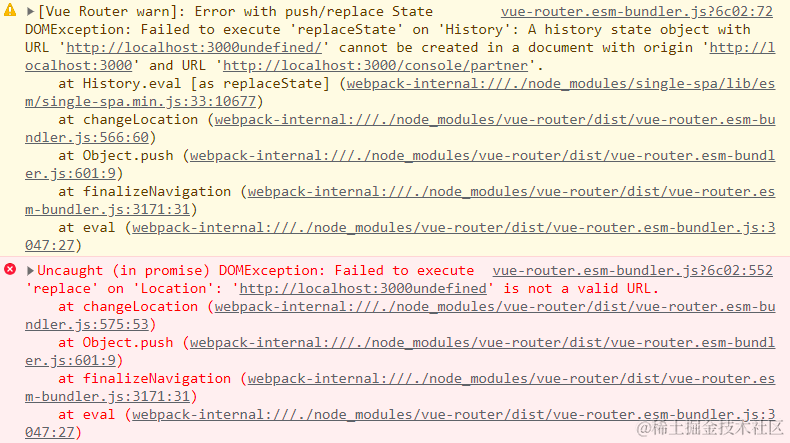
- 控制台报错信息
[Vue Router warn]: Error with push/replace State DOMException:
Failed to execute 'replaceState' on 'History': A history state object with URL
'http://cilocal.leandc.cn:8081undefined/' cannot be created in a document with origin 'http://cilocal.leandc.cn:8081' and URL 'http://cilocal.leandc.cn:8081/microEmbpWeb/wel/home'.
zone.js:690 Unhandled Promise rejection: Failed to execute 'replace' on 'Location': 'http://cilocal.leandc.cn:8081undefined' is not a valid URL. ; Zone: <root> ; Task: Promise.then ; Value: DOMException: Failed to execute 'replace' on 'Location': 'http://cilocal.leandc.cn:8081undefined' is not a valid URL. zone.js:386 Uncaught (in promise) DOMException: Failed to execute 'replace' on 'Location': 'http://cilocal.leandc.cn:8081undefined' is not a valid URL.
- 解决方案
将 angular 根路由下的路由验证去掉