nextTick作用
- 我们修改了数据后,想要立刻拿到更新后的视图元素,是不能拿到的,因为vue的视图更新是
异步的,如果想拿到,就需要借助nextTick
<template>
    <p ref="pRef"> {{ num }}</p>
    <button @click="add">add</button>
</template>

<script>
export default {
     setup() {
          const num = ref(1);
          const pRef = ref(null);

          const add = () => {
            num.value += 1;
            console.log(pRef.value.innerText); // 输出 1
            nextTick(() => {
              console.log(pRef.value.innerText); // 输出 2
            });
          };

          return {
            add,
            num,
            pRef,
          };
        }
}
</script>
- 输出控制台(如下图)
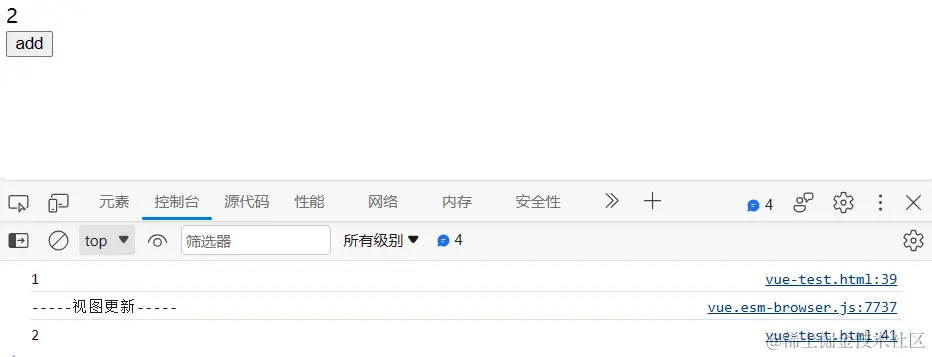
先看看视图怎么异步更新
const effect = new ReactiveEffect(
componentUpdateFn,
() => queueJob(update)
)
instance.effect = effect
const update = () => effect.run()
instance.update = update
queueJob代码
function queueJob(job) {
if (
!queue.length ||
!queue.includes(
job,
isFlushing && job.allowRecurse ? flushIndex + 1 : flushIndex
)
) {
if (job.id == null) {
queue.push(job);
} else {
queue.splice(findInsertionIndex(job.id), 0, job);
}
queueFlush();
}
}
function queueFlush() {
if (!isFlushing && !isFlushPending) {
isFlushPending = true;
currentFlushPromise = resolvedPromise.then(flushJobs);
}
}
function flushJobs(seen) {
isFlushPending = false;
isFlushing = true;
{
seen = seen || new Map();
}
queue.sort(comparator);
const check = (job) => checkRecursiveUpdates(seen, job);
try {
for (flushIndex = 0; flushIndex < queue.length; flushIndex++) {
const job = queue[flushIndex];
if (job && job.active !== false) {
if (check(job)) {
continue;
}
callWithErrorHandling(job, null, 14);
}
}
} finally {
flushIndex = 0;
queue.length = 0;
flushPostFlushCbs(seen);
isFlushing = false;
currentFlushPromise = null;
if (queue.length || pendingPostFlushCbs.length) {
flushJobs(seen);
}
}
}
视图是异步更新的,我们同样使用异步代码,在它更新后就能拿到数据了
nextTick源码
function nextTick(fn) {
const p = currentFlushPromise || resolvedPromise;
return fn ? p.then(this ? fn.bind(this) : fn) : p;
}
再来看看开关的demo
- 当进行
num.value+=1时会先把视图更新放到异步队列
- 后面接着调用
nextTick(fn)再把对应的fn放到队列
const add = () => {
num.value += 1
console.log(pRef.value.innerText)
nextTick(() => {
console.log(pRef.value.innerText)
})
}
结论
- 除了用nextTick,只要我们在视图更新后,使用异步任务(Promise.resolve(),setTimeout)都能取到更新后的视图元素