效果
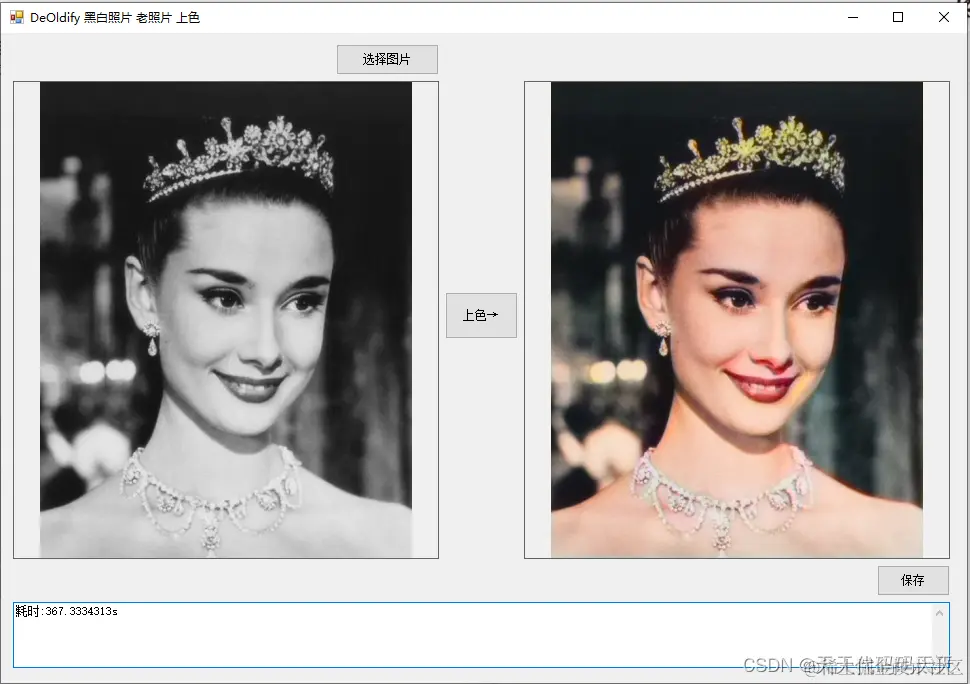
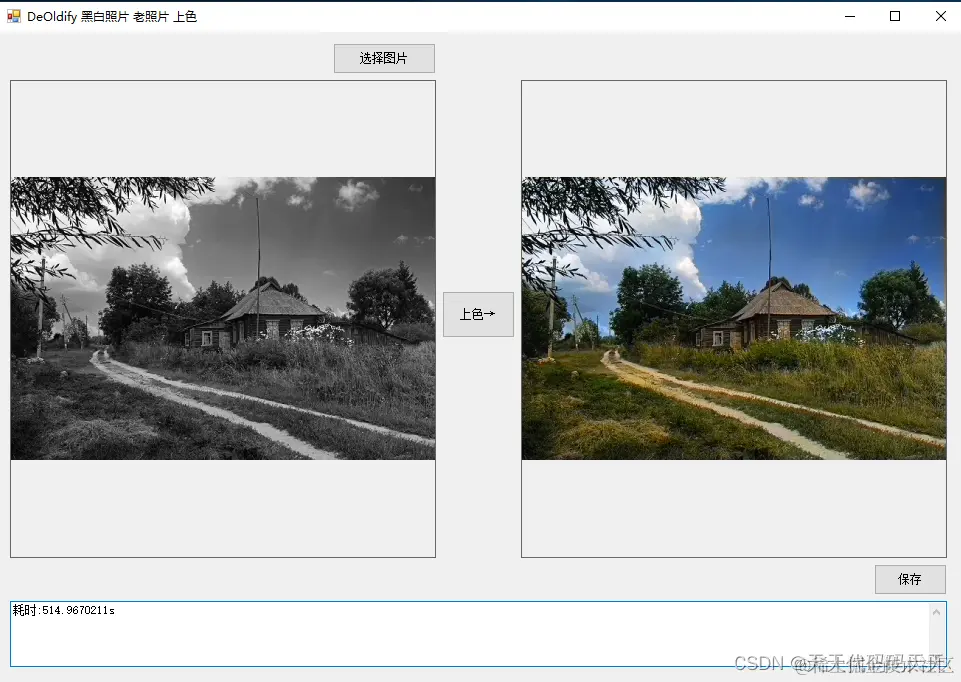
项目
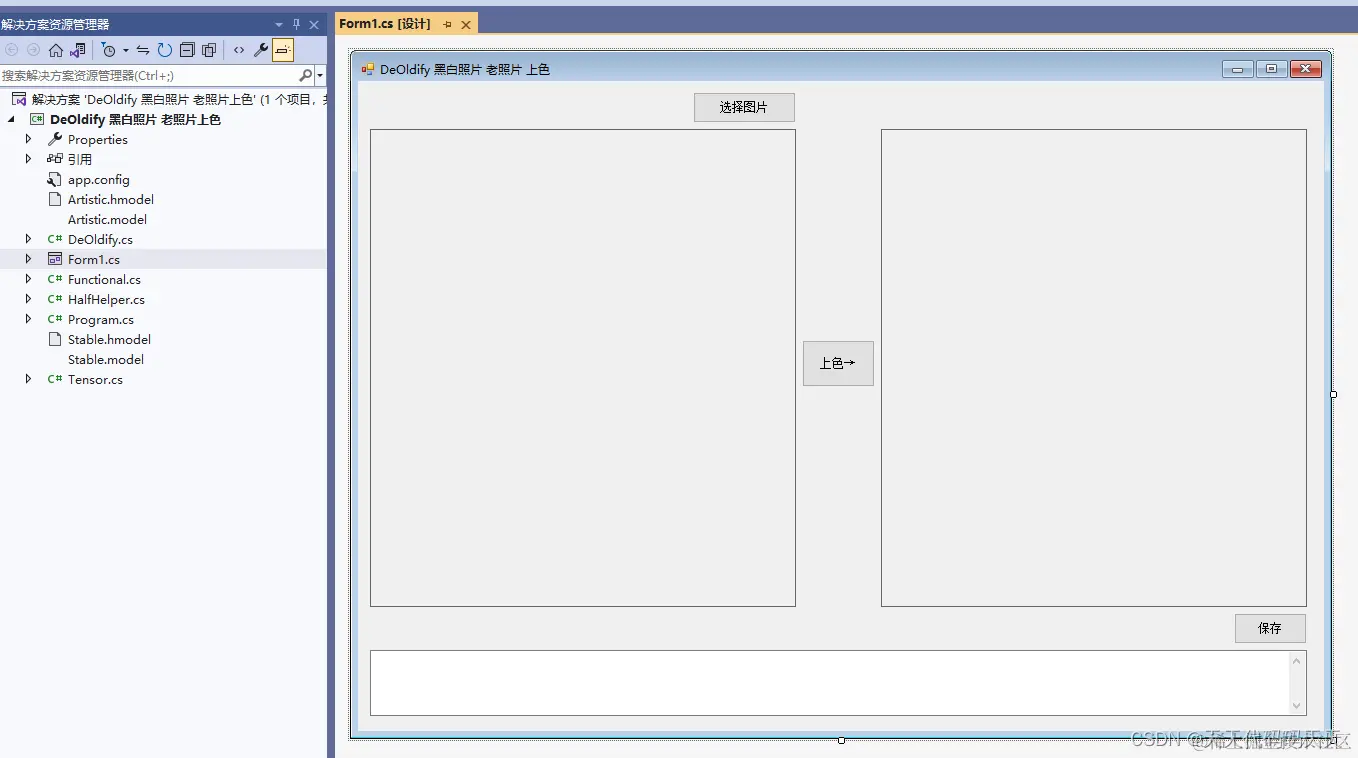
代码
using System
using System.Collections.Generic
using System.ComponentModel
using System.Data
using System.Drawing
using System.Drawing.Imaging
using System.IO
using System.Linq
using System.Reflection
using System.Text
using System.Threading.Tasks
using System.Windows.Forms
using static System.Windows.Forms.VisualStyles.VisualStyleElement
using static System.Windows.Forms.VisualStyles.VisualStyleElement.TaskBand
using static System.Windows.Forms.VisualStyles.VisualStyleElement.ToolBar
namespace DeOldify_黑白照片_老照片上色
{
public partial class Form1 : Form
{
public Form1()
{
InitializeComponent()
}
string fileFilter = "Images (*.bmp; *.emf; *.exif; *.gif; *.ico; *.jpg; *.png; *.tiff; *.wmf)|*.bmp; *.emf; *.exif; *.gif; *.ico; *.jpg; *.png; *.tiff; *.wmf|All files|*.*"
string image_path = ""
DateTime dt1 = DateTime.Now
DateTime dt2 = DateTime.Now
string startupPath
string model
/// <summary>
/// Input image.
/// </summary>
private Bitmap __Input
/// <summary>
/// Output image.
/// </summary>
private Bitmap __Output
/// <summary>
/// Normal output image.
/// </summary>
private Bitmap __NormalOutput
/// <summary>
/// Blurrified input image.
/// </summary>
private Bitmap __BlurryInput
/// <summary>
/// Blurrified output image.
/// </summary>
private Bitmap __BlurryOutput
private void button1_Click(object sender, EventArgs e)
{
OpenFileDialog ofd = new OpenFileDialog()
ofd.Filter = fileFilter
if (ofd.ShowDialog() != DialogResult.OK) return
pictureBox1.Image = null
image_path = ofd.FileName
__Input = new Bitmap(image_path)
//__BlurryInput = __Blurify(__Input)
pictureBox1.Image = __Decolorize(__Input)
textBox1.Text = ""
pictureBox2.Image = null
}
/// <summary>
/// Converts the image to greyscale.
/// </summary>
/// <param name="source">Input image.</param>
/// <returns>Greyscale image.</returns>
private static Bitmap __Decolorize(Bitmap source)
{
var result = new Bitmap(source)
for (int y = 0
{
for (int x = 0
{
var c = result.GetPixel(x, y)
var l = (byte)((c.R + c.G + c.B) / 3)
result.SetPixel(x, y, Color.FromArgb(c.A, l, l, l))
}
}
return result
}
/// <summary>
/// Blurrifies the image.
/// </summary>
/// <param name="source">Input image.</param>
/// <returns>Blurrified image.</returns>
private static Bitmap __Blurify(Bitmap source)
{
var output = new Bitmap(source.Width, source.Height)
for (int y = 0
{
for (int x = 0
{
var a = 0f
var r = 0f
var g = 0f
var b = 0f
for (int ky = 0
{
var iy = y + ky - 2
if ((iy < 0) || (iy >= source.Height))
{
continue
}
for (int kx = 0
{
var ix = x + kx - 2
if ((ix < 0) || (ix >= source.Width))
{
continue
}
var c = source.GetPixel(ix, iy)
a += c.A
r += c.R
g += c.G
b += c.B
}
}
output.SetPixel(x, y, Color.FromArgb((byte)(a / 25), (byte)(r / 25), (byte)(g / 25), (byte)(b / 25)))
}
}
return output
}
private void button2_Click(object sender, EventArgs e)
{
if (pictureBox1.Image == null)
{
textBox1.Text = "请先选择图片"
return
}
button2.Enabled = false
pictureBox2.Image = null
textBox1.Text = ""
Task task = new Task(() =>
{
dt1 = DateTime.Now
System.Threading.Thread.Sleep(2000)
__Output = DeOldify.Colorize(__Input)
//if (__Output.Height > __Output.Width)
//{
// __NormalOutput = new Bitmap(__Output, (int)(256f / __Output.Height * __Output.Width), 256)
//}
//else
//{
// __NormalOutput = new Bitmap(__Output, 256, (int)(256f / __Output.Width * __Output.Height))
//}
//__BlurryOutput = __Blurify(__NormalOutput)
//__Output = __NormalOutput
pictureBox2.Image = __Output
dt2 = DateTime.Now
textBox1.Invoke(new Action(() =>
{
TimeSpan ts = dt2.Subtract(dt1)
textBox1.Text = "耗时:" + ts.TotalSeconds + "s"
}))
button2.Invoke(new Action(() =>
{
button2.Enabled = true
}))
//GC.Collect()
})
task.Start()
}
private void Form1_Load(object sender, EventArgs e)
{
startupPath = System.Windows.Forms.Application.StartupPath
model = "Artistic.hmodel"
//Artistic model with half-precision floating point weights. Less accurate than original float32 model, but requires 2 times less disk space.
//Artistic.hmodel
//Artistic model with single-precision floating point weights. More accurate than compressed float16 model.
//Artistic.model
//Stable model with single-precision floating point weights. Less accurate than original float32 model, but requires 2 times less disk space.
//Stable.hmodel
//Stable model with single-precision floating point weights. More accurate than compressed float16 model.
//Stable.model"
try
{
DeOldify.Initialize(model)
textBox1.Text = "模型["+ model + "]初始化成功"
DeOldify.Progress += (float Percent) =>
{
textBox1.Invoke(new Action(() =>
{
textBox1.Text = string.Format("完成进度:{0}%,请稍等……", Percent.ToString("f2"))
}))
}
}
catch (Exception ex)
{
textBox1.Text = "模型初始化失败,异常信息:" + ex.Message
}
}
private void button3_Click(object sender, EventArgs e)
{
if (pictureBox2.Image == null)
{
return
}
var SFD = new SaveFileDialog()
SFD.Title = "保存"
SFD.Filter = "Images (*.bmp)|*.bmp|Images (*.emf)|*.emf|Images (*.exif)|*.exif|Images (*.gif)|*.gif|Images (*.ico)|*.ico|Images (*.jpg)|*.jpg|Images (*.png)|*.png|Images (*.tiff)|*.tiff|Images (*.wmf)|*.wmf"
if (SFD.ShowDialog() == DialogResult.OK)
{
switch (SFD.FilterIndex)
{
case 1:
{
__Output.Save(SFD.FileName, ImageFormat.Bmp)
break
}
case 2:
{
__Output.Save(SFD.FileName, ImageFormat.Emf)
break
}
case 3:
{
__Output.Save(SFD.FileName, ImageFormat.Exif)
break
}
case 4:
{
__Output.Save(SFD.FileName, ImageFormat.Gif)
break
}
case 5:
{
__Output.Save(SFD.FileName, ImageFormat.Icon)
break
}
case 6:
{
__Output.Save(SFD.FileName, ImageFormat.Jpeg)
break
}
case 7:
{
__Output.Save(SFD.FileName, ImageFormat.Png)
break
}
case 8:
{
__Output.Save(SFD.FileName, ImageFormat.Tiff)
break
}
case 9:
{
__Output.Save(SFD.FileName, ImageFormat.Wmf)
break
}
}
MessageBox.Show("保存成功,位置:"+SFD.FileName)
}
}
}
}
可执行程序exe下载
Demo下载
Stable.hmodel
Stable.model