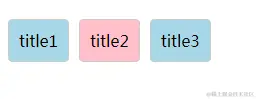
<!DOCTYPE html>
<html lang="en">
<head>
<meta charset="UTF-8">
<title>单选(点击选中,点击取消)</title>
<script src="https://cdn.bootcss.com/vue/2.5.22/vue.js"></script>
<style>
*{
padding: 0;
margin: 0;
}
.btnBox{
margin-top: 100px;
}
.btn{
padding: 10px;
width: 80px;
height: 40px;
background:
border-radius: 5px;
margin-left: 10px;
cursor: pointer;
border: 1px solid
}
.isActive{
background: pink;
}
</style>
</head>
<body>
<div class="btnBox" >
<span class="btn" v-for="(item,index) in list" :class="{ isActive:isChange == index}" @click="clickBtn(index)">{{item.name}}</span>
</div>
</body>
<script>
var app=new Vue({
el:'.btnBox',
data:{
list:[
{name:'title1', id:1},
{name:'title2', id:2},
{name:'title3', id:3},
],
isChange:-1,
},
methods:{
clickBtn(index){
if(index!=this.isChange){
this.isChange = index;
}else{
this.isChange = -1;
}
}
},
})
</script>
</html>