Springboot整合RabbitMQ--基本使用
前提:添加Spring AMQP依赖与配置文件
        <dependency>
            <groupId>org.springframework.boot</groupId>
            <artifactId>spring-boot-starter-amqp</artifactId>
            <version>2.7.6</version>
        </dependency>
spring:
  rabbitmq:
    host: 124.220.69.168 # 主机名
    port: 5672 # 端口
    virtual-host: / # 虚拟主机
    username: guest # 用户名
    password: guest # 密码
1.Fanout模式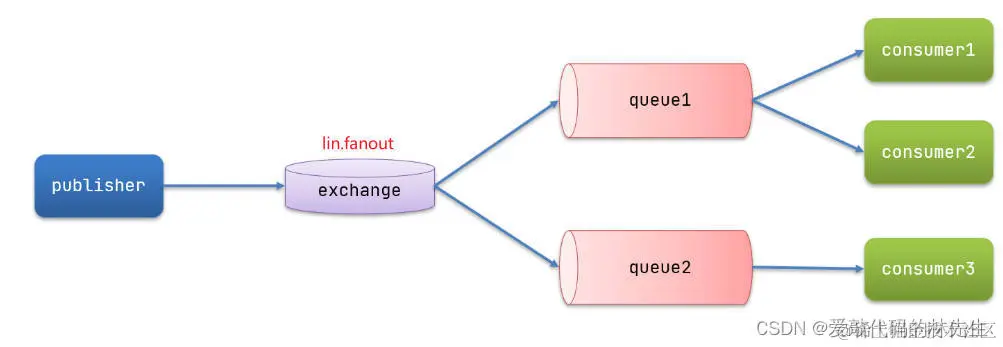
在广播模式下,消息发送流程是这样的:
- 1) 可以有多个队列
- 2) 每个队列都要绑定到Exchange(交换机)
- 3) 生产者发送的消息,只能发送到交换机,交换机来决定要发给哪个队列,生产者无法决定
- 4) 交换机把消息发送给绑定过的所有队列
- 5) 订阅队列的消费者都能拿到消息
生产者代码
    @Test
    public void testFanout(){
        //消息
        String msg = "hello fanout consume";
        //交换机名称
        String exchange = "lin.fanout";
        //发送消息--第二个参数为空字符串(必须指定,否则无法发送到队列中)
        rabbitTemplate.convertAndSend(exchange,"",msg);
        System.out.println("fanout生产者执行完毕");
    }
消费者代码
这里我创建了两个消费者,但没有指定routingKey
@Component
public class FanoutListener {
    @RabbitListener(bindings = @QueueBinding(
            value = @Queue(name="lin.fanout.queue1"),
            exchange = @Exchange(name = "lin.fanout",type = ExchangeTypes.FANOUT)
    ))
    public void fanoutConsume1(String msg){
        System.out.println("消费者1执行:"+msg);
    }

    @RabbitListener(bindings = @QueueBinding(
            value = @Queue(name="lin.fanout.queue2"),
            exchange = @Exchange(name = "lin.fanout",type = ExchangeTypes.FANOUT)
    ))
    public void fanoutConsume2(String msg){
        System.out.println("消费者2执行:"+ msg);
    }
}
2.Direct模式
在Direct模式中,需要指定具体routingKey来将消息投放到具体的消费队列中,而消费者的可以指定多个routingKey(若两个消费者都监听到了相同的routingKey消息,则两个消费者都执行)。
生产者代码
    @Test
    public void testDirect(){
        //消息
        String msg = "hello direct consume";
        //交换机
        String exchange = "lin.direct";
        //发送消息
        rabbitTemplate.convertAndSend(exchange,"blue",msg);
        System.out.println("direct生产者执行完毕");
    }
消费者代码
这里依旧创建了两个消费者,但他们的routingKey有所不同
@Component
public class DirectListener {
    @RabbitListener(bindings = @QueueBinding(
            value = @Queue(name = "lin.direct.queue1"),
            exchange = @Exchange(name = "lin.direct",type = ExchangeTypes.DIRECT),
            key = {"red","green"}
    ))
    public void directQueue1(String msg){
        System.out.println("消费者1执行:"+msg);
    }

    @RabbitListener(bindings = @QueueBinding(
            value = @Queue(name = "lin.direct.queue2"),
            exchange = @Exchange(name = "lin.direct",type = ExchangeTypes.DIRECT),
            key = {"red","blue"}
    ))
    public void directQueue2(String msg){
        System.out.println("消费者2执行:"+msg);
    }
}
3.Topic模式
生产者代码
    @Test
    public void testTopic(){
        //消息
        String msg = "hello topic consume";
        //交换机
        String exchange = "lin.topic";
        //发送消息
        rabbitTemplate.convertAndSend(exchange,"china.news",msg);
        System.out.println("topic生产者执行完毕");
    }
消费者代码
这里我依旧创建两个消费者,使用通配符的方式进行指定routingKey,若这两个消费者都监听到符合的消息时,都会执行。
@Component
public class TopicListener {

    @RabbitListener(bindings = @QueueBinding(
            value = @Queue(name = "lin.topic.queue1"),
            exchange = @Exchange(name = "lin.topic",type = ExchangeTypes.TOPIC),
            key = {"china.#"}
    ))
    public void topicQueue1(String msg){
        System.out.println("消费者1执行:"+msg);
    }

    @RabbitListener(bindings = @QueueBinding(
            value = @Queue(name = "lin.topic.queue2"),
            exchange = @Exchange(name = "lin.topic",type = ExchangeTypes.TOPIC),
            key = {"#.news"}
    ))
    public void topicQueue2(String msg){
        System.out.println("消费者2执行:"+msg);
    }
}
4.配置消息转换器--用来发送对象形式数据
引入依赖(生产者和消费者都需要引入)
<dependency>
    <groupId>com.fasterxml.jackson.dataformat</groupId>
    <artifactId>jackson-dataformat-xml</artifactId>
    <version>2.9.10</version>
</dependency>
在启动类中添加一个Bean
@Bean
public MessageConverter jsonMessageConverter(){
    return new Jackson2JsonMessageConverter();
}