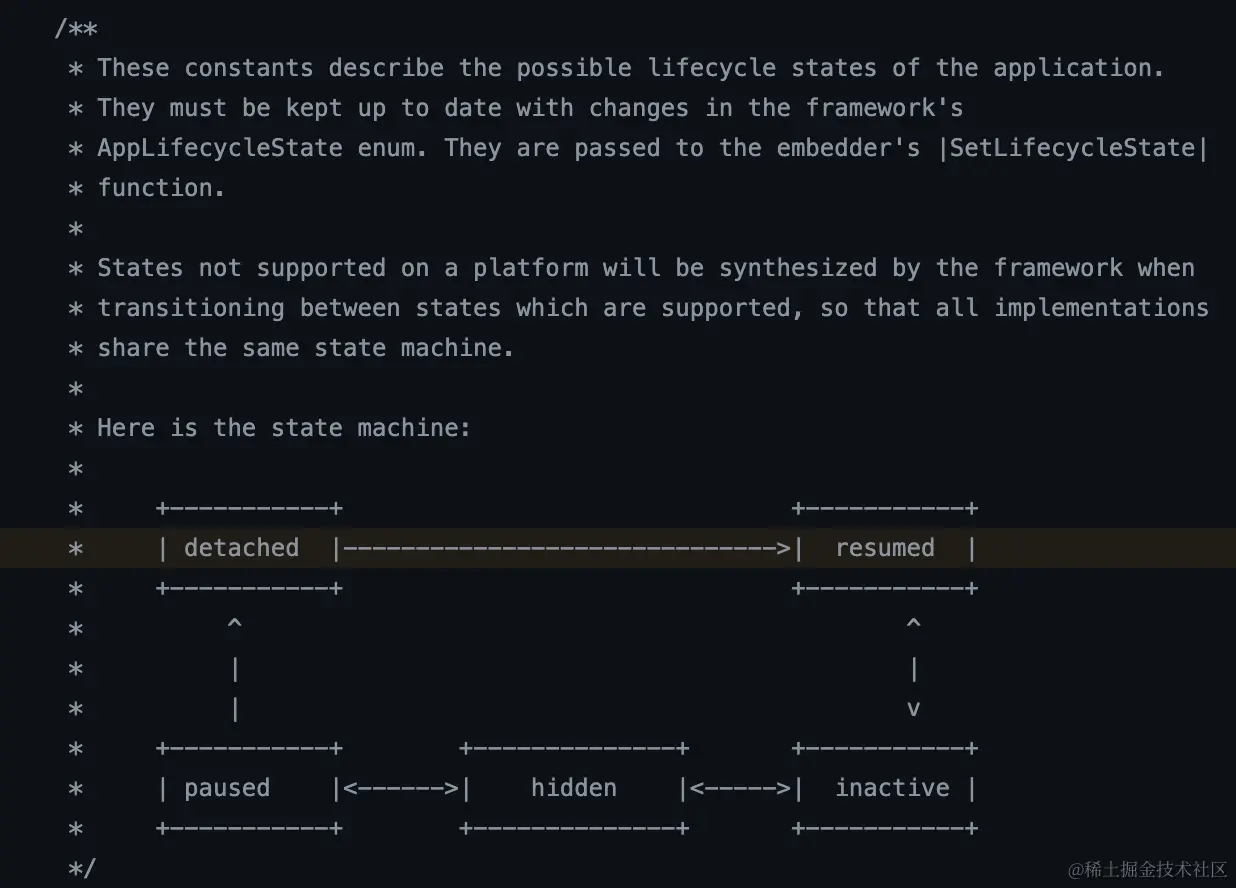
flutter生命周期 VS iOS和Android的生命周期方法对照表
| AppLifecycleState | resumed | paused | inactive | detached |
|---|
| Android | onResume | onStop | onPause | onDetach |
| iOS FlutterViewController | viewDidAppear | viewDidDisappear | viewWillAppear | dealloc |
| 同上 | | | viewWillDisappear | |
| iOS app life | applicationBecameActive | applicationDidEnterBackground | applicationWillEnterForeground | deaapplicationWillTerminatelloc |
| iOS Scene lifecycle | sceneBecameActive | appOrSceneDidEnterBackground | sceneWillEnterForeground | sceneWillDisconnect |
| 同上 | -- | -- | sceneWillResignActive | -- |
- (void)appOrSceneWillResignActive {
[NSObject cancelPreviousPerformRequestsWithTarget:self
selector:@selector(goToApplicationLifecycle:)
object:@"AppLifecycleState.resumed"];
[self goToApplicationLifecycle:@"AppLifecycleState.inactive"];
}
Android的状态对应

iOS的状态对应
参考
在FlutterViewController
- (void)viewWillAppear:(BOOL)animated {
TRACE_EVENT0("flutter", "viewWillAppear")
if ([_engine.get() viewController] == self) {
// Send platform settings to Flutter, e.g., platform brightness.
[self onUserSettingsChanged:nil]
// Only recreate surface on subsequent appearances when viewport metrics are known.
// First time surface creation is done on viewDidLayoutSubviews.
if (_viewportMetrics.physical_width) {
[self surfaceUpdated:YES]
}
[[_engine.get() lifecycleChannel] sendMessage:@"AppLifecycleState.inactive"]
[[_engine.get() restorationPlugin] markRestorationComplete]
}
[super viewWillAppear:animated]
}
- (void)viewDidAppear:(BOOL)animated {
TRACE_EVENT0("flutter", "viewDidAppear")
if ([_engine.get() viewController] == self) {
[self onUserSettingsChanged:nil]
[self onAccessibilityStatusChanged:nil]
BOOL stateIsActive = YES
if (@available(iOS 13.0, *)) {
stateIsActive = self.flutterWindowSceneIfViewLoaded.activationState ==
UISceneActivationStateForegroundActive
}
stateIsActive = UIApplication.sharedApplication.applicationState == UIApplicationStateActive
if (stateIsActive) {
[[_engine.get() lifecycleChannel] sendMessage:@"AppLifecycleState.resumed"]
}
}
[super viewDidAppear:animated]
}
- (void)viewWillDisappear:(BOOL)animated {
TRACE_EVENT0("flutter", "viewWillDisappear")
if ([_engine.get() viewController] == self) {
[[_engine.get() lifecycleChannel] sendMessage:@"AppLifecycleState.inactive"]
}
[super viewWillDisappear:animated]
}
- (void)viewDidDisappear:(BOOL)animated {
TRACE_EVENT0("flutter", "viewDidDisappear")
if ([_engine.get() viewController] == self) {
[self invalidateKeyboardAnimationVSyncClient]
[self ensureViewportMetricsIsCorrect]
[self surfaceUpdated:NO]
[[_engine.get() lifecycleChannel] sendMessage:@"AppLifecycleState.paused"]
[self flushOngoingTouches]
[_engine.get() notifyLowMemory]
}
[super viewDidDisappear:animated]
}
#pragma mark - Application lifecycle notifications
- (void)applicationBecameActive:(NSNotification*)notification {
TRACE_EVENT0("flutter", "applicationBecameActive");
[self appOrSceneBecameActive];
}
- (void)applicationWillResignActive:(NSNotification*)notification {
TRACE_EVENT0("flutter", "applicationWillResignActive");
[self appOrSceneWillResignActive];
}
- (void)applicationWillTerminate:(NSNotification*)notification {
[self appOrSceneWillTerminate];
}
- (void)applicationDidEnterBackground:(NSNotification*)notification {
TRACE_EVENT0("flutter", "applicationDidEnterBackground");
[self appOrSceneDidEnterBackground];
}
- (void)applicationWillEnterForeground:(NSNotification*)notification {
TRACE_EVENT0("flutter", "applicationWillEnterForeground");
[self appOrSceneWillEnterForeground];
}
#pragma mark - Scene lifecycle notifications
- (void)sceneBecameActive:(NSNotification*)notification API_AVAILABLE(ios(13.0)) {
TRACE_EVENT0("flutter", "sceneBecameActive");
[self appOrSceneBecameActive];
}
- (void)sceneWillResignActive:(NSNotification*)notification API_AVAILABLE(ios(13.0)) {
TRACE_EVENT0("flutter", "sceneWillResignActive");
[self appOrSceneWillResignActive];
}
- (void)sceneWillDisconnect:(NSNotification*)notification API_AVAILABLE(ios(13.0)) {
[self appOrSceneWillTerminate];
}
- (void)sceneDidEnterBackground:(NSNotification*)notification API_AVAILABLE(ios(13.0)) {
TRACE_EVENT0("flutter", "sceneDidEnterBackground");
[self appOrSceneDidEnterBackground];
}
- (void)sceneWillEnterForeground:(NSNotification*)notification API_AVAILABLE(ios(13.0)) {
TRACE_EVENT0("flutter", "sceneWillEnterForeground");
[self appOrSceneWillEnterForeground];
}
#pragma mark - Lifecycle shared
- (void)appOrSceneBecameActive {
self.isKeyboardInOrTransitioningFromBackground = NO;
if (_viewportMetrics.physical_width) {
[self surfaceUpdated:YES];
}
[self performSelector:@selector(goToApplicationLifecycle:) withObject:@"AppLifecycleState.resumed" afterDelay:0.0f];
}
- (void)appOrSceneWillResignActive {
[NSObject cancelPreviousPerformRequestsWithTarget:self selector:@selector(goToApplicationLifecycle:) object:@"AppLifecycleState.resumed"];
[self goToApplicationLifecycle:@"AppLifecycleState.inactive"];
}
- (void)appOrSceneWillTerminate {
[self goToApplicationLifecycle:@"AppLifecycleState.detached"];
[self.engine destroyContext];
}
- (void)appOrSceneDidEnterBackground {
self.isKeyboardInOrTransitioningFromBackground = YES;
[self surfaceUpdated:NO];
[self goToApplicationLifecycle:@"AppLifecycleState.paused"];
}
- (void)appOrSceneWillEnterForeground {
[self goToApplicationLifecycle:@"AppLifecycleState.inactive"];
}
- (void)goToApplicationLifecycle:(nonnull NSString*)state {
if (self.viewIfLoaded.window) {
[[_engine.get() lifecycleChannel] sendMessage:state];
}
}



