CSS相关内容
vertical-align:行内级元素的垂直对齐方式
top:
middle:
bottom:
【注】对齐的元素互相之间都要设置
元素类型分类
块级元素:div p h1-h6 ul ol li dl dt dd...
1.独占一行
2.能设置宽高
3.能正常设置内外边距
4.通常用来搭建页面结构
5:矩形显示

行级元素:span a i em b strong u...
1.在一行显示
2.不能设置宽高
3.不能正常设置垂直方向的内外边距
4.通常配合css展示视觉效果
5.非矩形显示,最小单位可能出现矩形

行块级元素:img input select textarea...
1.在一行显示
2.能设置宽高
3.能正常设置内外边距

过渡:过渡属性 过渡时间 延迟动画 过渡动画
作用:由一种状态到另一种状态的缓慢实现过程
transition:;
transition-property:过渡属性;
all所有属性
具体某一个属性
transition-duration:过渡时间
  s秒
transition-delay:延迟时间

transition-timimg-function:过渡动画
           linea 匀速运动
           ease  逐渐加速
           ease-in 加速运动
           ease-out 减速运动
           ease-in-out 先加速后减速运动
           贝塞尔曲线
           steps(数字)逐帧动画
HTML:行内级元素垂直对齐
<!DOCTYPE html>
<html>
	<head>
		<meta charset="utf-8" />
		<link rel="stylesheet" type="text/css" href="css/css.css">
		<title></title>
	</head>
	<body>
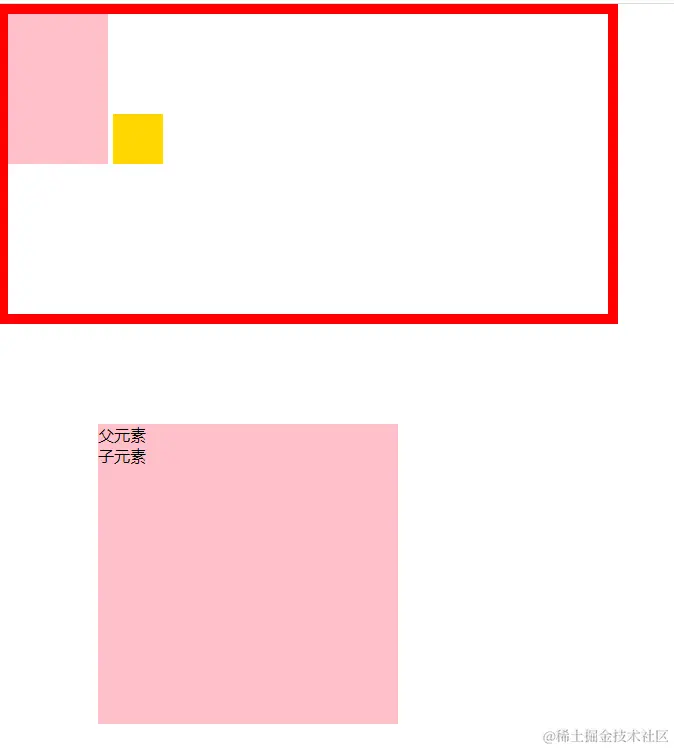
		<div class="box">
			<div class="box1"></div>
			<span></span>
		</div>
		<div class="con">
			父元素
			<div class="con1">
				子元素
			</div>
		</div>
	</body>
</html>
CSS:行内级元素垂直对齐
*{
margin: 0;
padding: 0;
}
.box{
width: 600px;
height: 300px;
border: 10px solid red;
}
.box1{
display: inline-block;
width: 100px;
height: 150px;
background: pink;
vertical-align: top;
vertical-align: middle;
vertical-align: bottom;
}
span{
display: inline-block;
width: 50px;
height: 50px;
background: gold;
vertical-align: top;
vertical-align: middle;
vertical-align: bottom;
}
.con{
width: 300px;
height: 300px;
background: pink;
margin: 100px;
}
.con:hover{
background: red;
}
.con:hover .con1{
font-size: 40px;
}
HTML:hover
<!DOCTYPE html>
<html>
	<head>
		<meta charset="utf-8">
		<link rel="stylesheet" type="text/css" href="../css/css2.css">
		    <div class="box">
				<div class="box1">
					<img src="images/logo1.png">
				</div>
				<div class="box1">
					<img src="images/logo2.png">
				</div>
				<div class="box1">
					<img src="images/logo3.png">
				</div>
				<div class="box1">
					<img src="images/logo4.png">
				</div>
				<div class="box1">
					<img src="images/logo5.png">
				</div>
				<div class="box1">
					<img src="images/logo6.png">
				</div>
				<div class="box1">
					<img src="images/logo7.png">
				</div>
			</div>
		<title></title>
	</head>
	<body>
	</body>
</html>
CSS:hover
* {
margin: 0;
padding: 0;
}
.box{
width: 700px;
height: 92px;
margin: 100px;
}
.box1{
width: 92px;
height: 92px;
float: left;
margin-right: 2px;
line-height: 92px;
text-align: center;
}
.box1:hover{
background: url("../img/bg.png") no-repeat center;
}
.box1 img{
vertical-align: middle;
}
HTML:溢出隐藏
<!DOCTYPE html>
<html>
	<head>
		<meta charset="utf-8" />
		<link rel="stylesheet" type="text/css" href="css/css.css">
		<title></title>
	</head>
	<body>
		<ul class="list">
			<li class="firstlist">
				<a href="#">
					商品分类
				</a>
				<div class="txt">
					<p>哈哈哈哈</p>
					<p>哈哈哈哈</p>
					<p>哈哈哈哈</p>
					<p>哈哈哈哈</p>
					<p>哈哈哈哈</p>
					<p>哈哈哈哈</p>
					<p>哈哈哈哈</p>
				</div>
			</li>
			<li class="listLi">
				<a href="#">分类</a>
			</li>
			<li class="listLi">
				<a href="#firstLi">分类</a>
			</li>
			<li class="listLi">
				<a href="#">分类</a>
			</li>
			<li class="listLi">
				<a href="#">分类</a>
			</li>
			<li class="listLi">
				<a href="#">分类</a>
			</li>
			<li class="listLi">
				<a href="#">分类</a>
			</li>
			<li class="listLi">
				<a href="#">分类</a>
			</li>
		</ul>
	</body>
</html>
CSS:溢出隐藏
*{
margin: 0;
padding: 0;
}
li{
list-style: none;
}
a{
text-decoration: none;
color: #000;
}
.list{
width: 700px;
height: 40px;
background: pink;
margin: 100px;
font-size: 14px;
}
.list li{
float: left;
background: skyblue;
height: 40px;
margin-right: 1px;
font-size: 14px;
}
.list li.firstLi{
position: relative;
}
.list li a{
background: red;
display: block;
height: 40px;
line-height: 40px;
padding: 0 20px;
text-align: center;
}
.list .li.firstLi a{
width: 100px;
color: #fff;
}
.txt{
width: 140px;
height: 0px;
overflow: hidden;
background: skyblue;
position: absolute;
left: 0px;
top: 40px;
z-index: 999;
transition:all .8s;
}
.firstLi:hover.txt{
height: 360px;
}
.list .li.firstLi .txt p{
height: 36px;
line-height: 36px;
text-align: center;
}
p:hover{
background: blue;
color: #fff;
}