

背景
在我的这篇文章中给项目加入了 git commit 规范 vue3项目中集成husky、lint-stage——提升整体项目规范 - 掘金 (juejin.cn)
但是当时没加入 stylelint 对样式文件进行规范,本篇文章简单记录下vue项目中加入 stylelint来规范我们的 css、less样式。
stylelint是什么?
Stylelint 是一个强大、先进的 CSS 代码检查器(linter),可以帮助你规避 CSS 代码中的错误并保持一致的编码风格。
官网: Stylelint中文网
github: github.com/stylelint/s…
开始使用
项目根目录下安装所需依赖:
pnpm i postcss postcss-html stylelint stylelint-config-standard-vue stylelint-order postcss-less stylelint-less -D
postcss
postcss:转换css代码工具postcss-html:识别html/vue中的<style></style>标签中的样式
stylelint
stylelint:css样式lint工具stylelint-order
自定义指定样式书写的顺序,在根目录创建.stylelintrc.js,在order/properties-order字段下指定顺序
vue相关依赖
stylelint-config-standard-vue
.vue文件的样式配置规则
less相关依赖
postcss-less:识别less语法stylelint-less:stylelint-config-recommended-less的依赖,less的stylelint规则集合stylelint-config-recommended-less:less的配置规则
最终效果
-
配置vscode保存自动格式化css
插件市场安装:stylelintctrl+, 打开设置,打开settings.json 添加配置:
"stylelint.validate": ["css", "less", "postcss", "scss", "sass", "vue"] -
执行前
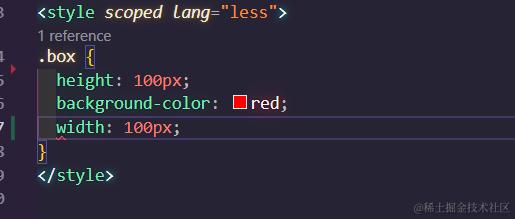
故意写错css顺序,此时编辑器会直接报红 -
格式化执行后
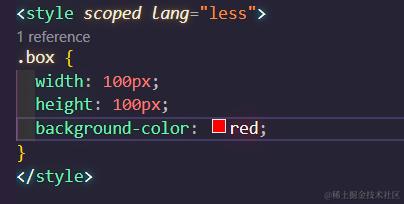
配置好后,此时保存时编辑器自动按照你的项目根目录配置的stylelint相关规则去修复代码。
======================================= 更新============================================
后续更新(24-12-11)
npm 地址:
遇到问题
今天运行stylelint --fix时莫名其妙直接报错:
大部分文件主要都报如下错误:
-
Unknown rule media-query-no-invalid media-query-no-invalid -
Unknown rule lightness-notation lightness-notation
仔细查看后确定我的配置文件是没有配置 lightness-notation 的。网上搜索了半天,大概率是版本的问题,stylelint 部分规则弃用导致的。
- 之前stylelint依赖相关版本
"stylelint": "^15.10.0",
"stylelint-config-standard-vue": "^1.0.0",
"stylelint-less": "^1.0.8",
"stylelint-order": "^6.0.3",
修改后 stylelint相关依赖版本
- 没问题的版本
"stylelint": "15.10.3",
"stylelint-config-recommended-vue": "1.4.0",
"stylelint-less": "3.0.1",
"stylelint-order": "^6.0.3",
查看 vue 相关依赖 stylelint-config-standard-vue 发现就 2 个版本:
尝试将严格的.vue 文件样式配置规则集 stylelint-config-standard-vue 替换为强度弱一些的 stylelint-config-recommended-vue 并且降级到 1.4.0。
stylelint-less 目前最新版本 3.0.1, stylelint最新版本 16.x。 stylelint 版本过高和 stylelint-less 不匹配会报错的。
解决一些不能自动 fix 的问题
安装完毕后,正常对全局文件执行: stylelint --fix 后还是有些文件有报错,一个个解决:
- Unexpected unknown pseudo-element selector
这里报错:意外的未知伪元素选择器
因为 ::input-placeholder 并不是标准的伪元素选择器
修改为浏览器通用标准写法: ::input-placeholder 即可
还有例如报错 class 限制选择器中复合选择器的数量,层级大于设置的值就会报错,可以根据自身需求更改规则
.stylelintrc.js配置
module.exports = {
  extends: [
    'stylelint-config-recommended-vue' // 校验.vue 文件中样式的规则
  ],
  /* 引入插件, 用于扩展stylelint的原生rules */
  plugins: ['stylelint-order', 'stylelint-less'],
  // 忽略文件
  ignoreFiles: [
    '**/*.js',
    '**/*.cjs',
    '**/*.jsx',
    '**/*.tsx',
    '**/*.ts',
    '**/*.json',
    '**/*.md',
    '**/*.yaml',
    'node_modules/',
    'dist/',
    'public/',
    'docs/',
    // 忽略之前代码 chat等目录
    'src/view/pages/chat/**/*',
    'src/view/pages/newStudy/**/*'
  ],
  /* 可以为不同格式的文件分别配置 */
  overrides: [
    {
      files: ['**/*.(less|vue)'],
      customSyntax: 'postcss-less'
    },
    {
      files: ['**/*.(html|vue)'],
      customSyntax: 'postcss-html'
    }
  ],
  /* 项目个性化的规则 */
  rules: {
    // null 禁用部分规则
    'block-no-empty': null, // 禁止空块。
    'selector-class-pattern': null, // 指定类选择器的模式。
    'max-nesting-depth': 4, // 限制嵌套深度。
    'selector-max-compound-selectors': 4, // 限制选择器中复合选择器的数量
    'function-url-quotes': null, // 要求或不允许网址加引号。
    'property-no-unknown': null, // 禁止未知属性。
    'no-empty-source': null, // 禁止空源。
    'no-descending-specificity': null, // 禁止较低特异性的选择器覆盖较高特异性的选择器。
    'declaration-empty-line-before': null, // 要求或不允许声明前有空行。
    // 禁止未知的伪类选择器
    'selector-pseudo-class-no-unknown': [
      true,
      {
        // 忽略如下伪类
        ignorePseudoClasses: ['deep', 'v-deep', 'global']
      }
    ],
    'order/properties-order': [
      'position',
      'top',
      'right',
      'bottom',
      'left',
      'z-index',
      'display',
      'justify-content',
      'align-items',
      'float',
      'clear',
      'overflow',
      'overflow-x',
      'overflow-y',
      'margin',
      'margin-top',
      'margin-right',
      'margin-bottom',
      'margin-left',
      'padding',
      'padding-top',
      'padding-right',
      'padding-bottom',
      'padding-left',
      'width',
      'min-width',
      'max-width',
      'height',
      'min-height',
      'max-height',
      'font-size',
      'font-family',
      'font-weight',
      'border',
      'border-top',
      'border-right',
      'border-bottom',
      'border-left',
      'border-radius',
      'text-align',
      'text-justify',
      'text-indent',
      'text-overflow',
      'text-decoration',
      'white-space',
      'color',
      'background',
      'background-position',
      'background-repeat',
      'background-size',
      'background-color',
      'background-clip',
      'opacity',
      'filter',
      'list-style',
      'outline',
      'visibility',
      'box-shadow',
      'text-shadow',
      'resize',
      'transition'
    ]
  }
};

