首先创建一个server.js文件
const WebSocket = require('ws')
const express = require('express')
const cors = require('cors')
const mock = require('./mock')
const app = express()
app.use(cors())
const server = app.listen(8080, () => {
console.log('服务启动成功,端口为:8080')
})
const wss = new WebSocket.Server({ server })
wss.on('connection', (ws) => {
ws.on('message', (data) => {
const message = JSON.parse(data)
wss.clients.forEach((client) => {
if (client.readyState === WebSocket.OPEN) {
if (message.type !== 'init') {
const data = { ...message, isMyselt: client == ws }
client.send(JSON.stringify(data))
}
}
})
})
wss.on('close', function () {
console.log('连接已关闭')
})
})
创建一个socket.js文件,定义一个名为Socket的类,方便项目中多次调用
new WebSocket(this.url):传入url,实例化WebSocket对象ws.onopen(()=>{}):开启连接ws.onmessage(()=>{}):接收服务器返回的消息ws.close():关闭连接( 会触发onclose )ws.onclose(()=>{}):关闭连接时的回调ws.onerror(()=>{}):连接报错ws.send():给服务器发送消息心跳机制:创建一个定时器,在一定时间间隔内给服务器发送一段固定信息,判断当前的连接状态
export default class Socket {
constructor(options) {
this.url = options.url
this.callback = options.received
this.name = options.name || 'default'
this.ws = null
this.status = null
this.pingInterval = null
this._timeout = options.timeout || 10000
this.isHeart = options.isHeart
this.isReconnection = options.isReconnection
this.connect({ type: 'init' })
}
connect(data) {
this.ws = new WebSocket(this.url)
this.ws.onopen = (e) => {
this.status = 'open'
console.log('连接成功', e)
if (this.isHeart) {
this._heartCheck()
}
if (data !== undefined) {
return this.ws.send(JSON.stringify({ type: 'init' }))
}
}
this.ws.onmessage = (e) => {
if (typeof this.callback === 'function') {
return this.callback(e.data)
} else {
console.log('参数的类型必须为函数')
}
}
this.ws.onclose = (e) => {
console.log('onclose', e)
this._closeSocket(e)
}
this.onerror = (e) => {
console.log('onerror', e)
this._closeSocket(e)
}
}
sendMsg(data) {
let msg = JSON.stringify(data)
return this.ws.send(msg)
}
_resetHeart() {
clearInterval(this.pingInterval)
return this
}
_heartCheck() {
this.pingInterval = setInterval(() => {
if (this.ws.readyState === 1) {
this.ws.send(JSON.stringify({ type: 'ping' }))
}
}, this._timeout)
}
_closeSocket(e) {
this._resetHeart()
if (this.status !== 'close') {
console.log('断开,重连', e)
if (this.isReconnection) {
this.connect()
}
} else {
console.log('手动关闭了', e)
}
}
close() {
this.status = 'close'
this._resetHeart()
return this.ws.close()
}
}
创建一个websocket.vue文件
<script lang="ts" setup>
import { ref, reactive, onMounted } from 'vue'
import Socket from './socket'
interface ListType {
id: number
text: string
type: string
isMyselt: boolean
}
const list = ref<ListType[]>([])
const inputVal = ref('')
const ws = ref()
const socketFn = () => {
ws.value = new Socket({
url: 'ws://localhost:8080',
name: '',
timeout: 15000,
isHeart: true,
isReconnection: true,
received: (data) => handleMessage(data)
})
}
const handleMessage = (data: string) => {
const msgData = JSON.parse(data)
if (msgData?.type == 'ping') return
list.value.push(msgData)
}
const sendMessage = () => {
if (!inputVal.value) return
const message = {
id: Date.now(),
text: inputVal.value,
type: 'sendMsg'
}
if (ws.value.status === 'open') {
ws.value.sendMsg(message)
inputVal.value = ''
} else {
console.error('WebSocket未连接,消息未发送')
}
}
onMounted(() => {
socketFn()
})
</script>
<template>
<el-card class="my-card">
<div class="content">
<div>
<h2>消息列表</h2>
<hr />
<div class="msg">
<div v-for="message in list" :key="message.id">
<div class="opposite" v-if="message.isMyselt">
{{ message.text }}
<el-tag type="success">我</el-tag>
</div>
<div v-if="!message.isMyselt">
<el-tag type="warning">对方</el-tag>
{{ message.text }}
</div>
</div>
</div>
</div>
<div style="margin-top: 20px">
<el-input
style="width: 170px"
size="large"
type="text"
v-model="inputVal"
@keyup.enter="sendMessage()"
/>
<el-button style="margin-left: 10px" size="large" type="primary" @click="sendMessage()"
>发送</el-button
>
<el-button size="large" type="danger" @click="() => ws.value.close()">关闭聊天</el-button>
</div>
</div>
</el-card>
</template>
<style scoped lang="scss">
.my-card {
width: 400px;
min-height: 600px;
.content {
min-height: 600px;
display: flex;
flex-direction: column;
justify-content: space-between;
.msg {
height: 500px;
padding: 20px 0 0 20px;
overflow-y: auto;
> div {
margin-top: 12px;
}
.opposite {
display: flex;
justify-content: end;
}
}
}
}
.el-tag.el-tag--success {
margin-left: 4px;
}
.el-tag.el-tag--warning {
margin-right: 4px;
}
</style>
运行
- 此时我们运行server.js文件:
node .\server.js
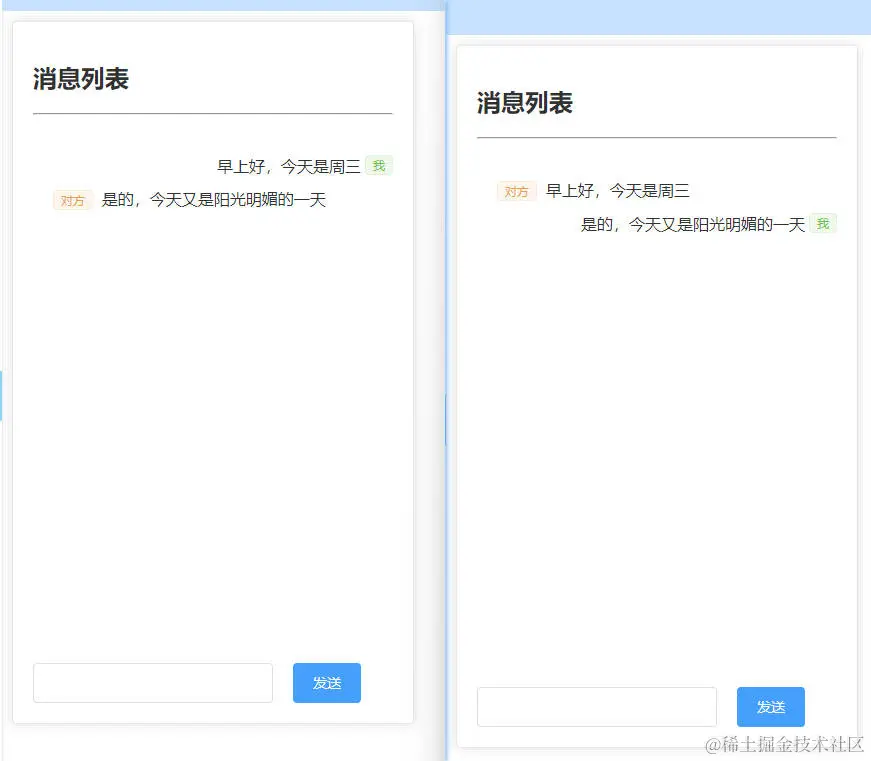
- 运行vue项目,同时运行在两个浏览器窗口,就可以互相聊天了