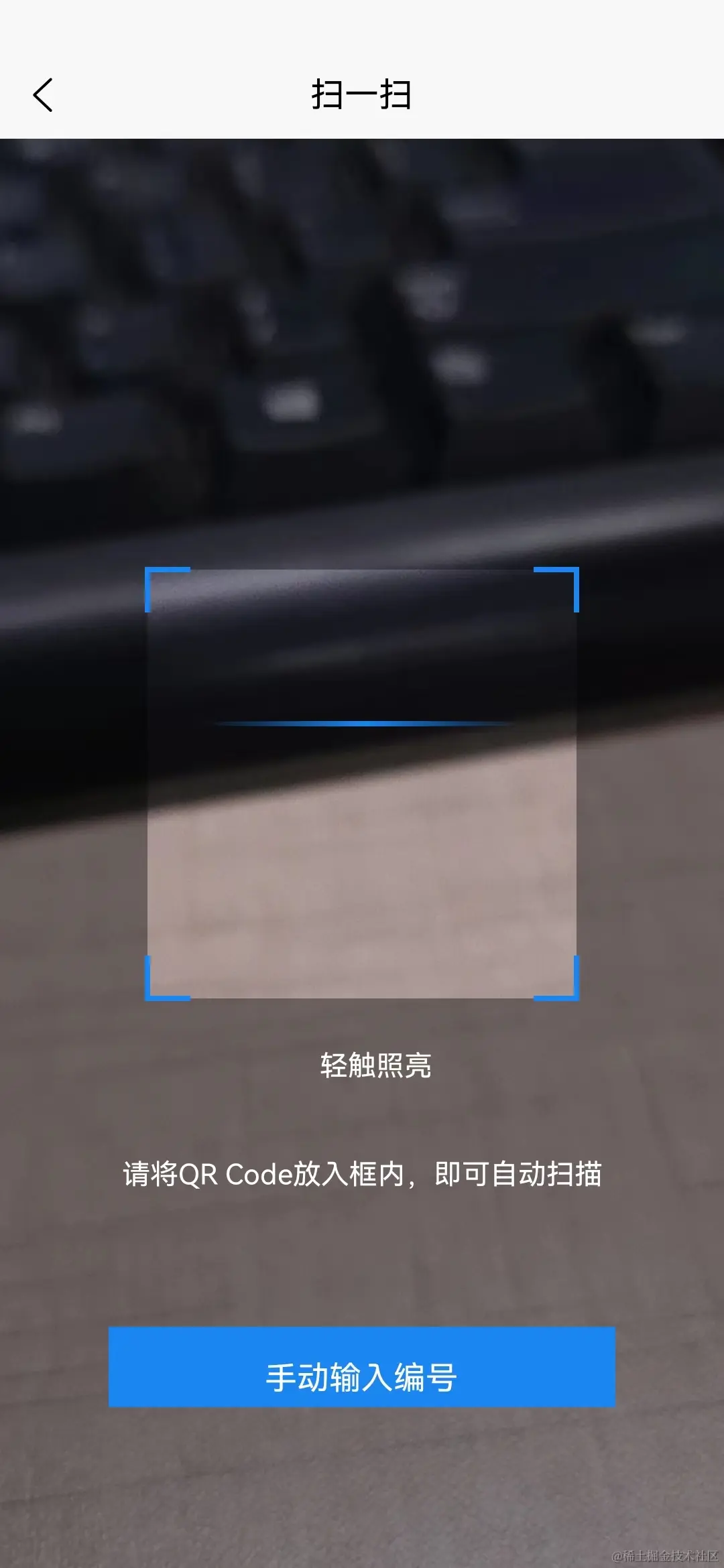
要求:页面需要扫码,有自定义点击事件,可以开关灯等等,如下所示
<template>
	<view class="scancode">
		<view class="scanKuang">
			<view class="kuang" id='barcodekuang'></view>
		</view>
	</view>
</template>

<script>
	import {
		equipmentScanApi,
		subtenancyApplicationApi
	} from '@/common/api/homeApi.js'
	export default {
		data() {
			return {
				barcode: null,
				flash: false,
				isUser: true,

			}
		},
		onLoad(opt) {
			// #ifdef APP-PLUS
			plus.navigator.setFullscreen(true); //全屏
			let currentWebview = this.$scope.$getAppWebview();
			this.createBarcode(currentWebview)
			this.createFlashBarView(currentWebview)
			this.createTipInfoView(currentWebview)
			// #endif
		},
		onBackPress() {
			uni.navigateBack({
				delta: 1
			})

		},
		methods: {
			toStart() {
				this.barcode.start()
			},
			goback() {
				uni.switchTab({
					url: '/pages/home/index'
				})
			},
			/**
			 * 创建二维码
			 * @param {Object} currentWebview
			 */
			createBarcode(currentWebview) {
				if (!this.barcode) {
					this.barcode = plus.barcode.create('barcodekuang', [plus.barcode.QR], {
						top: `auto`,
						left: 'auto',
						height: `100%`,
						width: '100%',
						position:'absolute',
						background: '#1A86F4',
						frameColor: '#1A86F4',
						scanbarColor: '#1A86F4',
					});
					this.barcode.onmarked = this.onmarked;
					this.barcode.setFlash(this.flash);
					//此处未演示扫码成功回调的地址设置,实际请参考HTML5Plus API自行处理
					//注意扫码区域需为正方形,否则影响扫码识别率
					currentWebview.append(this.barcode);
					this.barcode.start()
				}

			},
			/**
			 * 创建提示信息
			 * @param {Object} currentWebview
			 */
			createTipInfoView(currentWebview) {
				const content = new plus.nativeObj.View('content', {
						bottom: '170px',
						height: '50px',
						width: '100%',
						textAlign:'center',
					},
					[{
						tag: 'font',
						id: 'scanTips',
						text: '请将QR Code放入框内,即可自动扫描',
						textStyles: {
							size: '14px',
							color: '#ffffff',
							whiteSpace: 'normal'
						},
						position: {
							top: '15px',
							left: '10%',
							width: '80%',
							height: 'wrap_content'
						}
					}]);
				currentWebview.append(content);
				const contentBtn = new plus.nativeObj.View('contentBtn', {
						bottom: '80px',
						left: '15%',
						height: '40px',
						width: '70%',
						textAlign:'center',
						backgroundColor: '#1A86F4',
						borderRadius: '20px',
						lineHeight:'30px'
					},
					[{
						tag: 'font',
						id: 'scanTips',
						text: '手动输入编号',
						textStyles: {
							size: '16px',
							color: '#ffffff',
							whiteSpace: 'normal'
						},
						position: {
							top: '15px',
							left: '10%',
							width: '80%',
							height: 'wrap_content'
						}
					}]);
				currentWebview.append(contentBtn);

				contentBtn.addEventListener('click', () => {
					this.inputCode();
				})
			},


			// 创建 开关灯按钮
			createFlashBarView(currentWebview) {

				const openImg = this.crtFlashImg()
				const closeImg = this.crtFlashImg()
				const scanBarVew = new plus.nativeObj.View('scanBarVew', {
						top: '425px',
						left: '40%',
						height: '10%',
						width: '20%',
					},
					closeImg);
				scanBarVew.interceptTouchEvent(true);

				currentWebview.append(scanBarVew);

				scanBarVew.addEventListener("click", (e) => { //点亮手电筒
					this.flash = !this.flash;
					if (this.flash) {
						scanBarVew.draw(openImg);
					} else {
						scanBarVew.draw(closeImg)
					}
					if (this.barcode) {
						this.barcode.setFlash(this.flash);
					}
				}, false)
			},
			crtFlashImg() {
				return [{
					tag: 'font',
					id: 'font',
					text: '轻触照亮',
					textStyles: {
						size: '14px',
						color: '#ffffff'
					},
					position: {
						width: '100%',
						left: '10%',
						// top: `500px`,
					}
				}]
			},


			// 扫码成功回调
			onmarked(type, result) {
				let obj = this.barcode
				console.log('条码类型:' + type);
				console.log('条码内容:' + result);
				// 业务代码
				// 核对扫描结果
				// 判断是否是正确的格式
				// 不正确则跳转到 错误页面
				if (type == 0) {
					equipmentScanApi({
						userid: getApp().globalData.userid,
						qrcodecontent: result,
					}).then((res) => {
						if (res.resultCode === 0) {
							if (this.isUser) {
								uni.redirectTo({
									url: '/pages/home/linkEpt?code=' + result
								})
							} else {
								uni.redirectTo({
									url: '/pages/equipment/devicedetails?equipmentId=' + res.data.equipmentid + '&outboundId=' +
										res.data.outboundid
								})
							}

						} else {
							// console.log('错误')
							uni.showToast({
								icon: 'none',
								title: res.resultMsg
							})
						}
					})
				} else {
					uni.showToast({
						icon: 'none',
						title: '请扫描正确的二维码'
					})
				}

			},
			inputCode() {
				uni.redirectTo({
					url: '/pages/home/inputCode'
				})
			}

		}
	}
</script>

<style lang="scss">
	.scancode {
		height: 100vh;
		background: #1B1B1F;
		// padding-top: 20px;
		position: relative;

		.scanKuang {
			// margin-top: 240rpx;
			// text-align: center;
			width: 100%;
			height: 100%;
			.kuang {
				width: 100%;
				height: 100%;
				// display: inline-block;
				// background: url('../../static/img/saomiaokuang.png') no-repeat;
				// background-size: 100% 100%;
			}
		}

		.desc {
			margin-top: 150rpx;
			font-size: 30rpx;
			font-family: PingFang SC;
			font-weight: 400;
			color: #FFFFFF;
			text-align: center;
		}

		.btnsty {
			text-align: center;
			margin-top: 122rpx;

			.btnin {
				width: 520rpx;
				height: 80rpx;
				background: linear-gradient(90deg, #0173F4 0%, #65BFF5 100%);
				border-radius: 20rpx;
				line-height: 80rpx;
				color: #FFFFFF;
				display: inline-block;
			}
		}
	}

	.barcode {
		width: 534rpx;
		height: 534rpx;
	}
</style>