1.根据出生日期计算年龄
export function calculateAge(birthDate) {
let today = new Date()
let birth = new Date(birthDate)
let age = today.getFullYear() - birth.getFullYear()
let monthDiff = today.getMonth() - birth.getMonth()
if (monthDiff < 0 || (monthDiff === 0 && today.getDate() < birth.getDate())) {
age--
}
return age
},
2.日期格式化
export function dateFormat(date, format = "YYYY-MM-DD") {
if (!date) return date
try {
return moment(date).format(format)
} catch (error) {
console.error(error, "dateFormat error")
return date
}
}
3.自定义指令
Vue.directive('permission', {
inserted: function (el, binding) {
const { value } = binding
const buttonList = store.state.user.permission
if (value) {
const hasPermission = buttonList.some(btnKey => btnKey === value)
if (!hasPermission) {
el.parentNode && el.parentNode.removeChild(el)
}
} else {
throw new Error(`需要指定权限标识! 如:v-permission="'table_del'"`)
}
}
})
4.数据归类
const data = [
{
"status": 0,
"code": 200,
"phone": "18022923898",
"content": null,
"message": "发送成功",
"sGuid": "e52b84b5-f603-4beb-beff-7af352a9ba8f",
"projectName": "数据1",
"auditPerson": "刘杰"
},
{
"status": 0,
"code": 500,
"phone": "13560051578",
"content": null,
"message": "发送短信发生异常:URI is not absolute",
"sGuid": "e52b84b5-f603-4beb-beff-7af352a9ba8f",
"projectName": "数据1",
"auditPerson": "鲍魁"
},
{
"status": 0,
"code": 500,
"phone": "13560051578",
"content": null,
"message": "发送短信发生异常:URI is not absolute",
"sGuid": "e52b84b5-f603-4beb-beff-7af352a9ba8f",
"projectName": "数据2",
"auditPerson": "鲍魁"
}
];
const categorizedData = {}
data.forEach((item) => {
const projectName = item.projectName;
if (categorizedData.hasOwnProperty(projectName)) {
categorizedData[projectName].push(item)
}
else {
categorizedData[projectName] = [item]
}
})
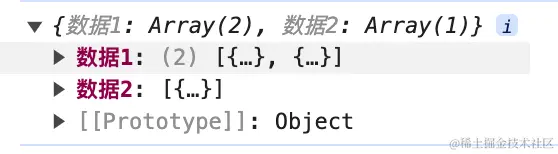
console.log(categorizedData);
5.链式方程
arr = arr
  .filter(item => item.d !== 'd')
  .map(item => {
    if (item.c && item.c.length > 0) {
      item.c = 'c'
    }
    return item
  });
6.字典数据
filters: {
    stautsFilter(status) {
      const statusMap = {
        0: '草稿',
        1: '待审核',
        2: '已通过',
        3: '不通过'
      }
      return statusMap[status]
    }
  },
7.函数额外带参
:http-request="(data) => httpRequest(data, '123')"
8.显示本地图片src
<img width="100%" :src="dialogImageUrl" alt="">

this.dialogImageUrl = require('@/assets/demo.png')