前言
- 前段时间总结过 如何跳出
forEach 的循环,以及常见结束循环的方式对于forEach来说,到底有没有作用;
- 今天就自己手写一下forEach循环;
手写 forEach 循环
分析
forEach 循环是 数组 的方法,只有数组才可以调用,因此,我们手写的方法(myForEach())也应该只能让数组调用,所以需要挂载到 Array 的 原型(prototype) 上;forEach 有 一个参数,是个 回调函数;forEach 的内部就只是能遍历数组,不进行别的任何操作,也没有返回值,因此,在 myForEach() 内部我们用 for 循环,对数组进行遍历;- 我们可以将
forEach理解成对for循环的二次封装;
- 注意:
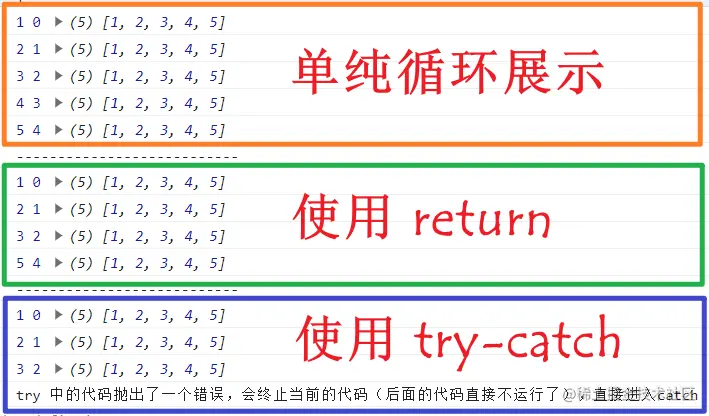
forEach 中使用 return,只能结束当前循环,不能结束整个函数,所以for循环每循环一次,就调用一次callback(),这样return就只能结束当前这次循环调用的callback();- 因为我们是在
Array 的原型挂载一个新的方法,所以,在这个方法内部要使用 this 代表 arr;
try-catch 能够结束 forEach,是得力于 try-catch 本身的机制;- 而
break 和 continue 是用来结束 循环语句 的,而不能终止函数的运行,并且,直接在函数中会报错;
代码展示
const arr = [1, 2, 3, 4, 5];
Array.prototype.myForEach = function(callback) {
for (let index = 0; index < this.length; index++) {
callback(this[index], index, this);
}
}
arr.myForEach((item, index, arr) => console.log(item, index, arr));
console.log('---------------------------');
arr.myForEach((item, index, arr) => {
if (item === 4) return;
console.log(item, index, arr);
});
console.log('---------------------------');
try {
arr.myForEach((item, index, arr) => {
if (item === 4) throw Error();
console.log(item, index, arr);
})
} catch (err) {
console.log('try 中的代码抛出了一个错误,会终止当前的代码(后面的代码直接不运行了),直接进入catch');
}