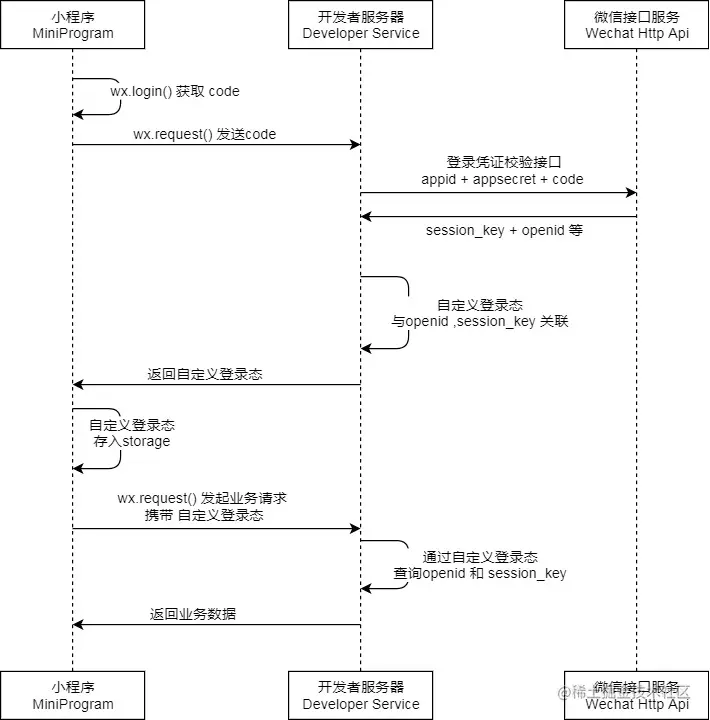
第一步:在小程序中点击授权按钮,并发送授权码给后端服务接口
 @PostMapping("login")
    @ApiOperation("微信登陆")
    public Result<UserLoginVO> login(@RequestBody UserLoginDTO userLoginDTO)
    {
        log.info("微信用户登陆:{}",userLoginDTO.getCode());
        User user=userService.wxLogin(userLoginDTO);
        HashMap<String, Object> map = new HashMap<>();
        map.put(JwtClaimsConstant.USER_ID,user.getId());
        String token=JwtUtil.createJWT(jwtProperties.getUserSecretKey(),jwtProperties.getUserTtl(),map);
       UserLoginVO userLoginVO = UserLoginVO.builder()
                .id(user.getId())
                .openid(user.getOpenid())
                .token(token)
                .build();
        return  Result.success(userLoginVO);
    }
第二步:后端接口得到授权码和自己的小程序id和密钥等信息 向微信服务接口发起请求得到openid
public User wxLogin(UserLoginDTO userLoginDTO) {
String openid=getOpenId(userLoginDTO.getCode())
if(openid == null)
throw new LoginFailedException(MessageConstant.LOGIN_FAILED)
User user=userMapper.getByUserId(openid)
if (user == null) {
user=User
.builder()
.openid(openid)
.createTime(LocalDateTime.now())
.build()
userMapper.insert(user)
}
return user
}
private String getOpenId(String code)
{
// 调用微信服务 获取openid
HashMap<String,String> map = new HashMap<>()
map.put("appid", wechatProperties.getAppid())
map.put("secret",wechatProperties.getSecret())
map.put("js_code", code)
map.put("grant_type","authorization_code")
log.info("appid:{} js_code:{}",wechatProperties.getAppid(),code)
String json= HttpClientUtil.doGet(WX_LOGIN,map)
JSONObject jsonObject = JSON.parseObject(json)
String openid = jsonObject.getString("openid")
return openid
}
第三步:
处理数据 将openid放入user(有则加入openid 无则注册) 返回后使用jwt处理结果得到token返回结果