新建一个文件夹(currentPageUrl)
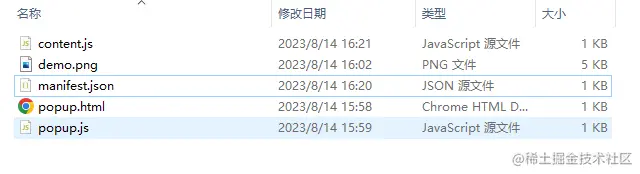
编写代码
{
    "manifest_version": 2,
    "name": "页面url插件",
    "version": "1.0",
    "description": "获取当前页面url",
    "permissions": ["activeTab"],
    "browser_action": {
      "default_popup": "popup.html",
      "default_icon": {
        "16": "demo.png",
        "48": "demo.png",
        "128": "demo.png"
      }
    },
    "icons": {
      "16": "demo.png",
      "48": "demo.png",
      "128": "demo.png"
    },
    "content_scripts": [
      {
        "matches": ["<all_urls>"],
        "js": ["content.js"]
      }
    ]
  }
(function() {
var currentPageUrl = window.location.href;
var infoDisplay = document.createElement('div');
infoDisplay.style.position = 'fixed';
infoDisplay.style.bottom = '10px';
infoDisplay.style.right = '10px';
infoDisplay.style.background = 'white';
infoDisplay.style.padding = '5px';
infoDisplay.style.border = '1px solid #ccc';
infoDisplay.innerHTML = `
<p><strong>当前页面url:</strong> ${currentPageUrl}</p>
`;
document.body.appendChild(infoDisplay);
})();
popup.html文件(其实就是一个显示当前url的容器)
<!DOCTYPE html>
<html>
<head>
  <title>Page URL Reader</title>
  <style>
    body {
      width: 200px;
      padding: 10px;
    }
  </style>
</head>
<body>
  <h2>当前页面Url:</h2>
  <p id="url"></p>
  <script src="popup.js"></script>
</body>
</html>
chrome.tabs.query({ active: true, currentWindow: true }, function(tabs) {
    var url = tabs[0].url;
    document.getElementById("url").textContent = url;
  });