
跑马灯
android:singleLine="true"设置为单行显示android:ellipsize="marquee"超出显示的部分设置为3个点android:marqueeRepeatLimit="marquee_forever"字幕重复限制,无限循环android:focusableInTouchMode="true"可在触摸模式下对焦 android:focusable="true"可聚焦的
<TextView
    android:padding="8dp"
    android:layout_width="150dp"
    android:layout_height="50dp"
    android:background="#000"
    android:gravity="center|left"
    android:text="跑马灯设置算法设计烦死了看风景"
    android:textColor="#fff"
    android:textSize="22sp"

    android:singleLine="true"
    android:ellipsize="marquee"
    android:marqueeRepeatLimit="marquee_forever"
    android:focusableInTouchMode="true"
    android:focusable="true"
  />
效果图

带阴影的TextView
android:shadowColor="#FF0000"设置阴影的颜色android:shadowDx="10.0"设置X轴偏移量android:shadowDy="10"设置Y轴偏移量android:shadowRadius="3"设置阴影模糊度
<TextView
    android:layout_width="match_parent"
    android:layout_height="wrap_content"
    android:text="这是设置TextView有阴影"
    android:textSize="22sp"
    android:textColor="#000"

    android:shadowColor="#FF0000"
    android:shadowDx="10.0"
    android:shadowDy="10"
    android:shadowRadius="3"/>
效果图

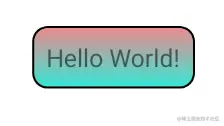
带边框和背景颜色的TextView
<TextView
    android:layout_width="wrap_content"
    android:layout_height="wrap_content"
    android:background="@drawable/border"
    android:text="Hello World!"
    />
背景文件的设置
<?xml version="1.0" encoding="utf-8"?>
<shape xmlns:android="http://schemas.android.com/apk/res/android">
<solid android:color="@color/teal_700"/>
<stroke android:width="1dp" android:color="@color/black"/>
<corners android:radius="8dp" />
<padding android:right="8dp"
android:left="8dp"
android:top="8dp"
android:bottom="8dp"/>
<gradient android:startColor="#EC8B8B"
android:endColor="#35E6D7"
android:angle="60"
android:type="sweep"/>
</shape>
效果图
TextView-超链接模式
android:autoLink="web"跳转到网页模式;phone:电话模式;email:电子邮件模式;map:地图模式;
<TextView
    android:id="@+id/text_web"
    android:layout_width="match_parent"
    android:layout_height="wrap_content"
    android:layout_marginStart="16dp"
    android:text="https://www.bilibili.com"
    android:textSize="24sp"
    android:autoLink="web"/>
效果图