1. 安装 font-spider 文件
npm install font-spider -g
2.创建文件夹,放入需要压缩的字体文件,并且创建 index.html 文件
// index.html内容
<!DOCTYPE html>
<html lang="en">
<head>
<meta charset="UTF-8" />
<meta name="viewport" content="width=device-width, initial-scale=1.0" />
<title>Document</title>
<style>
@font-face {
font-weight: normal;
font-family: "SSMengDongiTi";
font-style: normal;
src: url("./SSMengDongiTi.TTF");
}
@font-face {
font-weight: normal;
font-family: "original";
font-style: normal;
src: url("./.font-spider/SSMengDongiTi.TTF");
}
.original {
font-family: "original";
}
.SSMengDongiTi {
font-family: "SSMengDongiTi";
}
</style>
</head>
<body>
<div class="original">压缩前 abcdefghijklmnopqrstuvwxyz</div>
<div class="SSMengDongiTi">压缩后 abcdefghijklmnopqrstuvwxyz</div>
</body>
</html>
3.进入当前目录文件执行命令
font-spider index.html
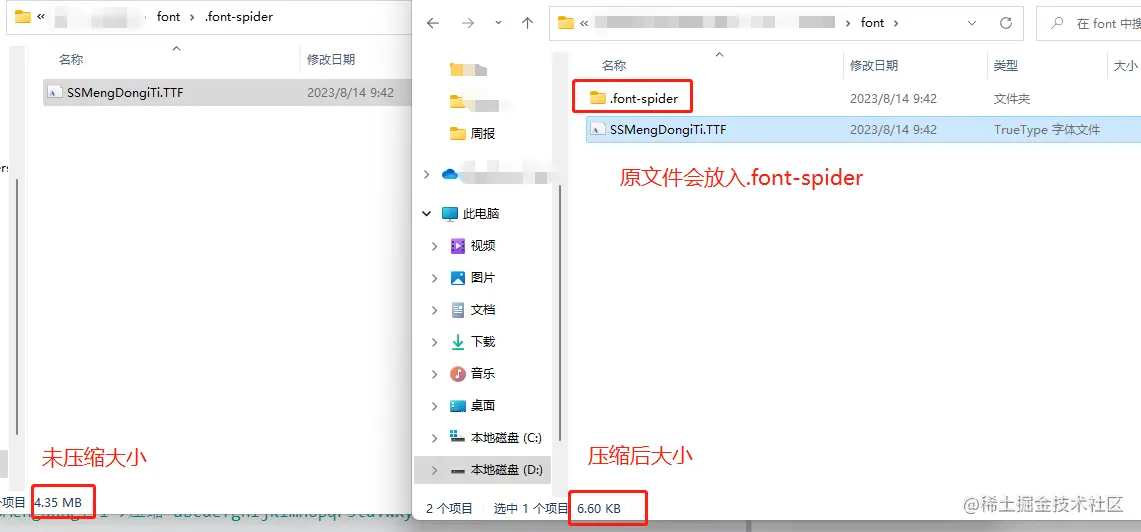
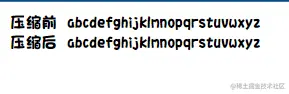
4.压缩前后大小、效果对比