

Built-in composition APIs of Vant.
1. useRect
作用
-
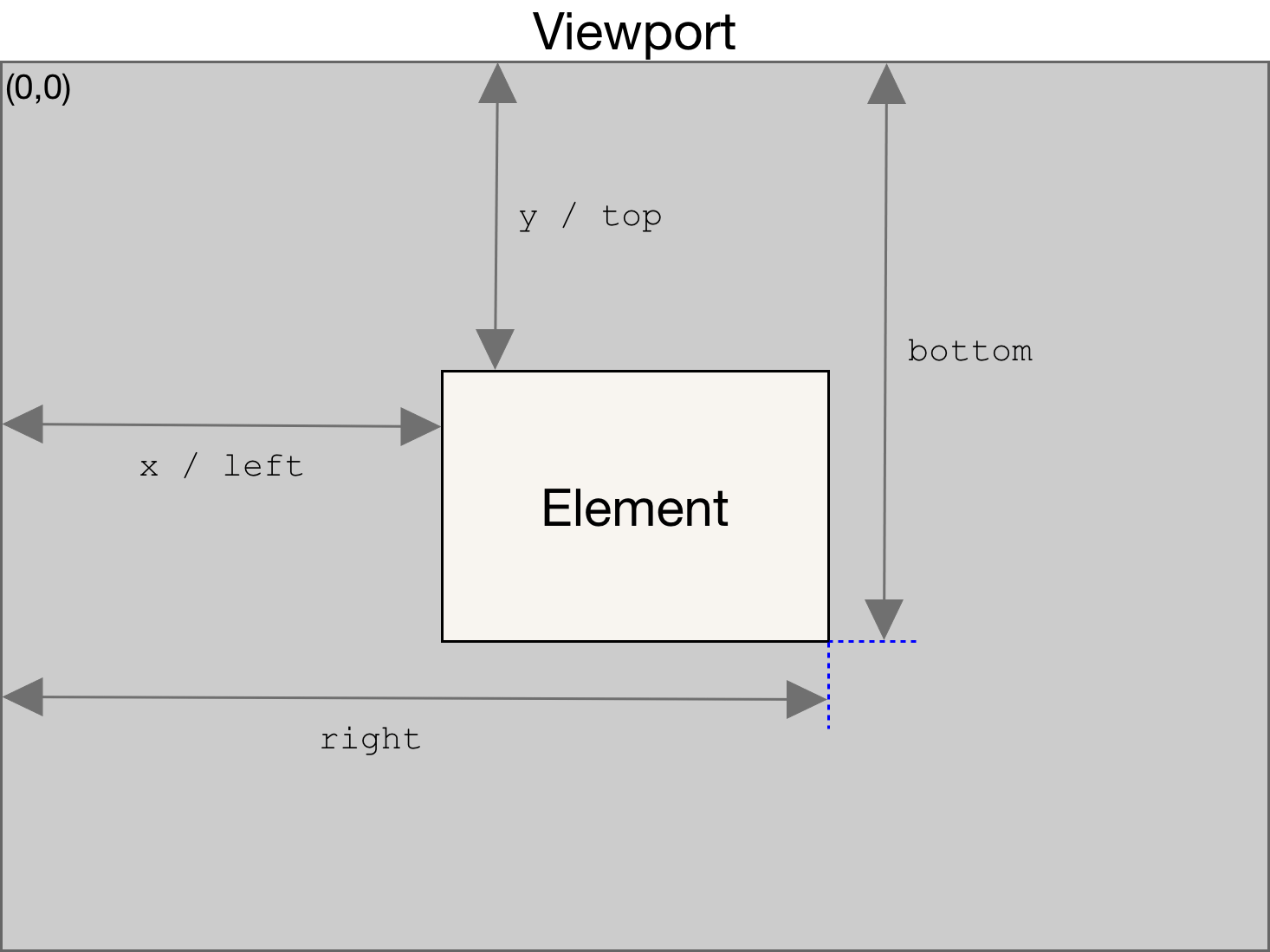
返回元素的大小及其相对于视口的位置
Element.getBoundingClientRect() 方法返回一个 DOMRect 对象,其提供了元素的大小及其相对于视口的位置。
优点
- 支持输入
windowreturngetBoundingClientRect格式返回值 - 提高兼容性
import { Ref, unref } from 'vue';

const isWindow = (val: unknown): val is Window => val === window;

const makeDOMRect = (width: number, height: number) =>
  ({
    top: 0,
    left: 0,
    right: width,
    bottom: height,
    width,
    height,
  } as DOMRect);

export const useRect = (
  elementOrRef: Element | Window | Ref<Element | Window | undefined>
) => {
  const element = unref(elementOrRef);

  if (isWindow(element)) {
    const width = element.innerWidth;
    const height = element.innerHeight;
    return makeDOMRect(width, height);
  }

  if (element?.getBoundingClientRect) {
    return element.getBoundingClientRect();
  }

  return makeDOMRect(0, 0);
};
2. useCustomFieldValue
作用
switch等输入的控件往包裹在外面的Field组件传递数据以及触发事件,用于校验以及往外暴露的回调事件- 例如以下的
switch组件利用useCustomFieldValuehook 监听自身响应式数据switchChecked触发Field组件上面的回调函数,做到实时更新校验等效果
<van-field name="switch" label="开关">
  <template #input>
    <van-switch v-model="switchChecked" size="20" />
  </template>
</van-field>
import { watch, inject, InjectionKey, Ref } from 'vue';

export type CustomFieldInjectionValue = {
  customValue: Ref<(() => unknown) | undefined>,
  resetValidation: () => void,
  validateWithTrigger: (trigger: 'onBlur' | 'onChange' | 'onSubmit') => void,
};

export const CUSTOM_FIELD_INJECTION_KEY: InjectionKey<CustomFieldInjectionValue> =
  Symbol('van-field');

export function useCustomFieldValue(customValue: () => unknown) {
  const field = inject(CUSTOM_FIELD_INJECTION_KEY, null);
  // 祖先组件Field使用 provide 来提供了一个对象,子组件使用 inject 来获取这个对象
  // provide(CUSTOM_FIELD_INJECTION_KEY, {
  //   customValue,
  //   resetValidation,
  //   validateWithTrigger,
  // });

  // 赋值 触发Field组件事件
  if (field && !field.customValue.value) {
    field.customValue.value = customValue;

    watch(customValue, () => {
      field.resetValidation();
      field.validateWithTrigger('onChange');
    });
  }
}
3. useChildren 寻找后代组件
说明
- 基于
Vue上面的provide方法上面的封装提供绑定等事件 - 内部
linkChildren函数调用才触发provide,为了暴露组件上更多的数据到后代组件
import {
  VNode,
  isVNode,
  provide,
  reactive,
  InjectionKey,
  getCurrentInstance,
  VNodeNormalizedChildren,
  ComponentPublicInstance,
  ComponentInternalInstance,
} from 'vue';

...

export function useChildren<
  // eslint-disable-next-line
  Child extends ComponentPublicInstance = ComponentPublicInstance<{}, any>,
  ProvideValue = never
>(key: InjectionKey<ProvideValue>) {
  // publicChildren 收集getCurrentInstance()
  // internalChildren 收集getCurrentInstance().proxy
  const publicChildren: Child[] = reactive([]);
  const internalChildren: ComponentInternalInstance[] = reactive([]);
  const parent = getCurrentInstance()!; // 获取当前组件实例

  const linkChildren = (value?: ProvideValue) => {
    // 绑定子组件到列表中
    const link = (child: ComponentInternalInstance) => {
      if (child.proxy) {
        internalChildren.push(child);
        publicChildren.push(child.proxy as Child); // push 当前组件实例的方法和属性
        sortChildren(parent, publicChildren, internalChildren); //
      }
    };
    // 解绑子组件
    const unlink = (child: ComponentInternalInstance) => {
      const index = internalChildren.indexOf(child);
      publicChildren.splice(index, 1);
      internalChildren.splice(index, 1);
    };

    // 提供给子组件的数据
    // 子组件通过inject(key, null)来获取
    // 把linkChildren的入参也提供给子组件
    provide(
      key,
      Object.assign(
        {
          link,
          unlink,
          children: publicChildren,
          internalChildren,
        },
        value
      )
    );
  };

  return {
    children: publicChildren,
    linkChildren,
  };
}
4. useParent 寻找祖先组件
说明
- 基于
Vue上面的inject方法上面的封装寻找对应的祖先组件 - 获取祖先组件的绑定函数自动绑定到祖先组件的数据中
import {
  ref,
  inject,
  computed,
  onUnmounted,
  InjectionKey,
  getCurrentInstance,
  ComponentPublicInstance,
  ComponentInternalInstance,
} from 'vue';

type ParentProvide<T> = T & {
  link(child: ComponentInternalInstance): void;
  unlink(child: ComponentInternalInstance): void;
  children: ComponentPublicInstance[];
  internalChildren: ComponentInternalInstance[];
};

export function useParent<T>(key: InjectionKey<ParentProvide<T>>) {
  // 获取祖先组件provide的对象
  const parent = inject(key, null);

  if (parent) {
    const instance = getCurrentInstance()!;
    const { link, unlink, internalChildren } = parent;

    // 自动绑定解绑
    link(instance);
    onUnmounted(() => unlink(instance));

    // 计算当前组件在父组件中的位置
    const index = computed(() => internalChildren.indexOf(instance));

    return {
      parent,
      index,
    };
  }

  return {
    parent: null,
    index: ref(-1),
  };
}
示例
// Field.tsx 中使用useParent寻找form组件
const { parent: form } = useParent(FORM_KEY);
// 挂载在Field自身上
useExpose <
  FieldExpose >
  {
    blur,
    focus,
    validate,
    formValue,
    resetValidation,
    getValidationStatus,
  };

// Form.tsx使用useChildren寻找所有的Field组件
const { children, linkChildren } = useChildren(FORM_KEY);

// 调用Form组件上面的validateAll方法,实际上就是调用了每个Field自身上validate方法
const validateAll = (names?: string[]) =>
  new Promise<void>((resolve, reject) => {
    const fields = children;
    Promise.all(fields.map((item) => item.validate())).then((errors) => {
      errors = errors.filter(Boolean);
      if (errors.length) {
        reject(errors);
      } else {
        resolve();
      }
    });
  });

