1.安装echarts-for-react
npm i echarts echarts-for-react
2.导入ReactEcharts
import ReactEcharts from "echarts-for-react"
3.创建数据
const getOption = () => {
let option = {
legend: {
data: ['Java', 'C', 'C++', 'Python', 'Visual Basic .NET', 'C#', 'JavaScript', 'PHP', 'SQL', 'Objective-C'],
textStyle: {
},
},
xAxis: {
nameLocation: 'start',
inverse: true,
data: ['2019', '2014', '2009', '2004', '1999', '1994', '1989'],
axisLabel: {
textStyle: {
},
},
},
yAxis: {
name: '排名',
nameLocation: 'start',
min: 1,
inverse: true,
axisLabel: {
textStyle: {
},
},
},
series: [
{ "name": "Java", data: [1, 2, 1, 1, 12, '-', 0], type: 'line' },
{ "name": "C", data: [2, 1, 2, 2, 1, 1, 1], type: 'line' },
{ "name": "C++", data: [3, 4, 3, 3, 2, 2, 3], type: 'line' },
{ "name": "Python", data: [4, 7, 5, 9, 27, 21, 0], type: 'line' },
{ "name": "Visual Basic .NET", data: [5, 10, '-', '-', '-', '-', 0], type: 'line' },
{ "name": "C#", data: [6, 5, 6, 7, 23, '-', 0], type: 'line' },
{ "name": "JavaScript", data: [7, 8, 8, 8, 17, '-', 0], type: 'line' },
{ "name": "PHP", data: [8, 6, 4, 5, '-', '-', 0], type: 'line' },
{ "name": "SQL", data: [9, '-', '-', 6, '-', '-', 0], type: 'line' },
{ "name": "Objective-C", data: [10, 3, 36, 44, '-', '-', 0], type: 'line' },
]
};
return option
}
4.组件库
<div id="two" style={{width:"324px",height:"300px"}}>
      <ReactEcharts option={getOption()} style={{width:"100%",height:"100%"}} />
</div>
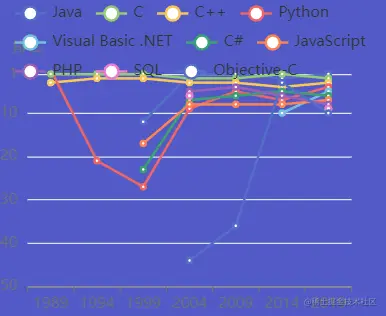
5.效果