Exception filters
Nest has an exception filter that takes care of handling the errors in our application. Whenever we don’t handle an exception ourselves, the exception filter does it for us. It processes the exception and sends it in the response in a user-friendly format.
The default exception filter is called BaseExceptionFilter. We can look into the source code of NestJS and inspect its behavior.
// nest/packages/core/exceptions/base-exception-filter.ts

export class BaseExceptionFilter<T = any> implements ExceptionFilter<T> {
  // ...
  catch(exception: T, host: ArgumentsHost) {
    // ...
    if (!(exception instanceof HttpException)) {
      return this.handleUnknownError(exception, host, applicationRef);
    }
    const res = exception.getResponse();
    const message = isObject(res)
      ? res
      : {
          statusCode: exception.getStatus(),
          message: res,
        };
    // ...
  }

  public handleUnknownError(
    exception: T,
    host: ArgumentsHost,
    applicationRef: AbstractHttpAdapter | HttpServer,
  ) {
    const body = {
      statusCode: HttpStatus.INTERNAL_SERVER_ERROR,
      message: MESSAGES.UNKNOWN_EXCEPTION_MESSAGE,
    };
    // ...
  }
Every time there is an error in our application, the catch method runs. There are a few essential things we can get from the above code.
HttpException
Nest expects us to use the HttpException class. If we don’t, it interprets the error as unintentional and responds with 500 Internal Server Error.
We’ve used HttpException quite a bit in the previous parts of this series:
throw new HttpException('Post not found', HttpStatus.NOT_FOUND);
The constructor takes two required arguments: the response body, and the status code. For the latter, we can use the provided HttpStatus enum.
If we provide a string as the definition of the response, NestJS serialized it into an object containing two properties:
- statusCode: contains the HTTP code that we’ve chosen
- message: the description that we’ve provided
We can override the above behavior by providing an object as the first argument of the HttpException constructor.
We can often find ourselves throwing similar exceptions more than once. To avoid code duplication, we can create custom exceptions. To do so, we need to extend the HttpException class.
// src/modules/posts/exception/postNotFund.exception.ts
import { HttpException, HttpStatus } from '@nestjs/common';

export class PostNotFoundException extends HttpException {
  constructor(postId: number) {
    super(`Post with id ${postId} not found`, HttpStatus.NOT_FOUND);
  }
}
// src/modules/posts/exception/postNotFund.exception.ts
import { NotFoundException } from '@nestjs/common';

export class PostNotFoundException extends NotFoundException {
  constructor(postId: number) {
    super(`Post with id ${postId} not found`);
  }
}
The first argument of the NotFoundException class is an additional error property. This way, our message is defined by NotFoundException and is based on the status.
Extending the BaseExceptionFilter
The default BaseExceptionFilter can handle most of the regular cases. However, we might want to modify it in some way. The easiest way to do so is to create a filter that extends it.
// src/utils/exception/exceptionsLogger.filter.ts
import { Catch, ArgumentsHost } from '@nestjs/common';
import { BaseExceptionFilter } from '@nestjs/core';

@Catch()
export class ExceptionsLoggerFilter extends BaseExceptionFilter {
  catch(exception: unknown, host: ArgumentsHost) {
    console.log('Exception thrown', exception);
    super.catch(exception, host);
  }
}
The @Catch() decorator means that we want our filter to catch all exceptions. We can provide it with a single exception type or a list.
We can use our new filter in three ways. The first one is to use it globally in all our routes through app.useGlobalFilters.
// src/main.ts
import { HttpAdapterHost, NestFactory } from '@nestjs/core';
import { AppModule } from './app.module/app.module';
import * as cookieParser from 'cookie-parser';
import { ExceptionsLoggerFilter } from './utils/exception/exceptionsLogger.filter';

async function bootstrap() {
  const app = await NestFactory.create(AppModule);
  const { httpAdapter } = app.get(HttpAdapterHost);
  app.useGlobalFilters(new ExceptionsLoggerFilter(httpAdapter));

  app.use(cookieParser());
  await app.listen(3000, () => {
    console.log('Listening on port 3000');
  });
}
bootstrap();
A better way to inject our filter globally is to add it to our AppModule. Thanks to that, we could inject additional dependencies into our filter.
//src/app.module/app.module.ts

import { ExceptionsLoggerFilter } from '../utils/exception/exceptionsLogger.filter';
import { APP_FILTER } from '@nestjs/core';

@Module({
  //...
  providers: [
    AppService,
    {
      provide: APP_FILTER,
      useClass: ExceptionsLoggerFilter,
    },
  ],
})
export class AppModule {}
The third way to bind filters is to attach the @UseFilters decorator. We can provide it with a single filter, or a list of them
// src/modules/posts/posts.controller.ts
  @Get(':id')
  @UseFilters(ExceptionsLoggerFilter)
  findOneById(@Param('id') id: string) {
    return this.postsService.findOne(+id);
  }
The above is not the best approach to logging exceptions. NestJS has a built-in Logger that we cover in the upcoming parts of this series.
Implementing the ExceptionFilter interface
If we need a fully customized behavior for errors, we can build our filter from scratch. It needs to implement the ExceptionFilter interface. Let’s look into an example:
// src/utils/exception/myNotFoundException.filter.ts
import {
  ExceptionFilter,
  Catch,
  ArgumentsHost,
  NotFoundException,
} from '@nestjs/common';
import { Request, Response } from 'express';

@Catch(NotFoundException)
export class HttpExceptionFilter implements ExceptionFilter {
  catch(exception: NotFoundException, host: ArgumentsHost) {
    const context = host.switchToHttp();
    const response = context.getResponse<Response>();
    const request = context.getRequest<Request>();
    const status = exception.getStatus();
    const message = exception.message;

    response.status(status).json({
      message,
      statusCode: status,
      time: new Date().toISOString(),
    });
  }
}
There are a few notable things above. Since we use @Catch(NotFoundException), this filter runs only for NotFoundException.
The host.switchToHttp method returns the HttpArgumentsHost object with information about the HTTP context.
Validation
1. use joi
// src/utils/pipe/joi-validation.pipe.ts
import {
  PipeTransform,
  Injectable,
  ArgumentMetadata,
  BadRequestException,
} from '@nestjs/common';
import { ObjectSchema } from 'joi';

@Injectable()
export class JoiValidationPipe implements PipeTransform {
  constructor(private schema: ObjectSchema) {}

  transform(value: any, metadata: ArgumentMetadata) {
    const { error } = this.schema.validate(value);
    if (error) {
      throw new BadRequestException('Validation failed');
    }
    return value;
  }
}
// src/modules/authentication/dto/create-register.dto.ts
import * as Joi from 'joi';
export const createRegisterSchema = Joi.object({
  email: Joi.string().email().required(),
  name: Joi.string().required(),
  password: Joi.string().required(),
});

export class CreateRegisterDto {
  email: string;
  name: string;
  password: string;
}
// src/modules/authentication/authentication.controller.ts
  @Post('register')
  @UsePipes(new JoiValidationPipe(createRegisterSchema))
  async register(@Body() registrationData: CreateRegisterDto) {
    console.log('registrationData', registrationData);
    return this.authenticationService.register(registrationData);
  }
2.Class validator
after install class-validator class-transformer, two error occured and displyed in termanal
[Nest] 13935  - 07/21/2023, 8:22:21 PM   ERROR [MappedTypes] Transformer ("class-transformer") metadata cannot be inherited for "CreatePostDto" class.
[Nest] 13935  - 07/21/2023, 8:22:21 PM   ERROR [MappedTypes] Error: Cannot find module 'class-transformer/storage'
 WARN  Issues with peer dependencies found
.
└─┬ @nestjs/mapped-types 0.0.1
  ├── ✕ unmet peer class-transformer@^0.2.3: found 0.5.1
  └── ✕ unmet peer class-validator@^0.11.1: found 0.14.0
after search with bing, in some github issues. some try downgrade the verson of and. i do not want do that.
i try to update all dependency packages in package.json using vscode extension version len, and run pnpm i, and "@nestjs/mapped-types": "*", changed to "@nestjs/mapped-types": "2.0.2", . the error gone.
// src/modules/authentication/dto/create-register2.dto.ts

import { IsEmail, IsNotEmpty, IsString, MinLength } from 'class-validator';

export class CreateRegisterDto2 {
  @IsEmail()
  email: string;

  @IsString()
  @IsNotEmpty()
  name: string;

  @IsString()
  @IsNotEmpty()
  @MinLength(7)
  password: string;
}
// src/utils/pipe/class-validation.pipe.ts

import {
  PipeTransform,
  Injectable,
  ArgumentMetadata,
  BadRequestException,
} from '@nestjs/common';
import { ValidationError, validate } from 'class-validator';
import { plainToInstance } from 'class-transformer';

type FuncType =
  | StringConstructor
  | BooleanConstructor
  | NumberConstructor
  | ArrayConstructor
  | ObjectConstructor;

@Injectable()
export class ClassValidationPipe implements PipeTransform<any> {
  async transform(value: any, { metatype }: ArgumentMetadata) {
    if (!metatype || !this.toValidate(metatype as FuncType)) {
      return value;
    }
    const object = plainToInstance(metatype, value);
    const errors = await validate(object);
    if (errors.length > 0) {
      const message = errors
        .map(
          (error: ValidationError) =>
            error.constraints && Object.values(error.constraints),
        )
        .join(', ');
      throw new BadRequestException(message);
    }
    return value;
  }

  private toValidate(metatype: FuncType): boolean {
    const types = [String, Boolean, Number, Array, Object];
    return !types.includes(metatype);
  }
}
use it param, method or global as you need.
//
  @Post()
  @UseGuards(JwtAuthenticationGuard)
  create(@Body(new ClassValidationPipe()) createPostDto: CreatePostDto) {
    return this.postsService.create(createPostDto);
  }
async function bootstrap() {
const app = await NestFactory.create(AppModule);
app.useGlobalPipes(new ClassValidationPipe());
await app.listen(3000);
}
bootstrap();
``
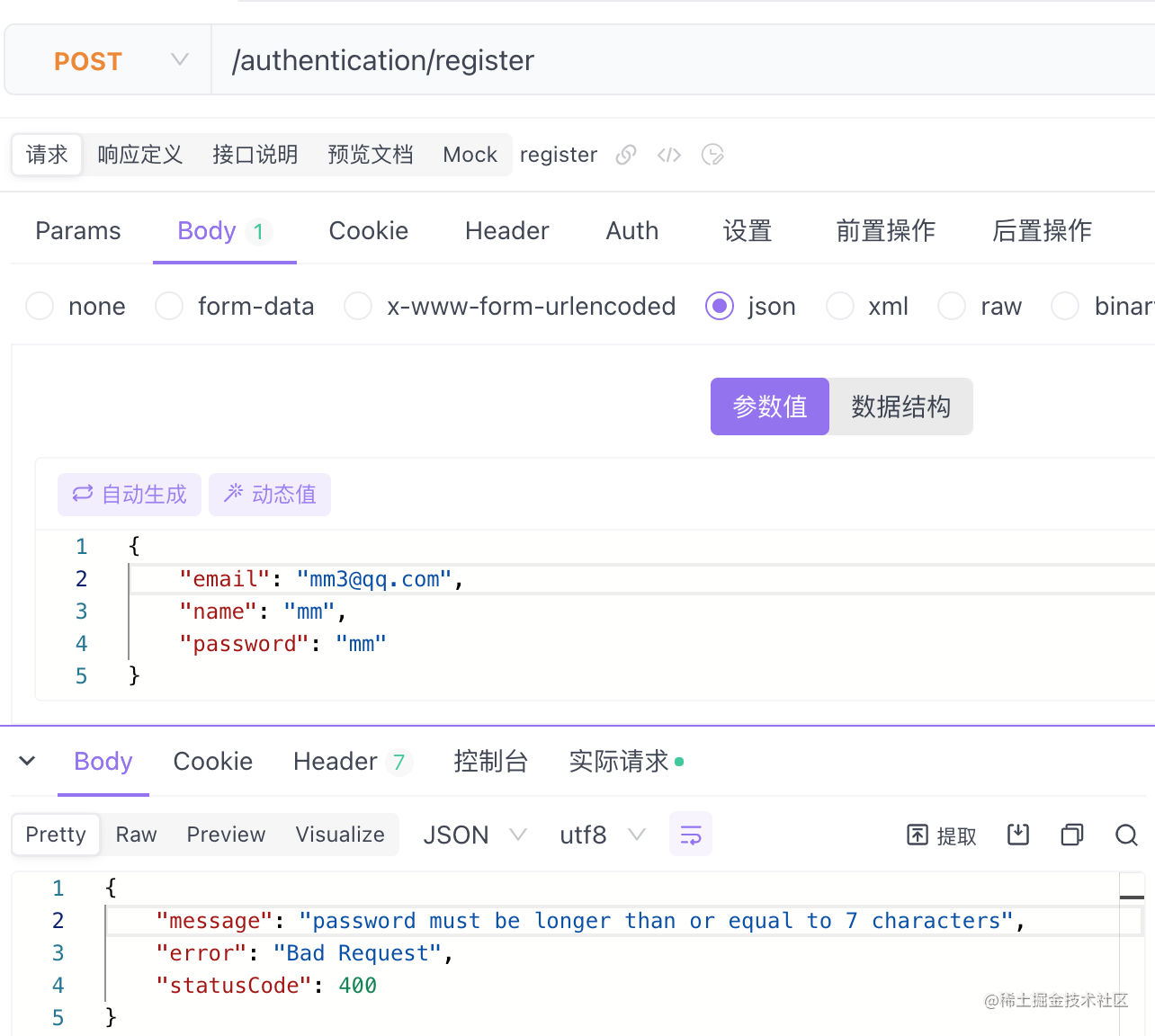
### Validating params
```ts
// src/modules/posts/dto/find-one.dto.ts
import { IsNumberString } from 'class-validator';
import { IsNumberString } from 'class-validator';
export class FindOneDto {
@IsNumberString()
id: string;
}
// src/modules/posts/posts.controller.ts

  @Get(':id')
  @UseFilters(ExceptionsLoggerFilter)
  findOneById(@Param() { id }: FindOneDto) {
    return this.postsService.findOne(+id);
  }
Handling PATCH
The difference between the PUT and PATCH methods. is that, PUT replaces an entity, while PATCH applies a partial modification. When performing partial changes, we need to skip missing properties.
when handle update method, you can you use all above, the patch method if need to be validate a seperate specical pipe may be a good solution.
I am finding Job, if you have a HC, Plz contact me, wechat: ftf2022 ref: