ESlint代码规范+Prettier格式化
vite创建的项目是默认没有集成ESLint的,所以我们需要手动去安装配置ESLint。
安装 eslint
pnpm create @eslint/config@latest
根据步骤,按照项目的需求选择需要的配置,然后会生成一个eslint.config.mjs文件。
你也可以将 .mjs 改为 .js,但是需要在 package.json 中添加 "type": "module"
如果env.d.ts中遇到如下报错:
是因为旧
ban-types已被废弃,被分成几条规则:
no-empty-object-type{}:在容易混淆的地方禁止使用内置类型no-unsafe-function-type:禁止内置Functionno-wrapper-object-types:禁止Object和内置类包装器,例如Number
只需要将@typescript-eslint/ban-types换成@typescript-eslint/no-empty-object-type即可消除报错。
注意:prettier 的配置需要放在所有配置的后面!
2.2 验证项目中代码是否符合ESLint的验证规范
package.json添加node脚本:
 "scripts": {
    "lint": "eslint ./src/**/*.{js,jsx,vue,ts,tsx} --fix"
  },
注意:在{}中的文件类型之间不能有空格,例如:{js, ts, tsx, jsx, vue}这样是会报错的。
VSCode安装ESLint插件
VSCode提示不符合ESLint语法规范错误
-
禁用
vetur插件 -
安装
eslint插件 只要安装启用了这个插件,它就会自动查找项目中的eslint配置规范,并且给出验证提示。 -
安装
volar插件
按照项目中的ESLint规则要求格式化代码
ESLint提供了格式化工具,但是需要手动配置才能使用。
设置 ---> 扩展 ---> ESLint ---> Format: Enable √
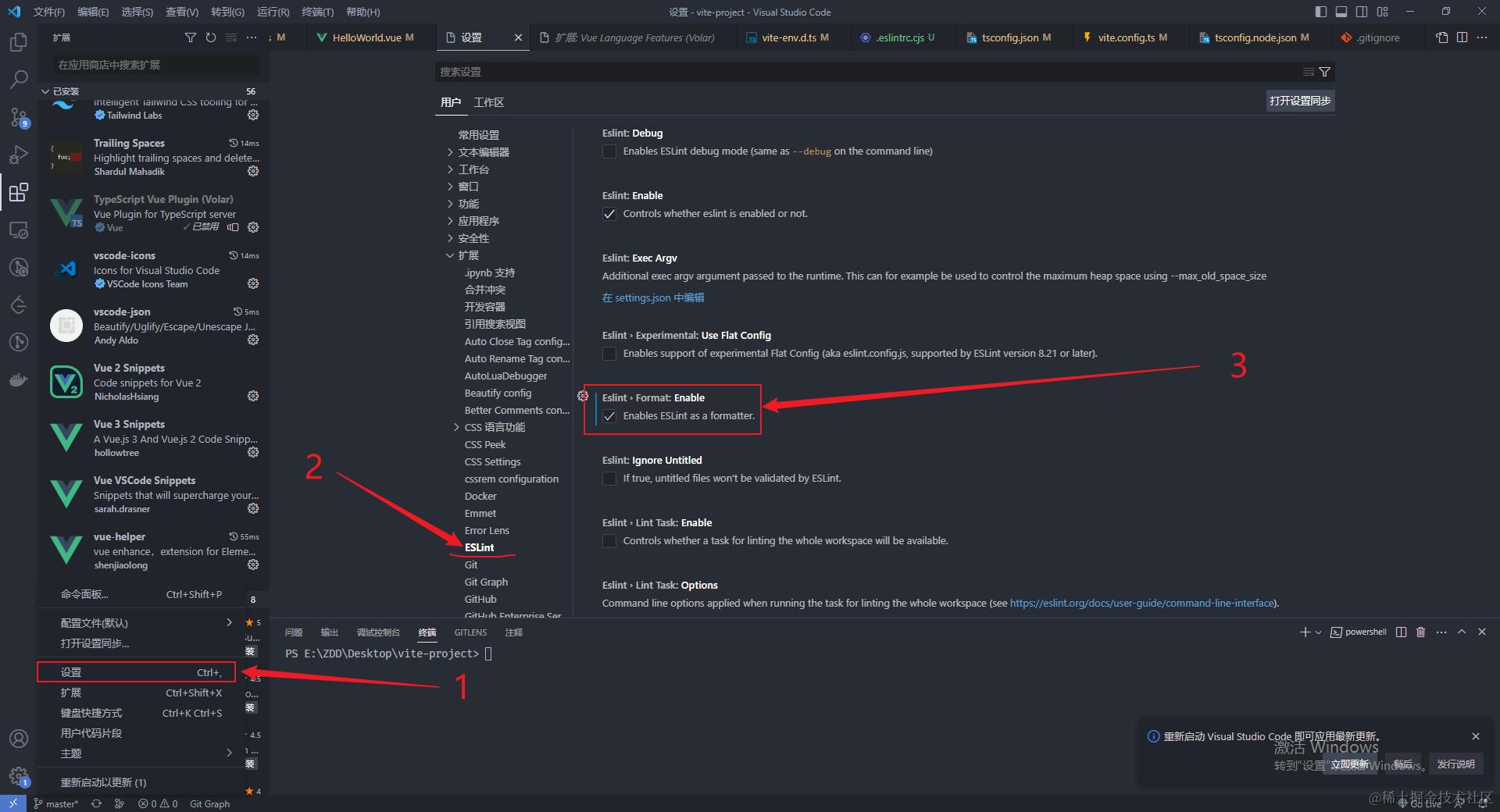
将图上的勾选,表示启用eslint插件作为格式化工具。
创建.eslintignore文件,忽略eslint不需要检查的文件
/index.html
/tsconfig.json
/src/vite-env.d.ts
/.preitterrc.json
配置prettier
-
安装
prettier、eslint-config-prettier、eslint-plugin-prettier-
eslint-plugin-prettier: 基于 prettier 代码风格的 eslint 规则,即eslint使用pretter规则来格式化代码。
-
eslint-config-prettier: 禁用所有与格式相关的 eslint 规则,解决 prettier 与 eslint 规则冲突,确保将其放在 extends 队列最后,这样它将覆盖其他配置
pnpm add prettier eslint-plugin-prettier eslint-config-prettier --save-devimport eslintConfigPrettier from 'eslint-config-prettier/flat'; import eslintPluginPrettierRecommended from 'eslint-plugin-prettier/recommended'; export default defineConfig([ ..., eslintConfigPrettier, eslintPluginPrettierRecommended ]);注意:prettier 的配置需要放在所有配置的后面!
-
-
项目根目录创建
prettier.config.js:{ "tabWidth": 2, // 缩进字节数 "endOfLine": "auto", // 结尾是 \n \r \n\r auto "printWidth": 120, // 超过最大值换行 "proseWrap": "preserve", // 默认值。因为使用了一些折行敏感型的渲染器(如GitHub comment)而按照markdown文本样式进行折行 "quoteProps": "as-needed", // 对象的 key 仅在必要时用引号 "semi": true, // 句尾添加分号 "singleQuote": true, // 使用单引号代替双引号 "trailingComma": "none", // 在对象或数组最后一个元素后面是否加逗号(在ES5中加尾逗号) "useTabs": false, // 缩进不使用tab,使用空格 "arrowParens": "always", // (x) => {} 箭头函数参数只有一个时是否要有小括号。avoid:省略括号 "bracketSpacing": true, // 在对象,数组括号与文字之间加空格 "{ foo: bar }" "eslintIntegration": true, // 使用eslint进行格式化校验 "vueIndentScriptAndStyle": true // 是否缩进Vue文件中<script>和<style>标记内的代码。 }规则也可以自行到prettier官网配置。
安装配置stylelint
stylelint为css的代码规范校验工具。可用来统一css代码规范,检查css语法错误与不合理的写法,指定css书写顺序,格式化css代码等...
安装stylelint相关依赖
以sass为例:
pnpm add --save-dev stylelint@13.13.1 postcss postcss-html stylelint-config-prettier-scss stylelint-config-standard-scss stylelint-order stylelint-config-standard-vue
-
stylelint:
css书写规范校验工具 -
postcss: 将最新的 CSS 语法转换成大多数浏览器都能理解的语法
-
postcss-html: 识别html/vue 中的
<style></style>标签中的样式 -
stylelint-config-prettier-scss: 关闭所有不必要或可能与
Prettier冲突的css和scss规则。 -
stylelint-config-standard-scss:
scss的标准配置规则,详细可查看官方文档 -
stylelint-config-standard-vue:Stylelint 的标准可共享
Vue配置。 -
stylelint-order: 指定样式书写的顺序,在
.stylelintrc.js中order/properties-order指定顺序
注意:stylelint版本14会报:# Stylelint: Unknown word (CssSyntaxError),解决这个问题需要16.8.2的版本;
增加stylelint.config.js
export default {
  root: true,
  // 插件
  plugins: ['stylelint-order'],
  customSyntax: 'postcss-html',
  // 扩展
  extends: ['stylelint-config-prettier-scss', 'stylelint-config-standard-scss', 'stylelint-config-standard-vue/scss'],

  rules: {
    'selector-pseudo-class-no-unknown': [
      true,
      {
        ignorePseudoClasses: ['global']
      }
    ],
    'selector-pseudo-element-no-unknown': [
      true,
      {
        ignorePseudoElements: ['v-deep', 'deep']
      }
    ],
    'at-rule-no-unknown': [
      true,
      {
        ignoreAtRules: [
          'tailwind',
          'apply',
          'variants',
          'responsive',
          'screen',
          'function',
          'if',
          'each',
          'include',
          'mixin'
        ]
      }
    ],
    'no-empty-source': null,
    'named-grid-areas-no-invalid': null,
    'no-descending-specificity': null,
    'font-family-no-missing-generic-family-keyword': null,
    'rule-empty-line-before': [
      'always',
      {
        ignore: ['after-comment', 'first-nested']
      }
    ],
    'unit-no-unknown': [true, { ignoreUnits: ['rpx'] }],
    'order/order': [
      [
        'dollar-variables',
        'custom-properties',
        'at-rules',
        'declarations',
        {
          type: 'at-rule',
          name: 'supports'
        },
        {
          type: 'at-rule',
          name: 'media'
        },
        'rules'
      ],
      { severity: 'warning' }
    ],
    'order/properties-order': [
      'position',
      'top',
      'right',
      'bottom',
      'left',
      'z-index',
      'display',
      'justify-content',
      'align-items',
      'float',
      'clear',
      'overflow',
      'overflow-x',
      'overflow-y',
      'margin',
      'margin-top',
      'margin-right',
      'margin-bottom',
      'margin-left',
      'padding',
      'padding-top',
      'padding-right',
      'padding-bottom',
      'padding-left',
      'width',
      'min-width',
      'max-width',
      'height',
      'min-height',
      'max-height',
      'font-size',
      'font-family',
      'font-weight',
      'border',
      'border-style',
      'border-width',
      'border-color',
      'border-top',
      'border-top-style',
      'border-top-width',
      'border-top-color',
      'border-right',
      'border-right-style',
      'border-right-width',
      'border-right-color',
      'border-bottom',
      'border-bottom-style',
      'border-bottom-width',
      'border-bottom-color',
      'border-left',
      'border-left-style',
      'border-left-width',
      'border-left-color',
      'border-radius',
      'text-align',
      'text-justify',
      'text-indent',
      'text-overflow',
      'text-decoration',
      'white-space',
      'color',
      'background',
      'background-position',
      'background-repeat',
      'background-size',
      'background-color',
      'background-clip',
      'opacity',
      'filter',
      'list-style',
      'outline',
      'visibility',
      'box-shadow',
      'text-shadow',
      'resize',
      'transition'
    ]
  },

  ignoreFiles: [
    // 不需要样式校验的文件
    '**/*.js',
    '**/*.jsx',
    '**/*.tsx',
    '**/*.ts',
    '**/*.json',
    '**/*.md',
    '**/*.yaml',
    'dist/**',
    'node_modules/**'
  ]
};
package.json添加脚本
{
 "scripts": {
    "lint:style": "stylelint \"./**/*.{css,scss,vue,html}\" --fix"
  }
}
vscode安装stylelint插件
安装该插件可在我们保存代码时自动执行stylelint

{
    // 开启自动修复
    "editor.codeActionsOnSave": {
      "source.fixAll": false,
      "source.fixAll.eslint": true,
 +    "source.fixAll.stylelint": true
    },
    // 保存的时候自动格式化
    "editor.formatOnSave": true,
    // 默认格式化工具选择prettier
    "editor.defaultFormatter": "esbenp.prettier-vscode",
    // 配置该项,新建文件时默认就是space:2
    "editor.tabSize": 2,
    // stylelint校验的文件格式
  + "stylelint.validate": ["css", "less", "vue", "html"]
  }
运行遇到的报错:
'eslint' 不是内部或外部命令
- 删除项目目录中的
node_modules文件夹。 - 重新安装
npm install
添加"lint",脚本的意义:运行这命令,验证指定目录下的文件的代码风格是否符合规范。
这里对src下面的任意目录下的任意名字的js、jsx、vue、ts、tsx文件进行验证。
--fix:简单的不符合代码规范的,自动帮你格式化。
问题一:
找不到模块"xxx"或其相应的类型声明。
解决方法:
安装@types/node:
npm install --save-dev @types/node
问题二:
Error: Error while loading rule '@typescript-eslint/dot-notation': You have used a rule which requires parserServices to be generated. You must therefore provide a value for the "parserOptions.project" property for @typescript-eslint/parser.
解决方法:
在.eslintrc.cjs中添加:
 parserOptions: {
   // eslint缺少ts类型检测,需要引入此扩展
   parser: '@typescript-eslint/parser',
   project: ['./tsconfig.json']
 }
问题三:
Parsing error: ESLint was configured to run on `/src\App.vue` using parserOptions.project`: /tsconfig.json The extension for the file (`.vue`) is non-standard. You should add `parserOptions.extraFileExtensions` to your config
-
解决方法:
在
.eslintrc.cjs中添加:parserOptions: { extraFileExtensions: ['.vue'] }
问题四:
Do not use a triple slash reference for vite/client, use import style instead @typescript-eslint/triple-slash-reference
不支持三斜杠引入。
- 解决方法:
关闭这个规则
rules: {
'@typescript-eslint/triple-slash-reference': 'off'
}
问题五:
Parsing error: ESLint was configured to run on <tsconfigRootDir>/.eslintrc.cjs using parserOptions.project: /tsconfig.json
提示使用了parserOptions.project.但是tsconfig.json不包含本文件
- 解决方法:
在
tsconfig.json的include数组中加入.eslintrc.cjs.重启生效"include": [ "src/**/*.ts", "src/**/*.d.ts", "src/**/*.tsx", "src/**/*.vue", ".eslintrc.cjs" ]
问题六:
Parsing error: Unexpected token )eslint

- 解决方法
在
.eslintrc.cjs中添加:parser: '@typescript-eslint/parser'
问题七:
Cannot find module 'vue'. Did you mean to set the 'moduleResolution' option to 'node', or to add aliases to the 'paths' option?
找不到模块'vue'。您的意思是将' modulerresolve '选项设置为'node',还是为'paths'选项添加别名?
-
解决方法: 在
tsconfig.json中,将moduleResolution的值设置为:node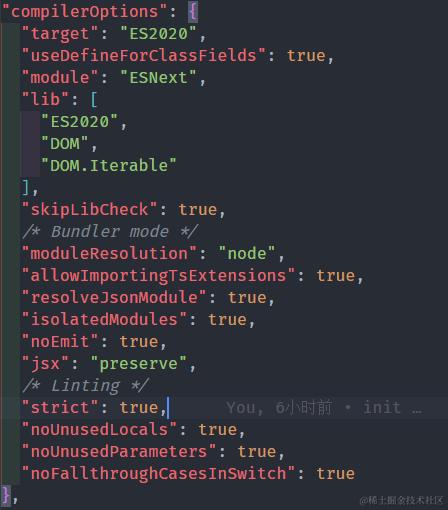
"moduleResolution": "node"
问题八:
Module '"e:/ZDD/Desktop/vite-project/src/components/HelloWorld.vue"' has no default export.
-
解决方法:
将
Vetur禁用,启用Volar。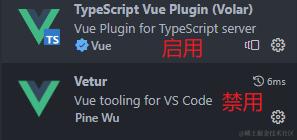
问题九
解决报错:找不到模块“./App.vue”或其相应的类型声明。ts(2307):
declare module "*.vue"{
    import { DefineComponent } from "vue"
    // eslint-disable-next-line @typescript-eslint/no-explicit-any, @typescript-eslint/ban-types
    const component: DefineComponent<{}, {}, any>
    export default component
}