页面效果
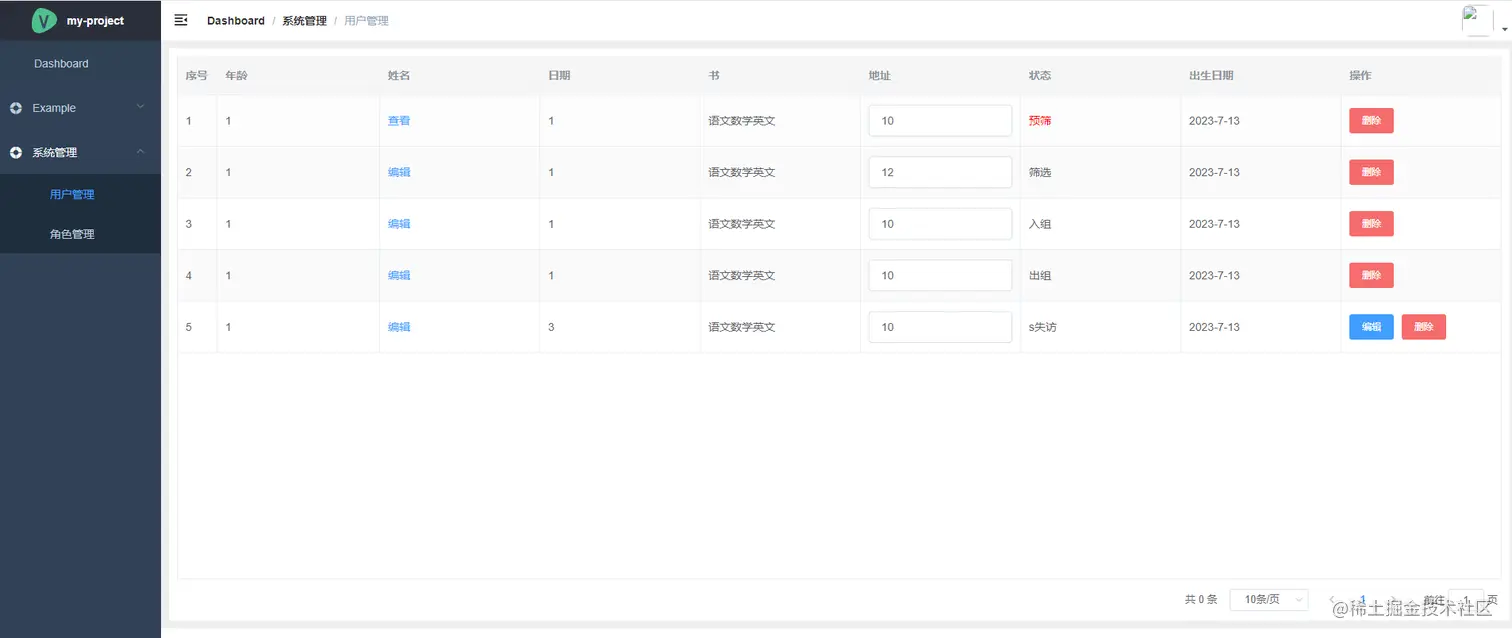
当前页面引用封装的组件
<Table
:tabledata="tableData"
:columns="columns"
height="calc(100vh - 270px)"
@onClickOption="handleClick"
:pagination.sync="pagination"
@sizeChange="handleSizeChangePag"
@currentChange="handleCurrentChangePag"
>
</Table>
<script>
import Table from '@/components/Table'
export default {
components: { Table },
}
</script>
引用js,定义 columns(表头)、tableData(数据)、pagination(分页)
<script>
import { dataTable } from './table'
import Table from '@/components/Table'
export default {
components: { Table },
data() {
const columns = dataTable(this)
return {
columns,
tableData: [
{ date: 1, name: 'liy', address: 10, status: 0, birthday: '2023-07-13', book: ['语文', '数学', '英文'] },
{ date: 1, name: 'liy', address: 12, status: 1, birthday: '2023-07-13', book: ['语文', '数学', '英文'] },
{ date: 1, name: 'liy', address: 10, status: 2, birthday: '2023-07-13', book: ['语文', '数学', '英文'] },
{ date: 1, name: 'liy', address: 10, status: 3, birthday: '2023-07-13', book: ['语文', '数学', '英文'] },
{ date: 3, name: 'liy', address: 10, status: 4, birthday: '2023-07-13', book: ['语文', '数学', '英文'] }
],
pagination: {
currentPage: 1,
pageSize: 2,
totalNum: 0
},
editIndex: 2,
editIndex1: 1,
editName: ''
}
}
}
</script>
table.js
export const dataTable = (vm) => {
return {
props: {
index: true,
border: true,
showSummary: false,
isSelection: false,
pagination: true,
},
events: {
"selection-change": vm.handleSelectionChange,
},
cols: [
{
label: "年龄",
prop: "age",
},
{
label: "姓名",
render: (h, { row, index }) => {
let box = "";
if (row.status == 0) {
box = (
<el-link type="primary" onclick={() => vm.edit(row, index)}>
查看
</el-link>
);
} else {
box = (
<el-link type="primary" onclick={() => vm.binding(row, index)}>
编辑
</el-link>
);
}
return h("div", [box]);
},
},
{
label: "日期",
prop: "date",
render: (h, { row }) => {
let box = "";
box = <span>{row.date}</span>;
return h("div", [box]);
},
},
{
label: "书",
render: (h, { row }) => {
let boo = initDom(h, row.book);
return h("div", [boo]);
},
},
{
label: "地址",
render: (h, { row, index }) => {
let address = "";
address = (
<el-input
type="text"
value={row.address}
oninput={(event) => vm.handleadd(row, index, event)}
/>
);
return h("div", [address]);
},
},
{
label: "状态",
render: (h, { row }) => {
let statusName = "";
if (row.status === 0) {
statusName = <span style="color: red">预筛</span>;
} else if (row.status === 1) {
statusName = "筛选";
} else if (row.status === 2) {
statusName = "入组";
} else if (row.status === 3) {
statusName = "出组";
} else if (row.status === 4) {
statusName = "s失访";
}
const name = statusName;
return h("div", [name]);
},
},
{
label: "出生日期",
render: (h) => {
const date = new Date();
const year = date.getFullYear();
const month = date.getMonth() + 1;
const day = date.getDate();
const birthday = `${year}-${month}-${day}`;
return h("span", birthday);
},
},
{
label: "操作",
width: "200",
fixed: "right",
options: [
{
label: "编辑",
type: "primary",
size: "small",
methods: { fun: "handleClickDetail", name: "edit" },
render(row) {
if (row.date === 3) {
return true;
}
},
},
{
label: "删除",
type: "danger",
size: "small",
methods: { fun: "handleClickDetail", name: "delete" },
},
],
},
],
};
};
function initDom(h, data) {
let arr = [];
let html = "";
for (let i = 0; i < data.length; i++) {
arr.push(renderDom(data[i]));
}
html = arr.map((item) => {
return item;
});
function renderDom(v) {
return [<span>{v}</span>];
}
return html;
}
封装的table.vue
<el-table
:data="tabledata"
style="width: 100%"
stripe
:border="columns.props.border"
:row-class-name="tableRowClassName"
:height="height"
:highlight-current-row="highlightCurrentRow"
:show-summary="showSummary"
:sum-text="sumTest"
@current-change="handleCurrentChangeTable"
@selection-change="handleSelectionChange"
:summary-method="getSummaries"
:header-cell-style="{ background: '#f6f6f6' }"
>
<el-table-column type="selection" width="55" v-if="columns.props.isSelection"> </el-table-column>
<el-table-column type="index" width="50" label="序号"> </el-table-column>
<template v-for="(item, rowIndex) in columns.cols">
<template v-if="item.label !== '操作'">
<el-table-column :prop="item.prop" :label="item.label" :key="rowIndex">
<template slot-scope="scope">
<template v-if="item.render">
<item :row="scope.row" :column="item" :rowIndex="rowIndex" :index="scope.$index" :render="item.render"></item>
<span @click="() => item.render(scope.row)"> </span>
</template>
<template v-else-if="item.slot">
<slot :row="scope.row" :column="item" :rowIndex="rowIndex" :index="scope.$index" :name="item.slot"></slot>
</template>
<template v-else>{{ scope.row[item.prop] }}</template>
</template>
</el-table-column>
</template>
<template v-else>
<el-table-column :prop="item.prop" :label="item.label" :key="rowIndex">
<template slot-scope="scope">
<template v-for="(ele, index1) in item.options">
<template v-if="ele.render">
<el-button :key="index1" v-if="ele.render(scope.row)" :type="ele.type" :size="ele.size" @click.stop="handleButton(ele.methods, scope.row, scope.$index)">{{ ele.label }}</el-button>
</template>
<template v-else>
<el-button :key="index1" :type="ele.type" :size="ele.size" @click.stop="handleButton(ele.methods, scope.row, scope.$index)">{{ ele.label }}</el-button>
</template>
</template>
</template>
</el-table-column>
</template>
</template>
</el-table>
<!--分页-->
<el-pagination
v-if="columns.props.pagination"
class="pagination-style"
layout="total, sizes, prev, pager, next, jumper"
:page-size="pagination.pageSize"
:current-page="pagination.currentPage"
:total="pagination.totalNum"
@size-change="handleSizeChange"
@current-change="handleCurrentChange"
>
</el-pagination>
<script>
export default {
name: 'Table',
components: { Item },
props: {
tabledata: {
type: Array,
default: function () {
return []
}
},
height: {
type: String
},
showSummary: {
type: Boolean,
default: false
},
isSelection: {
type: Boolean,
default: false
},
border: {
type: Boolean,
default: false
},
columns: {
type: Object,
default: function () {
return []
}
},
pagination: {
type: Object,
default: function () {
return []
}
}
},
data() {
return {
sumTest: '总价',
multipleSelection: [],
highlightCurrentRow: false
}
},
methods: {
tableRowClassName({ rowIndex }) {
if (this.highlightCurrentRow) {
if (rowIndex === 0) {
return 'warning-row'
} else if (rowIndex === 3) {
return 'success-row'
}
return ''
}
},
handleClick() {},
handleCurrentChangeTable(val) {
console.log(val)
},
handleSelectionChange(val) {
this.multipleSelection = val
},
getSummaries(params) {
console.log(params)
},
handleButton(methods, row, index) {
console.log(methods, row, index)
this.$emit('onClickOption', { methods, row, index })
},
handleSizeChange(val) {
console.log('val', val)
this.$emit('sizeChange', val)
},
handleCurrentChange(val) {
this.$emit('currentChange', val)
}
}
}
</script>
item.js
<script>
export default {
  name: 'MenuItem',
  functional: true,
  props: {
    icon: {
      type: String,
      default: ''
    },
    title: {
      type: String,
      default: ''
    },
    row: {
      type: Object,
      default: function () {
        return []
      }
    },
    column: Object,
    index: Number,
    render: Function
  },
  render: (h, ctx) => {
    const params = {
      row: ctx.props.row,
      column: ctx.props.column,
      index: ctx.props.index
    }
    return ctx.props.render(h, params)
  }
}
</script>



