服务端设置
方法一 nginx配置跨域信息
location / {
    proxy_pass http://127.0.0.1:8080/; # 设置是否允许 cookie 传输
        # 允许携带凭证(如Cookie)
        add_header Access-Control-Allow-Credentials true; # 允许请求地址跨域 * 做为通配符
        add_header Access-Control-Allow-Origin *; # 允许跨域的请求方法
        # 允许的请求方法
        add_header 'Access-Control-Allow-Methods' 'GET, POST, OPTIONS';
        # 允许的请求头
        add_header 'Access-Control-Allow-Headers' 'DNT,User-Agent,X-Requested-With,If-Modified-Since,Cache-Control,Content-Type,Range';
        if ($request_method = 'OPTIONS') { #预检
            return 204;
        }
}
前端本地调试:
方法一 在package.json中追加如下配置
"proxy":"http://localhost:5000"
说明:
- 优点:配置简单,前端请求资源时可以不加任何前缀。
- 缺点:不能配置多个代理。
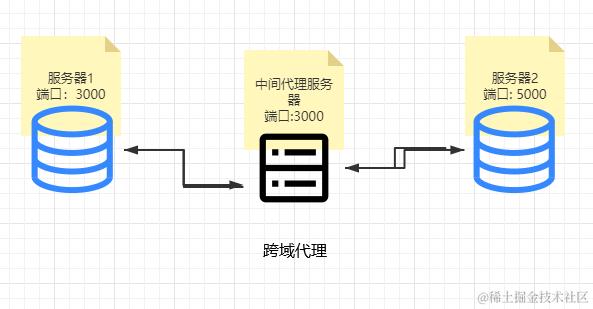
- 工作方式:上述方式配置代理,当请求了3000不存在的资源时,那么该请求会转发给5000 (优先匹配前端资源) 以React项目为例:
方法二:创建setupProxy.js文件
- 第一步:创建代理配置文件 在src下创建配置文件:src/setupProxy.js
- 编写setupProxy.js配置具体代理规则:
const {createProxyMiddleware} = require('http-proxy-middleware')
module.exports = function(app){
    app.use(
        createProxyMiddleware('/api1',{ //api1是需要转发的请求(所有带有/api1前缀的请求都会转发给5000)
            target:'http://localhost:5000',//配置转发目标地址(能返回数据的服务器地址)
            changeOrigin:true,//控制服务器接收到的请求头中host字段的值
            /*
      	changeOrigin设置为true时,服务器收到的请求头中的host为:localhost:5000
      	changeOrigin设置为false时,服务器收到的请求头中的host为:localhost:3000
      	changeOrigin默认值为false,但我们一般将changeOrigin值设为true
      */
            pathRewrite:{'^/api1':''}
        }),
        createProxyMiddleware('/api2',{
            target:'http://localhost:5001',
            changeOrigin:true,
            pathRewrite:{'^/api2':''} //去除请求前缀,保证交给后台服务器的是正常请求地址(必须配置)
        }),
    )
}
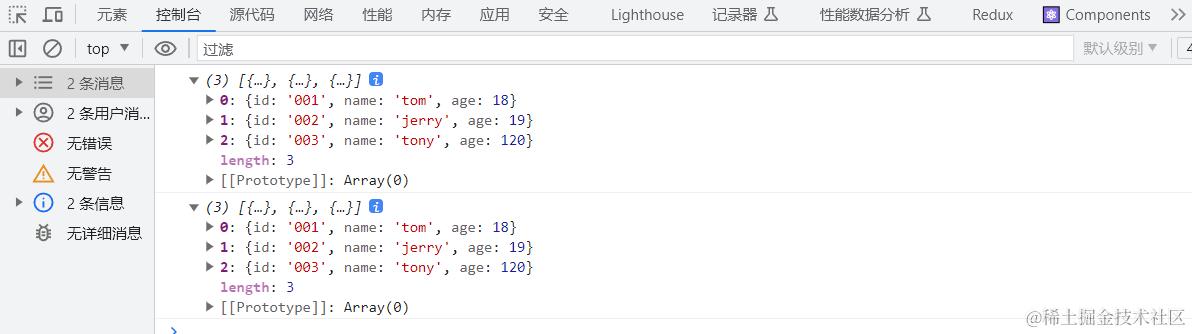
import axios from 'axios';
import './App.css';

function App() {
  // 自定义事件
  const getStudents = () => {
    // console.log("getStudents");
    const url = "http://localhost:3000/students";
    // axois 请求
    axios.get(url).then(res =>{
      console.log(res.data);
    })
    // fetch 请求
    fetch(url,{method:"GET"}).then(res => res.json()).then(res =>{
      console.log(res);
    }).catch(err =>{
      console.log(err);
    })
  }
  return (
    <div className="App">
      App ...
      <button onClick={getStudents}>获取学生数据</button>
    </div>
  );
}

export default App;