类型推论
TypeScript里,在有些没有明确指出类型的地方,类型推论会帮助提供类型。
定义时不赋值
义时不赋值,就会被 TS 自动推导成 any 类型,之后随便怎么赋值都不会报错。
初始化变量
因为赋值的时候赋的是一个字符串类型,所以 TS 自动推导出 userName 是 string 类型。这个时候,再更改 userName 时,就必须是 string 类型,是其他类型就报错
设置默认参数值
TS 会自动推导出 printAge 的入参类型,传错了类型会报错
决定函数返回值
当需要从几个表达式中推断类型时候,会使用这些表达式的类型来推断出一个最合适的通用类型
枚举(enum)
枚举定义一组具有命名的常量
枚举:表示一组相关的常量,并且可以增加可读性和可维护性。
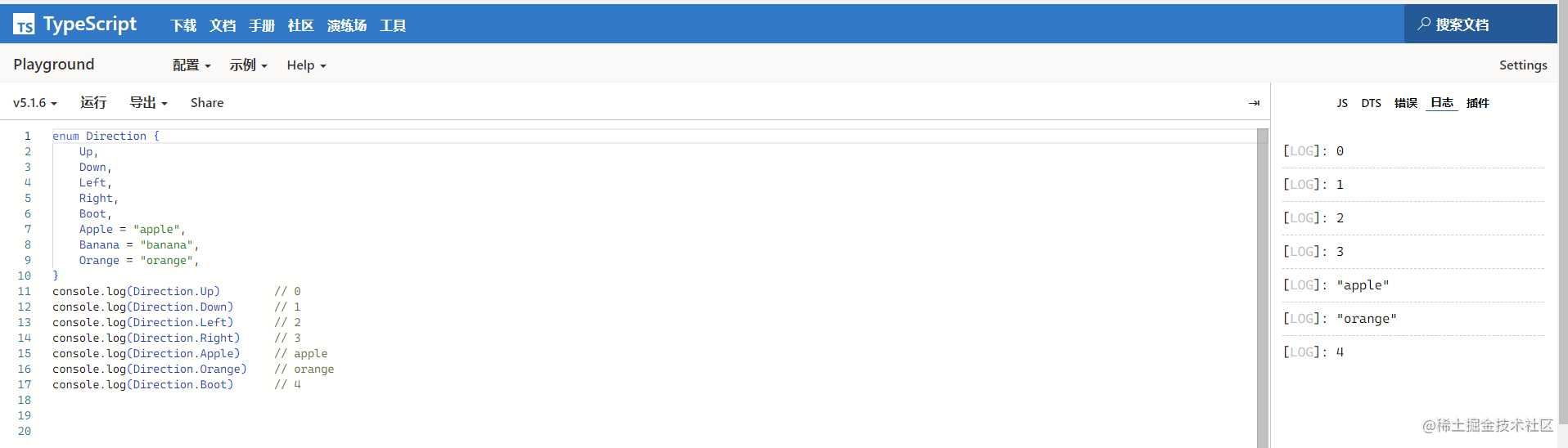
数字枚举
有两个特点:
- 数字递增
- 反向映射
// 数字递增
enum Direction {
    Up,
    Down,
    Left,
    Right,
    Boot,
    // 手动赋值
    Apple = "apple",
    Banana = "banana",
    Orange = "orange",
}
console.log(Direction.Up)        // 0
console.log(Direction.Down)      // 1
console.log(Direction.Left)      // 2
console.log(Direction.Right)     // 3
console.log(Direction.Apple)     // apple
console.log(Direction.Orange)    // orange
console.log(Direction.Boot)      // 4
结果:
// 反向映射
enum Direction {
Up,
Down,
Left,
Right,
Boot,
Apple = "apple",
Banana = "banana",
Orange = "orange",
}
console.log(Direction[0]) // Up
console.log(Direction[1]) // Down
console.log(Direction[2]) // Left
console.log(Direction[3]) // Right
console.log(Direction[4]) // Boot
console.log(Direction['Apple']) // apple
console.log(Direction[ 'Orange']) // orange
结果:
枚举默认是从 0 开始递增,如果枚举的第一个元素被赋初值,则会从初始开始递增,但是手动赋值的元素不受影响
例如:
enum Direction {
    Up = 6,
    Down,
    Left,
    Right,
    Boot,
    Apple = "apple",
    Banana = "banana",
    Orange = "orange",
}
console.log(Direction.Up)        // 6
console.log(Direction.Down)      // 7
console.log(Direction.Left)      // 8
console.log(Direction.Right)     // 9
console.log(Direction.Apple)     // apple
console.log(Direction.Orange)    // orange
console.log(Direction.Boot)      // 10
计算成员
枚举中的成员可以被计算,比如经典的使用位运算合并权限
enum FileAccess {
    Read    = 1 << 1,
    Write   = 1 << 2,
    ReadWrite  = Read | Write,
}

console.log(FileAccess.Read)       // 2   -> 010
console.log(FileAccess.Write)      // 4   -> 100
console.log(FileAccess.ReadWrite)  // 6   -> 110
Read的值是 1 左移 1 位,即 2。
Write的值是 1 左移 2 位,即 4。
<<左移运算符会将一个数的二进制表示向左移动指定的位数,在二进制表示中,数值 1 的二进制表示为 0001。左移 1 位,即将 0001 向左移动一位,变成了 0010,即二进制的 2。同理,左移 2 位,即将 0001 向左移动两位,变成了 0100,即二进制的 4。将一个数向左移动 n 位,相当于将该数乘以 2 的 n 次幂。
类型守卫
类型保护是可执行运行时检查的一种表达式,用于确保该类型在一定的范围内。
---- TypeScript 官方文档
类型保护与特性检测并不是完全不同,其主要思想是尝试检测属性、方法或原型,以确定如何处理值。
目前主要有四种的方式来实现类型保护:
in 关键字
// 接口
interface Admin {
  name: string;
  privileges: string[];
}

interface Employee {
  name: string;
  startDate: Date;
}
// 联合类型,表示可能是 `Employee` 或 `Admin` 的对象
type UnknownEmployee = Employee | Admin;

function printEmployeeInformation(emp: UnknownEmployee) {
  // 检查对象 `emp` 是否具有 `privileges`  属性
  if ("privileges" in emp) {
    console.log("Privileges: " + emp.privileges);
  }
  if ("startDate" in emp) {
    console.log("Start Date: " + emp.startDate);
  }
}
// 传入 `UnknownEmployee` 类型参数
const emp1: Employee = {
  name: "lin",
  startDate: new Date("2021-01-01")
};

const emp2: Admin = {
  name: "one",
  privileges: ["create", "delete"]
};
// 调用
printEmployeeInformation(emp1)
printEmployeeInformation(emp2)
结果:
typeof 关键字
function padLeft(value: string, padding: string | number) {
  if (typeof padding === "number") {

      return Array(padding + 1).join(" ") + value;
  }
  if (typeof padding === "string") {
      return padding + value;
  }
  throw new Error(`Expected string or number, got '${padding}'.`);
}

console.log(padLeft('lll','hhh'))
console.log(padLeft('lll',2))
结果:
instanceof 关键字
interface Padder {
  getPaddingString(): string;
}

class SpaceRepeatingPadder implements Padder {
  constructor(private numSpaces: number) {}
  getPaddingString() {
    return Array(this.numSpaces + 1).join(" ");
  }
}

class StringPadder implements Padder {
  constructor(private value: string) {}
  getPaddingString() {
    return this.value;
  }
}

let padder: Padder = new SpaceRepeatingPadder(6);
// 判断 `padder` 是否为 `SpaceRepeatingPadder` 类型的实例。如果是,类型收窄为 `SpaceRepeatingPadder`。
if (padder instanceof SpaceRepeatingPadder) {
  // padder的类型收窄为 'SpaceRepeatingPadder'
}
注意,类型收窄只在条件语句内部有效。在
if代码块外部,padder仍然被视为Padder类型的变量。
自定义类型保护类型谓词
指定函数的返回类型
 // 判断一个值是否为数字或字符串
function isNumber(x: any): x is number {
  return typeof x === "number";
}

function isString(x: any): x is string {
  return typeof x === "string";
}
联合类型与交叉类型
联合类型
下面代码中,函数联合三种类型后,可以接受任意一种类型值
const sayHello = (name: string | number | undefined) => {
  /* ... */
};
sayHello('123')
sayHello(123)
sayHello(undefined)
可辨识联合
可辨识联合(Discriminated Unions)类型,也称为代数数据类型或标签联合类型
这种类型的本质是结合联合类型和字面量类型的一种类型保护方法。
条件:如果一个类型是多个类型的联合类型,且多个类型含有一个公共属性
目的:利用这个公共属性,来创建不同的类型保护区块
1、可辨识要求联合类型中的每个元素都含有一个单例类型属性,比如:
enum CarTransmission {
  Automatic = 200,
  Manual = 300
}

interface Motorcycle {
  vType: "motorcycle"; // discriminant
  make: number; // year
}

interface Car {
  vType: "car"; // discriminant
  transmission: CarTransmission
}

interface Truck {
  vType: "truck"; // discriminant
  capacity: number; // in tons
}
上面三个接口,都包含vType属性。该属性被称为可辨识的属性,而其它的属性只跟特性的接口相关。
2、可以创建一个 Vehicle 联合类型
type Vehicle = Motorcycle | Car | Truck;
3、定义一个 evaluatePrice 方法,使用上方定义的接口
const EVALUATION_FACTOR = Math.PI;
function evaluatePrice(vehicle: Vehicle) {
  return vehicle.capacity * EVALUATION_FACTOR;
}

const myTruck: Truck = { vType: "truck", capacity: 9.5 };
evaluatePrice(myTruck);
报错:
报错原因:在 Motorcycle 接口中,并不存在
capacity属; Car 接口也不存在capacity属性。
解决方法:使用类型守卫
确保在 evaluatePrice 方法中,我们可以安全地访问 vehicle 对象中的所包含的属性
function evaluatePrice(vehicle: Vehicle) {
  switch(vehicle.vType) {
    case "car":
      return vehicle.transmission * EVALUATION_FACTOR;
    case "truck":
      return vehicle.capacity * EVALUATION_FACTOR;
    case "motorcycle":
      return vehicle.make * EVALUATION_FACTOR;
  }
}
交叉类型
交叉类型是将多个类型合并为一个类型。
通过
&运算符定义交叉类型
interface IPerson {
  id: string;
  age: number;
}

interface IWorker {
  companyId: string;
}

// 交叉类型
type IStaff = IPerson & IWorker;

const staff: IStaff = {
  id: 'E1006',
  age: 33,
  companyId: 'EFT'
};

console.log(staff)
Ts 装饰器
Ts中的装饰器,有四种常见的
类装饰器
类装饰器应用于类声明上,可以修改类的行为或元数据。它接受一个参数,表示被装饰的类的构造函数。
function classDecorator(constructor: Function) {
  console.log("Class decorator");
  // 在原型对象上,添加一个对象方法
  constructor.prototype.customMethod = function() {
    console.log("Custom method");
  };
}
@classDecorator
class MyClass {
  myMethod() {
    console.log("Original method");
  }
}
const instance = new MyClass();
instance.customMethod(); // 输出 "Custom method"
instance.myMethod(); // 输出 "Original method"
在装饰器内部添加方法和属性。实例后,可以直接使用修饰符中的方法和属性
方法装饰器
方法装饰器应用于类的方法声明上,可以修改方法的行为或元数据。它接受三个参数:被装饰方法的原型对象,方法名称和方法的属性描述符。
function methodDecorator(target: Object, propertyName: string, descriptor: PropertyDescriptor) {
  console.log("Method decorator");
  // 修改了方法的属性描述符,将其值修改为新的函数
  descriptor.value = function() {
    console.log("Modified method");
  };
}
class MyClass {
  @methodDecorator
  myMethod() {
    console.log("Original method");
  }
}
const instance = new MyClass();
instance.myMethod(); // 输出 "Modified method"
在装饰器内部,修改方法的属性。实例化后,使用声明的方法,实际上调用的是装饰器中的方法,所以调用 myMethod 方法时,会输出 "Modified method"。
属性装饰器
属性装饰器应用于类的属性声明上,可以修改属性的行为或元数据。它接受两个参数:被装饰属性的原型对象和属性名称。
function propertyDecorator(target: Object, propertyName: string) {
  console.log("Property decorator");
  Object.defineProperty(target, propertyName, {
    get: function() {
      console.log("Get accessor");
      return this["_" + propertyName];
    },
    set: function(value) {
      console.log("Set accessor");
      this["_" + propertyName] = value;
    }
  });
}
class MyClass {
  @propertyDecorator
  myProperty: string;
}
const instance = new MyClass();
instance.myProperty = "Hello"; // 输出 "Set accessor"
console.log(instance.myProperty); // 输出 "Get accessor" 和 "Hello"
给 myProperty 赋值或访问其值时,会分别输出 "Set accessor" 和 "Get accessor"
参数装饰器
参数装饰器应用于类的方法参数声明上,可以修改参数的行为或元数据。它接受三个参数:被装饰参数的原型对象,方法名称和参数在函数参数列表中的索引。
function parameterDecorator(target: Object, propertyName: string, parameterIndex: number) {
  console.log("Parameter decorator");
}
class MyClass {
  myMethod(@parameterDecorator param1: string, @parameterDecorator param2: number) {
    console.log("Method");
  }
}
const instance = new MyClass();
instance.myMethod("Hello", 123); // 输出 "Method"
Ts 配置文件
tsconfig.json 的作用
- 用于标识 TypeScript 项目的根路径;
- 用于配置 TypeScript 编译器;
- 用于指定编译的文件。
tsconfig.json 重要字段
- files - 设置要编译的文件的名称;
- include - 设置需要进行编译的文件,支持路径模式匹配;
- exclude - 设置无需进行编译的文件,支持路径模式匹配;
- compilerOptions - 设置与编译流程相关的选项。
compilerOptions 选项
{
  "compilerOptions": {

    /* 基本选项 */
    "target": "es5",                       // 指定 ECMAScript 目标版本: 'ES3' (default), 'ES5', 'ES6'/'ES2015', 'ES2016', 'ES2017', or 'ESNEXT'
    "module": "commonjs",                  // 指定使用模块: 'commonjs', 'amd', 'system', 'umd' or 'es2015'
    "lib": [],                             // 指定要包含在编译中的库文件
    "allowJs": true,                       // 允许编译 javascript 文件
    "checkJs": true,                       // 报告 javascript 文件中的错误
    "jsx": "preserve",                     // 指定 jsx 代码的生成: 'preserve', 'react-native', or 'react'
    "declaration": true,                   // 生成相应的 '.d.ts' 文件
    "sourceMap": true,                     // 生成相应的 '.map' 文件
    "outFile": "./",                       // 将输出文件合并为一个文件
    "outDir": "./",                        // 指定输出目录
    "rootDir": "./",                       // 用来控制输出目录结构 --outDir.
    "removeComments": true,                // 删除编译后的所有的注释
    "noEmit": true,                        // 不生成输出文件
    "importHelpers": true,                 // 从 tslib 导入辅助工具函数
    "isolatedModules": true,               // 将每个文件做为单独的模块 (与 'ts.transpileModule' 类似).

    /* 严格的类型检查选项 */
    "strict": true,                        // 启用所有严格类型检查选项
    "noImplicitAny": true,                 // 在表达式和声明上有隐含的 any类型时报错
    "strictNullChecks": true,              // 启用严格的 null 检查
    "noImplicitThis": true,                // 当 this 表达式值为 any 类型的时候,生成一个错误
    "alwaysStrict": true,                  // 以严格模式检查每个模块,并在每个文件里加入 'use strict'

    /* 额外的检查 */
    "noUnusedLocals": true,                // 有未使用的变量时,抛出错误
    "noUnusedParameters": true,            // 有未使用的参数时,抛出错误
    "noImplicitReturns": true,             // 并不是所有函数里的代码都有返回值时,抛出错误
    "noFallthroughCasesInSwitch": true,    // 报告 switch 语句的 fallthrough 错误。(即,不允许 switch 的 case 语句贯穿)

    /* 模块解析选项 */
    "moduleResolution": "node",            // 选择模块解析策略: 'node' (Node.js) or 'classic' (TypeScript pre-1.6)
    "baseUrl": "./",                       // 用于解析非相对模块名称的基目录
    "paths": {},                           // 模块名到基于 baseUrl 的路径映射的列表
    "rootDirs": [],                        // 根文件夹列表,其组合内容表示项目运行时的结构内容
    "typeRoots": [],                       // 包含类型声明的文件列表
    "types": [],                           // 需要包含的类型声明文件名列表
    "allowSyntheticDefaultImports": true,  // 允许从没有设置默认导出的模块中默认导入。

    /* Source Map Options */
    "sourceRoot": "./",                    // 指定调试器应该找到 TypeScript 文件而不是源文件的位置
    "mapRoot": "./",                       // 指定调试器应该找到映射文件而不是生成文件的位置
    "inlineSourceMap": true,               // 生成单个 soucemaps 文件,而不是将 sourcemaps 生成不同的文件
    "inlineSources": true,                 // 将代码与 sourcemaps 生成到一个文件中,要求同时设置了 --inlineSourceMap 或 --sourceMap 属性

    /* 其他选项 */
    "experimentalDecorators": true,        // 启用装饰器
    "emitDecoratorMetadata": true          // 为装饰器提供元数据的支持
  }
}